

When a customer orders something online, and it arrives on time, in perfect condition, that is not luck. That is a warehouse running as it should. And in most cases, a warehouse management system is what makes that possible.
Warehouses today are not simple storage spaces. They receive hundreds of shipments, process thousands of orders, track tens of thousands of SKUs, and coordinate teams across shifts. Without a system to manage all of that, errors pile up fast. Wrong items get picked. Stock counts drift. Orders go out late. And when that happens, the business pays for it twice: once in operational costs and again in customer trust.
A warehouse management system (WMS) sits at the centre of all of this. It controls what comes in, where it goes, how it gets picked, and when it ships. If you are trying to understand what a WMS actually does, whether you need one, or how to pick the right one, this article covers it in full.
Table of Contents
What Is Warehouse Management?
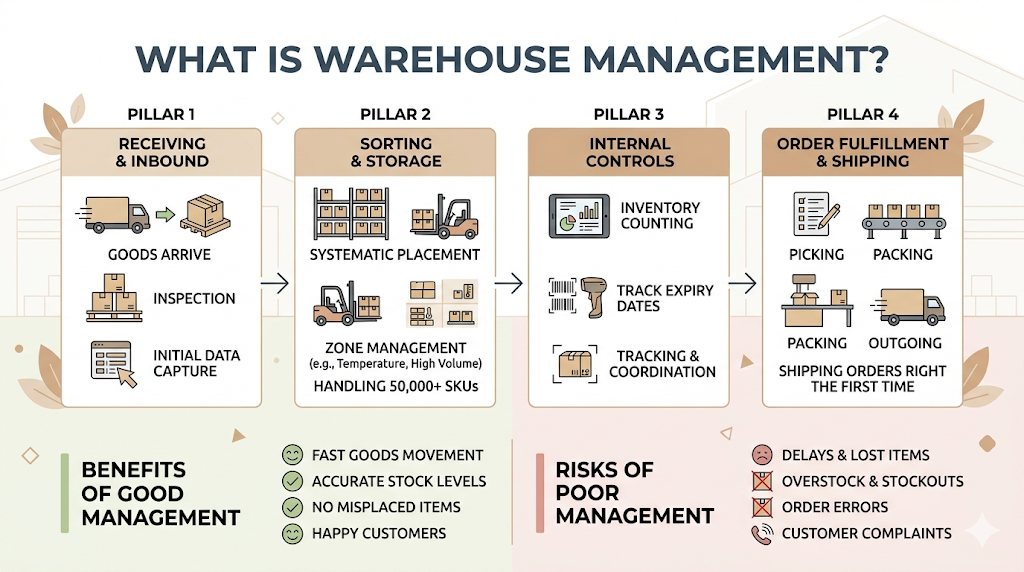
Warehouse management covers every activity that happens inside a storage facility, from the moment goods arrive to the moment they leave. That includes receiving, sorting, storing, picking, packing, and shipping. It also includes counting inventory, tracking expiry dates, managing returns, and coordinating the people doing all of the above.
Good warehouse management means goods move quickly, stock levels are accurate, and orders go out right the first time. Poor warehouse management means delays, misplaced items, overstock, stockouts, and a customer service team fielding complaints all day.
The term sounds straightforward, but in practice, it covers a lot. A large facility might handle 50,000 SKUs across multiple zones, with dozens of staff running different processes simultaneously. Coordinating all of that manually, using clipboards and spreadsheets, stops working at a certain scale. Most businesses hit that ceiling sooner than they expect.
What Is a Warehouse Management System (WMS)?
A warehouse management system is software that tracks and controls the movement of goods within a warehouse, from inbound delivery through to outbound shipment.
At its core, a WMS tells you where every item is, how many you have, where it should go, and what needs to happen next. It replaces manual tracking with real-time data. Instead of someone physically counting stock and updating a spreadsheet, the system updates automatically when items are scanned, moved, picked, or packed.
A modern WMS does not just record what has already happened. It guides operations. It tells a picker which aisle to go to, in what order, by the most efficient route. It flags inventory that is running low before a stockout happens. It checks order accuracy before a shipment goes out. Think of it as a control layer that sits between your physical warehouse and the business decisions that depend on what is in it.
A warehouse management system is software that controls the movement of inventory within a warehouse, from receiving through to dispatch. It replaces manual tracking with real-time visibility, directing staff on where to store, pick, and pack items to maximise speed and accuracy. Modern WMS platforms also connect with ERP systems, shipping carriers, and automation equipment to coordinate the full fulfilment process.
A Brief History of WMS
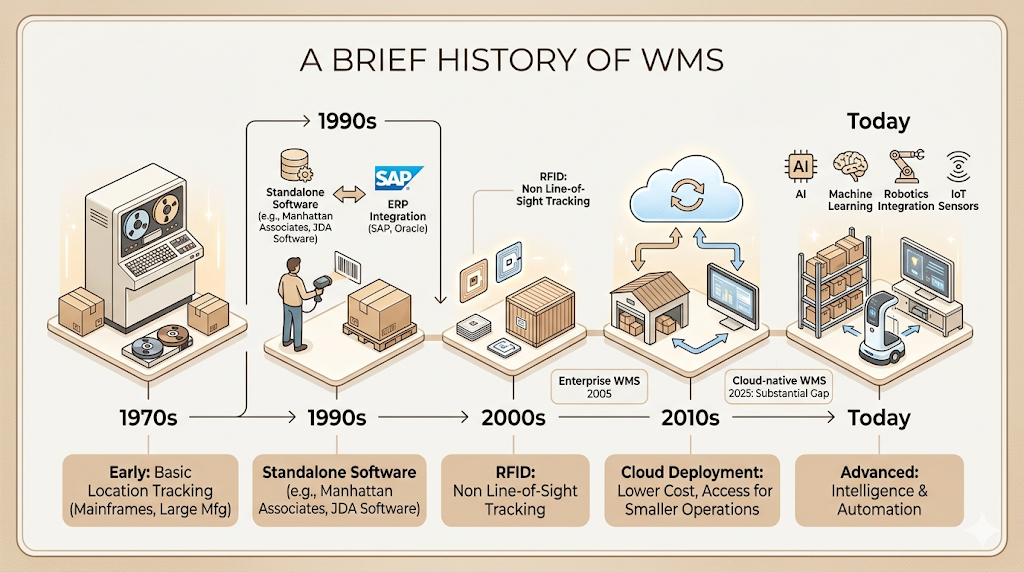
Warehouse management systems have existed in some form since the 1970s. Early versions were simple: basic storage location tracking, mostly used in large manufacturing warehouses. The software ran on mainframe computers and required significant IT resources to maintain.
The 1990s brought barcode scanning and the first WMS products that could be sold as standalone software packages. Companies like Manhattan Associates and JDA Software (now Blue Yonder) built enterprise-grade systems that could handle real-time inventory tracking at scale. This was also when integration with ERP (Enterprise Resource Planning) systems, particularly SAP and Oracle, became standard practice.
The 2000s brought Radio Frequency Identification (RFID) into the mix, allowing inventory to be tracked without line-of-sight scanning. By the 2010s, cloud deployment changed the economics completely. Smaller operations could access WMS capabilities without heavy upfront infrastructure investment.
Today, WMS platforms use AI, machine learning, robotics integration, and IoT sensors. The gap between an enterprise WMS from 2005 and a cloud-native WMS from 2025 is substantial.
The Role of WMS in Supply Chain Management
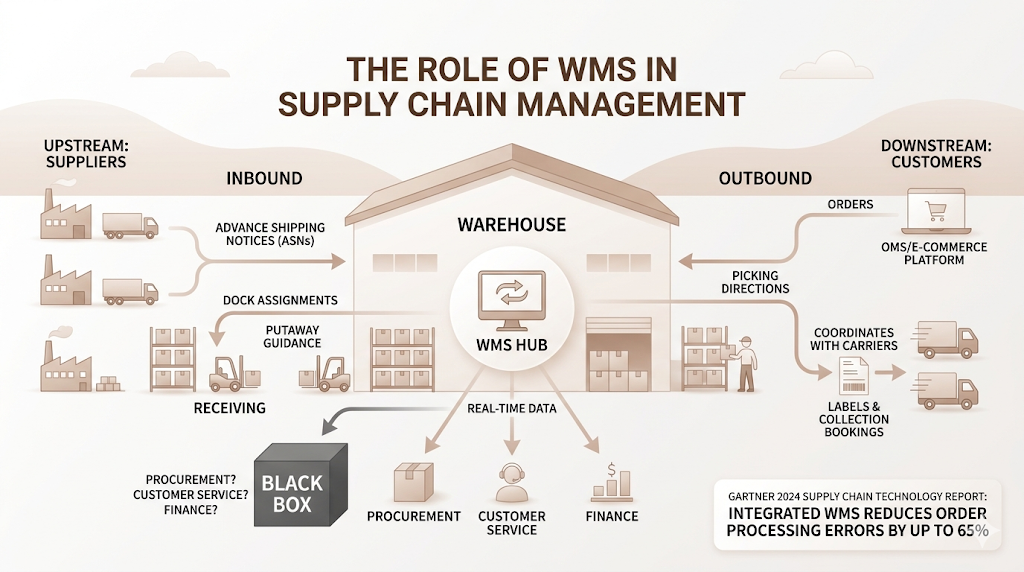
A warehouse does not operate in isolation. It sits in the middle of a supply chain: upstream from suppliers and downstream toward customers. A warehouse management system connects what happens inside the warehouse to everything happening around it.
On the inbound side, a WMS receives advance shipping notices (ASNs) from suppliers, prepares dock assignments, and guides staff to unload and putaway efficiently. On the outbound side, it processes orders from an order management system or e-commerce platform, directs picking, and coordinates with shipping carriers to generate labels and book collections.
Without that connection, the warehouse becomes a black box. Procurement teams don’t know what has actually arrived. Customer service teams don’t know if an order has been picked. Finance teams are working from inventory counts that are days old.
When a WMS is properly integrated, everyone gets real-time data. According to Gartner’s 2024 Supply Chain Technology Report, organisations with integrated WMS platforms reduce order processing errors by up to 65% compared to those using manual or spreadsheet-based warehouse tracking.
Core Functions of a Warehouse Management System
Every WMS handles a set of core operational functions. The specific features vary between platforms, but the fundamentals are consistent across the category.
Inbound Delivery
This covers everything that happens when goods arrive at the warehouse. A WMS receives ASNs before the trucks show up, assigns dock doors, and creates receiving tasks for staff. When items are unloaded and scanned, the system checks quantities against the purchase order, flags discrepancies, and logs the receipt.
This step matters more than it looks. Errors at receiving cascade through the entire operation. If 500 units are received but only 490 are recorded, you will spend weeks chasing a “missing” stock problem that was created in the first ten minutes.
Storage Management and Putaway
Once items are received, they need a location. A WMS does not store items randomly. It uses putaway rules: fast-moving items go near the packing station, heavy items go on lower shelves, and temperature-sensitive goods go to controlled zones. The system directs each staff member to the right location and confirms the put when they scan.
This is where slotting optimisation begins. The best WMS platforms analyse movement data over time and suggest re-slotting, moving slow movers out of prime locations so fast movers take their place.
Inventory Control
Real-time inventory tracking is one of the most valued capabilities a WMS provides. Every scan, every movement, every pick updates the inventory count instantly. The system also runs cycle counts, which are rolling partial counts of inventory that keep accuracy high without requiring a full annual stocktake.
Stock accuracy in warehouses without a WMS typically runs between 60% and 80%. With an active WMS and proper processes, that number moves above 99%. The difference between 80% and 99% accuracy sounds small. In practice, it is the difference between a fulfilment operation that works and one that is constantly firefighting.
Order Fulfilment
Order management within a WMS covers pick, pack, and ship. The system releases work orders to staff, directing them to pick locations in the most efficient sequence. It supports different picking methods: single order picking, batch picking (multiple orders in one pass), zone picking (staff assigned to specific areas), and wave picking (coordinated releases of work across the floor).
After picking, the WMS guides packing, selects the right box size, generates a packing slip, and prints a shipping label with the correct carrier service. At the point of dispatch, it triggers shipment confirmation back to the order management system so the customer gets their tracking notification.
Quality Control
Quality checks at multiple stages catch errors before they reach the customer. A WMS can enforce scan-to-verify at pick (confirming the right item and quantity), require photos for damaged goods at receiving, and prompt a final check at packing. For regulated industries like pharmaceutical or food, the WMS tracks batch numbers, expiry dates, and serial numbers through every movement.
Wave Versus Order Streaming
Wave picking releases batches of orders at scheduled intervals. It works well in high-volume operations where coordinating labour across zones is important. Order streaming is a newer approach that releases work continuously as capacity becomes available, which reduces waiting time and improves throughput.
The right model depends on your volume, layout, and workforce. Most modern WMS platforms support both and let you configure rules to switch between them.
Alignment With Shipping, Labour, Yard, and Reporting
A full-featured WMS connects to four adjacent systems: shipping carrier platforms for label generation and manifesting, labour management modules for tracking productivity by staff member, yard management systems for tracking trailers and dock activity, and reporting dashboards for real-time operational visibility.
Core WMS functions span the full warehouse cycle: inbound receiving, directed putaway, real-time inventory tracking, order picking and packing, quality verification, and carrier integration. When these functions are managed within a single system, warehouses typically achieve inventory accuracy above 99% and reduce picking errors by 60% or more compared to manual operations.
Types of WMS Solutions Available
Not every WMS is built the same way or for the same kind of operation. Understanding the deployment models and integration options helps you match the right system to your actual situation.
Standalone WMS
A standalone WMS is a dedicated system built specifically for warehouse management. It does not share a codebase with an ERP or other business software. Companies like Manhattan Associates, Blue Yonder, Körber, and Infor build dedicated WMS platforms that are among the most capable in the market. The tradeoff is integration complexity: you will need API connections to your ERP, OMS, and carrier systems, and maintaining those connections requires ongoing IT involvement.
WMS Modules Integrated with ERP Systems
SAP Extended Warehouse Management (SAP EWM) and Oracle Warehouse Management are examples of WMS capabilities built directly into large ERP platforms. For companies already deep in SAP or Oracle, using the native WMS module reduces integration overhead significantly. The capabilities are generally good, though dedicated standalone WMS platforms tend to offer more advanced picking logic and automation support.
On-Premise WMS
An on-premise WMS runs on hardware owned and managed by the company. You have full control over the system, data, and customisation. The downsides are upfront infrastructure cost, internal IT maintenance burden, and slower update cycles. On-premise deployment made sense in 2005. Today, unless data residency requirements or regulatory constraints force it, most new implementations choose cloud.
Cloud-Based and Cloud-Native WMS
Cloud-based WMS means the software runs on a provider’s servers and you access it via the internet. Cloud-native means it was built from the ground up for cloud deployment, not ported from an on-premise codebase. The difference matters. Cloud-native platforms update continuously, scale automatically, and typically offer better uptime than legacy platforms hosted in the cloud.
For most mid-market operations today, a cloud-based WMS is the default choice. Lower upfront cost, faster implementation, and subscription pricing make the economics work at a smaller scale. Platforms like Deposco, Softeon, and Logiwa serve this segment well.
The Five Key Features of a Warehouse Management System
Inventory Management
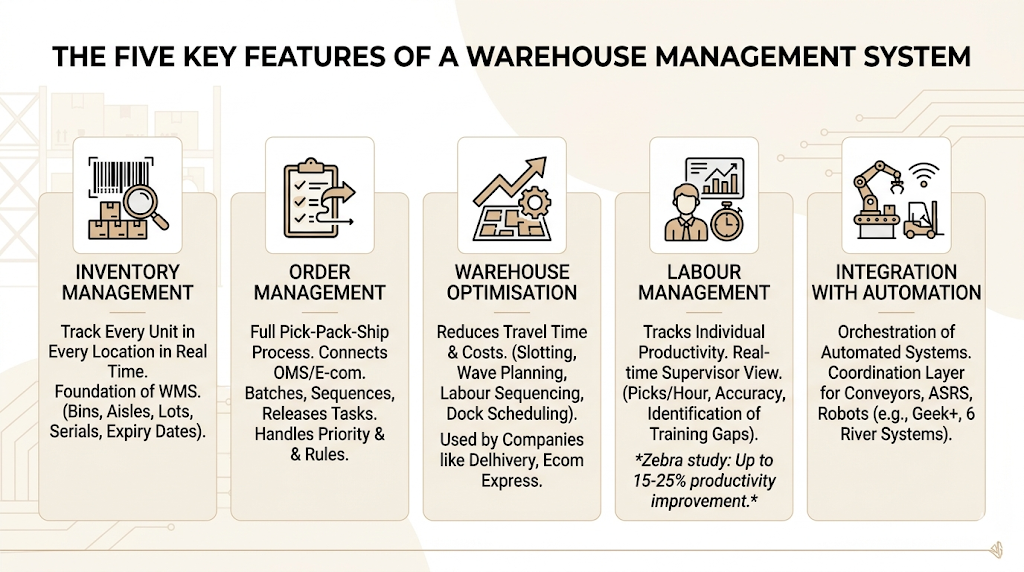
The ability to track every unit, in every location, in real time is the foundational feature of any WMS. This includes location-level tracking (which bin in which aisle), lot and batch tracking, expiry date management, and serial number tracking where required. Without this, nothing else in the system works reliably.
Order Management
Order management within a WMS covers the full pick-pack-ship process. It receives orders from an OMS or e-commerce platform, batches and sequences them, releases pick tasks, and confirms fulfilment back to the originating system. Good order management also handles priority logic: rush orders, pre-orders, backorders, and partial fulfilment rules.
Warehouse Optimisation
Slotting, wave planning, labour task sequencing, and dock scheduling all fall under optimisation. A WMS analyses movement data and suggests where fast movers should be located to reduce travel time. Companies like Delhivery and Ecom Express in India have invested heavily in warehouse optimisation logic because even a 10% reduction in average travel distance per pick translates to thousands of additional orders processed per day at scale.
Labour Management
Labour management tracks individual staff productivity: picks per hour, accuracy rates, and time on task. It allows supervisors to rebalance work assignments in real time and gives managers data to identify training gaps, reward top performers, and improve scheduling. According to a 2023 Zebra Technologies Warehouse Vision study, warehouses using labour management tools within their WMS see productivity improvements of 15% to 25% over baseline.
Integration With Automation
Modern warehouses are increasingly automated. Conveyor systems, automated storage and retrieval systems (ASRS), goods-to-person robots like those made by Geek+, and autonomous mobile robots (AMRs) like those from 6 River Systems all need to be orchestrated by software. A WMS with strong automation integration acts as the coordination layer, directing which robot picks what, when, and where to bring it.
Key Benefits of Implementing a WMS
The case for a warehouse management system comes down to measurable outcomes. Here is what companies consistently report after going live.
Enhanced inventory management. Real-time visibility eliminates the blind spots that cause overstock and stockouts. When you know exactly what you have and where it is, you buy better and allocate more accurately.
Improved order fulfilment. Scan-to-verify picking and system-guided packing reduce mis-picks and wrong shipments. Returns drop. Customer complaints drop. The cost of re-shipping orders drops.
Labour optimisation. Task interleaving, where a worker picks one order on the way to a putaway task, reduces dead travel time. Labour management data shows you where your operation is efficient and where it is not.
Operational efficiency. Processing more orders with the same headcount, or the same number of orders with fewer errors, directly improves your cost per order. Most WMS implementations pay back within 18 to 24 months.
Scalability and flexibility. A WMS scales with volume. You don’t need to re-hire and retrain at the same rate as you grow because the system handles the coordination that otherwise falls on supervisors.
Cost reduction. Reduced mis-picks mean fewer returns and replacements. Better storage utilisation means you may not need additional warehouse space as quickly. Lower labour cost per order is the biggest driver for most operations.
Data-driven insights. A WMS generates a continuous stream of operational data. Throughput by hour, accuracy by staff member, order cycle time by carrier. These numbers let you make decisions based on what is actually happening, not gut feel.
Enhanced customer service. Faster fulfilment, fewer errors, and real-time tracking information all translate to a better customer experience. For e-commerce brands competing on delivery speed, this is not a nice-to-have.
Compliance and traceability. For food, pharma, and medical device companies, batch and serial traceability is not optional. A WMS provides the audit trail regulators require.
Competitive advantage. Amazon’s logistics operation runs on a highly sophisticated WMS. D2C brands competing with Amazon need to match fulfilment speed and accuracy. A WMS is the infrastructure layer that makes that possible.
WMS implementation consistently delivers measurable operational improvements across several dimensions. Inventory accuracy typically rises above 99%, order processing errors fall by 60% or more, and labour productivity improves by 15% to 25%. Most operations recover their WMS investment within 18 to 24 months through reduced labour costs, lower return rates, and improved throughput.
Advanced Features of Modern WMS
Automation, Robotics, and Integration
The line between a WMS and a warehouse execution system (WES) is blurring. Modern WMS platforms are increasingly managing not just human workers but automated equipment. Conveyors, sorters, ASRS systems, and AMRs all require real-time coordination. A WMS that can direct both human and robotic workflows from a single platform reduces the complexity of managing multiple control systems.
Geek+ deployed over 20,000 AMRs globally by 2024, and most of those operate within environments where a WMS handles the pick logic and the robots handle the physical movement. The WMS tells the robot what to pick; the robot handles the travel.
Use of IoT in Warehouse Operations
IoT sensors extend visibility beyond what scanners can capture. Temperature sensors in cold chain storage send alerts if conditions drift out of range. Weight sensors on shelves detect when stock is running low without a manual check. RFID readers at dock doors automatically log items moving in and out. Together, these sensors feed the WMS with a continuous stream of location and condition data.
For a company like Mamaearth, which ships temperature-sensitive natural products, IoT-enabled storage monitoring is not a luxury. It is the difference between a product arriving in condition and a product arriving as a liability.
Application of Artificial Intelligence and Machine Learning in WMS
AI in WMS is moving from concept to practical application faster than most people expected. Current applications include demand-based slotting (the system recommends where to slot items based on predicted velocity, not just past velocity), predictive labour planning (the WMS estimates staffing needs based on the order backlog and historical throughput), and anomaly detection (the system flags inventory discrepancies that look like theft or process errors rather than normal variance).
Machine learning models trained on historical order data can also predict which orders are most likely to have issues, allowing quality checks to be targeted rather than random. That is a meaningful efficiency gain at scale.
Warehouse Execution System (WES) Inside WMS
A warehouse execution system coordinates real-time work across both human staff and automated equipment. It sits between the WMS (which handles planning and inventory) and the warehouse control system (WCS, which runs individual machines). Some vendors now embed WES functionality directly into their WMS platform, creating a single system that handles planning, execution, and machine control.
For operations with significant automation investment, this integration eliminates the communication gaps that cause equipment to sit idle waiting for instructions.
Challenges and Considerations in WMS Implementation
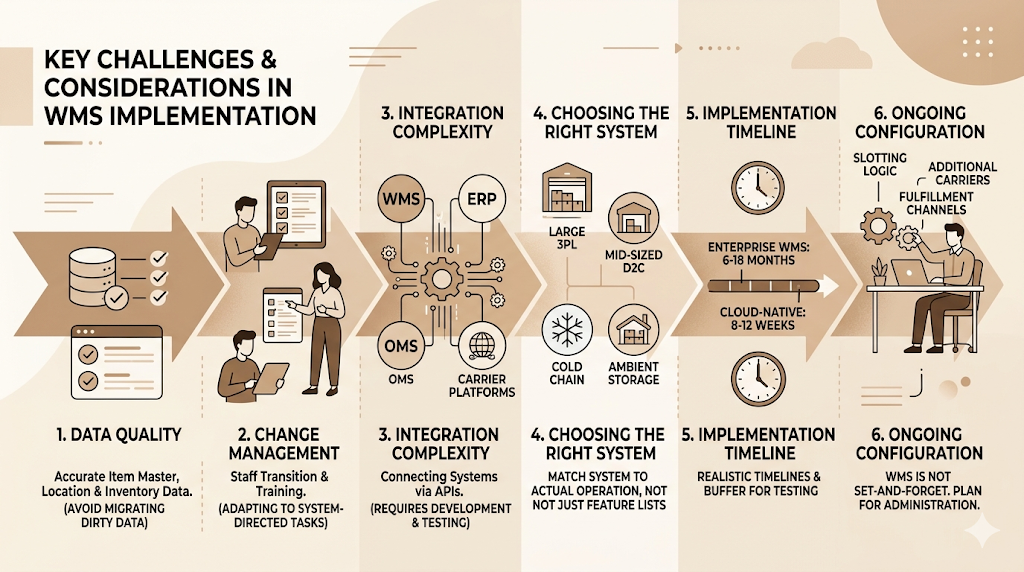
A WMS is not a plug-and-play solution. Implementation is a significant project, and the risks are real.
Data quality. A WMS is only as good as the data it runs on. Before go-live, your item master data, location data, and inventory counts need to be accurate. Migrating dirty data into a new system is one of the most common causes of failed implementations.
Change management. Staff need to operate differently. Instead of working from memory or paper lists, they follow system-directed tasks. Some experienced warehouse workers resist this. Training is important, but so is explaining why the change is happening and what it means for their jobs.
Integration complexity. Connecting a WMS to an ERP, an OMS, carrier platforms, and automation equipment requires API development, testing, and ongoing maintenance. Underestimating this scope is one of the biggest implementation mistakes.
Choosing the wrong system. A WMS designed for a large 3PL operation may be the wrong fit for a mid-sized D2C brand. A system designed for ambient storage will not handle cold chain requirements without significant customisation. Match the system to your actual operation, not to a feature list.
Implementation timeline. A full enterprise WMS implementation typically takes six to eighteen months. Cloud-native platforms for mid-market operations can go live in eight to twelve weeks. Build your plan around realistic timelines and include a buffer for integration testing.
Ongoing configuration. A WMS is not set-and-forget. As your product mix changes, your slotting logic needs to change. As you add carriers or fulfilment channels, the WMS needs to be configured for them. Plan for ongoing system administration.
Industry Use Cases for WMS
Consumer Goods
High-SKU count, seasonal demand spikes, and promotional order volumes make consumer goods warehousing complex. A WMS handles the slotting changes that come with seasonal peaks and manages the allocation logic for promotional stock. Hindustan Unilever’s distribution network, for example, uses WMS-driven operations to manage product flow across hundreds of SKUs to thousands of retail outlets across India.
Food and Beverage
Expiry date tracking, FIFO (First In, First Out) enforcement, and temperature zone management are non-negotiable in food and beverage. A WMS tracks lot numbers from receiving through to dispatch and ensures FIFO is followed without depending on staff memory. One recall event in a food business can wipe out years of brand equity. WMS traceability is the prevention layer.
Grocery and Wholesale
Grocery operates on thin margins with high velocity. Order accuracy and pick speed are everything. Many grocery distribution centres now use goods-to-person automation with AMRs directed by a WMS, allowing them to process thousands of lines per hour with very few picking errors.
Medical and Pharmaceutical
Serialisation requirements, cold chain compliance, and regulatory audit trails make pharma one of the most demanding WMS use cases. Systems must track every unit by serial number, enforce quarantine holds for pending QC results, and generate complete chain-of-custody records. Companies like Sun Pharma and Cipla operate under strict regulatory requirements that make a capable WMS a compliance necessity, not just an efficiency tool.
Retail and E-Commerce
Retail and e-commerce drive the highest WMS adoption growth. Same-day and next-day delivery expectations require warehouse operations that can process orders in under an hour from receipt to handover to a carrier. Nykaa’s fulfilment operations process thousands of beauty and personal care orders daily across multiple warehouses, with WMS-driven processes managing the pick, pack, and ship cycle for SKUs ranging from small cosmetics to large skincare sets.
Manufacturing
In manufacturing, a WMS manages both inbound raw materials and outbound finished goods. It tracks components through kitting and assembly processes, ensures the right materials are staged at production lines on time, and manages the finished goods inventory that feeds distribution.
Third-Party Logistics (3PL) Providers
3PL providers face a unique challenge: they run warehouse operations for multiple clients, each with different SKUs, processes, and system requirements. A multi-client WMS keeps each client’s inventory segregated, applies client-specific picking and packing rules, and generates client-branded documentation. Delhivery, Mahindra Logistics, and Ecom Express all run multi-client WMS environments.
Government and Defence
Government warehouses manage everything from office supplies to military equipment. Traceability, audit compliance, and asset management requirements are strict. WMS implementations in this sector often emphasise reporting and regulatory compliance over throughput optimisation.
Different Types of WMS: A Clear Summary
Before choosing, it helps to have the options laid out clearly.
Standalone systems are dedicated WMS platforms built specifically for warehouse management. They offer the deepest functionality but require integration work to connect with other business systems. Best for: operations where warehouse complexity is high and dedicated capability matters.
ERP modules are WMS capabilities built into an existing ERP system like SAP or Oracle. They reduce integration overhead for companies already using those platforms. Best for: businesses deeply invested in a major ERP that want unified data without a separate system.
Supply chain modules are WMS capabilities bundled within broader supply chain management platforms. They handle warehousing as one piece of a larger supply chain picture. Best for: companies optimising across the full supply chain, not just the warehouse.
Cloud-based systems deliver WMS capabilities via subscription with no on-premise infrastructure required. They update continuously and scale with usage. Best for: mid-market operations, fast-growing e-commerce brands, and companies that need to go live quickly.
How to Choose the Right WMS for Your Operation
Getting this decision wrong is expensive. Here is a practical framework.
Step 1: Define your requirements before looking at vendors. Document your current order volumes, SKU count, picking methods, automation equipment, and integration requirements. Do not let a vendor demo drive your requirements list.
Step 2: Shortlist based on the deployment model first. Cloud vs. on-premise, standalone vs. ERP-integrated. These decisions narrow the field significantly before you look at individual features.
Step 3: Evaluate integration capabilities carefully. How does the WMS connect to your ERP, your OMS, your carrier systems? What does the integration require in terms of IT resources? Ask to see working integrations with the systems you already use.
Step 4: Assess the vendor’s implementation support. A WMS is only as good as the implementation. Ask about their go-live process, their typical timeline, and what ongoing support looks like after launch.
Step 5: Talk to reference customers in your industry. A WMS that works brilliantly for a 3PL may be the wrong fit for a pharmaceutical manufacturer. Ask vendors for references from companies with similar operations to yours.
Step 6: Plan for the total cost of ownership, not just the licence cost. Include implementation, integration, training, ongoing support, and the internal IT time required to maintain the system. Cloud platforms typically have a lower total cost of ownership over five years compared to on-premise, but not always.
Common Challenges and How to Avoid Them
Most WMS implementation problems are predictable. Here is where projects typically go wrong and what to do instead.
Poor data preparation. The number one cause of troubled go-lives. Fix: run a data audit before your implementation starts. Clean item master, location, and inventory data before migration.
Scope creep. Adding requirements mid-implementation extends timelines and budgets. Fix: Lock the initial scope before go-live. Add phase two requirements after the system is stable.
Inadequate training. Staff who don’t understand why the system works the way it does make more errors, not fewer. Fix: invest in proper training, not just a half-day walkthrough. Include floor supervisors in the implementation process from the beginning.
Underestimating integration work. Connecting a WMS to five other systems takes longer than connecting it to two. Fix: build a detailed integration map before you sign a contract, and make sure the vendor’s timeline accounts for all of it.
Going live too quickly. Rushing to go-live before testing is complete creates operational disruptions that take months to recover from. Fix: run parallel operations (old system and new) for at least two to four weeks before fully cutting over.
Conclusion
Warehouses that run on manual processes and spreadsheets hit a ceiling. At some point, the complexity of managing thousands of SKUs, dozens of staff, multiple channels, and carrier integrations exceeds what any team can handle without a system built for it.
A warehouse management system does not just automate what you are already doing. It gives you a level of control and visibility that changes how your operation works. Real-time inventory accuracy, system-directed picking, labour productivity data, and automation integration are not incremental improvements. They are structural upgrades to your fulfilment capability.
The companies that compete on delivery speed and order accuracy are not doing it through effort alone. They have built the right infrastructure. A WMS is that infrastructure.
If you are managing marketing for an e-commerce or D2C brand and want to understand how operational efficiency connects to customer acquisition costs and retention, the YUP Crystal Clear Newsletter covers the intersection of marketing and business performance every week. Subscribe and stay ahead.
Frequently Asked Questions
What is a warehouse management system?
A warehouse management system (WMS) is software that tracks and controls the movement of goods within a warehouse. It handles receiving, putaway, inventory tracking, order picking, packing, and shipping, and it connects with other business systems like ERP platforms and carrier networks to keep data accurate across the supply chain.
What is the difference between a WMS and an ERP?
An ERP (Enterprise Resource Planning) system manages business-wide functions: finance, HR, procurement, sales, and inventory at an accounting level. A WMS manages the physical operations within a warehouse at a location and task level. Many companies use both: the ERP handles business data, the WMS handles the physical operations. Some ERP platforms include a WMS module, but dedicated WMS platforms generally offer more advanced warehouse-specific features.
Do small warehouses need a WMS?
It depends on complexity, not just size. A small warehouse with 500 SKUs and 50 orders per day can probably manage with a simpler inventory system. A small warehouse with 5,000 SKUs, multiple clients, or strict compliance requirements will benefit from a WMS even at low volumes. If your order accuracy is below 98% or your stock counts are frequently wrong, that is a clear signal.
How long does a WMS implementation take?
Cloud-based WMS platforms for mid-market operations typically take 8 to 16 weeks from contract signing to go-live. Enterprise WMS implementations with complex integrations and automation can take 12 to 24 months. The biggest variables are data quality, integration scope, and how much customisation is required.
What does a WMS cost?
Cloud-based WMS platforms for mid-sized operations typically start between $500 and $2,000 per month at the lower end of the market, scaling with users, volume, and features. Enterprise platforms from Manhattan Associates, SAP, or Blue Yonder are priced for large operations and can run into the hundreds of thousands per year when implementation and integration costs are included. Total cost of ownership over five years, not just licence cost, is the right number to evaluate.
Is WMS the same as an inventory management system?
No. An inventory management system tracks what stock you have and where it is, typically at a location or bin level. A WMS does that and more: it also directs tasks (where to pick, where to put), manages labour, integrates with automation, tracks quality, and connects with carriers. An inventory management system is a subset of what a WMS does.
What is the difference between a WMS and a WES?
A WMS (Warehouse Management System) handles planning and inventory: where goods are, what orders need to be filled, and who should do what. A WES (Warehouse Execution System) handles real-time task execution, particularly for automated equipment like conveyors, sorters, and robots. In modern operations, many WMS platforms are absorbing WES capabilities so that one system handles both.
What industries benefit most from WMS?
Every industry with a physical warehouse benefits, but the highest-impact use cases are retail and e-commerce (high volume, high speed requirements), pharmaceutical and medical devices (compliance and traceability), food and beverage (expiry management and cold chain), and 3PL providers (multi-client complexity). Manufacturing also sees significant benefit from WMS managing component flows into production.
Can a WMS integrate with my existing software?
Most WMS platforms support standard API integrations with major ERP systems, OMS platforms, carrier networks, and automation equipment. The integration workload depends on how many systems you are connecting and how well-documented their APIs are. Before choosing a WMS, confirm which integrations the vendor has built and maintained previously, not just which ones they say are possible.
What is the biggest mistake companies make when implementing a WMS?
Underestimating data preparation is the most common and costly mistake. Companies focus on software selection and implementation timelines, but arrive at go-live with inaccurate item data, missing location data, and unreliable inventory counts. The WMS then runs on bad data and produces bad results. Fixing data before implementation, not after, is what separates successful go-lives from troubled ones.
How does AI improve warehouse management systems?
AI in WMS currently applies in three main areas: demand-based slotting that recommends product locations based on predicted velocity, predictive labour planning that estimates staffing needs from incoming order volumes, and anomaly detection that flags inventory discrepancies that look like process errors or theft. Machine learning models also improve picking route optimisation and carrier selection over time by learning from historical data.