
A single delayed shipment from one supplier can knock out production for three other partners down the line, and most teams don’t find out until customers start complaining. That’s not a logistics problem. It’s a visibility problem. And it’s exactly the gap that supply chain analytics software exists to close.
For years, supply chain teams ran on a patchwork of spreadsheets, monthly ERP reports, and Slack messages asking, “Where’s our shipment?” That worked when supply chains were simple, and demand was predictable. Neither is true anymore. Between e-commerce volatility, supplier disruptions, and customers who expect next-day delivery as a baseline, the old reporting cycle is too slow to matter.
Think about what happens during a festive sale spike or a sudden raw material shortage. By the time a weekly report flags the problem, the stockout has already happened, or the warehouse is already sitting on excess stock nobody wants to admit to. Supply chain analytics software exists to move that detection point from “after the damage” to “before it happens.”
This guide walks through what supply chain analytics software actually does, the features worth paying for, how it differs from generic BI tools, and a practical process for choosing a platform that fits your business instead of a vendor’s demo script. By the end, you’ll know exactly what to look for and what to skip.
Table of Contents
What Is Supply Chain Analytics Software?
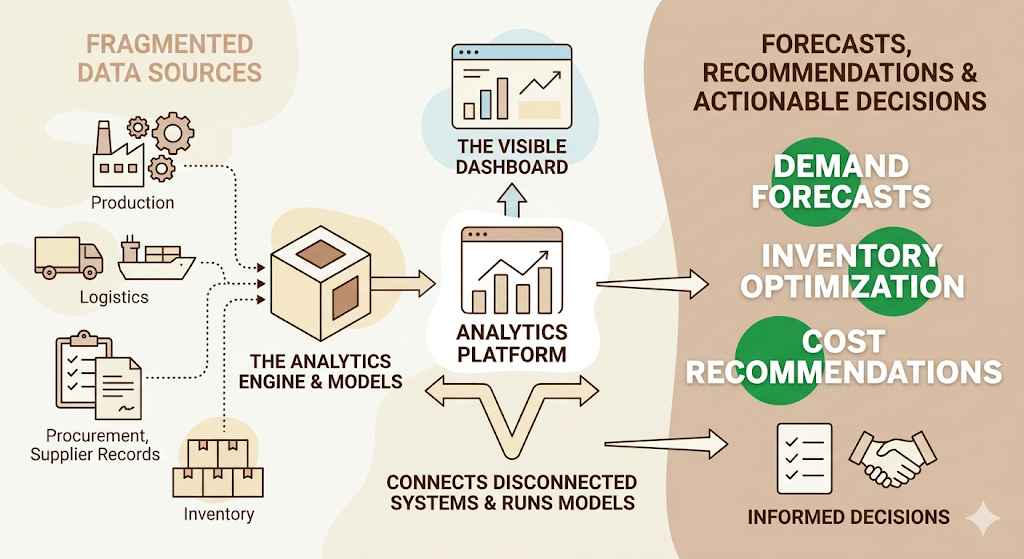
Supply chain analytics software is a platform that collects data from across your supply chain, procurement, inventory, logistics, and supplier records, and turns it into forecasts, dashboards, and recommendations you can act on. That’s the whole point of it. Not pretty charts. Decisions.
Most people picture a dashboard when they hear the term. The dashboard is the visible part. The real value sits underneath it, in the layer that connects fragmented data sources and runs models on top of them, so a planner isn’t reconciling three spreadsheets before making a single call.
How Supply Chain Analytics Software Works
The process is fairly consistent across vendors, even though the interfaces look different. Data gets pulled in from ERPs, WMS, TMS, point-of-sale systems, and supplier portals. It’s cleaned and standardized, since a supplier code in your ERP rarely matches the code your warehouse system uses. Then a model runs on top of it, whether that’s a basic trend line or a machine learning forecast, and the output lands on a dashboard built for a specific role: a demand planner’s view looks nothing like a procurement manager’s view.
Who Actually Uses Supply Chain Analytics Software
Demand planners use it to set forecasts. Procurement teams use it to track supplier risk and lead times. Logistics managers use it to monitor transportation costs and delivery performance. And increasingly, COOs and CFOs pull from the same platform to understand how supply chain performance is hitting working capital. That cross-functional use is actually a good test of whether a platform is worth buying: if only one team touches it, you’ve probably bought a reporting tool, not an analytics platform.
Why Supply Chains Can’t Run on Spreadsheets Anymore
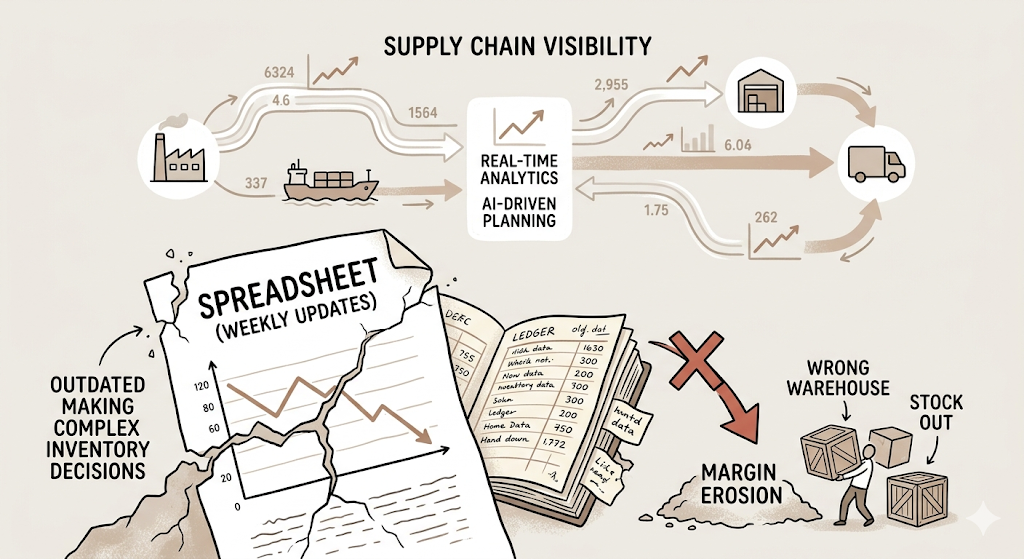
Here’s the uncomfortable part. Most companies still make six and seven-figure inventory decisions based on a spreadsheet someone updates every Monday. That gap between how fast the business moves and how slow the reporting is has only gotten wider.
The Cost of Operating Blind
Limited visibility shows up as a chain reaction. A planner doesn’t know a key supplier is running behind until the shipment misses its window. Inventory builds up in the wrong warehouse while another location stocks out of the same SKU. Transportation costs creep up because nobody’s tracking carrier performance against contracted rates. None of these is a dramatic failure on its own. Stacked together, they quietly erode the margin every single quarter.
Where the Pressure Is Coming From in 2026
E-commerce has reset customer expectations around speed, and that pressure rolls straight back to procurement and inventory planning. Add in geopolitical disruptions to shipping routes, semiconductor and raw material shortages that flare up with little warning, and supplier networks that span more countries than they did five years ago, and the case for real supply chain visibility writes itself. According to Gartner’s 2026 forecast on supply chain management software, annual spend on SCM software is set to grow from $29 billion in 2023 to $62 billion in 2028, a 16.3% compound annual growth rate, and a meaningful share of that spend is going specifically into analytics and AI-driven planning tools rather than basic transaction systems.
Supply chain analytics software closes the gap between how fast a business needs to react and how slow manual reporting can move. Spending on supply chain management software is projected to grow from $29 billion in 2023 to $62 billion in 2028 at a 16.3% CAGR, according to Gartner, with a growing share directed at analytics and AI-driven planning rather than basic transaction processing.
The Five Types of Supply Chain Analytics, Explained
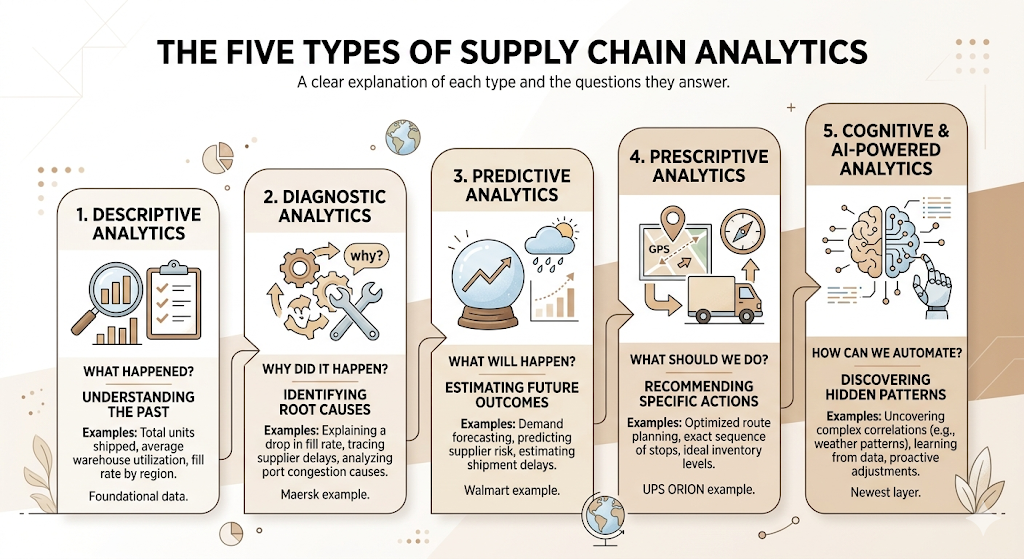
A lot of articles list these four or five types and move on without explaining why the distinction matters. It matters because each type answers a different question, and most platforms are stronger at some than others.
Descriptive Analytics
Descriptive analytics tells you what already happened. Total units shipped last month, average warehouse utilization last quarter, and fill rate by region. It’s the foundation every other type sits on, and most ERP reporting modules already do this reasonably well.
Diagnostic Analytics
Diagnostic analytics answers why something happened. If the fill rate dropped 8% in March, diagnostic tools help trace it back to a specific supplier delay or a warehouse staffing shortage, rather than leaving you to guess. Maersk, for instance, uses this layer heavily across its shipping network to isolate the root cause of port congestion delays rather than just flagging that a delay occurred.
Predictive Analytics
Predictive analytics is the use of historical data and statistical models to estimate what’s likely to happen next, most commonly applied to demand, supplier risk, and shipment delays. This is where demand forecasting software earns its budget line. Retailers like Walmart have run predictive demand models for years, specifically to avoid the two expensive failure modes: stockouts that lose sales and overstock that ties up working capital.
Prescriptive Analytics
Prescriptive analytics goes a step further and recommends a specific action, not just a prediction. UPS’s ORION routing system is the textbook example here. It doesn’t just predict that a route will be inefficient. It recommends the exact sequence of stops a driver should take, and UPS has credited the system with cutting millions of miles driven annually as a result.
Cognitive and AI-Powered Analytics
This is the newest layer, and it’s where most of the current vendor investment is going. Cognitive analytics uses machine learning and increasingly large language models to surface patterns a human planner would likely miss entirely, like a subtle correlation between a regional weather pattern and a specific SKU’s demand spike three weeks later.
Supply chain analytics breaks into five types: descriptive (what happened), diagnostic (why it happened), predictive (what’s likely to happen), prescriptive (what to do about it), and cognitive or AI-powered analytics, which uses machine learning to surface patterns a human planner would otherwise miss.
What Features Should You Look For in Supply Chain Analytics Software?
Most vendor websites list fifteen features in a grid. In practice, they cluster into four groups that actually matter to a buyer.
Visibility and Forecasting
Real-time visibility means tracking shipments, inventory, and supplier status as it happens rather than in a batch report run overnight. Pair that with demand forecasting that updates as new sales data comes in, not once a month, and a planner can actually get ahead of a problem instead of reacting to it after the fact.
Inventory, Procurement, and Supplier Tools
Inventory analytics should show you turnover, aging stock, and imbalances across locations without forcing you to export to Excel first. On the procurement side, supplier performance management tracks on-time delivery, quality defects, and lead time variability for every vendor you depend on, which matters a lot more than people expect until a key supplier quietly starts slipping.
Logistics, Warehouse, and Risk Alerts
Transportation management systems (TMS) integration lets the analytics layer pull in actual carrier performance and cost data rather than relying on what was budgeted. Warehouse management systems (WMS) data adds utilization and pick-pack accuracy into the same view. On top of that, risk alerts flag disruptions, a port closure, a weather event, a supplier going dark before they turn into a missed shipment.
AI, Scenario Planning, and Custom Reporting
Scenario planning software lets a team model “what if our largest supplier goes down for three weeks” before it actually happens, instead of improvising in a crisis. Custom reporting and flexible dashboards round this out, since a procurement lead and a CFO need to see entirely different slices of the same underlying data.
Cloud Platforms vs Enterprise Suites vs Industry-Specific Tools: Which Type Fits You?
The honest answer is that the right type depends almost entirely on company size and how messy your existing systems already are.
Cloud-based analytics platforms dominate new purchases right now, mainly because they remove the upfront infrastructure cost and let smaller teams access capabilities that used to require an enterprise IT budget. A fifty-person D2C brand can get meaningful demand forecasting running in a matter of weeks on a cloud platform today, a project that would have needed a six-figure IT budget and a dedicated implementation team a decade ago. Enterprise suites like SAP Integrated Business Planning sit on the other end, built for large manufacturers running complex, multi-tier supplier networks where a cloud-only tool would struggle to handle the data volume.
ERP-based analytics, the reporting layer baked into systems like Oracle Fusion Cloud or NetSuite, works fine for basic descriptive reporting but rarely goes deep enough on prediction or scenario modeling. Industry-specific tools, Blue Yonder for retail supply planning is a good example, bake in logic specific to one vertical’s demand patterns rather than asking you to configure it from scratch, which usually means faster time to value if your business fits squarely into that vertical. And general business intelligence tools, Power BI being the most common, can technically be pointed at supply chain data, but they weren’t built with supply chain logic in mind, which shows up the moment you need anything beyond a static report.
Supply Chain Analytics Software vs BI Software vs ERP Analytics: What’s the Difference?
This is probably the most common confusion in the buying process, and it’s worth a straight answer before you sit through five demos.
| Supply Chain Analytics Software | BI Software | ERP Analytics | |
| Primary purpose | Forecast and optimize supply chain decisions | Visualize data from any business function | Report on transactions already in the ERP |
| Data sources | ERP, WMS, TMS, supplier portals, IoT sensors | Almost any connected source | Native ERP modules only |
| Analytics depth | Descriptive through prescriptive/AI | Mostly descriptive and diagnostic | Mostly descriptive |
| Typical users | Planners, procurement, logistics, COOs | Analysts across departments | Finance and operations |
| Scalability | Built for supply chain data volume and complexity | Scales well, but logic must be built manually | Limited to what the ERP vendor supports |
| Best fit | Mid-size to enterprise teams managing real supply chain complexity | Companies needing flexible, cross-functional dashboards | Companies with simple, single-ERP operations |
Supply chain analytics software is purpose-built to forecast and optimize supply chain decisions using data from ERP, WMS, TMS, and supplier systems together, while generic BI tools can visualize the same data but require manual logic-building, and ERP analytics modules are largely limited to descriptive reporting on transactions already inside that one system.
What Do You Actually Gain From Supply Chain Analytics Software?
Skip the slide-deck version of this list for a second. Here’s what changes in practice.
Visibility stops being a once-a-week status meeting and becomes something a planner checks in real time. Decisions get faster because the data and the recommendation sit in the same screen instead of three separate exports. Forecast accuracy improves enough to matter financially, not because the algorithm is magic, but because it’s updating on fresh data instead of last month’s spreadsheet. Inventory costs come down as overstock and stockouts both shrink. Transportation spend tightens up, too, once you can finally see which carriers are actually hitting contracted rates instead of taking the invoice at face value. Supplier relationships improve as well, since a scorecard built on real delivery and quality data is a far better conversation starter than a complaint email. And customers feel the difference directly, since fewer stockouts and more accurate delivery promises translate straight into fewer support tickets asking where an order is.
Flipkart’s experience is a useful real-world reference here. In 2021, the company rebuilt its supply chain planning technology into a single platform with two layers: one for demand forecasting using machine learning, and one that converts those forecasts into inventory, capacity, and network decisions automatically. According to a case study published in the INFORMS Journal on Applied Analytics, that shift let Flipkart make inventory and capacity decisions based on forecasts generated at both the category and product level, rather than planners manually reconciling separate spreadsheets for each.
Integrations That Actually Matter
A platform with brilliant analytics and no integrations is a very expensive standalone dashboard. ERP integration sits at the top of the list, since most of your transactional data already lives there. After that, your WMS and TMS need to feed in directly, not through a manual CSV upload that someone forgets to run on Fridays. That distinction matters more than vendors let on: a “native” integration that syncs in real time through an API is a completely different experience from one that technically “integrates” through a nightly batch file export.
CRM integration matters more than people expect, since customer order patterns are often the earliest signal of a demand shift. Procurement software, IoT sensors on high-value shipments, and any existing data visualization dashboards your finance team already trusts round out the list. The fewer manual handoffs between systems, the faster the analytics layer actually reflects reality.
How to Choose the Right Supply Chain Analytics Software
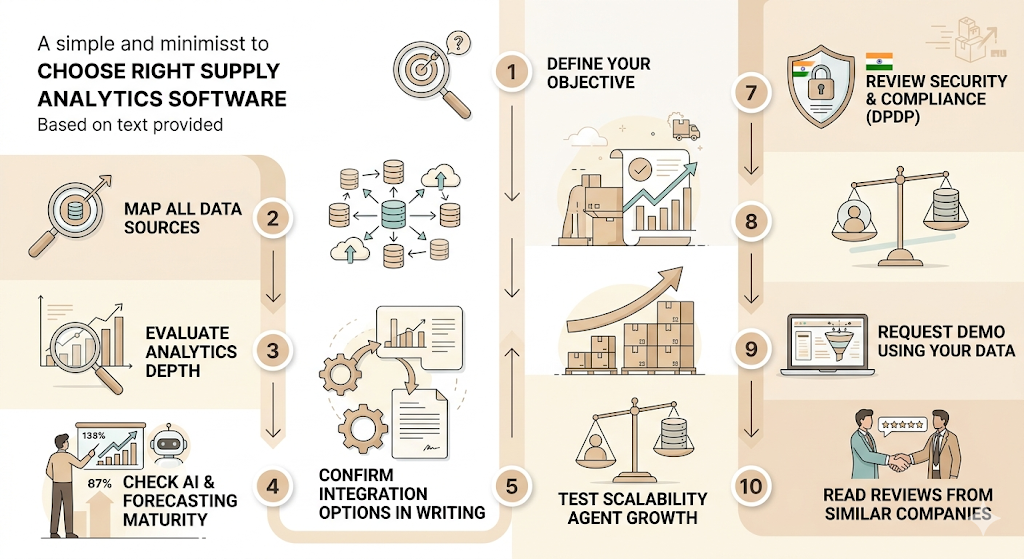
This is the part most buying guides rush through. It shouldn’t be rushed, since a bad fit here costs a year of frustrated planners and a renewal nobody wants to sign.
Step 1: Define your objective before you take a single demo call. Are you solving a forecasting problem, an inventory cost problem, or a supplier risk problem? Trying to solve all three at once usually means solving none of them well.
Step 2: Map every data source you’d need connected. List your ERP, WMS, TMS, and any supplier portals. If a vendor can’t clearly explain how they’ll connect to each one, that’s your answer.
Step 3: Evaluate analytics depth, not just dashboard polish. Ask specifically whether the platform handles predictive and prescriptive analytics, or whether it stops at descriptive reporting with a nicer interface.
Step 4: Check the AI and forecasting maturity directly. Ask for the actual forecast accuracy improvement past customers have seen, with a number attached, not a vague claim about “smarter forecasting.”
Step 5: Confirm integration options in writing. Get a clear answer on which systems connect natively versus which need a custom build, since custom builds quietly become the most expensive line item in year one.
Step 6: Test scalability against your real growth plan. A platform that works for 5,000 SKUs might choke at 50,000. Ask for a reference customer at roughly your scale, not the vendor’s biggest logo.
Step 7: Review security and compliance requirements. For Indian businesses, this increasingly means checking how the vendor handles data residency and consent under the Digital Personal Data Protection Act, alongside whatever industry-specific compliance applies.
Step 8: Compare pricing models honestly. Per-user pricing punishes growing teams. Usage-based pricing punishes data-heavy operations. Know which one fits your shape before you sign.
Step 9: Request a demo using your own data, not the vendor’s sample dataset. A polished demo on clean sample data tells you almost nothing about how the platform handles your messy real-world numbers.
Step 10: Read reviews from companies your size, in your industry. A glowing review from a Fortune 500 manufacturer means very little if you’re a 200-person D2C brand.
Mistakes Companies Make When Adopting Supply Chain Analytics Software
The most common mistake is buying the platform before fixing the data feeding it. Garbage in, garbage out applies here more than almost anywhere else in business software. A close second is choosing a tool without checking integrations first, then discovering eighteen months later that the WMS and the new analytics platform simply don’t talk to each other cleanly.
Companies also tend to focus entirely on dashboards instead of asking whether the insights actually change a decision. A beautiful dashboard that nobody acts on is decoration, not analytics. And teams routinely skip employee training, assuming a planner who’s used Excel for a decade will intuitively know how to interpret a machine learning forecast confidence interval. They won’t, not without a few real sessions walking through it.
There’s also a quieter mistake that shows up later: failing to define measurable KPIs before launch. Without an agreed baseline for fill rate or forecast accuracy going in, nobody can prove the platform paid for itself a year later, and that makes the next budget conversation a lot harder than it needs to be.
Best Practices for a Rollout That Actually Sticks
Start with data governance before anything else gets built on top of it. If your supplier IDs don’t match across systems, fix that first, not after the platform goes live. Standardize data definitions across departments, too. Finance’s “inventory value” and operations’ “inventory value” need to mean the same thing, or every report becomes a debate.
Pick one high-impact use case to launch with rather than trying to solve every supply chain problem in month one. Demand forecasting for your top twenty SKUs is a realistic starting point. A full network redesign is not. Once that’s working, automate the reporting that used to eat someone’s Monday morning, and build in ongoing performance monitoring so the model doesn’t quietly drift out of accuracy six months after launch without anyone noticing.
One more thing that’s easy to skip: assign a single owner for the rollout, someone whose job it is to chase data quality issues and keep cross-functional teams aligned. Without that, a platform with five departments touching it tends to end up with nobody actually accountable for whether it’s working.
Supply Chain KPIs You Should Be Tracking
A platform is only as useful as the metrics you actually watch inside it. These are the ones worth a permanent spot on your dashboard.
| KPI | What It Tells You |
| Perfect Order Rate | Percentage of orders delivered complete, on time, and damage-free |
| Order Fulfillment Cycle Time | Time from order placement to delivery |
| Inventory Turnover | How many times is the inventory sold and replaced in a given period |
| Fill Rate | Percentage of customer demand met from available stock |
| Supplier On-Time Delivery | Percentage of supplier shipments arriving within the agreed window |
| Transportation Cost per Shipment | Average freight cost per unit shipped |
| Warehouse Utilization | Percentage of available warehouse capacity actively in use |
| Forecast Accuracy | How closely did actual demand match the forecast |
| Cash-to-Cash Cycle Time | Days between paying suppliers and collecting from customers |
Where Supply Chain Analytics Is Headed Next
AI decision intelligence is moving past dashboards entirely. Gartner’s 2026 forecast on agentic AI in supply chain management software projects’ spending in this category is growing from under $2 billion in 2025 to $53 billion by 2030, with 60% of enterprises using SCM software expected to have adopted agentic AI features by 2030, up from just 5% in 2025. That’s not a small shift. It means the software itself starts taking low-risk actions, like reordering a fast-moving SKU, instead of just flagging that it should happen.
Digital twins, virtual replicas of a physical supply chain network used to test disruptions before they occur in real life, are gaining traction with larger manufacturers who can’t afford to learn a network’s failure points the hard way. Real-time visibility through IoT sensors is extending further down the chain, sometimes literally inside a shipping container. Generative AI is starting to show up in genuinely useful ways, too. IBM’s Sterling Intelligent Promising Premium, released in 2024, applies it specifically to real-time order fulfillment, promising to help companies tell customers with more confidence exactly when an order will actually arrive. And sustainability analytics is no longer optional in some markets. Regulations like the EU’s Corporate Sustainability Reporting Directive now require detailed supply chain disclosures from more than 50,000 companies, which means ESG tracking is quietly becoming a core analytics requirement rather than a side project.
Closer to home, Delhivery’s RTO Predictor model is a solid example of where this is headed in India specifically. The company says the model analyzes data from billions of past shipments to flag cash-on-delivery orders likely to be returned, letting D2C brands adjust before the shipment even leaves the warehouse rather than absorbing the cost after the fact.
Agentic AI spend within supply chain management software is projected to grow from under $2 billion in 2025 to $53 billion by 2030, according to Gartner, with 60% of SCM software users expected to have adopted agentic AI features by 2030, up from just 5% in 2025.
Conclusion
Supply chain analytics software has moved from a nice-to-have reporting layer to a genuine competitive advantage, mostly because the cost of operating without visibility has gone up faster than the cost of the software itself. The businesses getting real value out of it aren’t necessarily the ones with the flashiest dashboards. They’re the ones who picked a platform that matched their actual data maturity and stuck to one high-impact use case before trying to scale across the entire operation.
Before you sign anything, go back to the four-group feature breakdown and the ten-step selection process above and run your shortlist through it honestly. The right platform should make a planner’s Tuesday morning easier, not just make a board deck look more sophisticated.
Frequently Asked Questions
What is supply chain analytics software?
Supply chain analytics software is a platform that pulls data from your ERP, warehouse, transportation, and supplier systems and turns it into forecasts, dashboards, and recommendations covering inventory, demand, and supplier performance. It’s built specifically for supply chain decisions, not general business reporting.
Who actually needs supply chain analytics software?
Any business managing inventory across more than one location, working with multiple suppliers, or dealing with demand that shifts seasonally, benefits from it. Smaller operations with simple, single-supplier setups can often get by with their ERP’s built-in reporting for longer.
What’s the difference between supply chain analytics software and a BI tool?
Supply chain analytics software is purpose-built around supply chain logic, demand forecasting, supplier scorecards, and inventory optimization, baked in from the start. A generic BI tool can visualize the same underlying data, but requires your team to build that logic manually from scratch.
How do I calculate forecast accuracy?
The most common method is Mean Absolute Percentage Error (MAPE), which compares forecasted demand against actual demand and expresses the gap as a percentage. A lower MAPE means a more accurate forecast. Most platforms calculate this automatically once you’ve fed them a few cycles of actual sales data.
Can supply chain analytics software integrate with my existing ERP?
Yes, most established platforms offer native integrations with major ERPs like SAP, Oracle, and NetSuite. Always confirm the specific integration depth during evaluation, since “integrates with” sometimes means a basic data export rather than a real-time connection.
Is supply chain analytics software worth it for a small or mid-size business?
For most mid-size businesses managing real inventory and supplier complexity, yes. Cloud-based pricing has brought the entry cost down significantly compared to a decade ago. For a very small operation with one or two suppliers and simple demand patterns, the return may not justify the cost yet.
What are the five types of supply chain analytics?
Descriptive, diagnostic, predictive, prescriptive, and cognitive or AI-powered analytics. Each answers a different question, from what happened to what you should do about it, and most platforms are stronger in some of these layers than others.
How much does supply chain analytics software typically cost?
Pricing varies widely based on company size, data volume, and whether you choose per-user or usage-based pricing. Cloud platforms aimed at mid-size businesses often start in the low five figures annually, while enterprise suites for large manufacturers can run well into six or seven figures, depending on scope.
Why isn’t my analytics dashboard actually improving decisions?
Usually, because the underlying data is inconsistent across systems, or because the dashboard was built without input from the people who’d actually use it daily. A dashboard that looks impressive but doesn’t answer a planner’s real question gets ignored within a few weeks.
How long does implementation typically take?
A focused rollout around one use case, demand forecasting for top SKUs, for example, can go live in eight to twelve weeks. A full enterprise deployment across multiple business units and legacy systems often takes six months to a year.