
QR codes stopped being a novelty years ago. In 2026, they sit on restaurant tables, product packaging, out-of-home billboards, event badges, and every third Instagram story swipe-up. The problem isn’t whether to use one. It’s picking the right QR Code Generator out of a market that now has dozens of overlapping options, each promising the same thing: unlimited scans, custom branding, and analytics you’ll probably check once and forget about.
Most teams don’t need all ten tools on this list. They need one that fits their budget, their volume, and whether they actually need to track and edit a code after it’s already printed on 50,000 flyers. That last part matters more than most guides admit.
This article breaks down 10 tools worth your time in 2026, what each one is actually good at, where it falls short, and who should skip it entirely.
Table of Contents
Why QR Codes Still Matter in 2026
Scan behavior hasn’t slowed down. If anything, it’s more embedded in daily habits than it was three years ago, mostly because restaurants, transit systems, and retail packaging normalized it during and after the pandemic and never went back to printed menus or manual entry.
What’s changed is what businesses expect from the tools that create these codes. A static image with black squares used to be enough. Now marketing teams want to know how many people scanned a code, from which city, on which device, and whether that scan turned into a sale. That’s a different product category entirely, and it’s why the tools on this list range from free single-purpose generators to full campaign platforms with CRM integrations.
Static vs Dynamic: The Decision That Changes Everything
A QR code either encodes its destination directly into the pattern, or it points to a short redirect link you control. That one distinction decides which tool you need.
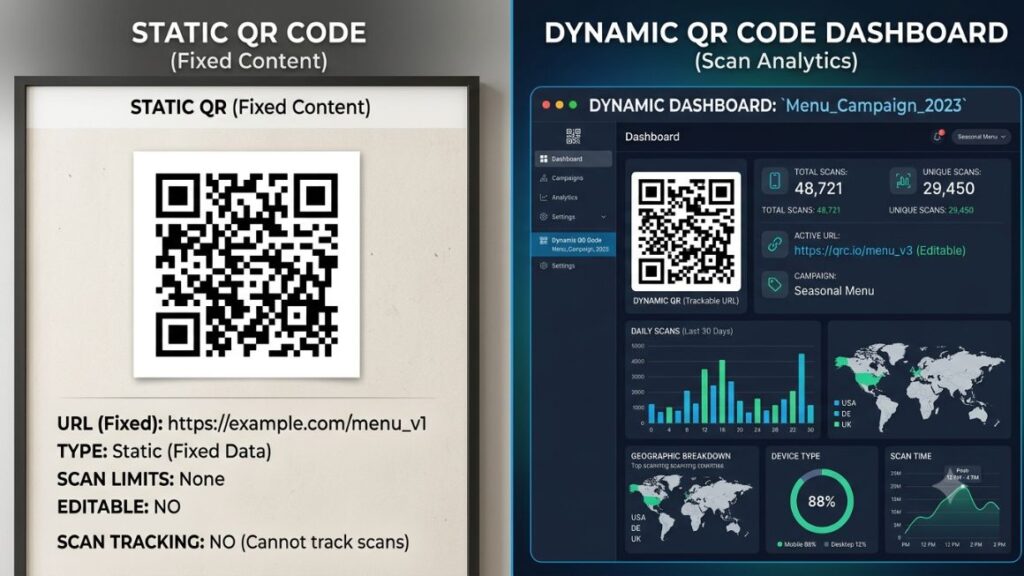
A Static QR Code Generator bakes the URL or text straight into the code itself. Once it’s created, you can’t change where it points, and there’s no scan tracking. It’s free, permanent, and works without an internet connection on the generator’s end.
A Dynamic QR Code Generator creates a short redirect URL instead of encoding the destination directly. You can change where the code sends people after it’s already printed, and you get scan counts, device data, and often location breakdowns. This flexibility usually sits behind a paid plan, because someone has to keep that redirect server running indefinitely.
Here’s the part that trips people up: if you stop paying for a dynamic QR tool, the code doesn’t just lose its analytics. It stops working entirely, because the redirect it depends on gets shut down. Print a static code on a building sign and it works forever. Print a dynamic one and you’ve signed up for a subscription you can’t easily walk away from.
Static QR codes encode data permanently and cost nothing to run, but can’t be edited or tracked after creation. Dynamic QR codes redirect through a controlled short link, which allows destination edits and scan analytics, but the code stops functioning if the subscription lapses. The right choice depends on whether the QR code sits on a permanent asset or a campaign you’ll want to update.]
How We Evaluated These Tools
We looked at six things across every tool on this list: how deep the customization goes (logos, colors, frames, shapes), whether dynamic codes and analytics are actually included or upsold separately, the honesty of the free tier, export formats for print versus digital use, bulk generation for teams handling hundreds of codes, and integration options for marketing stacks. Pricing figures below reflect publicly listed rates as of mid-2026 and can shift, so check the provider’s site before committing to an annual plan.
The 10 Best QR Code Tools for 2026
1. Uniqode (formerly Beaconstac): Best for Enterprise Campaigns
Uniqode is built for teams running QR codes at scale across retail, packaging, and multi-location campaigns. It supports bulk generation in the thousands, GPS-restricted scans for location-specific campaigns, and enterprise security features like SSO.
Independent testing that compared nine dynamic tools, including Uniqode, Scanova, Bitly, and Flowcode, against destination editing, customization, and analytics found Uniqode holds up well on feature depth, though it isn’t the cheapest option on the list.The evaluation covered Uniqode, Scanova, Bitly, Flowcode, Hovercode, QRCG PRO, TQRCG, QR Tiger, and QRCodeKIT, testing destination editing, customization, and analytics on each. Paid plans start around $15 a month, scaling up sharply for team and enterprise tiers with advanced analytics and dedicated support.
Uniqode makes the most sense if you’re running QR codes across dozens of retail locations or need audit-level reporting for a compliance-heavy industry. A single-location cafe or a solo creator will find it overbuilt and overpriced.
Best for: Multi-location retail and enterprise marketing teams
Skip if: You need fewer than 10 dynamic codes a month
2. QR Tiger: Best Value for Growing Businesses
QR Tiger sits in the middle of the market: dynamic codes, decent analytics, and pricing that doesn’t punish small teams the way enterprise tools do. Its Premium plan includes unlimited static codes alongside 600 dynamic codes with unlimited scans and downloads, which covers most mid-sized campaign needs without upgrading further.
QR Tiger also supports password-protected codes, campaign scheduling (activate or deactivate a code on a set date), and lead capture forms attached directly to the scan page. According to a 2026 pricing comparison across seven QR platforms, QR Tiger’s entry-level dynamic plan starts around $7 a month, making it one of the cheaper ways into dynamic tracking without going fully free-tier.
Best for: Small to mid-sized marketing teams that need dynamic codes without enterprise pricing
Skip if: You need SSO or enterprise-grade access controls
3. Bitly: Best If You’re Already Using It for Links
Bitly’s QR feature lives inside the same dashboard most marketing teams already use for link shortening and UTM tracking. If your team tracks click data through Bitly already, adding QR codes to that same workflow avoids managing a second tool and a second login.
The tracking is solid, not flashy: scan counts, referring device type, and geographic breakdown, all sitting next to your existing link analytics. Bitly’s paid QR access starts around $10 a month as part of its broader link management plans, which makes it attractive mainly as a bundle rather than a standalone QR platform.
Design customization is lighter here than on QR Tiger or Uniqode. You get logo placement and basic color control, not much beyond that.
Best for: Teams already using Bitly for link shortening
Skip if: You want deep visual customization or frame designs
4. Flowcode: Best for Retail and Out-of-Home Campaigns
Flowcode built its brand around QR codes that don’t look like QR codes: custom shapes, embedded brand colors, and codes designed to sit naturally inside a billboard or product label without looking like an afterthought. It also ships Flowpage, a mobile landing page you can attach directly to a scan, built for email collection and promotions rather than a generic redirect.
Flowcode leans enterprise on price. Entry plans start around $25 a month, and its more capable Pro and Growth tiers run considerably higher, often cited near $60 a month and up depending on code volume and CRM integration needs. Free-tier codes carry Flowcode branding, which most businesses will want to remove immediately.
Reviews consistently note the design flexibility and responsive support, alongside complaints that basic customization gets locked behind higher-tier plans faster than competitors.
Best for: Retail brands and OOH campaigns where the code needs to look premium
Skip if: Budget is a bigger constraint than design polish
5. Scanova: Best for Trackable Print Campaigns
Scanova focuses on the print-to-digital handoff: packaging, direct mail, and in-store signage where the QR code needs to survive physical wear and still scan reliably at a distance. It includes vector export formats (EPS, SVG) specifically built for commercial printing, which some of the more design-first tools on this list handle less cleanly.
Scanova’s dynamic tracking covers scan location, time, and device, standard for the category, but its bulk generation and campaign folder structure make it easier to manage hundreds of codes across a multi-SKU product line without losing track of which code goes on which package.
Best for: Packaging and direct-mail campaigns with high print volume
Skip if: You only need a handful of codes for a single campaign
6. QRCode Monkey: Best Free Static QR Code Generator
QRCode Monkey is the tool most people land on first, and for good reason: unlimited static codes, logo embedding, color and pattern customization, and no account required. According to Jotform’s 2026 review of free QR tools, its color controls go deeper than they first appear, including gradient fills and separate control over the QR “eyes,” though the live preview doesn’t always update until you click generate.
One catch worth flagging clearly: the “statistics and editability” toggle in QRCode Monkey’s interface doesn’t create a dynamic code within QRCode Monkey itself. It redirects you to a separate paid tool, QR Code Generator PRO, which has caused plenty of confused reviews from people expecting native dynamic support.
Best for: Anyone who needs a free, unlimited Custom QR Code Generator for static use
Skip if: You need native dynamic tracking without switching platforms
7. Canva: Best for Designers Already Working in the Platform
Canva added a QR code function directly into its design menu, which means you can generate a code inside the same canvas as your flyer, Instagram post, or business card, without exporting and re-importing between tools. Add a URL, and the code drops into your design ready to resize and reposition.
It’s free on Canva standard plan, with Canva Enterprise adding SSO, admin controls, and custom app integrations for larger teams already standardized on Canva. The tradeoff is that Canva’s QR codes are static only. There’s no built-in analytics or editable destination.
Best for: Designers and small teams who want a QR code baked into a finished visual asset
Skip if: You need scan data or the ability to edit the link later
8. Adobe Express: Best for Fast, Branded Marketing Assets
Adobe Express offers a free QR Code Maker aimed squarely at marketers who need a branded code fast, without opening a full design file. It works well for one-off assets: a single social post, a print flyer, a one-time event handout, where speed matters more than campaign-level tracking.
Customization covers color and basic frame styles, tied into Adobe’s broader template library, so the code can match brand assets you’ve already built in Express. Like Canva, it’s a static-first tool. If you need to change the destination after printing, you’re back to generating a fresh code and reprinting.
Best for: Quick, branded static codes for one-off marketing assets
Skip if: You’re running a campaign that will need updates after launch
9. ME-QR: Best Free Dynamic QR Code Generator
Most “free” QR tools quietly reserve dynamic codes for paid tiers. ME-QR is one of the few genuine exceptions. According to a 2026 review of QR code platforms, ME-QR has built a large user base, cited at over 14 million monthly users as of 2023, by offering both static and dynamic codes at no cost, letting users edit destinations and view scan data without a paywall.
Paid tiers exist mainly to remove ad-supported scan pages and raise scan limits, with Lite around $5.75 a month and Premium around $8.25 a month. For a small business that needs one or two trackable codes without committing to a subscription, ME-QR is hard to beat as a genuine Online QR Code Generator with no catch on the core feature.
Best for: Small businesses that need free dynamic tracking without a paywall
Skip if: You need enterprise volume or advanced security controls
10. GoQR.me: Best No-Frills Option for a Single Code
Sometimes you just need one code, right now, with no account, no upsell, and no design decisions to make. GoQR.me strips the category down to that single job: paste a URL, download a PNG or SVG, done in under a minute.
It won’t win any awards for customization or analytics, and it doesn’t try to. For a landlord posting a WiFi code in a rental unit, a student printing a code for a class project, or anyone who needs exactly one static code and never again, that simplicity is the whole point.
Best for: One-off, no-account-needed static codes
Skip if: You’ll ever need more than a handful of codes or any tracking
How to Pick the Right One for Your Use Case
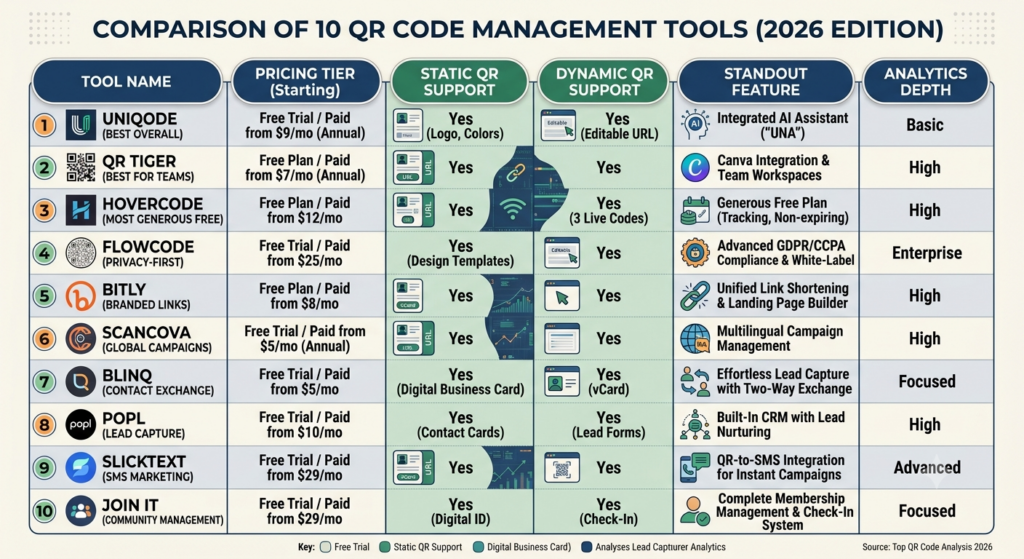
Start with one question: will this code ever need to point somewhere else after it’s printed? If the answer is no, a free static tool like QRCode Monkey, Canva, or GoQR.me covers you completely, and paying for anything more is wasted spend.
If the answer is yes, or you want scan data to justify the campaign to a stakeholder, you’re in dynamic territory, and budget becomes the deciding factor. QR Tiger and ME-QR offer the most accessible entry points. Bitly makes sense if link tracking already lives there. Uniqode, Flowcode, and Scanova earn their higher price tags when you’re managing volume across multiple locations or need packaging-grade export formats.
There isn’t one Best QR Code Generator for every situation. A solo creator’s answer and an enterprise retail chain’s answer will never be the same tool, and that’s fine. Match the tool to the volume and tracking need, not the other way around.
Choosing between QR code tools comes down to two questions: whether the destination needs to change after printing, and how much scan volume the campaign requires. Static, free tools cover permanent, low-volume use cases completely. Paid dynamic platforms only earn their cost when tracking or post-print editing genuinely changes campaign decisions.
Mistakes Most Teams Make When Creating QR Codes
Printing a dynamic code on a permanent asset like a storefront sign is the most common one. The moment the subscription lapses, the sign stops working, and most teams don’t realize this until a customer complains.
Skipping the test scan is another. Codes with heavy logo overlays or low contrast between the code and background can fail to scan on older phone cameras, especially printed small on a business card. Always test a physical print, not just a screen preview, before running a full print job.
Honestly, the third mistake gets ignored the most: nobody checks the scan analytics after week one. If you’re paying for a dynamic QR Code Generator specifically for the tracking, actually look at the data. Otherwise you’re paying dynamic prices for a static feature set.
Final Thoughts
The right tool here isn’t the one with the longest feature list. It’s the one that matches how you’ll actually use the code, static and permanent, or dynamic and campaign-driven, without overpaying for tracking you won’t check or underbuying on a code you’ll need to update in three months.
Start with the free static tools if you’re testing the waters. Move to a dynamic platform only once you can point to a specific reason you need editability or scan data. Most teams overbuy on this decision far more often than they underbuy.
If you’re building QR codes into a broader content or campaign strategy and want a sharper eye on what actually converts scans into results, YUP’s Crystal Clear newsletter breaks down real campaign tactics like this every week, sent straight to your inbox.
FAQs
What is a QR code generator?
A QR code generator is a tool that converts a URL, text, contact card, or other data into a scannable two-dimensional barcode. Free tools handle basic static codes, while paid platforms add dynamic tracking, custom branding, and bulk generation.
What’s the difference between a static and dynamic QR code?
A static code encodes its destination permanently and can’t be edited or tracked. A dynamic code redirects through a short link that you can update after printing, with scan analytics included, usually as a paid feature.
Which QR code generator is actually free?
QRCode Monkey, Canva, Adobe Express, and GoQR.me all offer genuinely free static codes with no account required. ME-QR stands out as one of the few tools offering free dynamic codes with real analytics, not just static generation.
Do I need a dynamic QR code for my business?
Only if you expect to change the destination after printing, or if scan analytics will directly influence a marketing decision. A restaurant menu that rarely changes doesn’t need one. A print ad campaign you’re optimizing week to week probably does.
How much does a dynamic QR code generator cost?
Entry-level dynamic plans range from roughly $7 a month with QR Tiger up to $25 or more with Flowcode, depending on code volume, analytics depth, and branding controls. Enterprise tiers for platforms like Uniqode climb well beyond that for teams managing hundreds of locations.
Is Canva good for creating QR codes?
Canva works well if you’re already designing the surrounding asset in Canva and want the code embedded directly into that layout. It only supports static codes, so skip it if you need tracking or post-print editing.
Why did my QR code stop working?
This almost always happens with dynamic codes when the subscription that powers the redirect lapses. Static codes never stop working since the destination is encoded directly into the pattern with no server dependency.
What file format should I download my QR code in?
Use PNG for digital use like websites and social posts. For print, especially large-format signage or packaging, use a vector format like SVG or EPS so the code stays crisp at any size.
Can I track how many people scan my QR code?
Only with a dynamic code. Static codes offer zero tracking since there’s no redirect server logging the scan. Every tool on this list except the purely static options (Canva, Adobe Express, GoQR.me, and QRCode Monkey’s native feature) includes some level of scan analytics on paid plans.
What should I look for before choosing a QR code tool?
Check whether dynamic codes are genuinely included or upsold to a separate paid product, confirm export formats match your use case (digital versus print), and read the cancellation terms before committing, since dynamic codes typically stop working the moment you cancel.