

Every email you send is doing marketing whether you notice it or not. Most people still sign off with a name typed in a default font, no logo, no links, nothing that tells the reader this is a real business they’re dealing with.
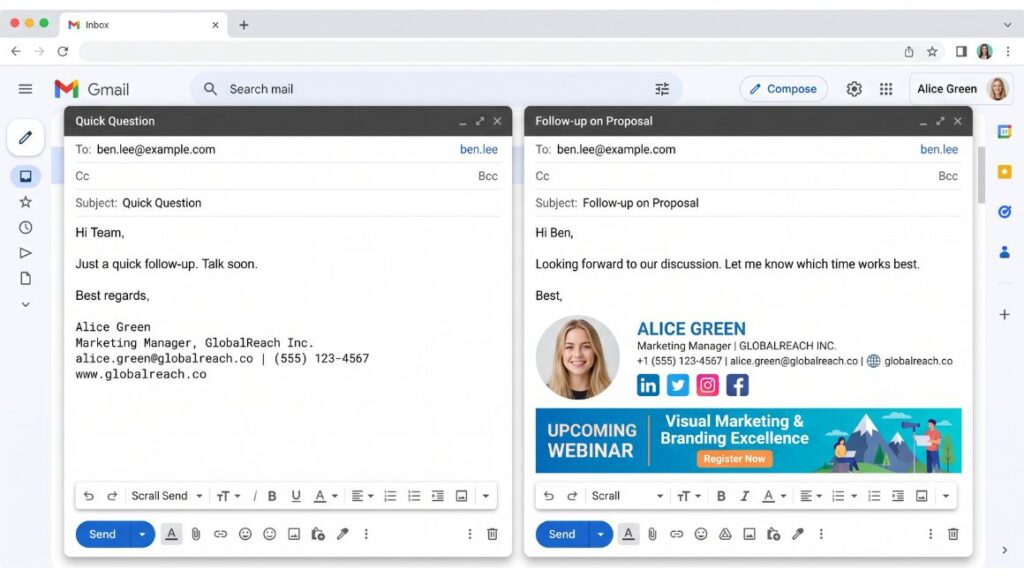
That gap is exactly what an email signature generators is built to close, and by 2026 the good ones do a lot more than drop a logo under your name. They add clickable social icons, track banner clicks, sync employee details from your directory, and keep every signature on brand the moment someone gets promoted or your phone number changes.
A professional email signature signals more than tidiness. It tells the person on the other end that they’re dealing with a real company, not a Gmail address someone set up five minutes ago. According to Litmus’s September 2025 Email Client Market Share report, Apple Mail clients account for roughly 46% of email opens and Gmail sits around 24%, which means your signature has to render cleanly across at least two very different rendering engines before it reaches most inboxes.
We tested and compared 10 of the most popular tools on the market this year. Some are built for solo freelancers who need a signature once and never think about it again. Others are enterprise platforms designed to push consistent branding across a 2,000-person sales org overnight. This guide breaks down all 10, tells you who each one is actually for, and gives you a framework for choosing without wasting a week on demos.
Table of Contents
Why a Consistent Signature Matters More Than People Think
Picture two sales reps at the same company. One has a plain text sign-off. The other has a signature with a photo, a booking link, and a small banner promoting a webinar. The second one gets more replies, more clicks, and more booked meetings, and nobody had to write a single extra word to make that happen.
A business email signature is one of the few brand touchpoints that lands in every external conversation a company has, from a first sales pitch to a routine support reply. Marketing spends months on a logo refresh and then lets 200 employees keep using the old one in their signatures for another year. It happens constantly, and it’s avoidable.
There’s also a compliance angle that gets ignored until it’s a problem. Legal disclaimers, GDPR notices, and confidentiality statements need to appear consistently across every outgoing email in regulated industries like finance and legal. Manually updating that across a whole team isn’t realistic. That’s the actual reason management-grade tools like Exclaimer and CodeTwo exist, not just prettier signatures.
A professional email signature functions as a passive brand and compliance touchpoint that appears in every external email a company sends. Unlike a logo refresh or a new tagline, signature updates typically require manual changes across every employee’s email client unless a centralized signature management tool is in place. This is why regulated industries treat signature consistency as a compliance requirement, not just a design preference.
Read More: Email Finder Tools: How to Find Verified B2B Contacts and Build Better Prospect Lists
How We Evaluated These Tools
Ranking ten different tools fairly means judging them all against the same criteria, not just picking favorites. We looked at seven things for each one:
- Template quality and customization — how many layouts, and how much control over fonts, colors, and spacing
- Email client compatibility — does it render cleanly in Gmail, Outlook, and Apple Mail without breaking
- Team management features — directory sync, bulk deployment, role-based permissions
- Analytics — click tracking, banner performance, engagement data
- Pricing transparency — clear published pricing versus “contact sales” for everything
- Integrations — Google Workspace, Microsoft 365, CRM platforms like HubSpot and Salesforce
- Ease of setup — how long it takes a non-technical person to get a working signature live
We tested each email signature generator against these criteria using published vendor pricing, verified reviews on platforms like Capterra and G2, and where possible, our own trial accounts. Tools built for individuals get judged mostly on templates and ease of use. Tools built for teams get judged mostly on management and rollout speed, since that’s what the buyer actually cares about.
The 10 Best Email Signature Generators in 2026
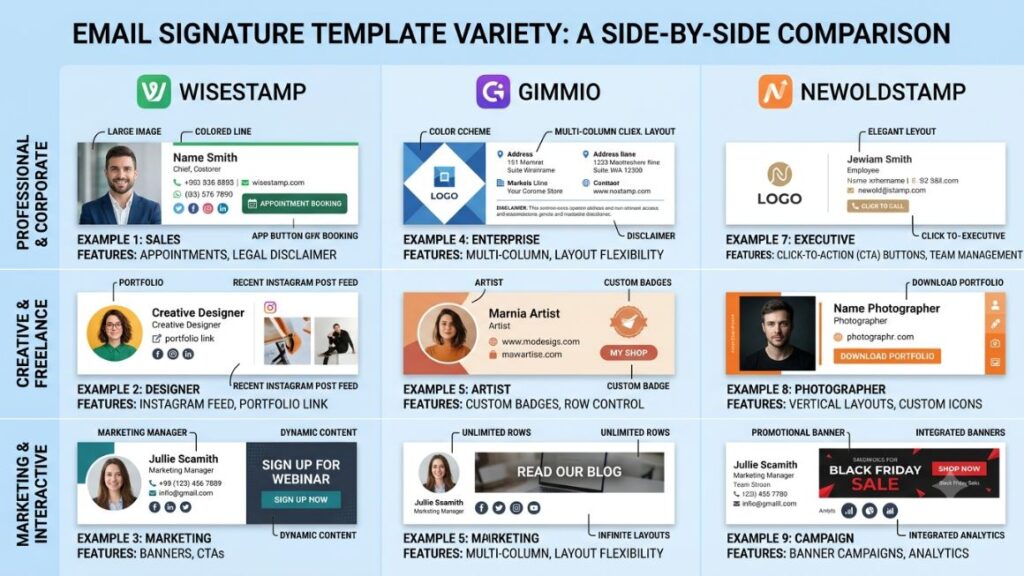
1. WiseStamp
WiseStamp has been around since 2008 and has built a strong reputation for design-forward signatures that don’t look templated. It’s browser-based, works without installing anything, and supports animated GIFs, social profile icons, and a rotating “apps” feature that can display your latest blog post or a promotional banner that updates automatically.
The individual plans start around $5 to $9 a month depending on the billing term, giving access to a large template library and scheduling features. Team pricing shifts to a per-seat model, with the Basic team plan running roughly $29 a month for 10 seats and scaling up from there for larger rollouts, based on WiseStamp’s current published pricing.
Best for: small teams and solo professionals who want a signature that looks genuinely designed rather than assembled from a generic template.
Limitation: several reviewers on SourceForge note that team pricing jumps in fixed seat blocks, so adding one or two extra people can mean paying for a whole new tier.
2. Newoldstamp
Newoldstamp positions itself as a marketing-focused email signature template platform rather than just a design tool. It’s built for teams that want to run actual campaigns through their signatures, complete with A/B testing on banners and click tracking tied back to specific promotions.
Pricing is usage-based, starting around $1.80 per signature per month on annual billing according to current vendor comparisons. That model is economical for small teams but adds up quickly once you’re managing signatures for 50 or more employees.
Best for: marketing teams that want to treat the signature as a genuine acquisition channel, not just a formality.
Limitation: per-signature pricing means costs scale linearly with headcount, with no volume discount kicking in until much larger tiers.
Newoldstamp differs from most competitors by pricing per active signature rather than a flat team fee, and by including A/B testing on signature banners as a core feature rather than an add-on. This makes it a stronger fit for teams that treat their signature as a marketing channel with measurable click-through data, rather than purely a branding formality.
Read More: Best A/B Testing Tools in 2026
3. MySignature
MySignature works like a straightforward email signature maker: pick a layout, fill in your contact details, copy the generated HTML, and paste it into Gmail or Outlook. No account required to get started on the free tier, though the free version carries a small watermark link.
Paid plans unlock more templates, multiple saved signatures, and basic analytics, with the entry-level Solo plan sitting around $6 a month to remove the watermark. Team management features exist but are noticeably lighter than what WiseStamp or Newoldstamp offer.
Best for: freelancers and consultants who need something clean today without a learning curve.
Limitation: not built for centralized team rollout, so it’s a weaker fit once you’re managing signatures for more than a handful of people.
4. Exclaimer
Exclaimer sits at the enterprise end of the market, built specifically for Microsoft 365 and Exchange environments where IT needs full control over what goes out the door. It handles centralized signature deployment, legal disclaimers, and campaign banners across thousands of mailboxes without touching individual devices.
Published starting pricing runs around $0.90 to $1.75 per user per month depending on tier and contract length, based on 2026 comparison data from Capterra and Vendr. That places it at the higher end of the management software category, and multiple sources note pricing rose noticeably in recent years, pushing some buyers to evaluate CodeTwo as a cheaper alternative.
Best for: mid-market and enterprise organizations, typically 200-plus users, that need centralized compliance control more than design flexibility.
Limitation: minimum spend and per-user pricing make it expensive for small teams, and it’s Microsoft-ecosystem focused rather than platform-agnostic.
5. HubSpot Email Signature Generator
HubSpot offers a genuinely free email signature creator with no account or credit card required. You fill in a form with your name, title, contact details, and social links, pick from a handful of clean templates, and it spits out ready-to-use HTML.
There’s no paid tier for the signature tool itself since it exists mainly as a lead magnet for HubSpot’s broader CRM and marketing suite. That means no analytics, no team management, and no way to update a signature centrally once it’s deployed.
Best for: individuals or very small startups who need a one-time, no-cost signature and don’t plan to manage a team’s worth later.
Limitation: it’s a single-use generator, not a management tool. There’s no login to update your signature later; you’d start from scratch.
Read More: Best Email Drip Campaign Software in 2026
6. CodeTwo
CodeTwo Email Signatures 365 is Exclaimer’s closest competitor and consistently rates as one of the highest-scored tools in this category on G2 and Capterra. It’s built specifically for Microsoft 365 and Exchange, with a notably simple pricing structure: one plan, all core features included, no confusing tier ladder.
Starting price runs around $0.81 to $1.36 per user per month on annual billing, with a typical 10-user minimum, according to 2026 Software Advice and Capterra listings. That undercuts Exclaimer on list price while covering much of the same centralized deployment ground.
Best for: IT teams already standardized on Microsoft 365 who want enterprise-grade signature control without Exclaimer’s price tag.
Limitation: Microsoft-only. If your organization runs Google Workspace, or a mix of both, CodeTwo isn’t the right fit.
7. Terminus (formerly Sigstr)
Terminus, which absorbed the Sigstr platform, takes a different angle entirely. It treats the email signature as an advertising surface for account-based marketing, letting sales and marketing teams target specific banner content to specific accounts or industries based on who’s on the other end of the email thread.
Pricing isn’t published and requires a sales conversation, which is typical for ABM platforms aimed at mid-market and enterprise marketing teams already running account-based campaigns elsewhere in their stack.
Best for: B2B marketing teams already doing account-based marketing who want signature banners as another targeted touchpoint.
Limitation: this is overkill, and likely overpriced, for a company that just wants a clean signature without an ABM strategy behind it.
8. Canva
Canva isn’t a dedicated signature tool, but its free email signature template library gives you full visual design control that dedicated generators don’t. You can build a signature from scratch with custom illustrations, brand colors, and layout choices, then export it as an image or HTML block.
The tradeoff is manual work. There’s no automated HTML generation built for email client compatibility, no team sync, and no analytics. You’re designing a graphic, not deploying a managed signature system.
Best for: designers, agencies, or brands with strong visual identities who want a signature that doesn’t look like everyone else’s.
Limitation: exporting a Canva design as a functioning HTML email signature that renders correctly across Outlook and Gmail takes more manual troubleshooting than any purpose-built generator on this list.
9. Rocketseed
Rocketseed is aimed squarely at IT and marketing teams that need centralized control plus real marketing functionality, and it’s built to serve organizations from around 50 to 50,000 employees. It integrates with Microsoft 365, Google Workspace, and Exchange, and includes ISO 27001-certified security controls, which matters for regulated industries.
Pricing starts around $1.25 per user per month based on Capterra’s current listing, with volume pricing for larger deployments. Rocketseed also runs targeted banner campaigns with segmentation, so different departments or regions can see different promotional content in the same rollout.
Best for: mid-size to large organizations that need both compliance-grade control and a genuine marketing channel from their signatures.
Limitation: no free tier and no free version, so there’s no low-cost way to trial it beyond the offered demo period.
10. Gimmio
Gimmio caters to agencies, designers, and businesses that want extensive customization without touching code. It supports bulk signature creation for teams, multiple signature variants for A/B testing different layouts, and full control over fonts, colors, and structure.
Individual pricing starts around $28 a year, with business plans scaling based on team size and feature needs. It’s more expensive than a basic email signature template tool like MySignature, but the design flexibility is genuinely broader.
Best for: agencies managing signatures for multiple clients, or design-conscious teams that find most generators too restrictive.
Limitation: the flexibility that appeals to designers can overwhelm a non-technical user who just wants to fill in a form and get a result.
Quick Comparison Table
| Tool | Starting Price | Best For | Team Rollout |
|---|---|---|---|
| WiseStamp | ~$5-9/mo individual, ~$29/mo team | Design-forward small teams | Moderate |
| Newoldstamp | ~$1.80/signature/mo | Marketing-driven signatures | Moderate |
| MySignature | Free, ~$6/mo paid | Freelancers and solo users | Limited |
| Exclaimer | ~$0.90-1.75/user/mo | Enterprise Microsoft 365 | Strong |
| HubSpot | Free | One-time individual use | None |
| CodeTwo | ~$0.81-1.36/user/mo | Microsoft 365 IT teams | Strong |
| Terminus | Custom quote | ABM marketing teams | Strong |
| Canva | Free | Design-first custom builds | None |
| Rocketseed | ~$1.25/user/mo | Mid-large organizations | Strong |
| Gimmio | ~$28/year individual | Agencies and designers | Moderate |
How to Choose the Right Email Signature Generator for Your Business
The right choice depends almost entirely on how many people need a signature and how often those signatures need to change.
Step 1: Count your actual users. A solo freelancer has completely different needs than a 300-person sales team. If it’s just you, HubSpot or MySignature’s free tier gets the job done in ten minutes.
Step 2: Check your email platform. CodeTwo and Exclaimer only work well inside Microsoft 365 and Exchange. If your company runs Google Workspace, or a mix of both, look at Rocketseed or WiseStamp instead.
Step 3: Decide if you need marketing features. If the goal is just a clean, professional look, skip the analytics and banner campaign tools entirely. If the signature needs to drive clicks to a webinar or product page, Newoldstamp or Rocketseed are built exactly for that.
Step 4: Test rendering before rolling out. Copy your finished signature into a test email and send it to a Gmail address and an Outlook address before deploying it company-wide. Broken formatting in one client is the most common complaint across every review platform we checked.
That’s the whole decision tree, really. Most companies overthink this and end up demoing five platforms when the answer was obvious from headcount and email platform alone.
Common Mistakes to Avoid When Creating a Business Email Signature
Most signature problems aren’t about the tool. They’re about what people put in the signature itself.
- Too many links. A signature with five social icons, a calendar link, a phone number, and a banner starts to look like spam, not professionalism.
- Oversized images. A logo or headshot that isn’t compressed properly can push email size limits and slow down load time on mobile.
- No mobile testing. A signature that looks fine on desktop Outlook can break entirely on the Gmail mobile app if the HTML wasn’t built with responsive tables.
- Outdated information. Job titles, phone numbers, and even company addresses go stale fast, especially without a centralized tool to push updates.
- Ignoring dark mode. Signatures with white backgrounds and light text can become unreadable when a recipient’s email client is set to dark mode, which is increasingly common on both iOS and Android.
Fix these five things and most of what makes a signature look amateur disappears, regardless of which generator you’re using.
Conclusion
The right email signature generator comes down to two questions: how many people need one, and what email platform they’re on. Solo users and tiny teams do fine with a free tool like HubSpot’s or MySignature’s basic plan. Growing teams need something with real management features, and Rocketseed, CodeTwo, and WiseStamp all cover that ground well depending on your platform and budget.
Don’t treat this as a set-it-and-forget-it task either. Job titles change, phone numbers change, and a signature nobody’s updated in two years does more brand damage than no signature at all.
If you want to go deeper on how small, overlooked details like this compound into stronger brand perception and better response rates, [INTERNAL LINK: subscribe to Crystal Clear → YUP’s Crystal Clear Newsletter] breaks down exactly this kind of practical marketing detail every week, the stuff that doesn’t show up in a course syllabus but changes how prospects actually perceive your brand.
FAQ
What is an email signature generator?
An email signature generator is a tool that lets you build a formatted, HTML-based email sign-off using templates instead of writing code by hand. You enter your name, title, contact details, and links, and the tool outputs code you can paste directly into Gmail, Outlook, or Apple Mail.
Email signature generator vs. designing one manually, what’s the difference?
Designing a signature manually means writing raw HTML tables yourself, which is time-consuming and prone to breaking across different email clients. A generator handles that compatibility work for you and usually adds features like analytics and team deployment that a manual build won’t have out of the box.
How do I create a professional email signature for my business?
Pick a tool based on your team size and email platform, fill in your branding details and contact information, choose a clean template without too many competing elements, and test it in both Gmail and Outlook before rolling it out to your whole team.
Who actually needs a dedicated signature tool instead of just typing one manually?
Anyone managing more than a handful of email accounts benefits from a dedicated tool, since manual signatures drift out of consistency fast. Solo freelancers can often get away with a one-time free generator, while any team of 10 or more should look at a management-grade platform.
Is it worth paying for a signature tool, or are free ones good enough?
Free tools like HubSpot’s generator or MySignature’s basic tier are genuinely good enough for individuals who just need a clean, one-time signature. Once you’re managing a team, analytics, centralized updates, and compliance disclaimers become worth paying for.
Why does my email signature look broken in some inboxes but fine in others?
Different email clients render HTML and CSS differently, and Outlook in particular has notoriously poor support for modern CSS compared to Gmail or Apple Mail. This is why purpose-built generators test their templates across clients, something a manually coded signature rarely accounts for.
What’s the difference between a signature generator and signature management software?
A generator, like MySignature or Gimmio, is typically built for creating one signature at a time. Management software, like Exclaimer, CodeTwo, or Rocketseed, is built to deploy and update signatures centrally across an entire organization from one admin dashboard.
Do I need Google Workspace or Microsoft 365 for these tools to work?
Most tools work with any email client since the output is just HTML you paste manually. However, centralized management platforms like CodeTwo and Exclaimer are built specifically around Microsoft 365 and Exchange, so check platform compatibility before committing to an enterprise tool.
What should a good business email signature actually include?
Keep it to a name, job title, company name, one or two contact methods, and a small logo, with maybe one social icon or a single call-to-action link. More than that starts to hurt readability and can trigger spam filters on some platforms.