
Electronic Mail Etiquette, at its core, isn’t really about rules; it’s about how emails land on the other side. This guide walks through the small, often overlooked details that shape that experience. Things like tone, structure, timing… even how a subject line sets expectations before the email is opened. It also gets into common mistakes, the kind that don’t seem big but slow everything down over time. The idea here isn’t to make emails sound perfect. It’s to make them easier to read, easier to respond to, and honestly… easier to work with day to day.
Table of Contents
Introduction
What is Electronic Mail Etiquette?
Electronic mail etiquette sounds like one of those formal terms people throw around, but it’s really just about how emails feel on the receiving end.
It covers the small things most people don’t think about: how a message is worded, how it’s structured, how quickly it gets to the point. None of it is complicated on its own. But together, it shapes how someone reads you as a professional.
Email doesn’t give second chances the way conversations do. There’s no tone of voice to soften a blunt sentence. No facial expression to clarify intent. So whatever lands in the inbox has to carry that weight by itself.
And that’s where etiquette quietly comes in, not as a rulebook, but more like a filter. It helps the message land the way it was meant to.
Importance of Proper Email Behavior in Professional & Personal Settings
People tend to underestimate how much email habits reveal over time.
Not in a dramatic way. More in patterns. Someone who writes clearly, responds on time, and keeps things respectful… they’re easier to work with. That impression builds without anyone saying it out loud.
On the flip side, messy emails create friction. Long threads. Repeated clarifications. Sometimes, even unnecessary tension. It’s rarely about one bad email; it’s the accumulation.
In professional settings, this affects things like:
- How quickly do people trust your communication
- whether your messages get priority or sit unread
- How often do others need to “double-check” what you meant
In personal or casual exchanges, the stakes are lower, but the effect is similar. Clear, thoughtful emails keep things smooth. Less back-and-forth. Fewer misunderstandings.
It’s not about being overly formal. That usually feels stiff anyway. It’s more about being considered, writing in a way that respects the other person’s time and attention.
How Electronic Mail Etiquette Impacts Communication Efficiency
Most inboxes aren’t slow because of volume. They’re slow because of unclear messages.
An email that rambles, or buries the actual point halfway through, forces the reader to work harder than they should. And when that happens, one email turns into three. Or five.
A cleaner email does the opposite. It moves things along without friction.
There’s usually a simple flow behind it:
- What this is about
- Why it matters
- What needs to happen next
When that flow is missing, people hesitate. They re-read. Sometimes they just leave it for later, which, in inbox terms, often means never.
And this is where etiquette starts to feel less like “good manners” and more like a practical skill. It saves time. Quietly, but consistently.
The Fundamentals of Email Etiquette
Understanding Email Tone and Professionalism
Tone is tricky. It’s one of those things that looks obvious after the fact, but easy to miss while writing.
A short line like “Send the file” might seem efficient. But depending on the context, it can come off a bit sharp. Not always, but often enough.
Small shifts change the feel completely.
“Could you share the file when you get a chance?” reads softer. More collaborative. Same outcome, different impact.
Professionalism doesn’t mean sounding rigid or overly formal. In fact, that tends to create distance. What usually works better is a steady, neutral tone; clear, respectful, and a bit human.
There’s also a balance to maintain:
- too direct – can feel abrupt
- too friendly – can feel forced or informal
- too formal – can feel impersonal
Finding that middle ground takes some awareness. And honestly, a bit of trial and error.
Email Structure: Subject Line, Greeting, Body, Signature
Structure is what makes an email feel easy to read… or slightly exhausting.
When everything is in one long block, or ideas are scattered, the reader has to piece things together. That’s where attention drops.
A simple structure keeps things grounded:
- The subject line gives context before the email is opened
- Greeting sets the tone (even a quick “Hi” helps more than skipping it)
- The body delivers the message without wandering too much
- Signature makes it clear who the message is from and how to respond
None of this is complicated. But skipping these pieces, especially consistently, creates a kind of subtle friction. The email feels incomplete, even if the content is fine.
Importance of Clarity and Concise in Emails
Clarity tends to beat everything else. Even style.
People rarely read emails word-for-word. They scan, pause, jump ahead, come back. So the message needs to hold up under that kind of reading.
Long emails aren’t necessarily bad. But unclear ones… those are where things break.
A few habits that help, almost immediately:
- saying the main point earlier instead of building up to it
- breaking text into shorter paragraphs
- cutting filler phrases that don’t add meaning
- being specific about what’s needed
There’s also a common mistake: trying to sound polished instead of being clear. It usually shows. And it slows the reader down.
Avoiding Common Email Mistakes That Hurt Professional Image
Some mistakes are obvious. Others are easy to overlook but show up over time.
Things like missed attachments, unclear requests, or rushed grammar errors; they seem small in isolation. But repeated often enough, they shape how someone’s communication is perceived.
A few that tend to stand out:
- sending emails without a quick re-read
- writing in a hurry and skipping context
- overloading one email with too many points
- forgetting to mention what action is expected
There’s also a subtle one; emails that feel reactive. Sent too quickly, without much thought behind them. People notice that, even if they don’t say it directly.
And once that impression forms, it tends to linger longer than expected.
Email Subject Lines and Headers: First Impressions Matter
Writing Clear, Attention-Grabbing Subject Lines
Subject lines don’t need to be clever. They need to be clear.
Most people decide whether to open an email in a second or two. If the subject feels vague or overly dramatic, it gets skipped or saved for later.
Simple works better:
- “Meeting rescheduled to Thursday.”
- “Feedback needed on proposal draft”
They say exactly what’s inside. No guesswork.
Trying too hard here usually backfires. Especially with urgency. “Important!!!” or “Read ASAP” tends to create resistance unless it’s genuinely urgent.
Clarity, more than anything, gets emails opened.
Using Keywords Effectively for Email Readability
Keywords in subject lines aren’t about optimization; they’re about orientation.
The right words help the reader place the email instantly. What it’s about. Where it fits. Whether it needs attention now or later.
For example:
- “Q2 Report – Final Version”
- “Client Feedback – Action Required”
These work because they’re specific. They give just enough detail without overloading the line.
It also helps later, when someone is searching their inbox. Clear subject lines are easier to find. That matters more than people expect, especially in longer threads.
Avoiding Misleading or Spammy Subject Lines
There’s a temptation to make subject lines more “interesting” than they need to be.
But when the subject doesn’t match the content, trust takes a hit. Even slightly.
Things that usually don’t land well:
- exaggerated claims
- vague curiosity hooks
- unnecessary urgency
It might get an open once. But over time, those patterns train people to ignore similar emails.
Consistency works better than cleverness here. A straightforward subject line builds reliability, even if it’s not exciting.
Capitalization, Punctuation, and Tone in Subject Lines
Small details, but they carry weight.
ALL CAPS tends to feel aggressive. Too many exclamation marks… a bit forced. Even inconsistent formatting can make an email look rushed.
Most effective subject lines keep it simple:
- standard capitalization
- minimal punctuation
- calm, direct tone
It doesn’t draw attention to itself, and that’s kind of the point. It just works.
Crafting the Perfect Email Body
Using Polite and Professional Language
The body of an email is where things either come together… or fall apart a bit.
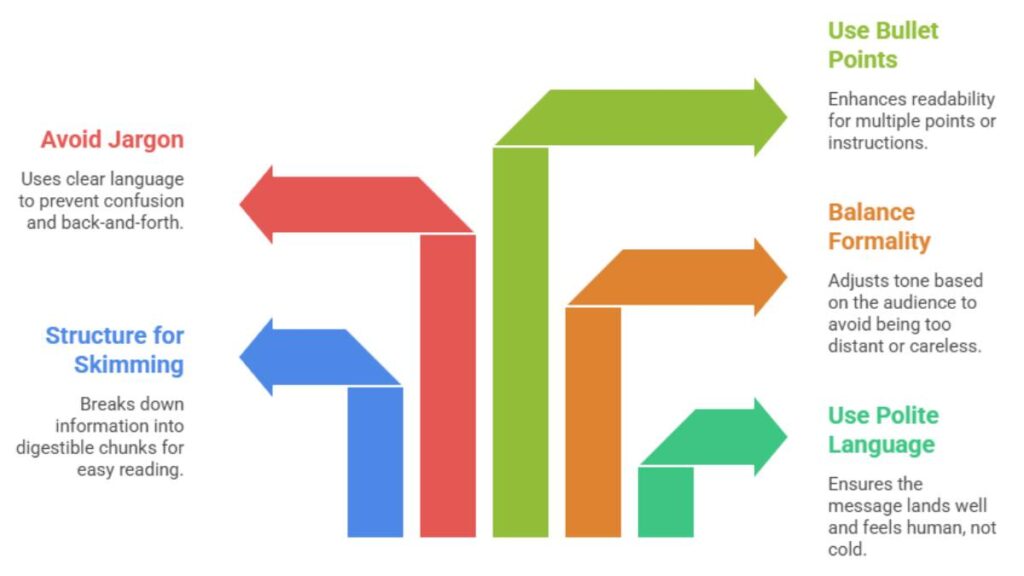
Politeness here isn’t about sounding overly formal or stiff. It’s more about tone; how the message lands when someone reads it quickly, maybe between meetings, maybe on their phone.
Direct language works. But it needs a bit of softness around the edges.
Compare:
- “Send the updated file today.”
- “Could you share the updated file today?”
Same intent. Completely different feel.
A few small habits tend to make a big difference:
- adding “please” and “thanks” where it feels natural (not forced)
- avoiding language that sounds like a rather than a request
- acknowledging effort, especially in longer threads
It’s not about padding every sentence. Just making sure the message doesn’t feel cold or transactional.
Structuring Paragraphs for Easy Skimming
Most emails aren’t read carefully. They’re skimmed first… then maybe read properly if needed.
That changes how the body should be written.
Long, dense paragraphs slow people down. They create that slight resistance where someone thinks, “I’ll come back to this later.” And later doesn’t always happen.
Shorter paragraphs help. So does spacing.
A simple structure often works best:
- a quick opening line for context
- The main message broken into 2–3 short paragraphs
- a clear closing or next step
White space matters more than people think. It gives the eyes somewhere to pause.
How to Balance Formality and Friendliness
This is where a lot of emails go slightly off without realizing it.
Too formal, and the email feels distant. Almost scripted.
Too casual, and it can feel careless or out of place, especially in professional settings.
The balance usually depends on who’s reading it.
- With clients or new contacts – lean slightly formal, but not stiff
- With internal teams, more relaxed, but still structured
- With senior stakeholders – clear, respectful, and to the point
A good middle ground often looks like:
- clear sentences
- a natural tone (not overly “corporate”)
- just enough warmth to make it feel human
It doesn’t need to be perfect. Just consistent.
Avoiding Jargon, Slang, or Ambiguous Phrases
Clarity drops fast when language gets vague or overly technical.
Jargon can be useful in the right context, when everyone understands it. But outside of that, it creates confusion more than anything else.
Slang is even trickier. It might feel friendly, but it doesn’t always translate well across teams, industries, or cultures.
Then there are ambiguous phrases. These cause the most back-and-forth:
- “Let’s do this soon.”
- “We’ll circle back.”
- “Handle it when possible.”
They sound fine… but they don’t say much.
Replacing them with something specific helps immediately:
- timelines
- clear actions
- defined expectations
It removes guesswork. And guesswork is usually what slows email conversations down.
When to Use Bullet Points and Lists for Readability
There’s a point where paragraphs stop working, and that’s usually when too many ideas are packed into them.
That’s where bullet points come in.
They’re not just for formatting. They make information easier to scan and process, especially when:
- Multiple points are being covered
- Instructions need to be followed
- options or updates are being shared
For example, instead of writing a long paragraph, it’s often clearer to break it down:
- key updates
- next steps
- deadlines
It gives structure to the message without overcomplicating it.
That said, overusing bullet points can make an email feel fragmented. So it’s more about balance; use them when they actually improve readability, not just to break text.
A well-written email body doesn’t try too hard. It just makes things easy for the reader. Clear, structured, and a bit thoughtful; that’s usually enough.
Greetings, Closings, and Signatures
Professional vs Casual Email Greetings
The greeting seems small. Easy to skip, even. But it quietly sets the tone before anything else is read.
A cold start, jumping straight into the message, can feel a bit abrupt. Not always wrong, just… slightly off. Adding a simple “Hi [Name]” or “Hello [Name]” smooths that edge.
The tricky part is choosing how formal to go. There isn’t one rule that fits every situation.
- Hi [Name] – works in most cases, safe default
- Hello [Name] – a touch more formal, useful for first-time or external emails
- Hey [Name] – fine for internal teams, less so for clients or senior folks
What tends to matter more than the word itself is consistency. If the tone keeps shifting, formal one email, casual the next; it creates a bit of disconnect.
And yes, spelling the name right. Still one of the fastest ways to get things off track if missed.
Closing Lines That Leave a Positive Impression
Closings are often treated like an afterthought. Quick “Thanks” and done. Which is fine… but it can do more.
A good closing nudges the conversation forward without being pushy. It gives a sense of direction.
Something like:
- “Let me know your thoughts when you get a chance.”
- “Happy to discuss if needed.”
- “Looking forward to your feedback.”
Nothing fancy. Just clear and polite.
Skipping a closing altogether can make the email feel a bit unfinished. On the other hand, overly formal lines, “Yours faithfully,” etc., rarely fit in day-to-day communication anymore.
Somewhere in the middle usually works best.
Optimizing Email Signatures for Contact Information & Branding
Signatures don’t get much attention… until they’re missing something important.
At the very least, the reader should know:
- who the sender is
- what they do
- How to reach them
That’s it.
A clean signature might look like:
- Name
- Role
- Company
- Phone or alternate contact
Anything beyond that, links, social profiles, extra details, should earn its place. Otherwise, it just adds noise.
There’s also a subtle branding effect here. A consistent, tidy signature across emails builds familiarity over time. Not something people consciously notice, but it registers.
Avoiding Overly Long or Unprofessional Signatures
It’s easy to go overboard with signatures. Happens more than expected.
Long disclaimers, multiple links, banners, quotes… they pile up. And suddenly, the signature is longer than the email itself.
A few things that tend to dilute the message:
- too many contact options
- promotional lines that feel out of place
- visual clutter (images, logos, multiple colors)
Keeping it simple works better. The email should carry the message; the signature just supports it.
Email Tone, Formality, and Audience Awareness
Understanding Your Audience Before Hitting “Send”
Before writing, it helps to pause, just briefly, and think about who’s going to read the email.
Not overthinking it. Just enough to adjust the tone.
An update to a teammate doesn’t need the same framing as a message to a client. And an email to senior leadership usually benefits from being tighter, more direct.
A few quick checks help:
- How well is the relationship established?
- Is this a first interaction or an ongoing thread?
- Does the reader prefer detail or brevity?
Skipping this step is where emails start to feel slightly off. Not wrong, just… misaligned.
How Tone Influences Perception and Response Rate
Tone has a quiet impact on how quickly people respond.
Emails that feel clear and respectful tend to get quicker replies. Ones that feel rushed or vague often get pushed aside, even if the content is important.
It’s rarely obvious in the moment. But over time, patterns show up.
Small adjustments can help:
- softening direct requests just a bit
- adding context where needed
- avoiding anything that sounds impatient or demanding
None of this adds much length. But it changes how the message is received.
And that, more than anything, affects whether someone responds now… or later.
Adjusting Formality for Internal vs External Communication
Not every email should sound the same. That’s where a lot of communication starts to feel unnatural.
External emails (clients, partners):
- slightly more structured
- clearer context upfront
- a bit more polished in tone
Internal emails (teams, colleagues):
- more relaxed
- shorter, often more direct
- less formal language
The balance matters.
Too formal internally, and it feels stiff.
Too casual externally, and it can feel careless.
Somewhere in between, adjusted to the situation, is usually where things land best.
Recognizing Cultural Differences in Email Etiquette
Email tone isn’t universal. What feels normal in one context can feel off in another.
Direct language, for example, is appreciated in some cultures. In others, it can come across as blunt.
Then there’s formality. Some teams expect it. Others move quickly and prefer brevity.
When working across regions or with new contacts, a safer approach tends to be:
- slightly more formal than usual
- clear, neutral language
- avoiding slang or informal shortcuts
It doesn’t require deep cultural knowledge. Just a bit of awareness, and a willingness to adjust if needed.

Enroll Now: Advanced Digital Marketing Course
Email Timing, Frequency, and Responsiveness
Best Practices for Sending Emails at Optimal Times
Timing doesn’t always get attention, but it affects visibility more than expected.
An email sent at the wrong time doesn’t get ignored; it gets buried.
Generally, emails are easier to catch when:
- They land during working hours
- They arrive earlier in the day rather than late evening
- They don’t compete with peak meeting hours
It’s not about perfect timing. That’s hard to predict anyway. But being roughly aligned with the recipient’s schedule helps the message stay visible.
Avoiding Overcommunication and Spammy Behavior
There’s a point where more emails start to hurt communication instead of helping it.
Multiple follow-ups in a short span, repeated reminders, looping in too many people… it creates noise. And once someone starts tuning that noise out, even important messages lose attention.
Some common patterns:
- sending a follow-up too soon (before the other person has had time to respond)
- Splitting one message into multiple emails unnecessarily
- Adding people to threads who don’t really need to be there
It’s usually better to pause, gather everything, and send one clear email. Saves time for everyone.
Responding Promptly: Recommended Response Windows
Response time carries its own kind of message.
Fast replies suggest reliability. Long gaps, especially without acknowledgment, can create uncertainty.
That said, not every email needs an immediate answer.
A practical rhythm tends to look like:
- urgent matters – same day, ideally sooner
- standard emails – within a day
- detailed responses – quick acknowledgment first, full reply later
Even a short “Got this, will review and revert” keeps things moving. Silence tends to stall conversations more than delays do.
How Delayed Responses Affect Professional Reputation
Occasional delays happen. That’s normal.
But repeated delays start forming a pattern. And patterns are what people remember.
Over time, slow responses can be read as:
- low priority
- lack of organization
- or just being hard to reach
None of those helps.
On the other hand, consistent responsiveness, even if it’s just quick acknowledgments, builds a sense of reliability. People know what to expect.
And that predictability, more than anything, makes working together easier.
Attachments, Links, and Multimedia: Proper Usage
Best Practices for Sending Attachments Safely
Attachments seem simple; attach, send, done. But this is where a lot of small mistakes creep in.
First thing, always mention the attachment in the email body. It sounds basic, but missing that line creates confusion. The reader ends up scanning the email twice, wondering if they missed something.
A few habits that keep things clean:
- clearly state what’s attached and why
- Use file names that actually mean something (not “final_v2_last”)
- double-check before hitting send… attachments get forgotten more often than expected
There’s also a trust factor. Unexpected attachments can feel risky, especially in professional settings. A quick line explaining the file helps remove that hesitation.
Linking Correctly Without Confusing the Reader
Links can either simplify an email or make it harder to follow.
Dropping raw URLs into the body tends to clutter things. It breaks the flow. Instead, it’s better to anchor links naturally within the sentence so they feel part of the message.
Also, context matters. A link without explanation forces the reader to guess:
- Is this important?
- Do they need to open it now?
A short lead-in helps:
- What the link contains
- Why it’s relevant
- What action (if any) is expected
It saves time. And avoids unnecessary back-and-forth.
File Size, Format, and Accessibility Considerations
This is one of those areas people only think about when something goes wrong.
Large files can bounce back or get blocked. Uncommon formats might not open on the other end. And not everyone views emails the same way; different devices, different limitations.
A few practical checks before sending:
- keep file sizes reasonable (compress if needed)
- use widely accepted formats (PDF, standard docs, images)
- Make sure the file actually opens and looks right
If something is heavy or complex, it’s often better to share it through a link instead of attaching it directly.
Accessibility matters too. Simple formatting, readable files, clear naming; it all adds up.
Avoiding Broken Links and Missing Files
Few things are more frustrating than clicking a link that doesn’t work… or opening an email that references a file that isn’t there.
It slows everything down. And it leaves a slightly careless impression.
Quick checks that help avoid this:
- test links before sending
- confirm permissions (especially for shared files)
- Re-read the email once to catch “attached here” moments without attachments
It takes a few seconds. But it saves follow-ups, delays, and a bit of unnecessary friction.
Common Email Etiquette Mistakes to Avoid
Overuse of CC and BCC
CC and BCC can be useful. But they’re often overused.
Adding people “just in case” creates noise. It fills inboxes with emails that don’t need attention, and over time, people start ignoring them altogether.
A simple way to think about it:
- To – people who need to act
- CC – people who need visibility
- BCC – use sparingly, usually for privacy reasons
If someone doesn’t need to read or respond, they probably don’t need to be included.
It’s less about being strict and more about being intentional.
Using ALL CAPS, Excessive Exclamation Marks, or Emojis
Formatting choices carry tone, even when unintended.
ALL CAPS tends to feel like shouting. Multiple exclamation marks can feel forced. Emojis… depend heavily on context.
In internal chats, they might be fine. In formal emails, they can feel out of place.
A steady approach works better:
- normal capitalization
- minimal punctuation
- tone carried through words, not symbols
It keeps the message clear without distracting from it.
Ignoring Proofreading and Spell Check
Rushed emails show. Not always in a big way, but in small things; typos, missing words, slightly awkward phrasing.
One or two mistakes aren’t a problem. But frequent ones start to affect how the message is taken.
A quick re-read before sending catches most issues:
- missing attachments
- unclear sentences
- accidental tone problems
It doesn’t need to be perfect. Just clean enough that the reader doesn’t stumble.
Reply-All Pitfalls and Forwarding Etiquette
“Reply all” is one of those features that causes more problems than expected.
Sometimes it’s necessary. Often, it isn’t.
Replying to everyone when only one person needs the answer adds unnecessary noise. It also pulls people into conversations they don’t need to follow.
A quick pause helps:
- Does everyone need this reply?
- Or just one or two people?
Forwarding emails comes with its own layer. Context matters. Dropping a forwarded thread without explanation leaves the reader guessing what to focus on.
A short note at the top, what this is, what needs attention, goes a long way.
Legal and Security Considerations in Emails
Understanding Confidentiality and Privacy Rules
Emails aren’t always as private as they seem.
Once sent, control is limited. Messages can be forwarded, copied, and stored. Which means anything sensitive needs to be handled carefully from the start.
In professional settings, there are often clear guidelines around:
- What can be shared
- who it can be shared with
- How it should be documented
Even when those rules aren’t formal, a cautious approach helps. If something feels sensitive, it probably is.
Avoiding Sharing Sensitive Data Without Permission
This is where small oversights can turn into bigger issues.
Sharing personal data, financial details, and internal documents without proper checks can create risk. Sometimes legal risk.
A few simple habits reduce that:
- Confirm the recipient before sending
- Avoid including sensitive details unless necessary
- Use secure methods when handling confidential information
It’s not about slowing things down. Just adding a layer of awareness.
Complying with Workplace Policies and Industry Regulations
Most organizations have some form of email policy, even if it’s not always top of mind.
These policies usually cover:
- acceptable use
- data handling
- communication standards
Ignoring them doesn’t always cause immediate problems, but it can over time.
In regulated industries, the stakes are higher. Certain information needs to be documented, stored, or protected in specific ways.
It’s worth knowing what applies. Even at a basic level.
Recognizing Phishing, Scams, and Unsafe Email Practices
Not every email is what it looks like.
Phishing attempts have become more subtle: familiar names, realistic formatting, convincing language. Easy to miss if not paying attention.
A few red flags to watch for:
- unexpected attachments or links
- urgent requests that feel out of place
- slight variations in email addresses
- messages asking for sensitive information directly
When something feels off, it usually is.
Taking a moment to verify, rather than reacting quickly, prevents bigger issues down the line.
Email Etiquette for Different Scenarios
Job Applications and Professional Outreach Emails
These emails carry more weight than most. First impressions, limited context, and usually no prior relationship, so every line matters a bit more.
Clarity and intent should show up early. Hiring managers or decision-makers don’t have time to decode long introductions.
A strong approach tends to look like:
- a clear reason for reaching out (not buried halfway through)
- a short, relevant introduction
- a direct ask or next step
What often gets overlooked is relevance. Generic outreach emails are easy to spot and easier to ignore. Even small personalization helps. Not overdone, just enough to show the email wasn’t copied and pasted.
And then… keep it tight. Long outreach emails rarely get read fully.
Customer Service and Client Communication
This is where tone really matters.
Clients don’t just read what’s written; they read into it. A delayed response, a vague answer, or a slightly off tone can create unnecessary tension.
A few things tend to work well:
- acknowledging the issue or request upfront
- being clear about what’s happening next
- avoiding defensive or overly technical language
Even when the answer isn’t ideal, the way it’s communicated makes a difference.
Instead of:
- “That’s not possible.”
A slight shift:
- “Here’s what can be done instead…”
It keeps the conversation moving forward rather than shutting it down.
Internal Team Emails and Collaboration Etiquette
Internal emails are usually faster, less formal… but that doesn’t mean structure disappears.
In fact, clarity becomes even more important because things move quickly.
Common patterns that help:
- getting to the point early
- separating updates from action items
- keeping threads focused (instead of mixing multiple topics)
Also, context matters. Not everyone reading the email has the same background or information. A quick line of context saves time for everyone involved.
And one thing that’s often missed: respecting attention. Just because it’s internal doesn’t mean people want to read long, scattered emails.
Follow-Ups and Reminder Emails Without Being Pushy
Follow-ups sit in a delicate spot. Too soon, and they feel impatient. Too late, and the opportunity might fade.
There’s no perfect timing, but a bit of space between emails usually helps. Enough time for the other person to realistically respond.
When writing a follow-up:
- Keep it short
- Reference the previous email briefly
- Restate the ask clearly
Something like:
- “Just checking in on the note below; would appreciate your thoughts when you get a moment.”
It works because it’s light. Not demanding, not passive.
And if multiple follow-ups are needed, it’s often better to adjust the message slightly each time. Repeating the same line can feel mechanical.
Tools and Resources to Improve Email Etiquette
Grammar and Tone Checkers (e.g., Grammarly, Hemingway)
Even experienced writers miss things. Happens more often than expected, especially when emails are written quickly.
Basic grammar checks help catch:
- typos
- awkward phrasing
- sentences that don’t read quite right
Tone checks are useful too, especially when the message feels slightly off but it’s hard to pinpoint why.
That said, these tools are support, not a replacement for judgment. Context still matters. A perfectly “correct” sentence isn’t always the right one for the situation.
Email Scheduling and Tracking Tools
Timing emails manually isn’t always practical. Work doesn’t follow a perfect schedule, and neither do inboxes.
Scheduling helps align messages with the recipient’s working hours. Especially useful when working across time zones or outside standard hours.
Tracking, on the other hand, gives visibility, but it should be used carefully. Over-reliance on tracking can lead to over-following up, which brings its own problems.
Used well, these tools support better timing and awareness. Used poorly, they create noise.
Templates for Professional and Polite Emails
Templates save time. But they can also feel… a bit lifeless if overused.
The key is treating templates as a starting point, not a finished product.
They work best for:
- recurring communication (follow-ups, confirmations, outreach)
- situations where structure matters more than personalization
But a quick adjustment, changing tone, adding a line specific to the context, makes a big difference.
Otherwise, emails start to feel repetitive. And people notice.
Continuous Learning Through Email Etiquette Guides
Email habits don’t usually change overnight. They improve gradually through awareness, small adjustments, and feedback.
Reading guidelines or best practices helps, but the real shift comes from observing what works:
- Which emails get quick responses
- Which ones create confusion
- Which ones move conversations forward smoothly
Over time, patterns become clear.
And once those patterns are noticed, improving email communication becomes less about rules… and more about instinct.
Conclusion:
Recap of Key Practices for Effective Email Communication
Good email communication isn’t built on one big rule. It’s a collection of small decisions; how a message starts, how it flows, how it ends.
The fundamentals stay consistent:
- clear subject lines that set expectations
- structured messages that are easy to scan
- tone that feels respectful and natural
- timing and responsiveness that keep things moving
None of it is complicated on its own. But together, it shapes how communication feels.
Benefits of Following Email Etiquette: Productivity, Reputation, Relationships
When email etiquette is handled well, things just… work better.
Fewer misunderstandings. Fewer unnecessary follow-ups. Conversations move faster.
There’s also a quieter benefit: reputation. People start to associate clear, thoughtful emails with reliability. It builds over time, without much effort.
And then there’s the relationship side. Emails that feel respectful and easy to engage with tend to keep interactions smoother. Less friction, more clarity.
It’s not about perfection. It’s about consistency.
Encouraging a Culture of Respectful and Clear Communication
Email etiquette isn’t just an individual habit; it spreads across teams.
When communication is clear and respectful, it sets a standard. Others tend to follow it, even without being told.
Simple things help reinforce that:
- writing emails that are easy to respond to
- avoiding unnecessary complexity
- respecting time, both in sending and replying
Over time, it creates a rhythm. One where communication doesn’t feel like effort; it just flows.
And that’s usually the goal.
FAQ:
What is the most important email etiquette rule?
If it had to be narrowed down, it’s this: make the email easy to understand on the first read. Not clever, not overly detailed. Just clear. When someone opens a message and instantly gets what’s needed, things move. When they don’t… it sits. Most issues trace back to that, more or less.
How formal should a business email be?
There’s no fixed setting for this. It shifts depending on context, and honestly, a bit of instinct. Early conversations? Keep it slightly formal, safe side. As replies go back and forth, the tone usually relaxes on its own. Forcing either extreme, too stiff or too casual, tends to feel off.
How can I improve my email response rate?
Emails get ignored when they feel like work to read. Or worse, work to figure out. Keeping things tight helps, but more than that, be specific. What’s being asked? What kind of reply is needed? When that’s obvious, responses come in quicker. People don’t delay clear asks nearly as much.
Are emojis acceptable in professional emails?
Depends who’s reading. Inside teams, especially where things are already informal, they show up here and there. Outside? A bit risky. Not because they’re wrong, just unpredictable. Tone doesn’t always travel well in text. So, unless there’s some familiarity already, better to keep it simple.
What are the basic rules of electronic mail etiquette?
Nothing complicated, really. Write with a purpose. Keep it structured enough to follow without effort. Don’t bury the point halfway down. And take a second before hitting send; small errors, missing context, those things slip in when emails are rushed. A quick pause usually catches them.
How do I write a professional email that gets noticed?
Most people skim first. That’s the reality. So the opening matters more than expected. If the first few lines don’t land, the rest might not even get read properly. Keeping it relevant, direct, and a bit thoughtful; that’s what makes someone actually stop and pay attention.
What should I avoid when sending business emails?
Overexplaining is a big one. So is being vague at the same time; strangely, both happen together. Then there’s tone… emails that sound abrupt without meaning to. And of course, the small misses; attachments forgotten, subject lines that don’t match the content. Individually minor, but they add up.
How do I address someone I’ve never met in an email?
Simple works best here. A clean greeting with their name, nothing too fancy. Overdoing it can feel forced. Skipping it feels abrupt. There’s a middle ground that works in most cases. Once the conversation starts, the tone usually adjusts naturally based on how the other person writes back.
How long should a professional email be?
As long as it needs to be… but no longer. That sounds vague, but it’s practical. If an email starts to feel heavy while reading, it probably needs trimming. Or breaking into smaller parts. People rarely read dense messages carefully. They scan, pick out what matters, and move on.
Is it okay to use humor in professional emails?
It can work, but it’s not always worth the risk. Without voice or expression, humor can land differently than intended. In familiar settings, it’s usually fine. Outside of that, it’s a bit unpredictable. When there’s any doubt, keeping things straightforward tends to avoid unnecessary confusion.
How do I follow up on an email politely?
A follow-up shouldn’t feel like pressure. More like a gentle nudge. Short message, quick reference to the earlier email, and that’s enough. Timing matters, though. Too soon feels pushy, too late, and the thread goes cold. There’s no exact rule; it’s more about reading the situation.
What is the difference between CC and BCC in emails?
CC keeps people in the loop. BCC keeps them hidden. Simple on the surface. The issue is how they’re used. Adding too many people to CC creates noise, and then no one feels responsible. BCC, used carelessly, can create trust issues if discovered. So both need a bit of restraint.
Should I use formal greetings in every email?
Not really necessary. They help at the start of a conversation, especially with new contacts. But once there’s an ongoing thread, they can feel a bit forced. Many emails just pick up where the last one left off. And that’s fine. It’s more about flow than strict rules.
What is the proper way to close an email?
A closing doesn’t need to be perfect. Just natural. Something that wraps things up without overdoing it. If there’s a next step, mention it. If not, a simple line works. Overly formal sign-offs sometimes feel disconnected from the rest of the message, especially if the tone is otherwise relaxed.
How often should I check and respond to emails?
Depends on the nature of the work, but staying reasonably responsive matters. Not everything needs an immediate reply. But letting emails sit too long slows things down quietly. Even a short acknowledgment can help. It keeps things moving and avoids that “did this get missed?” moment.
Can using all caps in an email be considered rude?
Most of the time, yes. It reads louder than intended. Even when the message itself is neutral, the formatting changes how it feels. That’s the tricky part with email; tone isn’t heard, it’s inferred. Sticking to normal text keeps things steady and avoids unnecessary misinterpretation.
What are the best practices for sending attachments?
Mention the file in the email, clearly. It sounds obvious, but it gets missed. File names should make sense at a glance; no guessing. And always double-check before sending. Attachments have a way of being forgotten at the last second. A quick check saves a follow-up later.
How do I maintain professionalism in internal team emails?
Even when things are informal, clarity still matters. Internal emails move quickly, and confusion slows everything down. Keeping messages short, structured, and easy to act on helps more than anything. Tone can stay relaxed, but the intent should always be clear. That balance tends to work best.