

OpenAI announced in February 2026 that ChatGPT had crossed 900 million weekly active users, and buried inside that number is a quieter trend. A growing share of people now reach for something else for specific parts of their work. Not because ChatGPT got worse. Because the field caught up, and on a few very specific tasks, several rivals pulled ahead.
That’s the real reason ChatGPT alternatives matter right now. If you’re a marketer who needs cited, real-time research, a developer working inside a million-token codebase, or a small team that wants AI built into tools you already pay for, the calculation has changed. ChatGPT alternatives aren’t a fallback option anymore. For a lot of these use cases, they’re the better default.
This guide walks through the best AI assistants competing with ChatGPT in 2026: who each one actually serves, what it costs, where it beats ChatGPT outright, and how to pick one without burning a weekend testing twelve different apps.
Table of Contents
What Makes People Look for ChatGPT Alternatives?
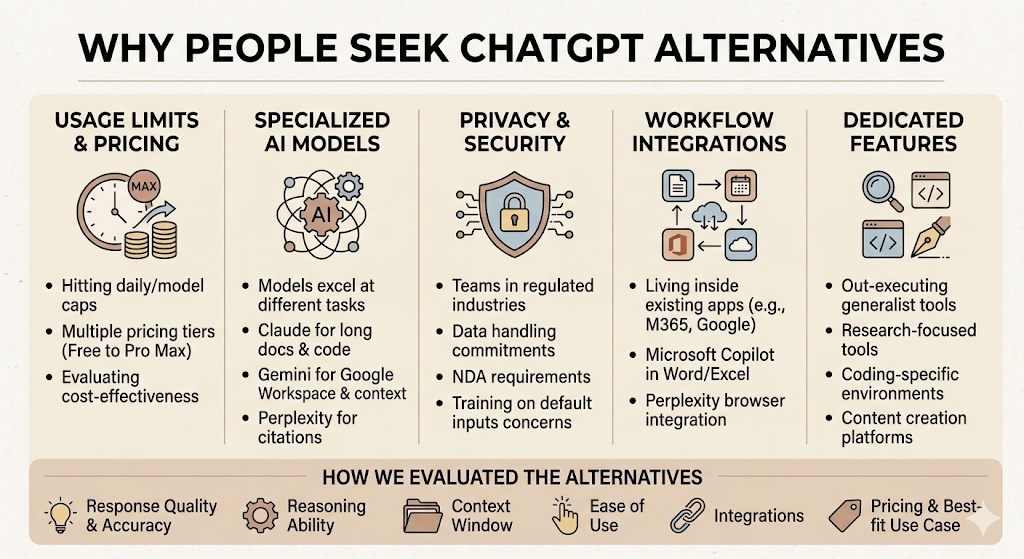
Most people don’t switch AI tools on a whim. Something specific breaks first, and that’s usually one of five things.
Usage Limits and Pricing
Free ChatGPT users get a hard daily cap, and even Plus subscribers run into Deep Research limits or model-switching restrictions during heavy weeks. OpenAI’s own 2026 pricing pages list six separate consumer tiers now, from a $0 free plan to a $200 Pro Max plan, which tells you something: a single price point stopped covering everyone’s needs a while ago. If you’re hitting limits twice a week, the math on switching, or running two tools side by side, starts to make sense fast.
Different AI Models Excel at Different Tasks
No single model wins everything. Claude tends to outperform on long-document analysis and code review. Gemini holds the largest practical context windows and the deepest Google Workspace ties. Perplexity wins on anything where you need a citation you can actually click. Treating ChatGPT as a universal tool, when the underlying models were never built to be universal, is where most disappointment starts.
Privacy and Data Security Concerns
Some teams can’t use a tool that trains on their inputs by default, full stop. This matters more in regulated industries (finance, healthcare, legal) and for any agency handling client data under an NDA. A handful of alternatives, Claude’s Team and Enterprise plans among them, lead with clearer data-handling commitments specifically because this objection comes up constantly in procurement conversations.
Better Integrations with Existing Workflows
If your team already lives inside Microsoft 365, asking everyone to also open a separate ChatGPT tab is a hard sell. Microsoft Copilot’s entire pitch is that the AI shows up inside Word, Excel, and Outlook, where the work already happens. The same logic applies to Gemini inside Google Workspace, or Perplexity’s Comet browser sitting on top of whatever you already search.
Specialised Features for Research, Coding, and Content Creation
ChatGPT is genuinely good at a lot of things, which is part of the problem. A dedicated research tool like Perplexity, a dedicated coding environment like Claude Code, or a dedicated marketing copy tool like Jasper will usually out-execute a generalist on its specific job. Specialisation is the whole reason this category got crowded in the first place.
How We Evaluated the Best ChatGPT Alternatives
We didn’t rank these on vibes. Every tool below was assessed against the same eight criteria, the way you’d want a vendor shortlist evaluated for any real budget decision.
Response quality and accuracy come first, since a confidently wrong answer is worse than no answer. Reasoning ability matters most for anything multi-step, like a campaign brief that needs five linked decisions. Context window decides whether a tool can actually hold an entire contract or codebase in working memory at once, not just a few pages. Ease of use and the strength of third-party integrations determine whether a team will actually adopt the thing past week one. And pricing and best-fit use case tie it all together: a brilliant tool that costs more than your team’s monthly software budget isn’t a realistic pick for most readers here.
The best ChatGPT alternative depends on the specific job, not a single overall winner. Claude leads on long-document reasoning and coding, Perplexity leads on cited research, Gemini leads on context window size and Google integration, and Microsoft Copilot leads on native Office workflows.
Quick Comparison of the Best ChatGPT Alternatives
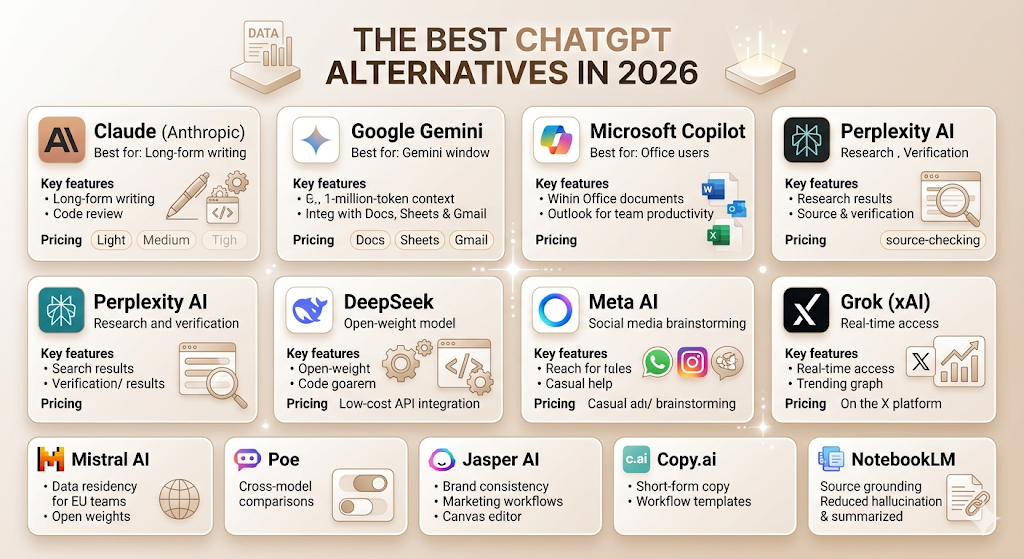
| Tool | Best For | Free Plan | Key Strength | Starting Price |
| Claude | Writing, coding, analysis | Yes | Long-document reasoning | $20/month (Pro) |
| Google Gemini | Google Workspace users | Yes | 1M-token context window | $19.99/month (AI Pro) |
| Microsoft Copilot | Microsoft 365 users | Yes (basic chat) | Native Office integration | $20/month (personal) |
| Perplexity AI | Research with citations | Yes | Real-time cited search | $20/month (Pro) |
| DeepSeek | Budget-conscious coding | Yes | Cheapest frontier-grade API | Free / pay-per-token |
| Meta AI | Casual, social use | Yes | Built into Instagram, WhatsApp | Free |
| Grok | Real-time X/social context | Yes (limited) | Live Search and X integration | $8/month (X Premium) |
| Mistral AI | Open-source, EU-hosted | Yes | Transparent, self-hostable models | Free / Pro tier |
| Poe | Trying multiple models in one app | Yes | Access to many models, one subscription | Free / paid bundles |
| Jasper AI | Brand-consistent marketing copy | No (7-day trial) | Brand voice and Canvas editor | $39/month (Creator) |
| Copy.ai | Short-form marketing copy | Yes | Workflow templates | $49/month (Starter) |
| NotebookLM | Source-grounded research notes | Yes | Answers only from your own uploaded sources | Free |
The Best ChatGPT Alternatives in 2026
This is the part most people skip to, so let’s get into it. Each profile below covers what the tool actually does well, who it’s wrong for, and what it costs as of mid-2026.
Claude
Overview: Claude is Anthropic’s AI assistant, and it has built a reputation as the model professionals trust with their actual work, not just quick questions. It’s the one writers and developers tend to reach for when the output needs to be genuinely good on the first draft, not just fast.
Best for: Long-form writing, code review, document analysis, and anyone who needs an AI assistant that holds context across a long, complicated task without losing the thread.
Key features: Claude Code brings AI assistance directly into the terminal for developers. Projects let you keep a persistent context for a specific client or campaign. Anthropic’s Pro plan includes file creation, code execution, and remote connectors to tools like Google Workspace.
Pros:
- Strong, consistent writing quality with less of the generic “AI voice” that plagues some competitors
- Excellent at following detailed, multi-step instructions without drifting off-brief
- A genuine free tier that, as of a February 2026 expansion, now includes Projects and Artefacts
Cons:
- No native image generation is built into chat
- Usage limits on the free and Pro tiers can feel tight for all-day, heavy use
Pricing: Free tier available. Claude Pro runs $20 a month and covers most individual professionals. Claude Max starts at $100 a month for 5x the usage, with a $200 a month tier for 20x. Team plans start around $25 to $30 per seat.
Google Gemini
Overview: Gemini is Google’s answer to ChatGPT, and its biggest structural advantage is sitting inside the rest of Google’s ecosystem. If your work already happens in Docs, Sheets, and Gmail, Gemini doesn’t ask you to leave that workflow.
Best for: Anyone working inside Google Workspace, plus users who need to process unusually long documents in a single pass.
Key features: Gemini’s AI Pro plan runs on Gemini 3.1 Pro with a full 1-million-token context window, large enough to load an entire report or contract and work with the whole thing at once. It also bundles Google One storage and direct integration across Docs, Sheets, Slides, and Gmail.
Pros:
- The largest mainstream context window of any consumer-facing assistant
- Deep, native integration across Google’s entire productivity suite
- A genuinely capable free tier through Google AI Studio for developers
Cons:
- Output quality can feel less consistent than Claude’s on long-form creative writing
- The premium Ultra tier, while recently discounted, is still priced well above most individual budgets
Pricing: Free tier available. Google AI Pro costs $19.99 a month. Google AI Ultra was repriced down to roughly $99.99 a month at the entry point, with a $200 a month tier at the top.
Microsoft Copilot
Overview: Copilot isn’t really one product; it’s a family of products that all share the same underlying models. The version most professionals care about is the one that lives inside Word, Excel, PowerPoint, and Outlook.
Best for: Teams and individuals already paying for Microsoft 365 who want AI assistance without adding another standalone subscription to manage.
Key features: Copilot drafts and edits directly inside Office documents, summarises long email threads in Outlook, and builds slide decks in PowerPoint from a rough outline. Microsoft 365 Copilot, the business tier, can also ground its answers in a company’s internal SharePoint and Teams data.
Pros:
- No new tool to learn since it lives inside software your team already uses daily
- Strong for repetitive office tasks like meeting summaries and first-draft slide decks
- Enterprise-grade data handling baked into the Microsoft 365 compliance stack
Cons:
- Personal and business Copilot are priced and licensed completely differently, which trips up a lot of buyers
- Weaker than Claude or ChatGPT for open-ended creative writing
Pricing: A free, basic chat version exists. The consumer version is now largely folded into Microsoft 365 Premium at roughly $19.99 a month. The business version, Microsoft 365 Copilot, costs $30 per user per month as an add-on to an existing Microsoft 365 licence.
Perplexity AI
Overview: Perplexity built its entire identity around one idea: every answer should come with a source you can click and verify. For research-heavy work, that single design choice changes everything.
Best for: Researchers, journalists, students, and any marketer who needs to back a claim with a real, current source instead of an AI’s best guess.
Key features: Every Perplexity answer includes inline citations to the actual web pages it pulled from. Pro users can switch between underlying models, including GPT and Claude, from within the same interface. The Comet browser brings the same search-and-cite behaviour directly into everyday browsing.
Pros:
- The clearest sourcing of any mainstream AI assistant, which matters enormously for credibility
- Genuinely fast at surfacing current, real-time information
- A capable free tier with a generous daily search allowance
Cons:
- Less suited to long, creative writing tasks than Claude or ChatGPT
- The jump from Pro to Enterprise pricing is steep if a team needs collaboration features
Pricing: Free tier with limited daily Pro searches. Pro costs $20 a month. Max runs $200 a month. Enterprise plans start at $40 per user per month.
DeepSeek
Overview: DeepSeek is the open-weight model out of China that rattled the industry’s pricing assumptions when it first launched, and it has kept undercutting Western labs on cost ever since.
Best for: Developers and technical teams who want frontier-level reasoning without frontier-level API bills, and anyone comfortable with an open-weight model.
Key features: DeepSeek’s models are available through a free web chat and app, plus an API priced well below most Western competitors for comparable reasoning quality. Because the weights are open, technical teams can also self-host for full data control.
Pros:
- Dramatically cheaper API pricing than ChatGPT, Claude, or Gemini for similar coding and reasoning tasks
- Open weights give technical users a self-hosting option that closed models don’t offer
Cons:
- The official web chat interface is noticeably more basic than ChatGPT’s or Claude’s
- Data handling and hosting location are reasonable concerns for regulated industries
Pricing: Free to use via web and app. API pricing is usage-based and consistently among the cheapest of any frontier-grade model.
Meta AI
Overview: Meta AI’s advantage isn’t capability, it’s reach. It’s already sitting inside WhatsApp, Instagram, and Facebook for billions of people who never went looking for an AI assistant at all.
Best for: Casual, everyday questions and quick content ideas, especially for anyone managing social accounts who wants AI help without opening a separate app.
Key features: Meta AI is built directly into the chat and search bars of WhatsApp, Instagram, and Messenger, plus a standalone app and website. It can generate images and answer questions without leaving the social app you’re already in.
Pros:
- Zero friction since it’s already installed inside apps most people use daily
- Genuinely useful for quick social captions and casual brainstorming
Cons:
- Falls noticeably behind Claude, Gemini, and ChatGPT on complex reasoning and longer tasks
- Less suited to any work that needs precision or careful sourcing
Pricing: Free.
Grok
Overview: Grok is xAI’s assistant, built into X, and its defining feature is real-time access to what’s happening on that platform right now. It’s the AI tool that knows about a trending story before most newsrooms do.
Best for: Social media managers and anyone who needs an AI assistant with a genuine pulse on real-time public conversation.
Key features: Grok’s Live Search pulls directly from X’s real-time feed. SuperGrok adds multi-agent reasoning, where parallel agents tackle parts of a complex question and merge the results into one answer.
Pros:
- Unmatched real-time awareness of trending topics and public sentiment
- One of the largest context windows on the API side, useful for processing long documents cheaply
Cons:
- Best features sit behind a paid X subscription, not a standalone free product
- Less proven than Claude or ChatGPT for careful, long-form professional writing
Pricing: A limited free tier exists. X Premium costs $8 a month, SuperGrok runs $30 a month, and SuperGrok Heavy tops the consumer lineup at $300 a month.
Mistral AI
Overview: Mistral is the European answer to the AI race, built by a Paris-based lab that has staked its reputation on open-weight models and a more transparent approach to how it builds them.
Best for: Teams in the EU with data residency requirements, and developers who want a capable model they can inspect, fine-tune, or self-host.
Key features: Le Chat is Mistral’s consumer-facing assistant. Several of its underlying models are released as open weights, which is rare among frontier labs and a deliberate positioning choice against the closed-model approach of OpenAI and Anthropic.
Pros:
- Strong option for EU-based teams concerned about where their data physically sits
- Open-weight models give technical teams genuine flexibility
Cons:
- Smaller ecosystem of third-party integrations than ChatGPT or Gemini
- Less name recognition outside Europe, which can slow internal buy-in for non-technical teams
Pricing: Free tier available through Le Chat, with a paid Pro tier for higher usage limits.
Poe
Overview: Poe, built by Quora, solves a specific annoyance: not wanting to pay for five separate AI subscriptions just to compare how each model handles the same prompt.
Best for: Anyone who regularly wants to compare answers from Claude, GPT, Gemini, and others without juggling five logins and five bills.
Key features: Poe gives you one interface with access to a wide range of underlying models, plus the ability to create and share custom bots built on top of those models.
Pros:
- One subscription instead of several, if you genuinely use multiple models
- Useful for quickly A/B testing how different models respond to the same brief
Cons:
- You’re still bound by each underlying model’s own usage limits within Poe’s bundle
- Doesn’t have a flagship model of its own; it’s an aggregator by design
Pricing: Free tier available, with paid bundles for higher usage across the included models.
Jasper AI
Overview: Jasper is built specifically for marketing teams that need AI output to sound consistently like the brand, not like an AI. That single focus is the entire reason it costs more than a general-purpose chatbot.
Best for: Marketing teams managing one or two brand voices across blogs, ads, and email who need consistency more than raw creativity.
Key features: Brand Voice lets Jasper learn and replicate a specific tone across every piece of content. The Canvas editor handles long-form drafts, and Knowledge assets store product and brand context that the AI can reference automatically.
Pros:
- Brand consistency that a general-purpose tool like ChatGPT can’t match out of the box
- Built specifically for marketing workflows, including ad copy, email, and SEO content
Cons:
- No permanent free tier, only a short trial
- Meaningfully more expensive than ChatGPT Plus or Claude Pro for solo users
Pricing: Creator plan starts at $39 a month, billed annually. Pro runs $59 a month annually. Business pricing is custom.
Copy.ai
Overview: Copy.ai leans into short-form marketing copy and workflow automation rather than long-form writing, positioning itself as the tool for fast, repeatable campaign assets.
Best for: Small marketing teams that need quick ad variations, email subject lines, and social captions at volume.
Key features: Pre-built workflow templates chain multiple AI steps together, for example, generating a campaign brief and then five ad variations from it in one pass.
Pros:
- Fast for high-volume, short-form copy tasks
- Workflow templates reduce the prompt-writing burden for non-technical marketers
Cons:
- Not built for long-form content like blog posts or detailed reports
- Pricing climbs quickly once a team needs more than basic seats
Pricing: A free tier is available. Paid plans start around $49 a month.
NotebookLM
Overview: NotebookLM, from Google, takes a different approach entirely: instead of answering from general knowledge, it only answers based on the specific sources you upload. That constraint is the whole point.
Best for: Researchers, students, and content writers who need an AI assistant that won’t quietly hallucinate facts outside the documents it was actually given.
Key features: Upload PDFs, documents, or links, and NotebookLM grounds every answer in those specific sources, with citations pointing back to the exact passage. It also generates audio overviews that summarise the uploaded material in a conversational format.
Pros:
- Genuinely reduces hallucination risk by refusing to answer outside the provided sources
- Free, with no meaningful catch for individual use
Cons:
- Not designed for open-ended creative writing or general-purpose chat
- Requires you to do the work of gathering good source material first
Pricing: Free.
ChatGPT vs Popular Alternatives
| Feature | ChatGPT | Claude | Gemini | Perplexity | Copilot |
| Writing | Strong, broad style range | Strongest for long-form and tone consistency | Solid, slightly less creative | Not built for creative writing | Decent for business documents |
| Coding | Strong, broad language support | Excellent, especially for review and refactoring | Strong, improving fast | Not a core focus | Good for Office-adjacent scripting |
| Research | Good with Deep Research mode | Good but not citation-first | Strong with Workspace data | Best in class, citations on every answer | Limited beyond enterprise data grounding |
| Web search | Yes, on paid tiers | Yes, via connectors | Yes, integrated with Google Search | Yes, core feature | Yes, via Bing integration |
| Context window | Up to 1M tokens on Pro tiers | Large, varies by plan | Up to 1M tokens, largest mainstream option | Moderate, optimised for search not bulk documents | Tied to document length in Office apps |
| Image generation | Yes, strong and frequently updated | No native image generation | Yes, strong | Limited | Limited, via Designer integration |
| Integrations | Broadest third-party ecosystem | Growing, includes Google Workspace connectors | Deepest within Google’s own products | Comet browser, growing API ecosystem | Deepest within Microsoft 365 |
| Collaboration | Custom GPTs, shared projects | Projects, Team plans | Workspace-native sharing | Shared Spaces on Enterprise plans | Native to Teams and SharePoint |
| Pricing | $0 to $200/month across six tiers | $0 to $200/month | $0 to roughly $200/month | $0 to $325/user/month (Enterprise) | $0 to $30/user/month |
At the standard paid tier, ChatGPT, Claude, Gemini, and Perplexity are all price-matched at around $20 a month. The real differentiator isn’t cost, it’s specialisation. ChatGPT leads on breadth and image generation, Claude on long-document reasoning, Gemini on context window and Google integration, and Perplexity on cited, real-time research.
Which ChatGPT Alternative Is Best for Different Use Cases?
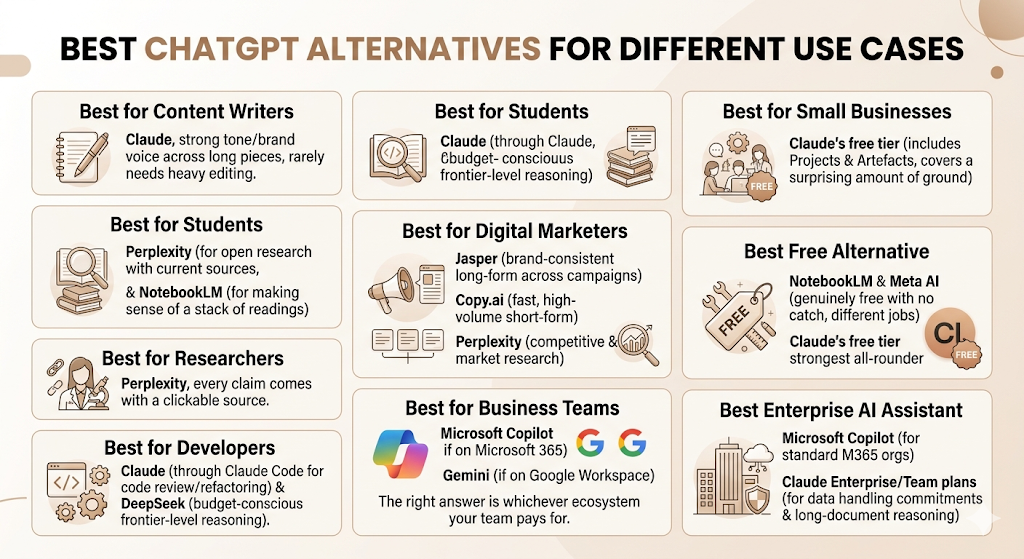
Best for Content Writers
Claude is the strongest pick here. It holds tone and brand voice across a long piece better than most competitors, and it rarely needs the heavy editing pass that some AI drafts require before they sound human.
Best for Students
Perplexity and NotebookLM both make sense, depending on the task. Perplexity is better for open research questions that need current sources. NotebookLM is better once you already have a stack of readings and just need help making sense of them.
Best for Researchers
Perplexity, again, for the same reason: every claim comes with a clickable source. That single feature matters more to a researcher than almost any other capability on this list.
Best for Developers
Claude, specifically through Claude Code, has built a strong reputation for code review and refactoring work. DeepSeek is the budget-conscious alternative for teams that need frontier-level reasoning without the matching API bill.
Best for Digital Marketers
This depends on the task. Jasper wins for brand-consistent long-form content across multiple campaigns. Copy.ai wins for fast, high-volume short-form copy. Perplexity wins for the competitive and market research that should inform both.
Best for Business Teams
Microsoft Copilot, if your team already runs on Microsoft 365. Gemini, if you live in Google Workspace instead. The right answer is almost always whichever ecosystem your team is already paying for.
Best for Small Businesses
Claude’s free tier, now expanded to include Projects and Artefacts, covers a surprising amount of ground for a small team not ready to commit to a paid plan yet.
Best Free Alternative
NotebookLM and Meta AI are both genuinely free with no real catch, though they serve very different jobs. Claude’s free tier is the strongest all-rounder of the group.
Best Enterprise AI Assistant
Microsoft Copilot for organisations already standardised on Microsoft 365. Claude Enterprise or Team plans for organisations that prioritise data handling commitments and long-document reasoning over ecosystem lock-in.
Features to Look for in a ChatGPT Alternative
Natural Language Understanding
This is the baseline. If a tool regularly misreads straightforward instructions, none of its other features matters.
Long Context Windows
A long context window is the size of a model’s working memory. It determines how much text, a contract, a codebase, or a research paper the AI can hold and reason about in a single conversation without losing earlier details.
Internet Access
Without live web access, an AI assistant is limited to whatever it learned during training, which means it can be confidently out of date on anything recent.
File Upload Support
The ability to drop in a PDF, spreadsheet, or image and get a direct answer about its contents saves enormous time over manually copying text into a chat window.
Image Generation
Useful for marketing teams that need quick visual concepts, though it’s worth checking licensing terms before using outputs commercially.
Team Collaboration
Shared projects, shared chat history, and centralised billing matter more than ever when more than one person on a team needs access.
API Availability
Developers building AI features into their own products need an API, not just a chat interface. Pricing here is usually per-token and separate from the consumer subscription.
Privacy Controls
Look specifically at whether your inputs are used to train future models by default, and whether that setting can be turned off.
Third-Party Integrations
A tool that plugs into Slack, your CRM, or your existing project management software gets used. One that requires a separate browser tab usually doesn’t, for long.
How to Choose the Right AI Assistant
Identify Your Primary Use Case
Start with the one task you do most often. Don’t shop for a tool that does everything well; shop for one that does your most frequent task very well.
Compare Features
Once you know the use case, narrow to three tools and compare them on that specific job, not on a generic feature checklist.
Consider Your Budget
Most serious tools cost around $20 a month at the entry paid tier. The real budget question is whether you need one tool or two, since most teams underestimate how often they’ll want a second specialist tool alongside their main one.
Test Free Versions
Every tool on this list has a usable free tier or trial. Spend a real week with it on actual work before paying for anything.
Think About Scalability
A tool that’s perfect for one person can fall apart at ten people if it lacks proper seat management, admin controls, or centralised billing. Check the Team or Enterprise tier before you commit, even if you don’t need it yet.
Are Free ChatGPT Alternatives Good Enough?
Advantages
Free tiers from Claude, Gemini, Meta AI, and NotebookLM cover a genuinely useful amount of work now. For casual use, or for testing whether a tool fits your workflow before paying, free is often plenty.
Limitations
Free tiers come with message caps, slower response times during peak hours, and restricted access to the most capable underlying models. Heavy daily use will hit a wall fast.
When Paid Plans Are Worth It
The moment you’re hitting a usage limit more than once a week, or the moment the work has real financial stakes, like a campaign brief going to a client, paying for reliability stops being optional.
ChatGPT Alternatives for Businesses
Marketing Teams
Jasper or Copy.ai for production work, paired with Perplexity for the research and competitive analysis that should shape the brief before any copy gets written.
Customer Support
Tools with strong API access and integration depth, since support AI needs to plug into a ticketing system, not live in a standalone chat window.
Sales Teams
Anything that integrates cleanly with a CRM matters more here than raw model quality. Microsoft Copilot and Gemini both have an edge if the CRM already lives inside their respective ecosystems.
HR Teams
Privacy controls move to the top of the priority list the moment employee data is involved. Confirm data handling commitments before rolling anything out company-wide.
Product Teams
Claude’s long-context reasoning is well-suited to synthesising user research, support tickets, and feature requests into something a roadmap can actually use.
Software Development
Claude Code and DeepSeek both deserve a serious look, the first for review quality, the second for cost efficiency at scale.
Common Mistakes When Choosing an AI Assistant
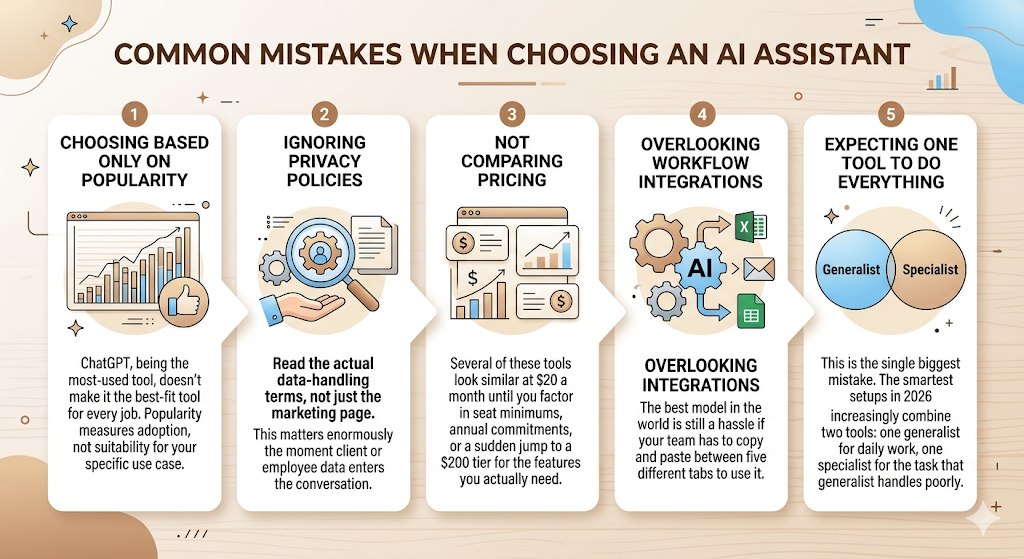
Choosing Based Only on Popularity
ChatGPT, being the most-used tool, doesn’t make it the best-fit tool for every job. Popularity measures adoption, not suitability for your specific use case.
Ignoring Privacy Policies
Read the actual data-handling terms, not just the marketing page. This matters enormously the moment client or employee data enters the conversation.
Not Comparing Pricing
Several of these tools look similar at $20 a month until you factor in seat minimums, annual commitments, or a sudden jump to a $200 tier for the features you actually need.
Overlooking Workflow Integrations
The best model in the world is still a hassle if your team has to copy and paste between five different tabs to use it.
Expecting One Tool to Do Everything
This is the single biggest mistake on this list. The smartest setups in 2026 increasingly combine two tools: one generalist for daily work, one specialist for the task that the generalist handles poorly.
Emerging AI Assistant Trends in 2026
AI Agents
The shift from “answer my question” to “complete this multi-step task on my behalf” is the defining trend of the year. Both ChatGPT’s Agent mode and Claude’s agentic tooling reflect this.
Multi-Model Platforms
Tools like Poe and Perplexity, which let you switch between underlying models inside one subscription, point to a future where the model matters less than the interface wrapped around it.
Personalised AI Workspaces
Persistent memory, custom instructions, and project-specific context are becoming standard rather than premium add-ons.
Voice-First AI Assistants
Advanced voice modes, now standard across ChatGPT, Gemini, and Grok, are pushing AI assistants toward genuinely hands-free use during commutes, meetings, and live demos.
Real-Time Collaboration
Shared workspaces where a whole team can see and build on the same AI conversation are moving from a Team-tier perk to an expected baseline feature.
Privacy-Focused AI Models
Mistral’s open-weight approach and Claude’s data-handling commitments both reflect growing enterprise demand for AI that doesn’t quietly become a compliance liability.
Final Verdict: Which ChatGPT Alternative Should You Choose?
| If you are… | Choose… |
| A writer | Claude |
| A researcher | Perplexity |
| A Google Workspace user | Gemini |
| A Microsoft user | Microsoft Copilot |
| A developer | Claude or DeepSeek |
| A small business | ChatGPT or Gemini |
| An enterprise | Claude Team or Microsoft Copilot |
There’s no single best ChatGPT alternative, and honestly, anyone who tells you otherwise is selling something. The right choice depends on what you actually do most days, what your team already pays for, and how much you care about specialisation over breadth.
The smartest move for most readers isn’t picking one tool forever. It’s matching the task to the tool, testing the free tier first, and being willing to run two subscriptions if the second one genuinely earns its cost. Start with whichever use case from this guide matches your actual daily work, not the tool with the loudest marketing.
FAQ
What are the best ChatGPT alternatives in 2026?
Claude, Google Gemini, Microsoft Copilot, and Perplexity AI are the four most capable general-purpose alternatives, with DeepSeek, Grok, and Mistral AI as strong options for specific technical or budget needs.
Is Claude better than ChatGPT?
It depends on the task. Claude tends to win on long-form writing consistency and code review, while ChatGPT has broader integrations and stronger native image generation. Neither is universally better.
Which ChatGPT alternative is free?
Claude, Gemini, Meta AI, Mistral’s Le Chat, Poe, and NotebookLM all offer genuinely usable free tiers with no credit card required.
How do I choose the right AI assistant for my needs?
Identify your single most frequent use case first, narrow to two or three tools that specialise in it, and test their free tiers on real work for at least a week before paying for anything.
Which AI assistant is best for writing?
Claude is the strongest general pick for long-form writing that needs to hold a consistent tone and voice across an entire piece.
Which ChatGPT alternative is best for coding?
Claude, through Claude Code, has the strongest reputation for code review and refactoring. DeepSeek is the best budget option for teams that need frontier-level reasoning at a fraction of the cost.
What is the best AI tool for research?
Perplexity AI, because every answer comes with a clickable, verifiable source, which matters more for research credibility than almost any other feature.
Which AI chatbot provides source citations?
Perplexity AI builds citations into every single answer by default. NotebookLM also cites sources, but only from documents you’ve uploaded yourself.
Are ChatGPT alternatives safe to use?
Most major providers, including Anthropic, Google, and Microsoft, publish clear data-handling policies and offer settings to opt out of having your conversations used for model training. Always check the specific provider’s current policy before sharing sensitive data.
Which AI integrates best with Google Workspace?
Google Gemini, since it’s built natively into Docs, Sheets, Slides, and Gmail rather than bolted on as a separate app.
Which ChatGPT alternative works best with Microsoft 365?
Microsoft Copilot, for the same reason: it lives directly inside Word, Excel, PowerPoint, and Outlook instead of requiring a separate workflow.
Can businesses use ChatGPT alternatives for team collaboration?
Yes. Claude, Perplexity, and Microsoft Copilot all offer Team or Enterprise tiers with shared workspaces, centralised billing, and admin controls built for multi-person use