

Most teams pick a survey tool the way they pick a coffee shop they’re walking past. Whatever’s familiar, whatever shows up first on Google, whatever a colleague mentioned once in Slack. That’s how you end up six months into a customer feedback program, realising your tool can’t handle skip logic, charges per response, or locks sentiment analysis behind a $999/month tier you didn’t see coming.
Choosing one of the best survey tools matters more than it used to. Response rates are dropping across the board, AI features have moved from gimmick to genuinely useful, and data privacy rules have tightened in ways that make the wrong platform a compliance headache, not just an inconvenience. We compared 15 platforms across pricing, AI capabilities, logic and branching, and real-world use cases so you don’t have to test all of them yourself.
By the end of this guide, you’ll know which survey tool fits your team’s size, budget, and the kind of data you’re actually trying to collect.
Table of Contents
What Is a Survey Tool and Why It Matters More in 2026
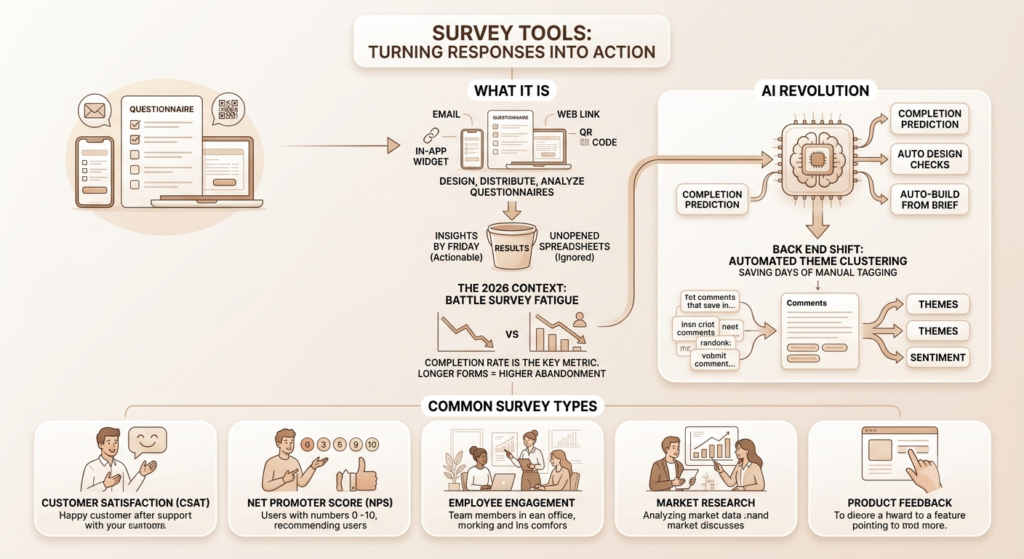
A survey tool is software that lets you design, distribute, and analyse questionnaires across channels like email, web links, in-app widgets, and QR codes. That’s the textbook version. In practice, the right one is the difference between insights you can act on by Friday and a spreadsheet of half-finished responses nobody opens again.
Here’s what’s changed. Survey fatigue is real, and it’s getting worse. People abandon long forms faster than they did two years ago, which means completion rate isn’t a vanity metric anymore. It’s the metric. A tool with brilliant analytics is worthless if 70% of recipients close the tab before question three.
How AI Has Changed Survey Creation and Analysis
AI in survey tools used to mean a chatbot that helped you write questions. That’s table stakes now. According to a 2026 comparison from Guideflow, platforms like SurveyMonkey Genius predict completion rates before you launch, Qualtrics ExpertReview flags design issues automatically, and Survicate’s AI builder generates a full survey from a one-line brief. The bigger shift is on the back end. Open-text response coding, where AI clusters thousands of free-text answers into themes, is saving research teams what used to take days of manual tagging.
That’s not a small thing. If you’ve ever tried to manually code 2,000 open-ended NPS comments, you know exactly how much time that buys back.
Common Survey Types Businesses Run Today
Most survey programs fall into a handful of buckets, and the tool you need often depends on which one you’re running most.
Customer satisfaction (CSAT) surveys measure happiness with a specific interaction, like a support ticket or a checkout flow. NPS surveys ask one core question, “How likely are you to recommend us,” and track it over time as a loyalty signal. Employee engagement surveys run quarterly or annually and need strong anonymity controls. Market research surveys go deeper into buying behaviour and often need advanced statistical analysis. Product feedback surveys sit inside the product itself, triggered by behaviour rather than a schedule.
A survey tool lets teams design, distribute, and analyse questionnaires digitally, replacing manual outreach with automated metrics like NPS and CSAT. In 2026, AI features such as automated open-text coding and completion rate prediction have become standard rather than premium add-ons across most major platforms.
How We Evaluated These Survey Tools
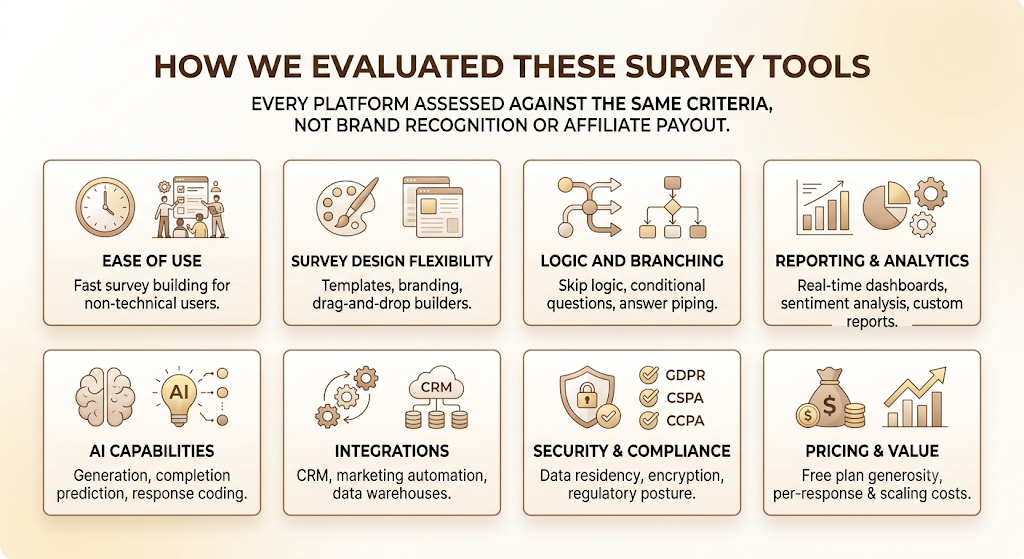
We didn’t rank these by brand recognition or affiliate payout, which is unfortunately how a lot of “best survey tools” lists get built. Every platform here was assessed against the same criteria.
- Ease of use: how fast a non-technical team member can build a working survey
- Survey design flexibility: templates, branding, drag-and-drop builders
- Logic and branching: skip logic, conditional questions, answer piping
- Reporting and analytics: real-time dashboards, sentiment analysis, custom reports
- AI capabilities: generation, completion prediction, response coding
- Integrations: CRM, marketing automation, data warehouses
- Security and compliance: data residency, encryption, GDPR/CCPA posture
- Pricing and value: free plan generosity, per-response costs, and scaling costs
Quick Comparison: Best Survey Tools at a Glance
| Tool | Best For | Free Plan | Starting Price | Key Strength |
| SurveyMonkey | All-around use | Yes (200 responses) | $25/user/mo | Template library, AI question suggestions |
| Typeform | Conversational surveys | Limited | $25/mo | Completion rates, design polish |
| Qualtrics | Enterprise research | Limited | Custom quote | Statistical depth, ExpertReview |
| Google Forms | Free, simple surveys | Yes, unlimited | Free | Zero cost, unlimited responses |
| Jotform | Workflow automation | Yes | $34/mo | Form-to-workflow automation |
| SurveySparrow | Closing the feedback loop | Yes | $19/mo | Conversational UI, CogniVue analytics |
| QuestionPro | Academic and enterprise research | Yes | $99/mo | 50+ question types |
| Tally | Free, modern form builder | Yes, unlimited | Free | Notion-style UI, no response caps |
| Survicate | In-app and website surveys | Yes | $69/mo | AI survey generation, multichannel |
| Zonka Feedback | AI-powered feedback | Limited | $79/mo | Real-time sentiment dashboards |
| Microsoft Forms | Microsoft 365 Teams | Yes (with M365) | Included in M365 | Native Teams/Outlook integration |
| SmartSurvey | Compliance-focused orgs | 14-day trial | Custom quote | UK data residency, no usage fees |
| Zoho Survey | Budget pick in the Zoho stack | Yes | $25/mo | Zoho ecosystem integration |
| Delighted | NPS programs | Yes (limited) | $224/mo | Purpose-built NPS workflows |
| Formbricks | Open-source | Yes, self-hosted | Free (self-hosted) | Full data ownership, open-source |
The 15 Best Survey Tools in 2026, Reviewed
1. SurveyMonkey: Best All-Around Survey Platform
SurveyMonkey is the default starting point for most teams, and that reputation is earned rather than inherited. It handles CSAT, employee engagement, and market research without forcing anyone into a learning curve. The platform’s biggest 2026 update is SurveyMonkey Genius, an AI layer that suggests questions, predicts completion rates before launch, and flags wording likely to confuse respondents, according to Guideflow’s 2026 survey software comparison.
Key features: 200+ templates reviewed by survey methodologists, AI-assisted question generation, built-in panel management for recruiting respondents, and broad third-party integration support.
Pros: Largest template library on this list. Strong analytics out of the box. A recognisable brand that stakeholders trust without explanation.
Cons: The free plan caps you at 200 responses per survey, fine for testing, not for production research. The interface is denser than Typeform or Tally, so expect a slower ramp-up for first-time users.
Pricing: Plans start around $25 per user per month, with enterprise pricing scaling well beyond that for advanced statistical features.
Best use cases: Mid-size teams running customer satisfaction, employee engagement, or general market research who want one platform that covers most scenarios without specialised tooling.
2. Typeform: Best for Conversational Surveys and Higher Completion Rates
Typeform’s one-question-at-a-time format isn’t just a design choice. It’s a response-rate strategy. Showing one question at a time keeps respondents from seeing the full length of a survey upfront, which reduces the instant drop-off long forms tend to trigger.
The AI question suggestion tool helps when you’re starting from a blank canvas, though it won’t replace a researcher who actually understands the survey’s goal.
Key features: Conversational, one-question interface, AI-generated question suggestions, strong mobile responsiveness, and brand customisation depth.
Pros: Genuinely beautiful surveys that feel less like a form and more like a conversation. Mobile completion rates noticeably outperform traditional multi-question layouts.
Cons: Premium pricing relative to competitors. Deep statistical analysis isn’t its strength, so pair it with another tool if you need heavy data processing.
Pricing: Plans start at roughly $25 to $28 per user per month, depending on the tier.
Best use cases: Marketing and brand teams running customer research or lead generation surveys where respondent experience directly affects data quality.
3. Qualtrics: Best for Enterprise Research and Advanced Analytics
Qualtrics is the platform research teams reach for when the analysis needs to hold up under academic or board-level scrutiny. Its text analytics and sentiment detection on open-ended responses go deeper than most competitors attempt, and the free plan still ships with genuinely useful statistical tools, which is rare for enterprise software.
Key features: ExpertReview AI that flags survey design issues pre-launch, advanced text and sentiment analytics, contact centre analytics, and statistical modelling tools.
Pros: Capterra’s 2026 Pricing Value Report named Qualtrics a top performer with a 4.9 out of 5 value-for-money rating. Unmatched depth for complex research.
Cons: No published pricing, you need a custom quote, which slows down evaluation. The AI Feedback Intelligence layer reportedly starts at $999 a month, out of reach for smaller teams. Expect roughly a week of onboarding before your team is fully comfortable.
Pricing: Custom quote only.
Best use cases: Academic researchers, enterprise CX teams, and organisations already on Salesforce or HubSpot who want AI-driven analysis without building a separate research stack.
4. Google Forms: Best Free Survey Tool
Google Forms does one thing extremely well: it gets a functional survey live in under five minutes, at zero cost, with no response cap. That’s still unbeaten in 2026, even with dozens of “free” competitors quietly gating real usage behind a paywall.
Key features: Unlimited responses, native Google Sheets integration, basic conditional logic, and simple collaboration through Google Workspace.
Pros: Completely free with no asterisk. Familiar interface, almost everyone already knows. Fast setup with zero onboarding.
Cons: No advanced branching, no AI features, and design customisation is minimal. Not built for anything beyond simple internal or quick external surveys.
Pricing: Free.
Best use cases: Internal polls, quick customer pulses, and any team that needs a survey live today without budget approval.
5. Jotform: Best for Forms and Workflow Automation
Jotform’s strength isn’t the survey itself; it’s everything that happens after someone submits one. Conditional workflows, payment collection, and document generation are all built in, which makes it less of a pure survey tool and more of a form-to-process engine.
Key features: Drag-and-drop builder, workflow automation triggers, PDF and document generation from responses, and payment integrations.
Pros: Versatile beyond surveys, useful for teams that also need intake forms, applications, or registration flows. Massive template library.
Cons: Survey-specific analytics are lighter than dedicated research tools like Qualtrics or QuestionPro.
Pricing: Plans start around $34 per month.
Best use cases: Teams that need surveys plus downstream automation, like onboarding flows, event registration, or lead intake.
6. SurveySparrow: Best for Omnichannel Feedback Collection
SurveySparrow built its reputation on completion rates, and a recent Reddit thread in r/customerexperience backs that up directly, with one user crediting the platform for getting people to actually finish surveys rather than abandon them midway. Its CogniVue analytics layer adds AI-driven sentiment scoring on top of the chat-style interface.
Key features: Conversational survey format, CogniVue AI analytics, multichannel distribution (web, email, in-app, link), recurring survey automation.
Pros: Strong completion rates compared to traditional form layouts. Closes the feedback loop with built-in follow-up actions.
Cons: Multilingual surveys are gated behind paid plans, a common complaint on G2.
Pricing: Starts around $19 per month.
Best use cases: CX teams that want higher response rates and a direct line from feedback to follow-up action.
7. QuestionPro: Best for Academic and Research Surveys
QuestionPro sits between SurveyMonkey and Qualtrics in both price and depth. It offers over 50 question types and enterprise-grade analytics without Qualtrics-level pricing, which makes it a common pick for research teams operating on a tighter budget.
Key features: 50+ question types, advanced statistical analysis, panel management, white-labelling options.
Pros: Strong value for the analytical depth offered. Good fit for academic researchers who need more than Google Forms but can’t justify Qualtrics pricing.
Cons: The breadth of features means a steeper learning curve than simpler tools.
Pricing: Plans start around $99 per month.
Best use cases: Academic research, market research firms, and nonprofits needing specialised question types below Qualtrics pricing.
8. Tally: Best Free Alternative to SurveyMonkey
Tally has quietly become the default recommendation for startups in 2026, and for good reason. The free plan includes unlimited forms, unlimited responses, and conditional logic, features competitors usually reserve for paid tiers.
Key features: Notion-style block-based builder, unlimited free responses, conditional logic on the free tier, integrations including Zapier and Notion.
Pros: The most generous free plan on this list by a clear margin. Clean, modern interface that doesn’t feel like Google Forms.
Cons: Lighter on advanced analytics and enterprise features compared to SurveyMonkey or Qualtrics.
Pricing: Free, with paid plans for additional branding and storage.
Best use cases: Startups and solo marketers who want real functionality without a budget line item.
9. Survicate: Best for In-App and Website Surveys
Survicate is built for surveys that happen inside the product or on the site itself, not just sent over email. Its AI survey creator, which generates a full survey from a written brief, has become one of its most-used features according to the Guideflow 2026 comparison.
Key features: Website and in-app survey widgets, AI survey generation, multichannel distribution, and integrations with product analytics tools.
Pros: Strong fit for SaaS teams running in-product NPS or feature feedback. AI generation cuts setup time significantly.
Cons: Pricing scales up quickly once you need multiple survey types running simultaneously.h
Pricing: Plans start around $69 per month.
Best use cases: B2B SaaS teams running in-app feedback alongside website surveys.
10. Zonka Feedback: Best for AI-Powered Customer Feedback
Zonka leans hardest into AI-driven sentiment analysis among the tools on this list. Real-time dashboards surface negative sentiment as it comes in rather than after a reporting cycle ends, which matters for CX teams that need to act same-day.
Key features: Real-time sentiment dashboards, AI-powered text analysis, kiosk and offline survey mode, multichannel distribution.
Pros: Fast alerting on negative feedback. Kiosk mode is useful for in-person or event feedback collection.
Cons: Free plan is limited, and most useful AI features sit behind paid tiers.
Pricing: Starts around $79 per month.
Best use cases: CX teams that need to catch and respond to negative feedback quickly, not just report on it monthly.
11. Microsoft Forms: Best for Microsoft 365 Users
If your organisation already runs on Microsoft 365, Forms removes the friction of adopting a separate tool entirely. It’s not built to compete with SurveyMonkey on features. It’s built to live inside Teams and Outlook without anyone noticing the switch.
Key features: Native Teams and Outlook integration, automatic response sync to Excel, and basic branching logic.
Pros: Zero additional cost if you already pay for Microsoft 365. Familiar interface for enterprise teams.
Cons: Limited advanced logic and no meaningful AI features compared to dedicated survey platforms.
Pricing: Included with Microsoft 365 subscriptions.
Best use cases: Internal surveys and employee feedback at organisations already standardised on Microsoft 365.
12. SmartSurvey: Best for Compliance-Focused Organisations
SmartSurvey leads on overall user satisfaction in 2026 with a 4.55 average rating across major review platforms, according to SmartSurvey’s own 2026 comparison, driven largely by UK data storage and a pricing model with no usage-based fees.
Key features: UK and EU data residency, unlimited responses with no per-response charges, and GDPR-focused compliance tooling.
Pros: Predictable pricing regardless of response volume. Strong fit for regulated industries needing clear data residency answers.
Cons: No published self-serve pricing for higher tiers, requiring a custom quote.
Pricing: 14-day free trial, then custom quote.
Best use cases: UK and EU organisations in healthcare, finance, or government needing compliance-first survey infrastructure.
13. Zoho Survey: Best Budget Pick Inside an Existing Ecosystem
Zoho Survey isn’t trying to out-feature SurveyMonkey. It’s trying to be the obvious choice if you already use Zoho CRM, Zoho Campaigns, or any other Zoho product. The free and entry-tier plans include unlimited surveys, which is unusually generous for the price point.
Key features: Unlimited surveys on paid tiers, native integration with the Zoho suite, customisable templates, and real-time reporting.
Pros: Affordable relative to feature depth. Frictionless if you’re already inside the Zoho ecosystem.
Cons: Less brand recognition and a smaller integration library outside of Zoho’s own products.
Pricing: Plans start around $25 per month.
Best use cases: Small to mid-sized businesses already using Zoho tools who want survey functionality without adding a new vendor relationship.
14. Delighted: Best for NPS and Customer Experience Programs
Delighted is built around one job: running NPS, CSAT, and CES programs cleanly, without the bloat of a general-purpose survey tool. That focus shows in how fast you can get a recurring NPS program running compared to configuring the same thing inside SurveyMonkey.
Key features: Purpose-built NPS, CSAT, and CES templates, automated recurring survey sends, and benchmarking against industry NPS scores.
Pros: Genuinely fast setup for NPS specifically. Benchmarking data adds useful context that most competitors don’t offer.
Cons: Pricing is steep for what is, functionally, a narrower feature set than SurveyMonkey or Qualtrics.
Pricing: Plans start around $224 per month.
Best use cases: CX teams running an ongoing NPS or CSAT program as their primary, repeated use case.
15. Formbricks: Best Open-Source Survey Platform
Formbricks is the pick for teams that care about data ownership as much as features. Being open-source means you can self-host it, which matters for companies with strict internal data policies that rule out third-party SaaS by default.
Key features: Self-hosting option, open-source codebase, in-app and website survey widgets, developer-friendly API.
Pros: Full control over where response data lives. No vendor lock-in.
Cons: Self-hosting requires technical resources that most marketing teams don’t have in-house.
Pricing: Free to self-host; managed cloud plans available for teams that don’t want to host it themselves.
Best use cases: Engineering-adjacent teams or companies with strict data residency requirements who can support self-hosted infrastructure.
Among the best survey tools in 2026, SurveyMonkey leads for general-purpose use, Typeform for completion rates, Qualtrics for enterprise research depth, and Tally for the most generous free plan. The right choice depends on survey volume, budget, and whether AI-driven analysis is a core requirement.
Survey Tool Pricing in 2026: What You Actually Pay For
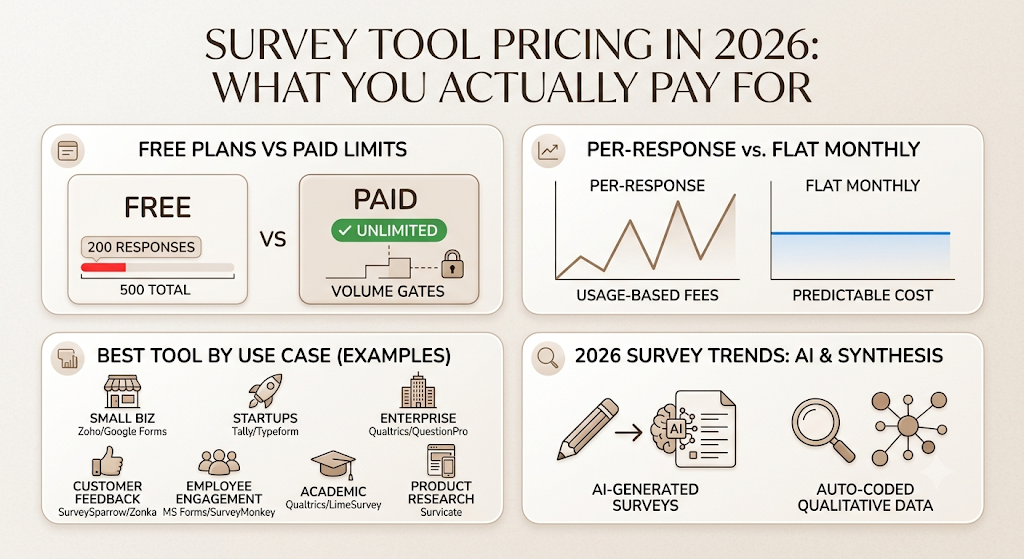
Pricing on most “best survey tools” lists looks deceptively simple until you actually try to scale past the entry tier.
Free vs Paid Plans, Where the Real Limits Hide
Free plans rarely fail on features. They fail on volume. SurveyMonkey’s free tier caps you at 200 responses per survey. Qualtrics’ free plan limits you to 500 responses total across three active surveys. Tally and Google Forms are the exceptions, both genuinely unlimited at zero cost, which is exactly why they show up repeatedly as the top recommendation for startups in CleverX’s 2026 startup survey tool guide.
The pattern worth noticing: tools built around brand recognition (SurveyMonkey, Qualtrics) gate volume. Tools built around developer or startup adoption (Tally, Formbricks, Google Forms) tend not to.
Per-Response Pricing vs Flat Monthly Plans
Some platforms charge per response once you exceed a threshold, which sounds fine until a single viral survey link triples your monthly bill. SmartSurvey’s appeal, according to its own 2026 positioning, is explicitly built around having no usage-based fees at all. If your survey volume is unpredictable, a flat-rate plan is worth paying a premium for over a cheaper per-response model.
Best Survey Tool by Use Case
Best survey tool for small businesses: Zoho Survey or Google Forms, both affordable and fast to set up without dedicated research staff.
Best survey tool for startups: Tally for the free tier, Typeform once customer-facing polish starts to matter, according to CleverX’s 2026 startup breakdown.
Best survey tool for enterprises: Qualtrics or QuestionPro, both built to support statistical rigour and procurement-level security review.
Best survey tool for customer feedback: SurveySparrow for closing the loop, Zonka Feedback if real-time sentiment alerting is the priority.
Best survey tool for employee engagement: Microsoft Forms if you’re already on Microsoft 365, SurveyMonkey if you need stronger anonymity controls and reporting.
Best survey tool for academic research: Qualtrics for complex statistical work, QuestionPro or the open-source LimeSurvey for tighter budgets.
Best survey tool for product research: Survicate for in-app feedback tied directly to product usage.
Survey Tool Trends Shaping 2026
AI-Generated Surveys and Auto-Coded Responses
Writing a survey from scratch is becoming optional. Tools across this list, SurveyMonkey, Survicate, and Qualtrics among them, now generate a full draft survey from a short text brief. The bigger time savings sit on the analysis side. Auto-coding open-ended responses into themes saves days of manual work for any team running surveys at a real scale.
Conversational and Chat-Style Survey Formats
Typeform proved the one-question-at-a-time format years ago. In 2026, that conversational pattern has spread to platforms like TheySaid, which builds entire surveys around dialogue rather than static question lists, aiming for higher completion through a format that feels less like homework.
The Rise of Qualitative AI Synthesis Tools
A newer category is emerging alongside traditional survey software: tools built purely to make sense of qualitative data after collection. Platforms in this space generate visual knowledge maps from hundreds of open-ended responses, letting researchers query their own data conversationally instead of manually tagging themes. This won’t replace a collection tool, but it’s increasingly run alongside one.
The biggest shift in survey software for 2026 is not collection, it’s synthesis. AI-driven open-text coding and qualitative knowledge mapping are turning raw survey responses into structured insight faster than manual analysis ever could, cutting research cycle time significantly for teams running feedback at scale.
How to Choose the Right Survey Tool for Your Team
Match the Tool to Your Survey Goal, Not the Other Way Around
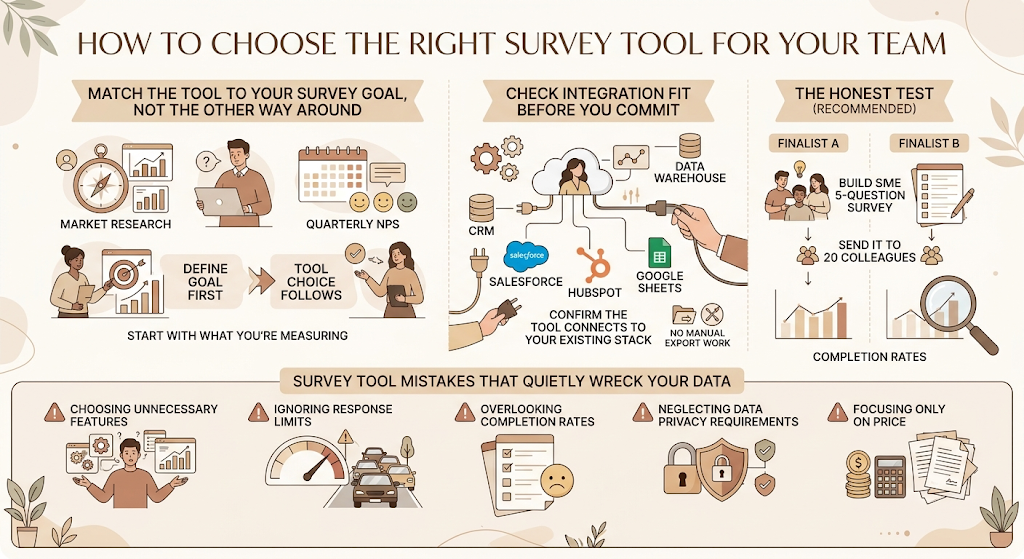
Start with what you’re measuring, not which tool everyone’s talking about. A one-time market research project has completely different requirements from a recurring quarterly NPS program. Define the goal first. The tool choice should fall out of that, not the reverse.
Check Integration Fit Before You Commit
A survey tool that doesn’t talk to your CRM or your data warehouse creates manual export work that quietly erodes any time it saved you upfront. Before signing up, confirm the tool connects to whatever you already use to act on the data, whether that’s Salesforce, HubSpot, or a Google Sheets workflow.
The honest test recommended in SurveySparrow’s 2026 comparison guide is simple: pick two finalists, build the same five-question survey in each, and send it to twenty colleagues. The completion-rate gap between them tells you more than any feature list will.
Survey Tool Mistakes That Quietly Wreck Your Data
Choosing features you don’t need. Enterprise statistical modelling is wasted on a 10-question customer satisfaction check.
Ignoring response limits. A free plan that looks generous on day one can quietly throttle a campaign that goes wider than expected.
Overlooking completion rates. A beautifully designed survey nobody finishes produces less usable data than a plain one that gets completed.
Neglecting data privacy requirements. Where respondent data is stored and processed matters more in regulated industries than almost any feature on the comparison table.
Focusing only on price. The cheapest tool that doesn’t integrate with your stack often costs more in manual work than the pricier one that does.
Choosing the Tool That Actually Fits Your Workflow
The best survey tools in 2026 aren’t defined by brand recognition anymore. They’re defined by how fast they turn a response into a decision your team can act on. If you’re running a quick internal pulse check, Google Forms or Tally will do the job without any setup friction. If you’re running customer research that feeds into actual strategy, the AI-driven analysis layer in tools like Qualtrics or SurveyMonkey is worth the higher price.
Start with the goal of your survey program, not the tool everyone else is using. That one decision will save you more time than any feature comparison ever could.
FAQs
What is the best survey tool overall?
There’s no single best survey tool for every team. SurveyMonkey is the strongest general-purpose pick for most businesses, while Typeform leads on completion rates and Qualtrics leads on enterprise research depth.
Which survey software is free?
Google Forms and Tally both offer genuinely unlimited free plans with no response caps. SurveyMonkey and Qualtrics offer free tiers, but both cap total responses.
Is Google Forms better than SurveyMonkey?
Google Forms wins on cost and simplicity for basic internal surveys. SurveyMonkey wins on logic, analytics, and template depth for anything more advanced. Most teams that outgrow Google Forms move to SurveyMonkey or Tally next.
What is the best alternative to SurveyMonkey?
Tally is the closest free alternative with real feature depth. Typeform is the best paid alternative if completion rate and design polish matter more than statistical depth.
Which survey tool has the best AI features?
Qualtrics ExpertReview and SurveyMonkey Genius lead on AI-assisted survey design and completion prediction. For AI-driven response synthesis specifically, dedicated qualitative analysis tools are increasingly used alongside a traditional survey platform rather than instead of one.
What is the best survey platform for enterprises?
Qualtrics and QuestionPro are the strongest enterprise picks, both built for statistical depth and the kind of security review enterprise procurement demands.
Which survey tool offers the highest response rates?
SurveySparrow and Typeform consistently come up in user discussions for higher completion rates, largely because of their conversational, low-friction formats.
Are AI-powered survey tools worth it?
For teams running surveys at any real volume, yes. Auto-coding open-ended responses alone can save dozens of hours per research cycle that would otherwise go into manual tagging.
What’s the best survey tool for startups?
Tally for budget-conscious teams that need real functionality for free, Typeform once customer-facing surveys start affecting brand perception.
Do free survey tools have data limits?
Most do. SurveyMonkey and Qualtrics cap responses on free plans. Google Forms and Tally are the notable exceptions with unlimited free responses.