

Marketing teams are running out of patience with static lead magnets. A gated PDF sits there, unread, while a quiz gets answered in ninety seconds and hands back an email address on the way out. That gap in performance is why quiz maker tools have quietly become one of the most fought-over categories in marketing software this year.
The best quiz maker for your team depends entirely on what you’re trying to do with it. A SaaS company qualifying leads needs scoring logic and CRM sync. A teacher running a Friday recap needs live buzzers and a leaderboard. A publisher chasing pageviews needs something that embeds cleanly and doesn’t choke under traffic spikes. Same category, three completely different jobs.
This guide breaks down 15 quiz maker tools across marketing, education, and corporate training, with current 2026 pricing, what each one actually does well, and where it falls short. By the end, you’ll know which tool fits your specific use case instead of just picking whatever ranks first on Google.
Table of Contents
What Is a Quiz Maker Tool?
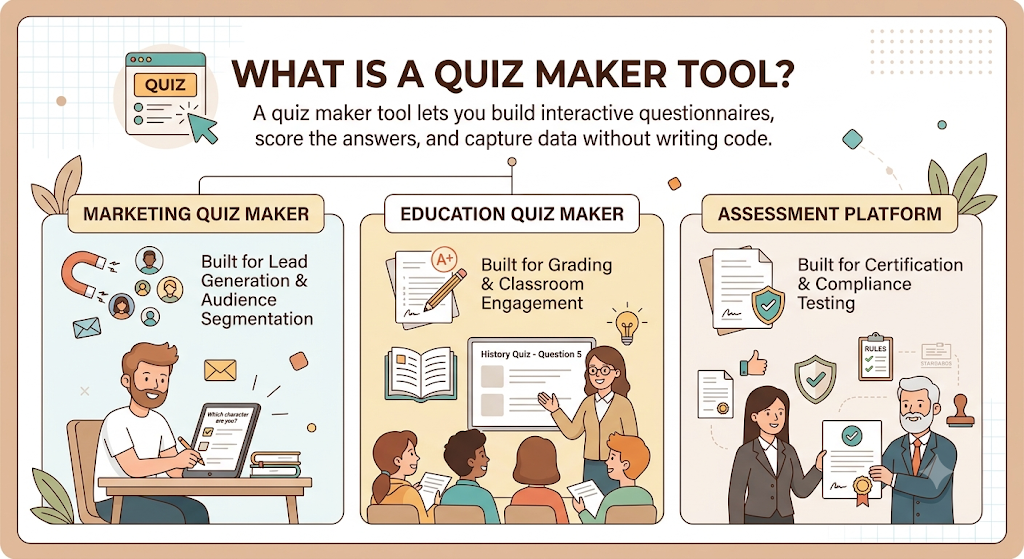
A quiz maker tool is software that lets you build interactive questionnaires, score the answers, and capture data from whoever takes them, all without writing code. That’s the one-sentence version. The longer version is that “quiz maker” has become a catch-all term covering at least three different products that happen to share a question-and-answer interface.
There’s the marketing quiz maker, built for lead generation and audience segmentation. There’s the education quiz maker, built for grading and classroom engagement. And there’s the assessment platform, built for certification and compliance testing, where the result has to hold up if someone challenges it. Trying to use one for the other’s job is usually where frustration starts.
Key Functions of Quiz Maker Software
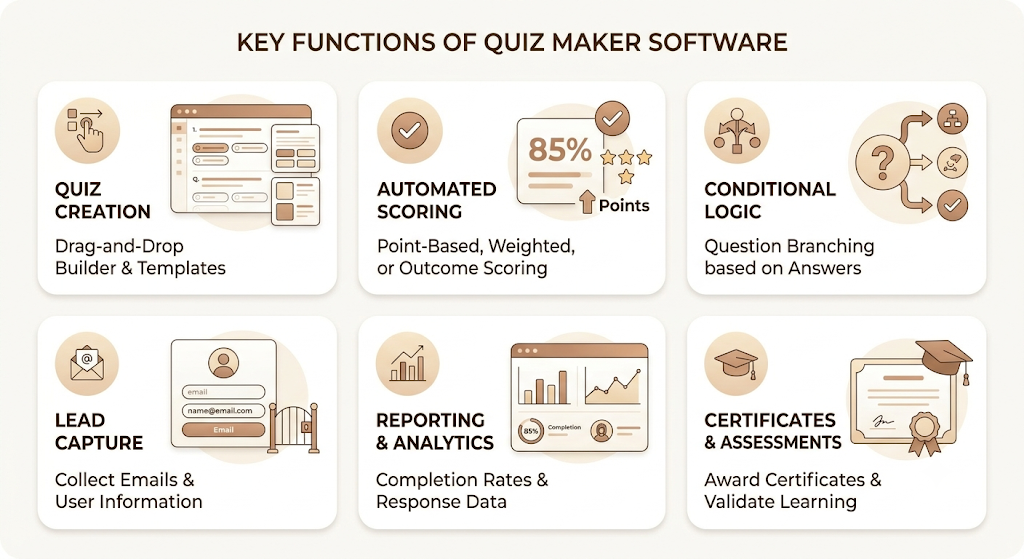
Strip away the marketing copy, and most quiz makers are built around the same six functions:
- Quiz creation through a drag-and-drop builder, usually with templates, so you’re not starting from a blank screen
- Automated scoring, either point-based, weighted, or outcome-based, depending on the quiz type
- Conditional logic, so the next question (or final result) changes based on what someone has already answered
- Lead capture, typically an email gate placed before, during, or after the quiz
- Reporting and analytics, covering completion rates, drop-off points, and individual response data
- Certificates and assessments, mostly relevant to the education and corporate training side of the category
Not every tool does all six well. Typeform is excellent at the first point and middling at the fourth. ClassMarker barely touches lead capture because that’s not what it’s for. Match the tool to the function you actually need, not the full list.
Common Types of Quizzes
Six formats cover almost everything you’ll see in the wild:
- Personality quizzes (“What type of marketer are you?”) are built for shares and brand engagement
- Knowledge tests with right and wrong answers are common in education and training
- Product recommendation quizzes that route a shopper to the item that fits them
- Lead generation quizzes designed primarily to collect contact details
- Employee assessments used for onboarding, compliance, and skills tracking
- Educational quizzes for classroom instruction and homework
A single platform rarely nails all six. That’s the real reason this list has 15 entries instead of three.
Best Quiz Maker Tools in 2026
1. Typeform
Best for Conversational Quizzes and Premium User Experience
Typeform answers a clear question before you read a single review: does the quiz feel like a conversation or a form? Typeform built its entire reputation on the former. Respondents see one question at a time, the screen transitions smoothly, and the whole thing feels less like data entry and more like texting a friend.
That experience comes at a real cost, though. Reviewers commonly point to tight response limits, ten-question caps, and key features like logic, branding removal, and integrations sitting behind higher tiers. The free plan looks generous on paper and turns out not to be once you start building anything serious, which is why teams often consider a typeform alternative when they need more flexibility without the same pricing constraints.
Key features
Typeform’s logic engine lets you calculate scores, prices, and quiz results, which makes it genuinely useful for everything from personality quizzes to order forms. You can use logic to calculate quiz scores and create outcome quizzes, track custom numeric or text values, and personalize forms with respondent data you already have. The platform also supports video answers, translation, and embedded forms across websites and email.
Pros
The design is the headline feature, and for good reason. Forms load quickly, respondents see one question at a time, and the conversational approach genuinely improves engagement and completion rates compared to a traditional static form. Logic jumps mean respondents only see questions relevant to their previous answers, which keeps longer quizzes from feeling like a slog.
Cons
Price is the recurring complaint across review sites. G2 reviewers consistently note that pricing scales quickly as response volumes grow, and that essential features like bot protection, branding removal, and advanced analytics sit behind higher tiers. One reviewer summed it up bluntly, describing essential CAPTCHA functionality as locked behind expensive plans, which led to spam problems on their forms.
Pricing
Typeform starts at $39 a month for the Basic plan, with Plus at $79, Business at $129, Talent at $169, and Growth Pro at $379. Enterprise is custom. The free plan exists but caps out at ten responses a month, which makes it more of a product demo than a usable tier for any real campaign.
Best for
Brands and solo creators who care more about how the quiz feels to take than how cheap it is to run. If design is the priority and budget has some room, Typeform earns its premium reputation.
2. Interact
Best for Lead Generation Quizzes
Interact does one job, and it does that job with more conviction than anyone else on this list. It’s a quiz maker built purely to turn website visitors into email subscribers, and the numbers back up the claim. The overall conversion rate when people start an Interact quiz is 40.1%, meaning just over four out of ten people who click start will become a lead. That figure has barely moved in over a decade of use.
Interact has handled over 100 million leads since launching in 2014. Josh Haynam, the company’s co-founder, says the idea started after noticing that adding a quiz to a website jumped conversion from around 1% to 40% almost overnight. Whether or not your results match that exactly, the underlying mechanic, curiosity plus a personalized payoff, is well established at this point.
Features
Interact gives you AI-generated quizzes, conversion-focused templates, brand customization, and CTA buttons baked into the results page. Atlassian used Interact quizzes to create differentiated content experiences that boosted engagement, and Henry’s House of Coffee achieved a 68% conversion rate with a product recommendation quiz built around customer taste preferences.
Pros and cons
The interface is genuinely beginner-friendly, and most users report having a working quiz live within an hour. The catch is the price-to-feature ratio at the entry tier. There’s no free plan, and design customization is decent but not as flexible as Typeform or involve.me.
Pricing
Interact’s Lite plan runs $27 a month billed annually (or $39 monthly) for 500 leads a month, the Growth plan is $53 annually (or $89 monthly) for 2,000 leads, and there’s a free tier to build and test before you commit to a card.
Best for
Coaches, course creators, and e-commerce brands whose entire goal is “get an email address and segment it by quiz result.” Nobody on this list does that single job better.
3. Outgrow
Best for Interactive Marketing Campaigns
Outgrow takes a wider swing than Interact. Instead of quizzes alone, it’s a no-code platform for quizzes, calculators, chatbots, assessments, and recommendation engines, all under one roof. If your marketing team wants to build an ROI calculator for the pricing page and a product quiz for the homepage without juggling two subscriptions, this is the obvious fit.
Features
Outgrow offers over 1,000 pre-built, customizable templates and supports over 1,000 integrations through native connections and Zapier. The calculator builder in particular goes well beyond what most quiz-first tools attempt, supporting custom formula logic for ROI math, pricing tools, and scoring models.
Pros and cons
Outgrow increases conversion rates over 40% with interactive content, and users consistently praise its ease of use, template variety, and lead generation results. The flip side shows up at scale. G2 reviewers note that pricing can feel high for smaller teams, and managing complex logic or deeply customized designs requires more manual adjustment than expected.
Pricing
Plans start at $14 a month for the Freelancer tier and run up to $600 a month for Business, with one-off content pieces available from $250 and custom enterprise plans on top.
Best for
Marketing teams that want quizzes, calculators, and chatbots in a single tool rather than stitching three platforms together.
4. Involve me
Best for Quiz Funnels and Multi-Step Experiences
involve.me’s pitch is simple: a quiz shouldn’t be the end of the funnel, it should be the start of one. It’s an AI quiz funnel builder with built-in email automation, used to create quizzes, assessments, calculators, product recommendation flows, landing pages, and forms, with everything running inside one subscription instead of stitching together a separate quiz builder and email tool.
What separates involve.me from a basic quiz maker is what happens after someone finishes. When a lead finishes a quiz, they become a contact automatically, with every answer, score, and outcome mapped onto their contact record, and a visual workflow builder lets you design email sequences that branch based on what each lead did.
Strengths
involve. My AI generates complete funnels from a single prompt, not just quiz questions, producing an eight-question quiz with scoring and three outcome pages from a prompt like “SaaS product fit assessment” in under a minute. The formula builder supports VLOOKUP and nested conditionals, which most quiz tools simply don’t attempt.
Weaknesses
The pricing structure draws the sharpest criticism in the category. Key features most marketers consider table stakes, like A/B testing and Google Tag tracking, sit behind the $129-a-month Business tier, and the free plan’s 30-day data retention means submission data disappears after a month.
Pricing
involve.me offers a free plan with basic limits, plus Starter at $29 a month, Pro at $59 a month, and Business at $129 a month on annual billing, with Enterprise on custom pricing.
Best for
involve.me works best for high-ticket service businesses, financial advisors, real estate agents, and course creators, where each qualified lead is worth enough to justify connecting the quiz directly to a built-in email sequence rather than exporting to a separate tool. Its AI Agent can build a complete funnel, including logic, scoring, and copy, from a single prompt in under a minute.
5. Jotform
Best All-in-One Form and Quiz Builder
Jotform’s quiz maker isn’t trying to be the flashiest tool in this list. It’s trying to be the one your team already uses for everything else, so adding quizzes doesn’t mean adopting a new vendor. If you’re already on Jotform for applications, registrations, and surveys, adding AI-generated quizzes to the same account means one billing relationship and one familiar interface.
Features
Jotform’s quiz builder supports conditional logic that creates smart question paths based on each learner’s answers, so students who struggle see extra practice questions while advanced learners skip ahead. The AI quiz generator can build a full quiz from a topic prompt or an uploaded PDF, PowerPoint, or document in seconds.
Pros
Connects to more than 100 integrations, so quiz results can route to a gradebook or generate class reports automatically. The free tier is generous enough for testing real workflows before committing.
Cons
It’s a form builder first and a quiz maker second. The quiz builder feels like an add-on rather than a core product, with AI quiz generation that’s basic compared to dedicated tools like Typeform or involve.me, since it generates questions but doesn’t build full logic flows.
Pricing
Jotform offers a free Starter plan, with Bronze at $34 a month, Silver at $39 a month, and Gold at $99 a month, plus a custom Enterprise tier.
Best for
Teams already running other workflows on Jotform who want quizzes without adding another subscription to the stack.
6. SurveyMonkey
Best for Research and Enterprise Surveys
SurveyMonkey isn’t a quiz-first platform, and it doesn’t pretend to be. Founded in 1999, it’s designed primarily for structured data collection, professional research workflows, and feedback programs, with a design philosophy centered on accuracy, reliability, and scalability rather than creative flair. If your quiz needs to hold up as part of a statistical study, this is where you’d start.
Strengths
SurveyMonkey provides free online questionnaire and survey software with the ability to publish surveys in minutes and view results graphically in real time. Founded in 1999, it has long been recognized as a leader in online surveys, with 98% of the Fortune 500 using it for research-grade data collection.
Weaknesses
Building a marketing-style quiz here feels like fighting the tool’s intended purpose. SurveyMonkey’s free plan caps responses at 25 per quiz with a maximum of ten questions, and the free version doesn’t show a custom result screen based on total score, displaying a generic confirmation instead. That makes it a poor fit for personality quizzes that depend on personalized outcomes.
Pricing
SurveyMonkey’s plans scale with feature depth and response volume, generally landing in the $25-and-up monthly range for individual paid tiers, with enterprise pricing handled through sales for larger research teams.
Best for
HR teams, researchers, and enterprises that need statistically defensible survey data more than they need a flashy lead-gen quiz.
7. Opinion Stage
Best for Engagement and Audience Interaction
Opinion Stage sits in an interesting middle ground. It’s not as polished as Typeform, not as funnel-focused as Involv.me, but it covers quizzes, polls, surveys, and forms with a genuinely large template library and an accessible price point.
Features
Opinion Stage supports personality quizzes, knowledge quizzes, and product recommendation quizzes, with over 100 marketing templates that let you build quickly without technical skills. Quizzes embed easily on websites, blogs, and landing pages.
Pros and cons
The free plan is genuinely usable for testing. It offers unlimited quizzes but caps responses at 25 per month on the free tier, with Pro at $39 a month raising that limit to a more realistic 2,500 responses. The trade-off is a builder that feels less modern than competitors, with setup steps that can be confusing due to a lack of in-app help.
Pricing
Opinion Stage offers a free plan with paid tiers starting from $25 a month for Pro and $79 a month for Business, plus a custom enterprise plan.
Best for
Small businesses and content teams who want a flexible all-rounder without committing to involvement.my funnel complexity or Typeform’s price tag.
8. Riddle
Best for Publishers and Media Companies
Riddle’s customer list reads like a media trade publication’s masthead. Renowned publishers and brands, including the BBC, Red Bull, and the NBA’s Chicago Bulls, trust Riddle to create engaging quizzes and interactive content. That’s not an accident. Riddle was purpose-built for high-traffic editorial sites, not small business lead capture.
Features
Riddle is built specifically for publishers, brands, and media companies that want to create engaging, on-brand quizzes, surveys, and forms while collecting first-party data, rather than just running traditional market research. White labeling is complete on the Business and Enterprise tiers, covering logo, domain, fonts, and custom CSS.
Strengths
GDPR compliance is a genuine differentiator here, not a checkbox feature. Riddle is the most thorough on GDPR compliance among quiz makers, operating as a German company with EU data hosting.
Weaknesses
At $59 a month, Riddle has the highest entry point on most comparison lists, which is overkill if you just need a simple lead-gen quiz rather than an ongoing interactive content program.
Pricing
Riddle has four pricing tiers ranging from $59 to $749 a month, with a free trial available and a 26 to 33 percent discount for annual billing.
Best for
Online publishers, news sites, and sports brands running recurring interactive content rather than a single one-off lead magnet.
9. LeadQuizzes
Best for Lead Qualification
LeadQuizzes does for lead scoring what Interact does for raw lead capture: one job, executed with focus. Unlike general form builders like Typeform or broad interactive content platforms like Outgrow, LeadQuizzes is purpose-built for lead generation, delivering quiz-specific lead capture, scoring, segmentation, and CRM integration in one affordable platform.
Features
LeadQuizzes’ quiz maker can help capture up to 500% more leads from a website and advertisement, while the answers collected help segment and understand the audience better. Real businesses back this up with real numbers. Phil Kyprianou of Goth Rider used LeadQuizzes to generate 75,813 leads for his eCommerce jewelry and apparel store, advertised through Facebook.
Pros and cons
The entry price is genuinely competitive. Plans start at $13 a month with no-code quiz building, advanced conditional logic, and white-label options for agencies. The downside shows up in the fine print. Overage fees apply once you exceed monthly response limits, and the lowest advertised rates require annual billing.
Pricing
LeadQuizzes offers Startup at $9 a month billed annually (or $13 monthly), Standard at $37 annually, Pro at $74 annually, and Premium at $186 annually, with no free plan but a 14-day full-featured trial instead.
Best for
Marketers whose only real goal is capturing and scoring leads as cheaply as possible, without needing the funnel-building extras of involve.me or Outgrow.
10. Fillout
Best Free Quiz Maker
If budget is the deciding factor, Fillout wins this comparison without much of a fight. Fillout has the most generous free plan of all the quiz makers tested, letting users publish unlimited quizzes and collect up to 1,000 responses per month, with a quiz builder that’s fast and intuitive.
Features
Fillout’s quiz builder supports a scoring system, personalized results with dynamic endings based on answers, and easy email sign-up integration for list-building. One small but useful detail: a free calendar widget that lets a finished quiz route directly into a booking page.
Pros and cons
Fillout handled quizzes better than most rivals tested, though duplicating a scored question doesn’t copy the scoring logic to the new question, which costs you a bit of setup time. Analytics stay basic, but the table view exports cleanly to CSV if you need to push data elsewhere.
Pricing
Fillout offers a free plan with unlimited forms and 1,000 monthly responses, with paid tiers at $15 a month for Starter, $40 for Pro, and $75 for Business on annual billing.
Best for
Anyone testing a quiz concept before committing budget, or running a low-volume lead magnet that doesn’t justify a paid tool.
11. Google Forms
Best Free Option for Educators and Teams
Google Forms is the baseline every other tool on this list gets compared against, mostly because it costs nothing, and almost everyone already has the account to use it. Google Forms is the most generous quiz maker in terms of usage limits, with unlimited responses for free, though that comes paired with a lack of customization and very basic feature depth.
Limitations worth knowing about
Google Forms doesn’t allow you to publish a quiz with scores assigned to different individual answer choices. It only lets you assign a score to the single correct answer in a quiz, which rules out weighted personality-quiz scoring entirely. There’s no built-in CRM or email marketing integration, so any follow-up after someone takes the quiz has to happen manually or through a separate tool.
Pricing
Google Forms is free to use with no tiered pricing, and additional costs only apply if you bring in other Google Workspace tools or third-party apps for more advanced functionality.
Best for
Schools, nonprofits, and small internal teams running simple knowledge checks where the result feeds a spreadsheet, not a marketing funnel.
12. Kahoot!
Best for Live Learning and Classroom Quizzes
Kahoot turned the classroom quiz into a game show, and that single design decision is the entire reason it dominates this corner of the market. Kahoot excels at high-energy, real-time classroom engagement, requiring all participants to answer simultaneously and creating a game-show atmosphere with live leaderboards.
Strengths
Kahoot is available for free with basic features, with extended individual features priced between $3 and $19 a month. Participants never need their own paid account. Kahoot charges per host or presenter, not per participant, since attendees always join for free through a game PIN.
Weaknesses
The format that makes Kahoot fun for live sessions also makes it weak for serious assessment. Kahoot’s speed-first model misses needs like compliance-grade security, granular analytics, and customization, since the race format rewards fast clicks over real comprehension. Pricing for teams gets complicated fast. There’s effectively no monthly billing option across business plans, with the 360 Spirit plan requiring a minimum of 25 host licenses at $6,000 a year, even if a team only needs three.
Pricing
Kahoot is free with basic features, with individual paid plans ranging from $3 to $19 a month, while school and district pricing varies and can run into thousands of dollars per month depending on size.
Best for
Teachers and trainers running live, in-person or virtual sessions where energy and competition matter more than detailed reporting.
13. Quizizz (now Wayground)
Best for Educational Assessments
Quizizz rebranded to Wayground in 2025, though most educators and search traffic still refer to it by the original name. For interactive and student-friendly environments, Wayground and Pear Assessment work best, focusing on engagement through real-time dashboards and self-paced quizzes. The rename doesn’t change what made it popular: it solved Kahoot’s biggest weakness by letting students move at their own pace.
Features
Quizizz stands out by offering a slower, more flexible gameplay experience where each student views the quiz directly on their personal device, going at their own pace without needing a classroom display. It can also be assigned as homework with deadline settings, something Kahoot only handles partially.
Pros and cons
The reporting tools offer solid insights, and the platform’s large public library of user-created quizzes speeds up content creation significantly. The honest limitation, as one reviewer who’d tested it extensively put it, is that the free plan limits the number of questions per quiz, which can push you toward a paid plan sooner than expected.
Pricing
Quizizz provides a generous free tier supporting up to 100 participants, with premium features priced at $19 a month.
Best for
Teachers who want the gamification of Kahoot without forcing every student onto the same timer, especially for homework and self-paced review.
14. ProProfs Quiz Maker
Best for Employee Training and Certification
ProProfs sits at the assessment-heavy end of this list, and it’s built that way on purpose. This quiz maker software has powerful SSL and encryption technologies, anti-DDoS protection, and GDPR-compliant assessments, with non-intrusive proctoring that can prevent cheating, impostors, and answer-sharing.
Features
ProProfs supports quiz creation in over 70 languages and offers a library of more than one million ready-made questions and expert-designed templates, with an AI generator that can build a compliance quiz from a policy document in just a few minutes. Multiple instructor roles let larger teams collaborate on the same question bank.
Pros and cons
Reviewers who’ve used ProProfs for years describe the AI quiz builder as a huge time-saver, with over 20 question types and a massive library of pre-made content available out of the box. On the downside, some Capterra reviewers note recurring pricing that feels high for educators, with user caps like 150 private users on certain tiers that can be limiting.
Pricing
ProProfs Quiz Maker has a free plan, with the Business tier starting around $20 a month (or $120 a year billed annually). Separate Basic and Team tiers sit below that, and Enterprise pricing scales with organization size.
Best for
HR teams, corporate trainers, and academic instructors who need quiz results that hold up for compliance records, certifications, or hiring decisions.
15. ClassMarker
Best for Secure Online Testing and Exams
ClassMarker exists for one purpose: high-stakes assessments where the test result needs to be trustworthy enough to act on. There’s no gamification, no leaderboard, no confetti animation. Just secure, proctored testing.
Features
ClassMarker boasts custom certificates, brand controls, and a user-friendly interface alongside its core security features for proctored testing. ClassMarker is GDPR compliant, hosting all data in the USA while adhering to the high security standards required under EU law, and offers a Data Processing Agreement on request.
Pros and cons
ClassMarker is about structured exam delivery and asynchronous testing, which gives it an edge whenever active supervision and academic integrity matter, unlike Kahoot’s energetic but unsupervised format. The trade-off is accessibility. ClassMarker has no free plan at all, which sets it apart from nearly everything else on this list.
Pricing
ClassMarker’s plans run on a per-test-taker model with no free tier, putting it at a higher effective entry cost than ProProfs or Google Forms for casual use, though the security and audit trail it provides justify that cost for regulated industries.
Best for
Businesses and training providers running certification exams or compliance tests where the result needs to survive an audit.
ClassMarker and ProProfs Quiz Maker are the two tools in this category built specifically for formal, defensible assessment rather than engagement, with features like proctoring, certificates, and GDPR-compliant data handling that gamified tools like Kahoot and Wayground don’t attempt to match.
Quiz Maker Tools Comparison Table
| Tool | Best For | AI Quiz Creation | Lead Capture | Conditional Logic | Free Plan | Starting Price |
| Typeform | Conversational quizzes | Yes | Yes | Yes | Yes (10 responses/mo) | $39/mo |
| Interact | Lead generation | Yes | Yes | Yes | Yes (no leads) | $27/mo |
| Outgrow | Interactive marketing | Yes | Yes | Yes | No | $14/mo |
| involve.me | Quiz funnels | Yes | Yes | Yes | Yes (50 submissions/mo) | $29/mo |
| Jotform | Forms + quizzes | Yes | Yes | Yes | Yes | $34/mo |
| SurveyMonkey | Research | Yes | Limited | Yes | Yes (25 responses/quiz) | ~$25/mo |
| Opinion Stage | Engagement | Yes | Yes | Yes | Yes (25 responses/mo) | $25/mo |
| Riddle | Publishers | Limited | Yes | Yes | No (trial only) | $59/mo |
| LeadQuizzes | Lead qualification | Yes | Yes | Yes | No (14-day trial) | $9/mo |
| Fillout | Free quiz maker | Limited | Yes | Yes | Yes (1,000 responses/mo) | $15/mo |
| Google Forms | Education | No | No | Basic | Yes (unlimited) | Free |
| Kahoot! | Live learning | Yes | No | No | Yes (10 participants) | $3/mo |
| Wayground (Quizizz) | Self-paced assessment | Limited | No | Basic | Yes (100 participants) | $19/mo |
| ProProfs Quiz Maker | Employee training | Yes | Yes | Yes | Yes | $20/mo |
| ClassMarker | Secure testing | No | No | Yes | No | Custom |
Prices reflect the lowest published paid tier as of mid-2026 and may change. Always confirm current pricing on the vendor’s site before budgeting.
How to Choose the Right Quiz Maker Tool
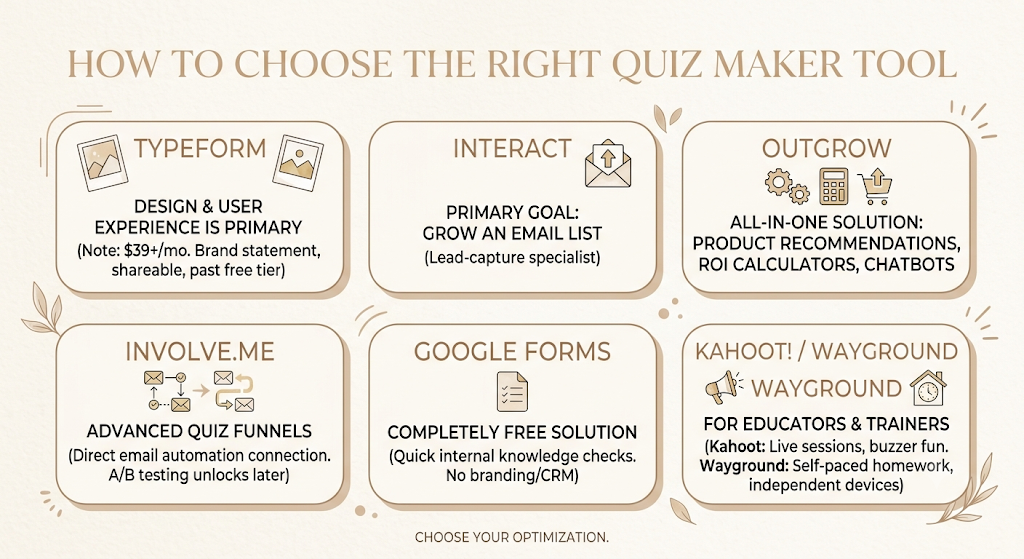
The honest answer to “which quiz maker should I use?” is almost always “it depends on what you’re optimizing for.” That sounds like a dodge, but it’s the difference between a tool that fits your workflow in a week and one you abandon after the trial.
Choose Typeform If…
Design and user experience matter more to you than price. You’re building a quiz that’s also a brand statement, something people screenshot and share, and you have the budget to absorb $39 a month minimum once you’re past the ten-response free tier.
Choose Interact If…
You want to grow an email list, and nothing else really matters. Interact does the lead-capture job better than tools twice its price because it’s never tried to be anything else.
Choose Outgrow If…
You need product recommendation quizzes alongside ROI calculators or chatbots, and you’d rather pay one vendor for all three than manage separate subscriptions and separate logins.
Choose Involve.me If…
You want advanced quiz funnels that connect directly to email automation without exporting a CSV and importing it somewhere else. The pricing jump to unlock A/B testing stings, but the funnel-to-inbox workflow is hard to replicate elsewhere.
Choose Google Forms If…
You need a completely free solution and don’t need weighted scoring, branding, or CRM integration. It’s the right tool for a quick internal knowledge check, the wrong tool for a branded marketing campaign.
Choose Kahoot! or Wayground If…
You’re an educator or trainer running live sessions (Kahoot) or self-paced homework (Wayground). Pick based on whether your students are in the same room, hitting buzzers together, or working independently on their own devices.
Features to Look for in a Quiz Maker
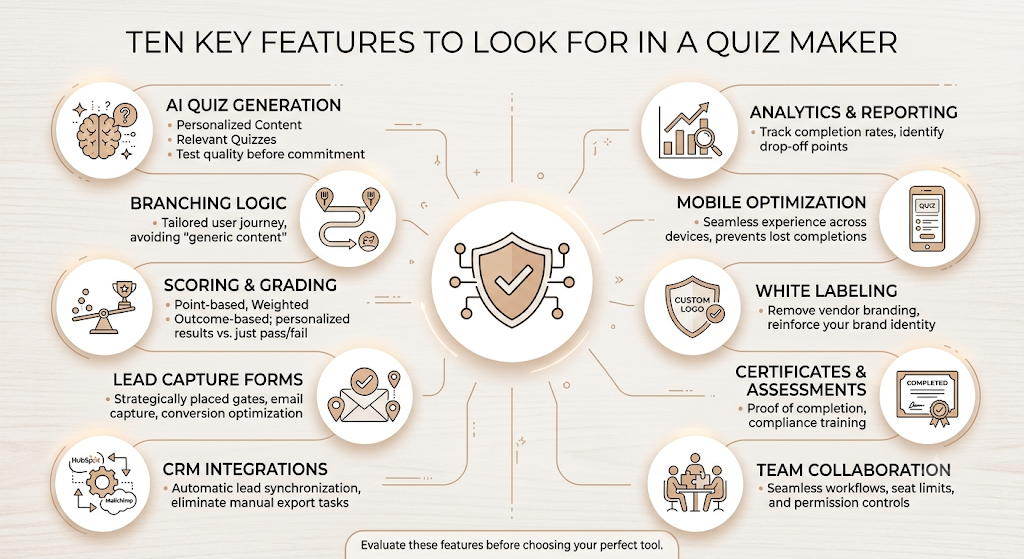
Before you commit a budget line to any tool on this list, run through these ten features and decide which ones are non-negotiable for your specific use case.
AI Quiz Generation. Most tools now offer some version of this, but quality varies enormously. AI helps create personalized, relevant quizzes that achieve high completion rates, often over 50%, because users exchange contact information for tailored results or recommendations rather than generic content. Test the AI on your actual topic before assuming it’ll save time.
Branching Logic. This is what separates a quiz from a glorified form. Without it, every respondent sees the same questions regardless of their answers, which defeats the point of personalization.
Scoring and Grading. Point-based, weighted, or outcome-based scoring determines whether your quiz can deliver a meaningful personalized result or just a pass/fail.
Lead Capture Forms. Where the email gate sits (before, during, or after the quiz) changes your conversion rate dramatically. Test placement before locking in a default.
CRM Integrations. A quiz that can’t get leads into HubSpot, Salesforce, or Mailchimp automatically just creates a manual export task nobody enjoys doing twice a week.
Analytics and Reporting. At a minimum, you need the completion rate and drop-off point by question. Anything less makes it impossible to fix a quiz that’s underperforming.
Mobile Optimization. Most quiz traffic now arrives on a phone. A builder that doesn’t preview cleanly on mobile will cost you completions you’ll never see in the data.
White Labeling. Removing vendor branding matters more for agencies and publishers than for internal HR quizzes, but check whether it’s gated behind an expensive tier before you assume it’s included.
Certificates and Assessments. Only relevant for training and education use cases, but essential if your quiz doubles as proof of completion for compliance purposes.
Team Collaboration. If more than one person will build or edit quizzes, confirm seat limits and permission controls before you hit a wall mid-project.
Emerging Trends in Quiz Maker Software for 2026
Quiz software hasn’t changed its core mechanics in years: ask a question, score an answer, but what’s happening underneath that mechanic in 2026 is worth paying attention to.
AI-generated quizzes have moved from novelty to default. Nearly every tool on this list, from Jotform to involve.me to ProProfs, now ships some version of “describe your quiz, and we’ll build it.” The gap has shifted from “does it have AI” to “is the AI output usable without heavy editing,” and that gap is still wide between platforms.
Personalized quiz paths are becoming the actual product, not the wrapper. Instead of quizzes existing purely as lead magnets, more brands are using them as the core experience, where the personalized recommendation itself is the value, and the email capture is secondary. Product recommendation quizzes lead this shift, particularly in e-commerce.
Quiz funnels are eating standalone quiz tools. involve.My entire pitch rests on this trend: a quiz that’s disconnected from what happens after someone finishes it is half a product. Expect more vendors to bolt on email automation, payment collection, and CRM sync rather than leaving that work to Zapier.
Advanced lead qualification is replacing simple lead capture. Quizzes appeal to marketers right now partly because privacy laws have made it harder than ever to collect customer data, and quizzes cut through that by gathering zero-party data, information a customer intentionally and proactively shares with a brand. That distinction matters more every year as third-party cookies keep eroding.
Compliance is no longer an afterthought feature. GDPR compliance, once a checkbox a handful of European-focused tools highlighted, now shows up as a buying criterion across the category, especially for publishers and corporate training platforms handling employee data.
The quiz maker market in 2026 is converging on two priorities: AI that genuinely speeds up quiz creation without producing generic output, and deeper integration between the quiz itself and what happens immediately after someone finishes it, whether that’s an email sequence, a CRM record, or a personalized product recommendation.
Final Verdict
Best Overall: Typeform. The design and completion-rate advantage justifies the price for brands that can absorb it.
Best for Lead Generation: Interact. Purpose-built, well-documented conversion numbers, and nothing extraneous to distract from the core job.
Best for Marketing Teams: Outgrow. One subscription covers quizzes, calculators, and chatbots instead of three separate tools.
Best Quiz Funnel Builder: involve.me. The only platform on this list where the quiz and the follow-up email sequence live in the same product.
Best Free Quiz Maker: Fillout. A genuinely usable 1,000-response free tier beats every other dedicated quiz builder’s free offering.
Best for Educators: Wayground (Quizizz). Self-paced flexibility solves the biggest frustration teachers have with Kahoot’s race-to-answer format.
Best for Enterprise Research: SurveyMonkey. Built for statistically defensible data collection at a scale most quiz-first tools were never designed to handle.
The right move isn’t picking the highest-ranked tool on this page. It’s matching the platform to the specific job, lead generation, classroom engagement, or compliance testing, and trusting that the best tool for that job is rarely the one with the biggest marketing budget.
If your team is building quizzes as part of a broader content or SEO strategy, the same principles that make a quiz convert (clear value exchange, fast load times, mobile-first design) apply directly to landing pages and lead magnets across your funnel.
Frequently Asked Questions
What is the best quiz maker tool?
There isn’t a single best tool, because “best” depends on your use case. Typeform wins on design, Interact wins on lead-generation conversion rates, ProProfs wins on corporate training and certification, and Kahoot wins on live classroom energy. Pick based on the job, not the overall ranking.
Which quiz maker is best for lead generation?
Interact is the most focused option, built from day one purely to convert quiz takers into email subscribers, with a documented 40.1% start-to-lead conversion rate. involve.me is the better pick if you also want the quiz connected directly to an automated email follow-up inside the same platform.
Are there free quiz maker tools?
Yes. Google Forms is free with no usage limits, though it’s basic. Fillout’s free plan allows unlimited quizzes and 1,000 monthly responses, which is the most generous limit among dedicated quiz builders. ProProfs and Kahoot also offer usable free tiers for smaller-scale use.
Can quiz maker tools integrate with CRM platforms?
Most marketing-focused quiz makers integrate with major CRMs either natively or through Zapier. involve. Me, Outgrow, Interact, and LeadQuizzes all offer native HubSpot and Salesforce connections. Education-focused tools like Kahoot and ClassMarker generally don’t, since CRM sync isn’t relevant to their use case.
What is the difference between a survey tool and a quiz maker?
A survey tool, like SurveyMonkey, is built to collect honest opinions and statistically valid data where there’s no “correct” answer. A quiz maker adds scoring logic, personalized outcomes, and often a lead capture mechanism, turning a question set into either an assessment or a marketing experience rather than pure research.
Can AI create quizzes automatically?
Yes, and this has become close to standard across the category. You typically provide a topic, a document, or a URL, and the AI generates questions, answer options, and sometimes scoring logic. Quality still varies significantly between tools, so test on your actual content before relying on AI output for a production quiz.
Which quiz maker is best for teachers?
It depends on the format you need. Kahoot suits live, in-class, competitive sessions where energy matters most. Wayground (formerly Quizizz) fits self-paced homework better, since students work at their own speed on individual devices. ProProfs and ClassMarker fit formal, graded assessments where the result needs to be defensible.
Is Involvement.me worth the price compared to Outgrow?
It depends on whether you need the built-in email automation. involve.My funnel-to-inbox workflow is genuinely differentiated, but its pricing gates A/B testing and tracking behind the $129-a-month Business tier. Outgrow starts cheaper and includes broader interactive content types like calculators and chatbots from a lower entry point.
Do I really need a paid quiz maker, or is the free tier enough?
For a quick internal poll or a single classroom quiz, free tiers like Google Forms or Kahoot’s basic plan are genuinely enough. Once you need branded design, weighted scoring, CRM sync, or response volumes above a few hundred a month, you’ll likely hit a wall that pushes you toward a paid tier within the first month or two of real use.