
Most landing pages don’t fail because of design. They fail because the words are vague. A visitor clicks an ad, scans the page for five seconds, can’t tell what’s on offer, and leaves. That’s your ad spend gone.
Writing the copy is the hard part. You need a clear headline, a sharp value proposition, some proof and a button that says something useful. Doing that for every campaign and every audience takes hours.
An AI landing page copy generator cuts that time sharply. You give it your offer, your target audience and their pain points, and it returns headlines, benefits and calls to action in minutes. Good ones also give you several copy variations to test.
But let’s be realistic. AI gives you a draft, not a finished page. It doesn’t know your customers, and it will happily invent claims. This guide shows you how to use it properly, from prompts to testing, so your AI-generated marketing copy earns its place in the marketing funnel.
Table of Contents
What Is an AI Landing Page Copy Generator?
An AI landing page copy generator is a tool that uses a language model to write landing page text, such as headlines, subheadings, benefits and calls to action, from the details you give it.
Understanding AI-Powered Copy Generation
Think of it as a fast first-draft writer. It has learned from huge amounts of marketing text, so it can produce a headline in almost any style you ask for. It doesn’t understand your business, though. It predicts likely words from your input. Weak input, weak copy.
How Does It Work?
You write a prompt. A good one covers the product, the audience, their customer pain points, the offer and the action you want. The model then writes to match.
Dedicated AI copywriting tools like Jasper and Anyword wrap this in templates and brand voice settings. A general assistant like ChatGPT gives you an open chat box where the prompt does all the work.
Who Can Benefit From Using It?
Solo founders and small teams get the most out of it. So do performance marketers who need ten campaign pages by Friday. Agencies use an AI landing page writer for first drafts across clients, and lead generation teams use it to localise pages for different regions. If you write landing pages even once a month, it saves real time.
Why Does Landing Page Copy Matter for Conversions?
Landing page copy matters because it decides whether a paid click becomes a lead or a bounce. If the words don’t explain the offer, the benefit and the next step quickly, people leave.
First Impressions Influence Visitor Decisions
Visitors decide fast. Picture someone tapping a festive sale ad from Flipkart or Nykaa on their phone. They want the offer, the deadline and the button before they scroll. That’s your above-the-fold content, and it has one job: prove they’re in the right place.
Clear Messaging Builds Trust
Trust comes from consistency. If the ad promises “Free demo class” and the page says “Learn more”, the user experience feels off. Visitors assume the rest of the process will be just as confusing.
The Connection Between Copy and Conversions
According to Unbounce’s 2024 Conversion Benchmark Report, the median landing page conversion rate across industries is 6.6%. The report covers about 41,000 landing pages, 464 million visits and 57 million conversions. SaaS pages sit lower, at a 3.8% median.
Two cautions. The data comes from pages built on Unbounce, so it leans toward marketers running dedicated campaign pages. And a median is not a target. Compare your page against your own industry and traffic source.
Unbounce’s 2024 Conversion Benchmark Report puts the median landing page conversion rate at 6.6% across industries, based on about 41,000 pages and 57 million conversions. SaaS pages convert lower, at a 3.8% median. Treat the figure as a reference point, not a goal, because the right benchmark depends on your industry, traffic source and offer.
Key Elements of a Successful Landing Page
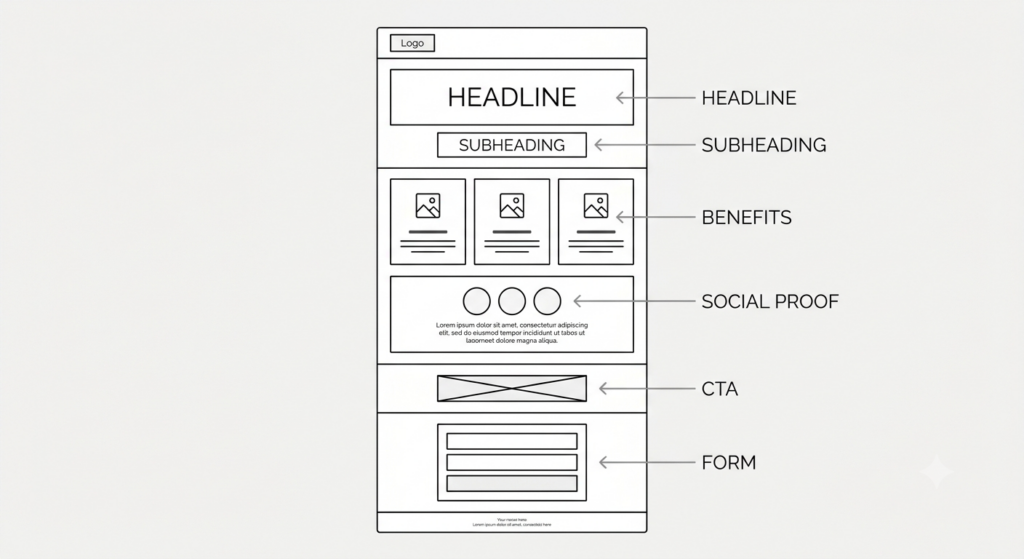
A high-converting landing page has six parts: a clear headline, a benefit-focused subheading, features tied to benefits, social proof, one strong call to action and a short form. Miss one and the page leaks conversions.
A Clear and Attention-Grabbing Headline
The headline states the outcome. “Welcome to our platform” says nothing. “Learn Meta Ads in six weeks” tells a beginner exactly what they get, and how long it takes.
A Benefit-Focused Subheading
The subheading backs up the headline with who it’s for and why it works. Keep it to one or two lines. It’s the second thing people read, so make it earn that spot.
Compelling Features and Benefits
Features describe the product. Benefits describe what changes for the customer. “24/7 chat support” is a feature. “Get an answer before your campaign wastes a day” is the benefit. Write both, benefit first.
Trust Signals and Customer Testimonials
Social proof lowers risk. Use named customer testimonials, review counts, client logos and real numbers. A quote from “Priya, performance marketer at a D2C brand” beats an anonymous five-star rating every time. Specific wins.
A Strong Call to Action
A landing page CTA should say what happens next. “Book my free demo class” beats “Submit”. Use one primary action per page, and repeat it where it makes sense, such as after the benefits and again at the bottom.
A Simple and Relevant Lead Form
Ask only for what you need. Name and email usually do it. Every extra field costs you sign-ups, and phone number fields hurt most on mobile-friendly landing pages.
How to Use an AI Landing Page Copy Generator Step by Step?
To use an AI landing page copy generator well, work through eight steps: define the goal, research the audience, list pain points, write a detailed prompt, generate headlines, draft benefits and CTAs, edit hard, then publish and measure. We’ll follow one running example: a six-week online digital marketing course for beginners.
Step 1: Define Your Product and Marketing Goal
Write one sentence about the product and one about the goal. For our course: “A six-week digital marketing course for beginners. Goal: 100 sign-ups for a free demo class.” One page, one goal. If you’re tempted to add a second goal, build a second page.
Step 2: Understand Your Target Audience
Describe who lands on this page and where they came from. In our example: recent graduates and career switchers, arriving from Instagram ads. Pull this from sales calls, surveys and reviews, not guesses. A visitor from a cold ad needs more reassurance than one from your email list.
Step 3: Identify Customer Pain Points
List what’s frustrating them, in their own words. “Too many free videos, no clear path.” Or “I have no portfolio to show employers.” These real lines often work better than anything the AI invents, so paste them straight into your prompt.
Step 4: Create a Detailed AI Prompt
Combine everything: role, product, audience, pain points, offer, tone, format and length. The more specific you are, the less generic the output. The prompts section below has five ready-made options you can adapt.
Step 5: Generate Headlines and Subheadings
Ask for ten headlines, not one. Pick the best two or three and rewrite them by hand. This is where a landing page headline generator earns its keep, because volume gives you options you’d never reach alone. Then ask for matching subheadings.
Step 6: Write Benefits, Features and CTAs
Turn each feature into a benefit. For the course, “live ad projects” becomes “build a campaign you can show employers”. Ask for several CTA button options too, and check that each one matches the offer in your ad.
Step 7: Review and Refine the Generated Copy
Read it aloud. Delete invented claims, stock phrases and anything you can’t prove. Add real testimonials. Then fit the copy to your brand voice, which usually means cutting a third of the adjectives.
Step 8: Publish and Measure Performance
Set up conversion tracking before you launch, not after. Then run your first A/B test on the headline. The first draft is a starting point, and nothing more.

Best AI Tools for Creating Landing Page Copy in 2026
You don’t need a paid generator to start. A general-purpose AI assistant such as ChatGPT, Claude or Gemini can write landing page content from a good prompt. Dedicated AI copywriting tools add templates, brand voice controls or testing. Prices below are in US dollars, checked in November 2026, and they change often. Confirm on each vendor’s pricing page before you buy.
| Tool | Best for | Starting price (USD) | Main limitation |
| ChatGPT | Flexible drafting | Free; Plus $20/month | No page builder or testing |
| Jasper | Brand voice for teams | Pro 69/month(59 billed yearly) | No free plan; Pro has one seat |
| Copy.ai | Marketing workflows | Chat $29/month (5 seats) | Focus has moved to go-to-market workflows |
| Anyword | Predictive scoring | Starter $49/month | Scores are estimates |
| Unbounce | Building and testing pages | Build $99/month | A/B testing starts at $149/month |
| Rytr | Tight budgets | Free; Unlimited $9/month | Plainer output |
ChatGPT for Flexible Copy Generation
Best for anyone starting out. There’s a free plan, and Plus costs $20 a month. It handles headlines, full drafts and rewrites well. The catch: it has no built-in page builder or testing, so your prompting skill does most of the work.
Jasper for Brand-Consistent Marketing
Built for marketing teams that care about voice. Pro costs $69 per seat monthly, or $59 billed yearly, and there’s no free plan, only a 7-day trial. It’s pricey for solo users, and Pro includes just one seat.
Copy.ai for Marketing Workflows
Copy.ai has shifted toward go-to-market workflows, which puts it closer to AI marketing automation than a pure writing tool. Its Chat plan costs $29 a month for five seats. Older reviews mention a free plan, but it has reportedly been retired, so check the pricing page first.
Anyword for Conversion-Focused Copy
Anyword scores your copy with predictive performance ratings. Starter is $49 a month, and Data-Driven is $99. Those scores are the tool’s estimates, not guarantees, and they can be less reliable for niche audiences.
Unbounce for Landing Page Creation and Optimisation
Unbounce builds pages and includes AI copy features. The Build plan is $99 a month, but A/B testing starts on the Experiment plan at $149. It’s worth it if you run paid traffic regularly. For one-off pages, it’s more than you need.
Rytr for Budget-Friendly Copywriting
Rytr’s free plan gives you 10,000 characters a month, and Unlimited costs $9. It’s cheap and simple. Expect plainer output, so plan to edit more.
Practical AI Prompts to Create Better Landing Pages
These five prompts work in any AI assistant. Replace the bracketed placeholders with your own details, and add real facts the AI can’t know, such as your price, your guarantee or a customer result. The more you give, the better the draft. Run each prompt two or three times, too. The second try is often sharper than the first.
Prompt 1: Generate Attention-Grabbing Headlines
Act as a conversion copywriter. Write 10 headlines for a landing page selling to [target audience]. Main benefit: [benefit]. Desired action: [action]. Keep each under 10 words. Use plain language, no hype words, and no claims beyond what I’ve given you.
Prompt 2: Write Benefit-Focused Landing Page Copy
Write landing page copy for . Audience: [target audience]. Pain points: [pain points]. Offer: [offer]. Include a headline, a subheading, three benefits and a short closing paragraph with a CTA. Write at a Grade 7 reading level. Don’t add any facts or numbers I haven’t supplied.
Prompt 3: Create Persuasive CTAs
Write 8 CTA button texts for visitors who need to [action]. Offer: [offer]. Keep each under five words. Make them specific and benefit-led. No “Submit” or “Click here”. Give me a one-line note on when each one works best.
Prompt 4: Rewrite Generic Copy in a Natural Brand Voice
Rewrite this copy for [brand]. Our tone is [tone: for example, friendly and direct]. Avoid these words: [list]. Use short sentences and contractions. Keep every fact unchanged. Copy: [paste copy].
Prompt 5: Generate Different Copy Variations
Write 3 variations of this headline for [target audience]: one benefit-led, one problem-led, one curiosity-led. Keep the offer, [offer], unchanged. Label each one so I can run an A/B test and know which angle won.
Real-World Example: Turning Weak Copy Into Stronger Copy
This is an illustrative example for a fictional online digital marketing course. It isn’t a measured conversion experiment, so don’t read it as proof of any lift. It simply shows what “more specific” looks like in practice.
Before: Generic Landing Page Messaging
- Headline: Best Digital Marketing Course Online
- Subheading: Learn digital marketing with our comprehensive program.
- CTA: Submit
After: Clear, Benefit-Driven Messaging
- Headline: Run Your First Paid Campaign in 6 Weeks
- Subheading: A beginner-friendly digital marketing course with live ad projects and mentor feedback.
- CTA: Book My Free Demo Class
Why the Revised Version Is Stronger
The old headline could describe any course on the internet. The new one names a result and a timeline. The subheading says who it’s for and what they’ll actually do. The CTA tells people what happens next, and that it’s free.
Nothing here is clever. It’s just specific. That’s the whole point.
Notice what the AI can and can’t do in a rewrite like this. It can offer ten versions of the headline in seconds. It can’t know that your mentors give live feedback. That detail has to come from you.
Best Practices for Getting Better Results From AI-Generated Copy
The best results come from specific prompts, human editing and fact-checking. AI speeds up drafting. It doesn’t replace judgement, and it can’t replace customer research.
Give AI Specific Instructions
Include audience, pain points, offer, tone and length. Vague prompts produce vague copy. If the first output is bland, the fix is usually a better prompt, not a different tool.
Maintain a Consistent Brand Voice
Paste two or three samples of your best writing into the prompt, and say what you like about them. Then edit the output until it sounds like you. Your visitors should feel the same voice on the ad, the page and the email.
Use Simple and Conversational Language
Short sentences. Common words. If a sentence needs two reads, rewrite it. Persuasive sales copy sounds like a confident person talking, not a brochure.
Focus on Customer Benefits
Lead with what the customer gains, then explain how. Features come second. AI tends to describe the product, so you’ll often need to flip its paragraphs around.
Verify Facts and Avoid Unsupported Claims
AI can state made-up numbers with total confidence. Check every statistic, price and promise before publishing. If you can’t source a claim, cut it.
Review Copy on Mobile Devices
Most visits happen on phones, so read the page there. Check that the headline, CTA and form fit without awkward scrolling, and that long lines don’t turn into walls of text.
Common Mistakes to Avoid When Using AI for Landing Pages
Most AI landing page mistakes come from skipping the human steps. Here are six that show up again and again.
Publishing Generated Content Without Editing
Raw AI copy sounds like everyone else’s. Visitors notice, even if they can’t say why. Always edit.
Using Generic Headlines
“Grow your business today” fits every company on earth. That’s exactly the problem. Name the outcome and the audience.
Adding Too Many Calls to Action
Three different buttons split attention. Pick one primary action and let everything on the page point to it.
Ignoring Customer Research
AI can’t interview your buyers. You can. Skip this step and you’ll get polished copy that answers questions nobody asked.
Making Unverified Marketing Claims
“Guaranteed results” or “number one” can cause legal and trust problems. Only claim what you can prove, and say how you measured it.
Forgetting to Test Different Versions
One version is a guess. Two versions give you data. Even a simple headline test teaches you something about your audience.
How to Measure and Improve Landing Page Performance?
You improve a landing page by measuring it. Conversion rate optimization means testing changes against real visitor data, instead of assuming your first AI draft is the best one. It rarely is.
Track Conversion Rates
Set up conversion tracking in Google Analytics 4 or your ad platform. Record form submissions and button clicks, and split them by traffic source. A page can convert well from email and badly from cold ads.
Test Headlines and CTAs
Run A/B testing for landing pages one change at a time, starting with the headline. Give each test enough visitors before declaring a winner. Calling it early is a common error, and it leads to false wins.
Analyse Visitor Behaviour
Heatmaps and session recordings show where people stop reading or abandon the form. Microsoft Clarity and Hotjar both offer these. If everyone drops off at the form, shorten it.
Improve Copy Based on Actual Results
Feed what you learn back into your prompts. If a problem-led headline wins, ask the AI for ten more like it. Then test again. This loop is where the real gains come from.
The Future of AI-Powered Landing Page Copywriting
Tools are changing fast, but the fundamentals haven’t moved. A clear offer, an honest message and a good test still beat any feature. Here’s what’s visible today, without guessing too far ahead.
More Personalised Marketing Experiences
Platforms like Unbounce already offer AI traffic routing, which sends visitors to the page variant most likely to convert for them. That’s personalisation at the page level, and it needs enough traffic to work.
Smarter Content Generation
Tools such as Anyword now add predictive scoring to drafts, and general assistants keep getting better at following brand voice. Treat the scores as estimates and keep testing.
The Continued Importance of Human Creativity
AI doesn’t know your customers. Insight, taste and honesty still come from people, and those are what make conversion-focused content work.
Conclusion
An AI landing page copy generator saves hours on first drafts. But the gains come from specific prompts, honest claims and steady testing, not from the tool alone. Human judgement still decides what ships.
Start small. Pick one landing page, write a detailed prompt, edit the output and test two headlines. You’ll learn more from that one experiment than from reading ten more guides.
If you want to build this skill properly, from prompting to measuring results, the YUP AI Marketing course walks you through it with practical projects.
FAQ: Frequently Asked Questions
What is the best AI tool for writing landing page copy?
There’s no single best tool. ChatGPT or another general assistant suits most beginners, Jasper suits teams that need brand voice controls, and Anyword suits performance-focused marketers. Pick based on budget and workflow.
Can AI generate an entire landing page?
Yes, it can draft every text section. You still need real proof, a fact-check and a design, and a builder such as Unbounce can handle layout.
Is there a free AI tool for landing page copy?
Yes. ChatGPT has a free plan, and Rytr offers 10,000 characters a month at no cost. Free plans come with usage limits.
Can AI-written landing pages convert visitors into customers?
Yes, if the copy is accurate, specific and tested. Conversion depends on the offer, audience match and testing, not on who wrote the first draft.
How do I write a good prompt for landing page copy?
Include the product, audience, pain points, offer, desired action, tone and format. Then ask for several options and edit the best one.
Does Google penalise AI-generated landing page content?
Not for using AI itself. Google’s spam policy targets scaled content created mainly to manipulate rankings, however it’s made, and helpful, original pages are fine.
Should I edit AI-generated copy before publishing?
Yes, always. AI can invent facts and miss your voice. A short human pass for accuracy, tone and claims takes minutes.