

Most email teams don’t struggle with sending. They struggle with everything around it. Someone builds segments by hand. Someone writes four versions of the same email. Someone schedules it. A week later, everyone stares at a dashboard asking what to change next. That loop eats days. Multiply it by every campaign and the cost is obvious.
Generative AI fixed the copy part. It never touched the decisions. An AI agent for email marketing goes further: it analyzes your data, recommends or makes decisions, takes the actions you’ve permitted, evaluates results, and adjusts what happens next.
Quick distinction. An AI assistant helps with individual tasks. Traditional automation follows rules you wrote in advance. An agent works toward a defined objective using data, tools, and permissions.
None of this replaces email marketers. It changes where their time goes. This guide covers capabilities, platforms, implementation, limitations and the human oversight that keeps it all safe.
Table of Contents
What Is an AI Agent for Email Marketing?
An AI agent for email marketing is software that pursues a campaign goal, such as more repeat purchases, by reading customer data, taking permitted actions and learning from the results.
AI Assistant vs. AI Agent vs. Traditional Automation
| Approach | How it works | Example |
| Generative AI | Produces content when prompted | Creates subject lines |
| Traditional automation | Follows predefined rules | Sends an abandoned-cart email |
| AI optimization | Predicts or recommends | Suggests a sending time |
| AI agent | Works toward a goal using data, actions, and feedback | Analyzes an audience, recommends campaign actions, evaluates results |
The word “agent” now gets stuck onto everything. So judge the capability, not the label. Klaviyo’s Composer, which entered public beta on June 30, 2026, builds campaigns from a prompt. Yet nothing goes live without approval. Mailchimp’s Analytics AI, launched May 28, 2026, analyzes campaign and store data and recommends next steps. It recommends; it doesn’t send. HubSpot’s campaign agent drafts assets that stay unpublished until you review them.
Generation, recommendation, approval, execution. Those are four different things. Vendors blur them constantly. Ask which one you’re buying.
Also Read: Agentic AI vs AI Agents: Key Differences
How an AI Agent Actually Works
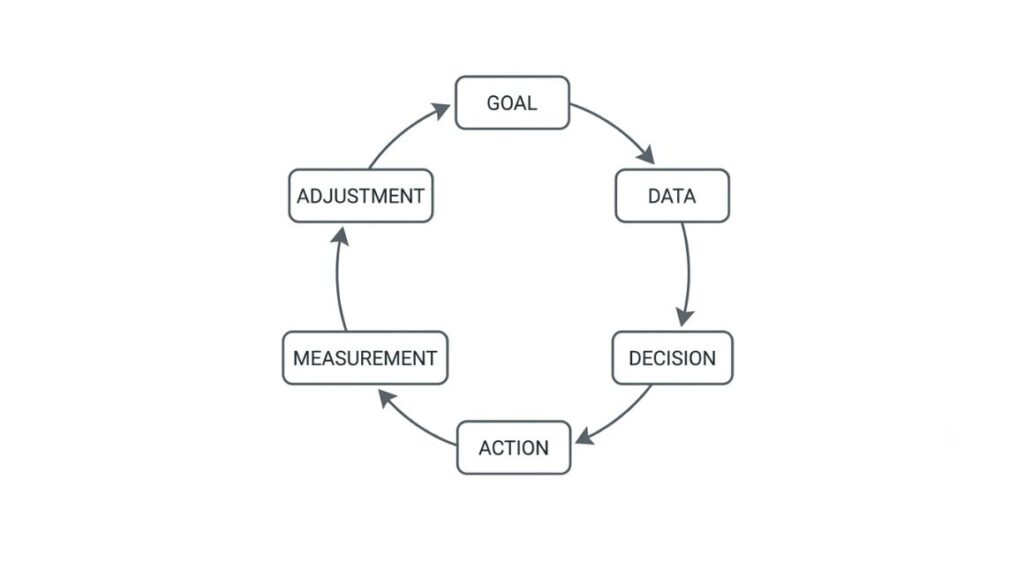
Picture a loop: data, goal, decision, action, measurement, adjustment. The agent reads inputs like email engagement, purchase history, website behavior, lifecycle stage, product data, campaign history, CRM information, and subscriber preferences. It weighs them against the goal you set, chooses an action, performs it within its permissions, measures what happened, and feeds that back into the next decision.
Here’s the catch. Poor data and broken tracking produce poor recommendations, delivered with total confidence.
What Can an AI Agent Do in Email Marketing?
An AI agent for email marketing can segment audiences, write and vary content, personalize by behavior, time sends, run tests and turn reports into next steps. Each task is useful alone. The value shows up when they’re connected to one goal.
Audience Segmentation
Agents spot patterns that fixed rules miss, using purchase frequency, engagement, product interests, lifecycle stage, churn signals, and recent behavior. A rule-based segment says “bought in the last 90 days.” A behavior-based one says “bought twice, browsed a new category this week, and stopped opening emails two weeks ago.” That second group needs a different message, and a static rule rarely finds it.
Email Content and Subject Lines
Subject lines, preheaders, body copy, CTAs, product recommendations, and dynamic content variations are all fair game. Still, writing is the easy part. What makes a draft land is context: what this customer bought, what they ignored, what they probably need next.
Personalization at Scale
“Hi Sarah” is personalization in the loosest sense. Behavioral personalization uses what Sarah actually did, like the running shoes she viewed twice or the order she placed last month. Push it too far and it feels creepy. Get it wrong and it’s just irrelevant, like recommending the item she already returned.
Send-Time Optimization
Using predictive analytics, these systems study when each subscriber tends to engage and suggest a better window for them. Treat the lift as a hypothesis to verify, not a promise.
Also Read: AI Agent for Customer Engagement: How to Deploy One That Works (2026)
A/B Testing and Experimentation
Agents can test subject lines, CTAs, content, offers, timing, and audience variations faster than a person can set them up. Speed doesn’t replace thinking, though. You still need a meaningful hypothesis and reliable measurement, or you’ll just collect noise faster.
Campaign Reporting and Next-Best Actions
“Your CTR decreased” tells you nothing. A useful recommendation names the affected audience, a likely cause, and a next test: click-through dropped among first-time buyers, probably because they received the same product set twice, so test a category-led version next.
An AI agent can segment, personalize, time, test, and report on email campaigns, but the value comes from connecting those tasks to a single goal and a reliable data set. Content generation alone is the smallest part of the opportunity.
AI Agent vs. Traditional Email Marketing Automation
Traditional automation runs the path you built. An AI agent for email marketing works toward an outcome and can change the path.
| Traditional Automation | AI Agent |
| Predefined workflows | Goal-oriented workflows |
| Fixed conditions | Can evaluate changing signals |
| Human builds most logic | AI can suggest or construct logic |
| Manual optimization | Continuous recommendations |
| Reactive | Potentially proactive |
| Rule-based segmentation | Dynamic or predictive segmentation |
| Reports results | Can recommend next actions |
Take a VIP list. Traditionally, someone defines VIP as anyone above a spend threshold, and fixed email workflows treat that list the same way until a person edits it. An agent can notice VIPs drifting away and propose a new segment. A human still approves.
A Simple Abandoned-Cart Example
Traditional approach:
- Cart abandoned.
- Wait two hours.
- Send email.
- Wait 24 hours.
- Send discount.
Agentic approach:
- Cart abandoned.
- Evaluate customer and product context.
- Select or recommend an appropriate message.
- Determine whether an incentive is necessary.
- Recommend or select timing.
- Monitor the result.
- Recommend the next action.
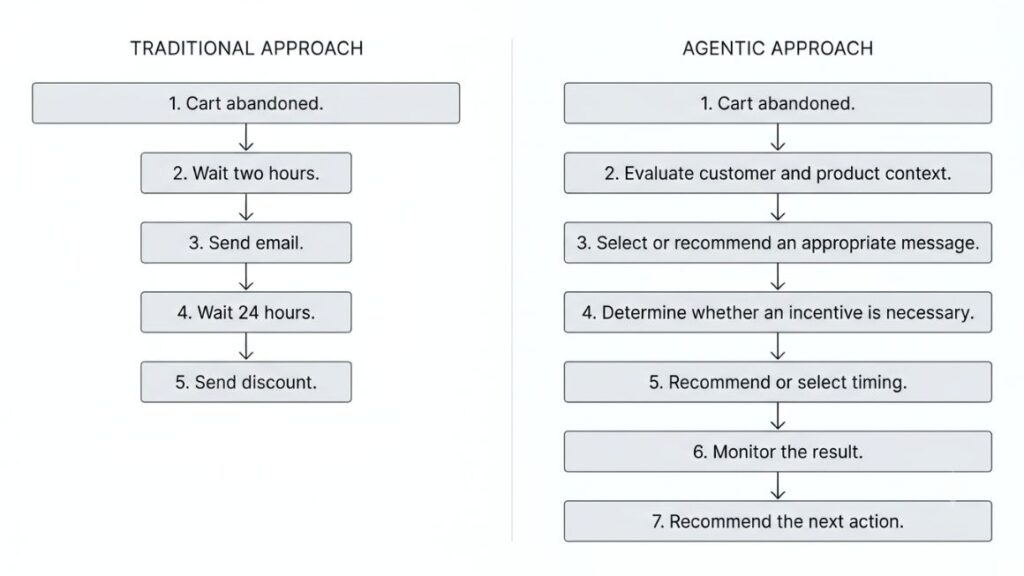
The second path demands stronger data access, permissions, and governance. It also needs accurate behavioral triggers, like checkout events, to know a cart was actually abandoned.
Best Use Cases for Email Marketing AI Agents
The best fits for an AI agent for email marketing are programs with rich behavioral data and repeatable decisions: ecommerce, SaaS, lifecycle-driven B2B, and small teams drowning in repetitive work.
Ecommerce
Abandoned carts, product recommendations, post-purchase journeys, replenishment, win-back campaigns, and VIP campaigns all benefit. Ecommerce suits agents because every browse, purchase, and return leaves a trail of behavioral and transactional data. That trail covers the whole customer lifecycle, from first order to lapsed buyer. A replenishment email for a skincare refill should depend on when the last bottle was bought, not on a calendar.
SaaS
Trial onboarding, feature adoption, product education, churn prevention, and upgrade campaigns are natural targets. Product behavior decides the message. A trial user who never connected an integration needs a different email than one who invited five teammates, and an account bumping against a usage limit is a better upgrade candidate than one that logged in once.
B2B
Lead nurturing, event follow-up, content recommendations, lead qualification, and sales handoff fit well, especially when paired with lead scoring. Keep one line clear, though. Lifecycle marketing to people who opted in is a different thing from unsolicited cold outreach, and agents shouldn’t blur it.
Small Businesses and Solo Marketers
A small team can hand off the repetitive layer: campaign planning, reporting, segmentation, content variations, and follow-up recommendations. That frees two people to spend their hours on offers and creative instead of spreadsheets. One caveat. A small list gives an agent less data to learn from, so lean on recommendations before full autonomy.
How to Choose the Right AI Email Marketing Agent?
Choose by what the agent can access, what it’s allowed to do, and how well it fits your stack. Feature demos matter less than those three answers.
1. Data Access
Check access to customer profiles, purchase data, website behavior, campaign history, and CRM data. An agent that can’t see the full customer is guessing, and a guess dressed up as a recommendation is worse than none.
2. Level of Autonomy
Ask plainly. Does it only generate content? Can it create segments, build workflows, or schedule campaigns? Can it make changes on its own, or does it require approval? The answers place a tool somewhere between copywriter and agent.
3. Integrations
Confirm compatibility with your CRM, ecommerce platform, email platform, analytics, and customer data platform. A brilliant agent stuck outside your data is a demo, not a deployment. Native connectors beat workarounds, because every manual export is a place for data to go stale.
4. Brand Controls
Look for brand voice settings, restricted language, product exclusions, approval workflows, and regional requirements. If a tool can’t be told what never to say, it will eventually say it.
5. Analytics and Attribution
Find out whether it connects activity to revenue, conversions, segment performance, and campaign performance, and whether those results shape future recommendations. Reporting that never loops back isn’t learning.
6. Deliverability Controls
Check support for authentication, suppression, unsubscribes, engagement, sending volume, and spam complaints. Ask what happens when complaints rise. Does the agent slow down, or keep sending?
Popular AI Email Marketing Platforms and What They Are Actually Good At
Each AI Email Marketing Tools platform fits a different business model, data environment, and appetite for automation, so read this as a use-case comparison, not a ranking. No marketing automation platform wins everywhere, and features change fast, so verify before you buy.
Klaviyo
Built for ecommerce and customer-data-driven lifecycle marketing. Klaviyo describes itself as an autonomous B2C CRM, and its Composer agent generates campaigns and flows from a single prompt using real-time profile data. The company states that nothing goes live without human approval. It’s strongest when store data is your engine, and less obviously suited to B2B.
HubSpot
The pick when email lives inside a CRM and a B2B funnel. At UNBOUND in September 2026, HubSpot rebuilt Breeze Assistant to coordinate campaign, content, and nurture agents inside Marketing Studio, and the nurture agent personalizes each email in a sequence using CRM data. Agent usage runs on a credit system, so watch consumption as you switch agents on.
Mailchimp
Friendly for small businesses and teams that value accessibility. Intuit Assist drafts content, Analytics AI answers performance questions conversationally, and a Mailchimp app now works inside ChatGPT and Claude for drafting campaigns. Mailchimp describes fuller agentic execution as the direction ahead, but today a human launches. AI features also depend on your plan, so confirm before committing.
ActiveCampaign
Suits teams that want advanced automation and detailed customer journeys. Its Active Intelligence layer includes Predictive Sending, which picks a send time for each recipient. Several of its agents have been in beta, and some AI features sit on higher plan tiers, so check what your plan actually includes.
How to Implement an Email Marketing AI Agent Without Creating a Mess?
Start with one goal, one workflow, and firm limits, then expand only when the numbers justify it. Introducing an AI agent for email marketing in that order costs a few weeks of setup. Skipping it can cost months of cleanup.
Step 1: Define One Business Goal
Pick a single outcome: more repeat purchases, lower churn, better trial activation, or more qualified leads. Write it as a number you can check. Resist the urge to automate the entire email program on day one.
Step 2: Audit Your Data
Check contact fields, event tracking, purchase information, consent records, duplicate profiles, suppression lists, and historical campaign data. A duplicate profile can receive the same email twice. An outdated consent record can turn a send into a compliance problem. Fix what’s broken first, because agents amplify bad data.
Step 3: Establish a Baseline
Record click-through rate, conversion rate, revenue per recipient, unsubscribe rate, spam complaints, and conversion by segment. Segment-level numbers matter because an average can hide a group quietly getting worse. Open rates alone shouldn’t decide anything, since they’re a noisy signal that says little about revenue.
Step 4: Start With One Workflow
Good first picks include campaign analysis, segmentation recommendations, send-time optimization, win-back campaigns, and subject-line testing. Choose the one where a mistake is cheap and a win is easy to measure.
Step 5: Create Guardrails
Write the boundaries down before switching anything on. The agent can:
- Analyze campaigns
- Recommend segments
- Draft emails
- Recommend timing
- Suggest experiments
The agent cannot:
- Ignore unsubscribe requests
- Override suppression rules
- Make unsupported claims
- Change sensitive offers without approval
- Send sensitive campaigns without appropriate review
Step 6: Keep Human Approval Where It Matters
Automate repetition, not responsibility. Human-in-the-loop means a person reviews and approves an agent’s output before it reaches customers. Klaviyo says nothing from Composer goes live without approval, and HubSpot’s campaign agent leaves its drafts unpublished until someone reviews them. Treat that pause as a feature, not friction.
Step 7: Expand Gradually
Move through the stages in order: Analyze → Recommend → Draft → Execute with approval → Limited autonomous execution → Continuous optimization. Earn each step with a clear result.
Start with one measurable goal, clean data, and a baseline, then let the agent move from analysis to drafting to approved execution. Expand autonomy only as results justify it, and keep human approval on sensitive sends.
AI, Email Deliverability, and Compliance: What Marketers Cannot Ignore
An AI agent for email marketing makes campaigns easier to produce, which makes deliverability and compliance easier to damage. The rules haven’t relaxed because the tools got faster.
More AI-Generated Emails Do Not Automatically Mean Better Results
Extra volume tends to bring spam complaints, unsubscribes, subscriber fatigue, and a weaker sender reputation. AI should increase relevance, not simply increase volume.
Gmail’s Current Sender Requirements
According to Google’s Email sender guidelines FAQ, anyone sending close to 5,000 messages a day to personal Gmail accounts is a bulk sender, and that status is permanent. Bulk senders must authenticate with both SPF and DKIM, publish a DMARC record (p=none at minimum), and include one-click unsubscribe in marketing messages.
Google also recommends honoring unsubscribes within 48 hours, keeping the user-reported spam rate below 0.1%, and never letting it reach 0.3%. Since November 2025, Gmail has enforced these rules harder, with temporary and permanent rejections.
Gmail treats anyone sending about 5,000 or more messages a day to personal accounts as a permanent bulk sender. That means SPF, DKIM, a DMARC record, one-click unsubscribe on marketing mail, and a spam rate kept below 0.1%, according to Google’s Email sender guidelines FAQ.
Privacy and Customer Data
Build on consent and first-party data, collect only what you need, restrict who and what can access it, and treat sensitive information carefully. India’s DPDP Rules were notified on November 14, 2025, with notice and consent obligations phasing in over 18 months. Using AI doesn’t make an email program GDPR compliant.
Common Mistakes When Using AI for Email Marketing
Most failures trace back to six habits, and nearly all of them come from moving too fast.
Mistake 1: Treating an AI Copywriter as an AI Agent
Generating text isn’t the same as managing a campaign. A tool that only drafts subject lines isn’t an AI agent for email marketing, however it’s labeled. Ask what it decides, what it does, and what it measures.
Mistake 2: Giving AI Too Much Autonomy Too Early
Sending, segmentation, workflow changes, offers, and subscriber management all carry real risk when nobody checks them.
Mistake 3: Using Poor Customer Data
Garbage in, garbage out. Duplicates, stale consent records, and broken event tracking turn smart tools into expensive mistakes.
Mistake 4: Optimizing Only for Open Rates
Opens are easy to count and easy to misread. Shift your attention to revenue, conversions, and unsubscribes, which show whether the email did its job.
Mistake 5: Sending More Because AI Makes It Easy
Volume without relevance hurts subscriber engagement and sender reputation alike. An agent that can send ten emails a week hasn’t proven you should.
Mistake 6: Removing the Human Voice
Keep people involved for brand storytelling, sensitive announcements, humor, crisis communication, and major promotions.
What Is Changing in AI Email Marketing in 2026?
The shift in 2026 is from tools that write to tools that decide, and an AI agent for email marketing is the clearest example.
From Content Generation to Decision-Making
The request is moving from “write an email” toward “determine what this audience needs and what we should do next.” Klaviyo’s Composer, HubSpot’s campaign agent, and Mailchimp’s Analytics AI all reflect that move, each at a different level of autonomy.
AI-Native Email Platforms
Three types now coexist: a traditional email platform with added AI features, an AI-enhanced marketing platform, and an AI-native or agentic platform built around goals. Klaviyo calls itself an autonomous B2C CRM. Treat labels with caution.
Human-in-the-Loop Becomes a Feature
Approval and governance aren’t signs of weak AI. They’re what makes it safe to give an agent real access to customers.
Deliverability Becomes More Important
The easier emails are to create, the more relevance and sending discipline decide who reaches the inbox.
Marketing Software Becomes More Conversational
You describe a goal in plain language instead of configuring every step by hand. HubSpot’s rebuilt Breeze Assistant works this way, and Mailchimp’s app inside ChatGPT and Claude lets you draft campaigns by chatting.
A Practical 30-Day Plan to Start Using an AI Email Agent
[IMAGE: four-week timeline graphic: Audit, Pilot, Test, Review]
Starting with an AI agent for email marketing doesn’t need a big-bang rollout. Run one measured pilot for 30 days, then decide with evidence.
Week 1: Audit
Review your data and existing automations, identify repetitive tasks, and establish baseline metrics. Check that tracking, consent, and suppression lists work before an agent touches them. Pick the single workflow that eats the most hours.
Week 2: Pilot
Build one controlled flow: win-back campaign → AI segmentation → AI copy variations → human approval → controlled send. Keep the test audience small enough to limit risk, and write down what the agent may change and what it may not.
Week 3: Test
Compare the AI-assisted workflow against your existing one across audience segments, messages, and timing. Hold a control group back so the comparison is fair, and let the test run long enough to produce meaningful results, even if early numbers look exciting.
Week 4: Review
Measure time saved, revenue impact, conversion, unsubscribes, deliverability, and how much human editing was required. Then decide: expand, modify, or abandon, based on evidence rather than enthusiasm. Abandoning is a legitimate result.
Conclusion
Using an AI agent for email marketing well comes down to a few key ideas. AI can reduce repetitive work, from segmentation to reporting. The bigger opportunity is better decision-making, not faster copy. Data quality determines how useful AI is, and human oversight remains important, especially for sensitive sends and major promotions. Deliverability can’t be ignored either. Start with one measurable workflow and expand only after proving results.
The goal isn’t to send more emails. It’s to make better decisions about which email should go to which person, when it should go, and what should happen next.
FYQs
What is an AI agent for email marketing?
An AI agent for email marketing is software that works toward a campaign goal, such as more repeat purchases, by analyzing customer data, recommending or taking permitted actions, measuring results, and adjusting future activity.
How is an AI agent different from an AI email writer?
An email writer produces content when prompted. An agent works toward a goal: it analyzes data, decides what to do, acts within its permissions, and checks the outcome. Writing is just one task it may perform.
Can AI agents automatically send emails?
Some can, but autonomy varies by platform, permissions, and workflow. Klaviyo says campaigns need approval, and HubSpot’s campaign agent leaves drafts unpublished until reviewed.
Can an AI agent personalize every email?
Technically yes, but quality depends on reliable data. Personalization runs from a first name to behavior-based content, and thin data leads to irrelevant or intrusive messages.
What data does an AI email marketing agent need?
Engagement, purchases, customer profiles, website activity, campaign history, and subscriber preferences, plus consent records. Clean, connected data matters more than sheer volume.
Are AI-generated emails safe for deliverability?
Not automatically. AI generation doesn’t guarantee inbox placement. Authentication, relevance, honest unsubscribe handling, and low spam complaints still decide where email lands.
Will AI agents replace email marketers?
Unlikely. Responsibilities shift toward strategy, oversight, and judgment while repetitive tasks shrink. Marketers who can set goals, review output, and read results gain the advantage.
What is the best AI agent for email marketing?
The best AI agent for email marketing is the one that fits your business model, data, integrations, autonomy needs, controls, and budget. Ecommerce, B2B, and small teams often land on different platforms.