

Most teams pick an online form builder the way they pick a coffee shop they’re walking past. Whatever’s closest, whatever a colleague mentioned last week, whatever shows up first in a Google search. Then six months later, they’re stuck paying for a tool that caps them at 100 submissions a month, or one that can’t handle a simple payment field, or one that locks conditional logic behind a $99/month plan they didn’t know existed.
That’s an expensive way to learn what you actually need. Forms aren’t a side project. They’re how you capture leads, run surveys, process event registrations, and collect payments without writing a line of code. Get the choice wrong and you either bleed money on features you’ll never use, or you outgrow your tool right when it matters most, mid-launch, mid-campaign, mid-quarter.
This guide breaks down the best online form builder tools available in 2026, what they’re actually good at, what they cost once you account for the fine print, and which one fits your specific use case. Whether you’re comparing options for lead generation, surveys, payment collection, or enterprise workflows, you’ll find a clear answer here instead of another generic “top 10” list.
Table of Contents
What Is an Online Form Builder?
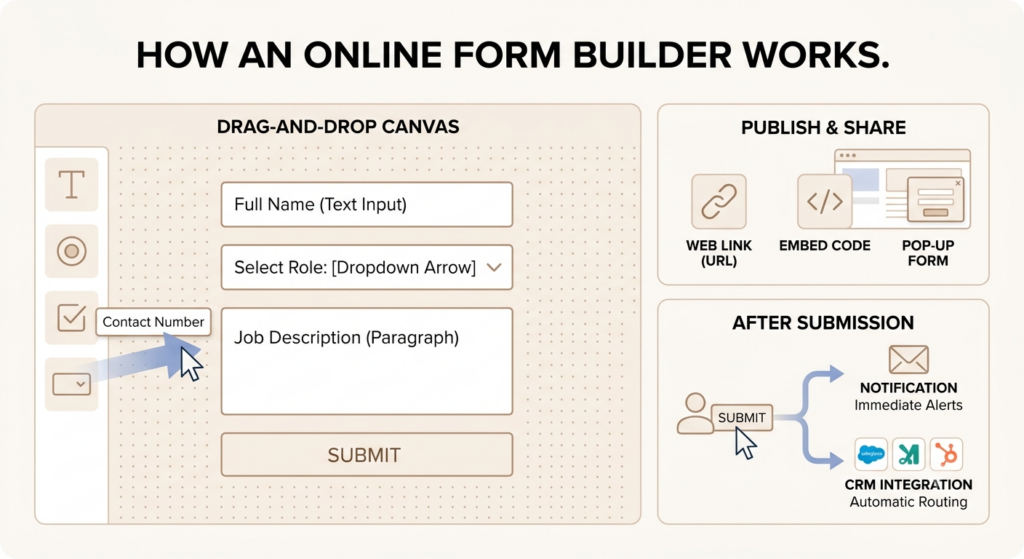
An online form builder is software that lets you create, publish, and manage digital forms without coding, whether that’s a lead capture form, a job application, or a payment page. You drag fields onto a canvas, set up logic, and share a link. No developer required.
That sounds simple. It mostly is. But the gap between “simple” and “actually useful” is where most of these tools either earn their subscription fee or waste it.
How Online Form Builders Work
Every form builder runs on the same basic skeleton: a drag-and-drop interface, a library of templates, and a way to publish and share what you build. The differences show up in the details.
The editor is where you spend most of your time. Drag a text field here, a dropdown there, and rearrange with your mouse. Jotform and Paperform lean toward visual, document-style canvases. Cognito Forms and WPForms feel closer to spreadsheet logic, built for calculations and conditional rules rather than visual flair.
Templates matter more than people expect. Jotform ships with over 10,000 of them, spanning industries from healthcare intake to event RSVPs. Starting from a blank canvas works fine for a simple contact form. It’s painful for a 40-field job application.
Once the form is built, publishing is the easy part. You get a hosted link, an embed code for your website, or a pop-up trigger. Most tools support all three. The real test is what happens after someone hits submit, where the data goes, how fast you’re notified, and whether it routes into your CRM automatically.
Common Use Cases
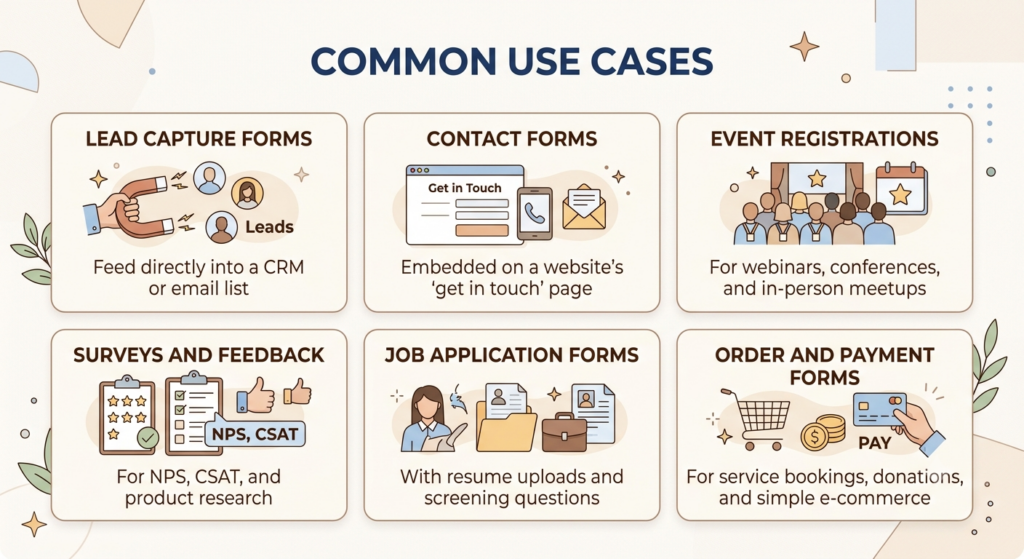
Forms show up everywhere in a typical business, often doing more work than people realize:
- Lead capture forms that feed directly into a CRM or email list
- Contact forms embedded on a website’s “get in touch” page
- Event registrations for webinars, conferences, and in-person meetups
- Surveys and feedback forms for NPS, CSAT, and product research
- Job application forms with resume uploads and screening questions
- Order and payment forms for service bookings, donations, and simple e-commerce
A D2C brand running a giveaway might use a form for lead capture and entry collection, the same way Mamaearth has used branded forms and landing pages to gather customer data during product launches. A SaaS company onboarding new users might lean on a multi-step form to collect billing details and preferences in one flow.
An online form builder is no-code software for creating digital forms, typically combining a drag-and-drop editor, prebuilt templates, and hosted or embeddable publishing. The most common business use cases are lead capture, surveys, event registrations, job applications, and payment collection, and the right tool depends heavily on which of these is the primary job.
Key Features to Look for in an Online Form Builder
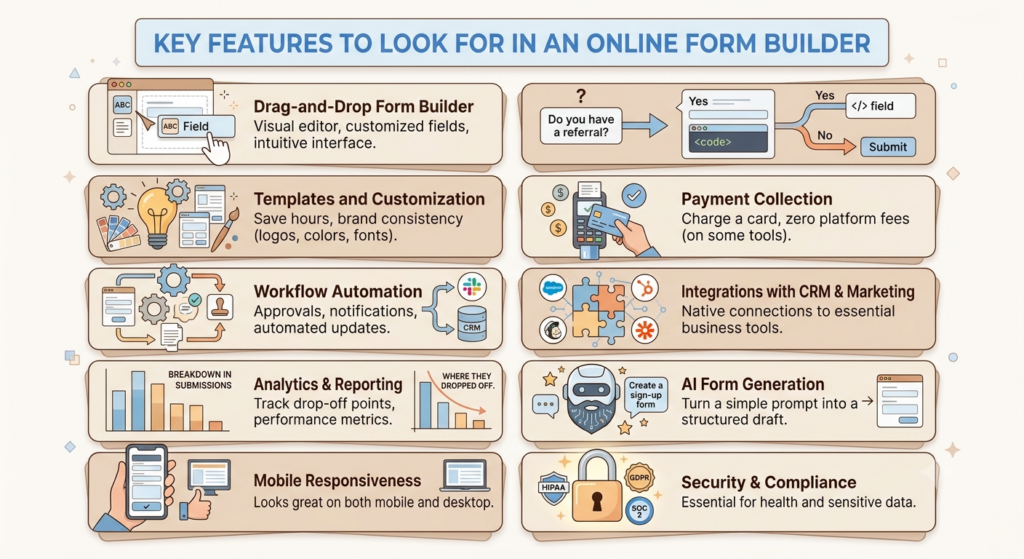
The features that separate a decent form builder from a genuinely useful one rarely show up on the pricing page’s first glance. They show up three months in, when your form needs to do something slightly more complicated than collect a name and email.
Drag-and-Drop Form Builder
This is table stakes now. Every tool on this list offers a visual editor where you add and arrange fields without code. What varies is how much you can customize once the field is placed, font, spacing, conditional styling, and whether the editor feels intuitive or like fighting with a clunky interface.
Conditional Logic and Branching
Conditional logic shows or hides fields based on a respondent’s previous answers. Ask “Do you have a referral code?” and only show the code field if they say yes. This single feature is the difference between a form that feels smart and one that feels like a static PDF.
Templates and Customization
Good templates save hours. Better customization options mean the form actually looks like it belongs on your brand’s website instead of a generic SaaS dashboard.
Payment Collection
If your form needs to charge a card, this becomes the single most important feature on the list. Some tools, like Jotform and Paperform, charge zero platform fees on payments. Others, like Typeform, restrict payment fields to their priciest plan.
Workflow Automation
Automation routes submissions where they need to go: an approval chain, a Slack notification, a CRM update. Formstack and Cognito Forms build entire product lines around this.
Integrations with CRM and Marketing Tools
A form that doesn’t talk to your CRM is a dead end. Look for native connections to Salesforce, HubSpot, Mailchimp, and Zapier at a minimum.
Analytics and Reporting
Basic reporting tells you how many people submitted. Good reporting tells you where they dropped off, which is the metric that actually helps you fix a broken form.
AI Form Generation
Describe what you need in a sentence and get a working draft back. SurveyMonkey, Zoho Forms, and Feathery have all shipped AI form generators that turn a prompt into a structured form in seconds.
Mobile Responsiveness
More than half of form traffic now arrives on a phone. A form that looks great on desktop and breaks on mobile isn’t done yet.
Security and Compliance
HIPAA, GDPR, SOC 2. If you’re collecting health data, EU resident data, or anything regulated, this isn’t optional. Jotform, Cognito Forms, and Formstack all offer HIPAA compliance, but typically only on mid-tier plans and above.
Across industry comparisons of form builder software in 2026, conditional logic, payment processing, CRM integrations, and AI-assisted form generation consistently rank as the features buyers weigh most heavily, ahead of pure design polish.
How We Evaluated the Best Online Form Builders
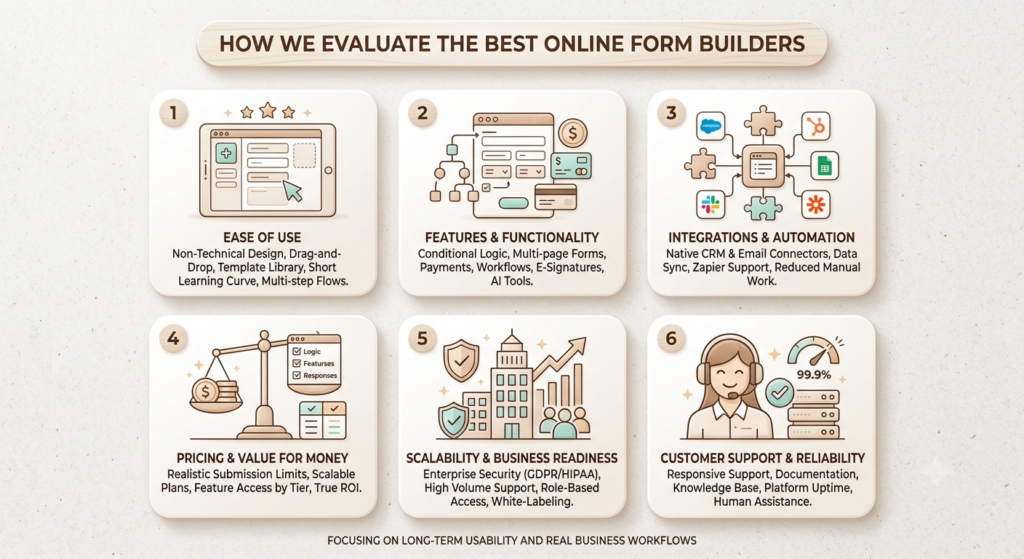
A form builder can look impressive during a free trial and still become a headache six months later. That’s why we didn’t rank tools based solely on feature checklists or entry-level pricing. Instead, we evaluated each platform using the criteria that matter most to marketing teams, startups, agencies, and growing businesses.
Our framework focuses on long-term usability, operational flexibility, and the ability to support real business workflows as requirements become more complex.
1. Ease of Use
The first question we asked was simple: how quickly can a non-technical user create and publish a professional form?
We evaluated each platform’s interface, drag-and-drop builder, template library, onboarding experience, and overall learning curve. Tools that allowed users to build contact forms, surveys, registration forms, and lead generation forms without documentation or technical support scored higher.
We also considered how efficiently users could create advanced forms with conditional logic, multi-step flows, file uploads, and custom branding. A tool may offer hundreds of features, but if users struggle to find them, those features provide little real-world value.
2. Features and Functionality
Modern businesses need more than a simple contact form.
We assessed the depth of each platform’s capabilities, including:
- Conditional logic and branching
- Multi-page and conversational forms
- Payment collection
- File uploads
- Workflow automation
- Approval processes
- Electronic signatures
- Quiz and survey functionality
- AI-powered form generation
- Analytics and reporting
Tools that supported complete business workflows rather than basic data collection earned higher scores. Platforms such as Jotform and Formstack stood out for offering advanced workflow automation, approvals, and payment processing alongside traditional form-building features.
3. Integrations and Automation
A form should not become a data silo.
We evaluated how well each platform connects with the tools businesses already use, including CRM systems, email marketing platforms, project management software, payment gateways, cloud storage providers, and automation tools.
Particular attention was given to native integrations with platforms such as Salesforce, HubSpot, Google Sheets, Slack, Stripe, PayPal, Airtable, Notion, and Zapier.
Builders that offered extensive integration ecosystems and automated workflows scored significantly higher because they reduce manual work and improve operational efficiency.
4. Pricing and Value for Money
Many form builders advertise attractive entry-level plans, but costs often increase rapidly as submission volumes grow.
Instead of evaluating only the cheapest plan, we examined what businesses actually receive at realistic usage levels. We compared:
- Submission limits
- Number of forms allowed
- Storage capacity
- Team collaboration features
- Branding removal
- Advanced logic access
- Integration availability
We also analyzed how pricing scales as organizations grow. Some tools remain affordable at higher volumes, while others become significantly more expensive once response limits are exceeded. This allowed us to identify which platforms deliver genuine value rather than simply low entry pricing.
5. Scalability and Business Readiness
A form builder that works for a startup may not meet the needs of a growing organization.
To evaluate scalability, we looked at how well each platform supports:
- High submission volumes
- Multiple team members
- Role-based permissions
- Approval workflows
- Enterprise security requirements
- Compliance standards such as GDPR and HIPAA
- White-label deployments
- Audit logs and administrative controls
Platforms that could support both small businesses and larger organizations without requiring a platform migration received higher scores. Enterprise capabilities, security controls, and governance features became increasingly important in this category.
6. Customer Support and Reliability
Even the best form builder becomes a problem if support is unavailable when a critical form stops working.
We evaluated support channels, response times, documentation quality, onboarding resources, knowledge bases, and access to human support teams. We also considered platform reliability, uptime reputation, and the availability of dedicated customer success resources for larger customers.
Tools offering responsive support, comprehensive documentation, and strong service reliability scored higher because downtime during lead generation campaigns, event registrations, or payment collection can directly impact revenue.
Our Final Scoring Methodology
Each form builder received a score across all six categories. Rather than rewarding platforms with the longest feature lists, we prioritized overall value, usability, flexibility, and long-term suitability.
The result is a ranking designed for real-world business use cases, whether you’re creating simple lead capture forms, customer surveys, registration workflows, payment forms, or enterprise-level data collection systems. The tools that ranked highest consistently delivered strong performance across usability, integrations, scalability, and value-not just one area.
Best Online Form Builder Tools Compared
If you’re comparing form builders for the first time, it’s easy to get overwhelmed. Most platforms can create a basic contact form, but the differences become obvious once you need advanced workflows, payment collection, conditional logic, team collaboration, or CRM integrations.
Some tools are built for simplicity, while others are designed to handle complex business processes. The right choice depends less on the number of features and more on how those features align with your use case, team size, and growth plans.
Before diving into the detailed reviews, here’s a quick overview of how the leading online form builders compare in 2026:
| Tool | Best For | Key Strength |
|---|---|---|
| Jotform | Businesses needing advanced functionality | Extensive feature set, payments, approvals, and workflow automation |
| Tally | Startups, creators, and budget-conscious teams | Generous free plan and Notion-style form building experience |
| Typeform | Customer-facing forms and surveys | Conversational design that improves completion rates |
| Fillout | Data-driven teams | Strong Airtable, Notion, and spreadsheet integrations |
| Google Forms | Simple internal forms and surveys | Completely free and easy to deploy |
| Formstack | Mid-market and enterprise organizations | Workflow automation, compliance, and advanced business processes |
| Zoho Forms | Businesses already using Zoho products | Deep integration with the broader Zoho ecosystem |
| Microsoft Forms | Organizations using Microsoft 365 | Native integration with Microsoft productivity tools |
| Paperform | Businesses focused on branded experiences | Highly customizable forms and landing page-style layouts |
| Cognito Forms | Teams collecting payments and calculations | Powerful calculations, workflows, and payment capabilities |
Two platforms consistently stand out for different reasons.
Jotform remains one of the most complete form-building platforms on the market. It combines a large template library, extensive integrations, payment processing, approval workflows, electronic signatures, and automation features that can support everything from lead generation to complex operational processes. For businesses expecting their requirements to grow over time, it’s often the safest long-term investment.
Tally, on the other hand, has become a favorite among startups, freelancers, agencies, and creators. Its generous free plan, clean interface, unlimited forms, and growing integration ecosystem make it one of the best value-for-money options available in 2026. Teams that don’t need enterprise-level complexity often find that Tally delivers everything they need at a fraction of the cost of traditional form builders.
That said, neither tool is the universal winner.
A marketing team focused on lead generation may prefer Typeform’s conversational experience. A company heavily invested in Airtable might find Fillout a better fit. Enterprise organizations with strict compliance requirements may lean toward Formstack, while businesses already using Zoho or Microsoft products can often reduce costs by staying within their existing ecosystem.
The reviews below examine each platform in detail, including features, pricing, strengths, limitations, and the specific use cases where each tool performs best.
15 Best Online Form Builder Tools
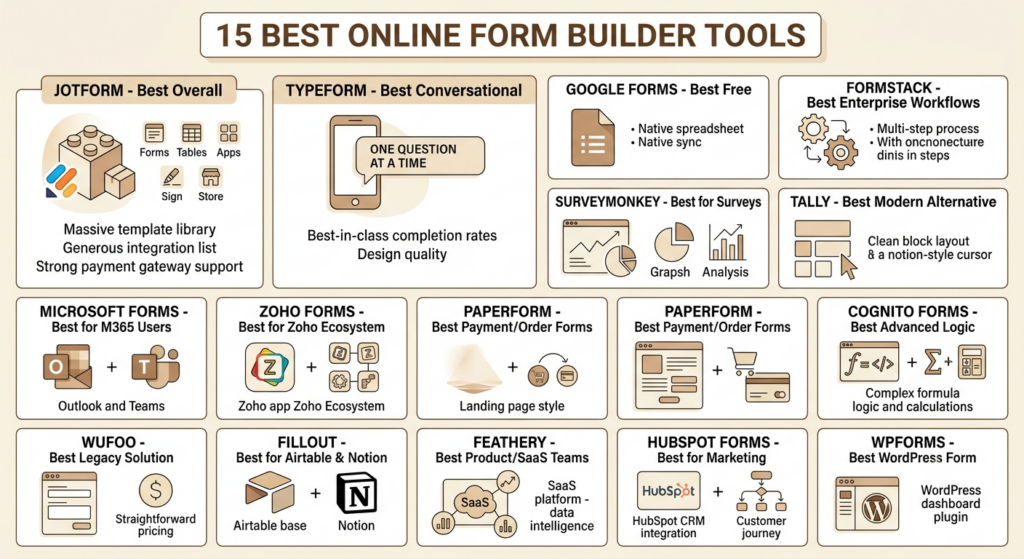
Jotform -Best Overall Form Builder
Jotform has been building forms since 2006, and it shows in the breadth of what it now covers: forms, tables, apps, sign, and a store builder, all under one account. The free Starter plan includes five forms, 100 monthly submissions, 100 fields per form, and 100 MB of storage, with Jotform branding attached. Paid tiers start with Bronze, then Silver, then Gold, scaling submissions from 1,000 a month up to 10,000 a month with HIPAA compliance unlocked on Gold and above.
Key features: 10,000+ templates, 150+ integrations, no platform fee on payments (you only pay standard Stripe or PayPal processing rates), HIPAA-compliant forms on Gold and Enterprise.
Pros: Massive template library, generous integration list, strong payment gateway support, including Stripe, PayPal, and Square. Cons: Every plan below Enterprise is single-user only, so a three-person team needs three separate subscriptions. Forms stop accepting submissions entirely once you hit a plan’s cap, rather than charging overage fees.
Pricing: Free, then Bronze at $34/month, Silver at $39/month, Gold at $99/month (all billed annually), and custom Enterprise pricing.
Best use cases: Healthcare intake forms, HR onboarding, retail order forms, and any team that wants one platform covering forms, tables, and e-signatures together.
Typeform -Best for Conversational Forms
Typeform built its reputation on a single idea: ask one question at a time, and people answer more honestly and complete more often. The one-question-per-screen format remains the platform’s clearest differentiator three years into a market full of imitators.
Key features: Conversational one-at-a-time flow, video questions, calculator fields, Salesforce integration on Business and above.
Pros: Genuinely best-in-class completion rates for short, brand-sensitive forms. The design quality out of the box is hard to beat. Cons: The free plan caps out at just 10 responses a month, and calculator fields require the $83/month Business plan. Stripe is the only supported payment gateway on any tier.
Pricing: Free, then Basic around $25/month, Plus around $50/month, Business around $83/month (all annual), Enterprise custom.
Best use cases: Customer satisfaction surveys, top-of-funnel lead qualification, brand-critical public-facing forms where completion rate matters more than raw volume.
Google Forms -Best Free Form Builder
There’s no catch with Google Forms. It’s free, it’s unlimited, and it lives inside the Google Workspace ecosystem most teams already use daily.
Key features: Unlimited forms and responses, native Google Sheets sync, basic branching logic, and real-time collaboration.
Pros: Zero cost, zero submission caps, instant familiarity for anyone who’s used Google Docs. Cons: No payment fields, no advanced conditional logic beyond simple section jumps, and design options are limited to a handful of themes.
Pricing: Free with a personal Google account; included in Google Workspace business plans.
Best use cases: Internal surveys, quick event RSVPs, classroom quizzes, and any low-stakes form where design and payments don’t matter.
Formstack -Best for Enterprise Workflows
Formstack (rebranded under parent company Intellistack in 2025) positions itself less as a form builder and more as a workflow automation platform that happens to start with forms.
Key features: Multi-step approval workflows, document generation, e-signatures, Salesforce integration, and prefill from existing records.
Pros: Genuinely strong for organizations that need forms to trigger downstream processes, not just collect data. Cons: The entry Forms plan starts around $83 per user per month billed annually, with HIPAA compliance available only as a paid add-on or bundled into higher-tier Suite and Enterprise plans. Pricing climbs fast once you add document automation or signatures.
Pricing: Forms plan from roughly $50 to $83/month, depending on billing terms, Suite and Enterprise pricing scaling well beyond that.
Best use cases: Mid-market and enterprise teams running multi-step approval chains: HR onboarding, vendor contracts, grant applications.
SurveyMonkey -Best for Surveys and Research
SurveyMonkey is the name most non-marketers already know, and for structured research, NPS tracking, and academic-style surveys, it still earns that recognition.
Key features: 1,180+ expert-built survey templates, sentiment analysis, A/B testing on higher tiers, and AI-assisted survey creation.
Pros: Deep question-type library and statistical export options (SPSS) that few competitors match. Cons: Once you exceed your plan’s response limit, SurveyMonkey charges $0.15 per additional response automatically, and Team plans require a three-user minimum billed annually.
Pricing: Free, Individual Standard around $99/month, Team Advantage around $30/user/month, Team Premier around $92/user/month, Enterprise custom.
Best use cases: Customer research, employee engagement surveys, and market research projects that need statistically rigorous analysis tools.
Tally -Best Modern Alternative to Google Forms
Tally was built specifically because its founders got tired of paying for form builders that gated basic features behind expensive tiers. It offers unlimited forms and submissions for free, including conditional logic, signatures, calculations, and file uploads, within fair usage limits.
Key features: Notion-style block editor, unlimited free submissions, native Stripe payments, and GDPR-compliant EU hosting.
Pros: The single most generous free tier on this entire list. Pro unlocks branding removal and a custom domain for around $24 to $29 a month, well below what Typeform or Jotform charge for comparable features. Cons: No conversational one-question-at-a-time mode, and the design feels more functional than polished compared to Typeform.
Pricing: Free (unlimited), Pro around $24-29/month, Business around $74/month.
Best use cases: Startups, freelancers, and lean teams that need unlimited submissions without enterprise pricing.
Microsoft Forms -Best for Microsoft 365 Users
Microsoft Forms is the form builder you already have if your company runs on Microsoft 365. It doesn’t try to be more than that, and for teams entrenched in Outlook, Teams, and SharePoint, it doesn’t need to.
Key features: Native Teams and SharePoint integration, real-time response charts, quiz mode for training assessments.
Pros: Zero additional cost if you already pay for Microsoft 365. Familiar card-based editor for anyone who’s used Office products. Cons: Effectively inaccessible to anyone outside your Microsoft 365 tenant without extra configuration, and design customization is limited to preset color themes with no multi-page layouts.
Pricing: Free, bundled with Microsoft 365 subscriptions.
Best use cases: Internal employee surveys, training quizzes, and quick polls for organizations already standardized on Microsoft’s ecosystem.
Zoho Forms -Best for Zoho Ecosystem Users
If your business already runs Zoho CRM, Zoho Books, or Zoho Desk, Zoho Forms slots in as the natural form layer connecting all of them.
Key features: Native sync with the full Zoho app suite, AI form generator, offline mobile form filling, geolocation, and image capture in the field.
Pros: Starting price around $10 to $12 a month makes it one of the more affordable paid options on this list, with a genuinely usable free plan beneath it. Cons: Design flexibility lags behind dedicated builders like Paperform or Typeform, and the real value only shows up if you’re already inside the Zoho ecosystem.
Pricing: Free plan available, paid plans starting around $10-12/month.
Best use cases: Field service data collection, sales lead intake feeding directly into Zoho CRM, and small businesses already using other Zoho products.
Paperform -Best for Payment and Order Forms
Paperform treats a form less like a data-entry widget and more like a landing page you can fill out, which is exactly why it’s become a favorite for order forms, bookings, and donation pages.
Key features: Document-style editor mixing rich content and fields on one canvas, five payment gateways including Braintree and Google Pay, built-in e-signatures via Papersign.
Pros: An AI calculations assistant helps non-technical users write complex pricing formulas, and the visual output looks like a branded page rather than a generic form. Cons: No HIPAA compliance, and no free-forever plan; every tier requires payment from day one.
Pricing: Essentials plan starting around $24/month, with higher tiers for teams and advanced automation.
Best use cases: Service bookings, product order forms, donation pages, and anything where the form itself needs to double as a sales page.
Cognito Forms -Best for Advanced Logic
Cognito Forms has quietly built one of the most capable calculation engines in the form builder space, and it’s been doing it since 2013 without much fanfare.
Key features: Excel-style formula calculations, repeating sections for variable line items, native Stripe and PayPal payments at zero platform fee, HIPAA compliance with a signed BAA on Team and Enterprise plans.
Pros: The free plan includes payment collection, calculations, e-signatures, and conditional logic, capped at 100 entries a month, which is more functionality than most competitors offer for free. Cons: The editor’s design output feels utilitarian. Getting a polished, branded look requires custom CSS work that most non-technical users won’t attempt.
Pricing: Free (100 entries/month), Pro around $19/month, Team around $36-39/month, Enterprise around $99-129/month.
Best use cases: Quote forms with live pricing calculations, registration forms with variable attendee counts, and budget-conscious teams that need payments without the Typeform price tag.
Wufoo -Best Legacy Form Solution
Wufoo, now owned by SurveyMonkey, has been around long enough that some reviewers call its interface dated. It’s also been around long enough to have ironed out most of the rough edges that newer tools are still discovering.
Key features: 400+ templates, Zapier and Salesforce integrations, custom branding on paid tiers, and reporting dashboards built from form data.
Pros: Straightforward, predictable tiered pricing based on entry volume, which several long-time users specifically cite as a reason they’ve stuck with it for years. Cons: No permanent free plan, only a free trial, and the interface genuinely looks like it hasn’t had a meaningful visual refresh in years.
Pricing: Starter around $19/month, Professional around $39/month, Advanced around $99/month, Ultimate around $249/month.
Best use cases: Nonprofits and small businesses that want dependable, no-surprises form software without chasing the newest design trend.
Fillout -Best for Airtable and Notion Users
Fillout built its entire pitch around the teams already living inside Airtable and Notion, rather than asking them to adopt yet another standalone database.
Key features: Native Airtable and Notion sync, meeting scheduling via Google Calendar and Zoom, 50+ customizable field types, unlimited forms on every plan, including free.
Pros: Unlimited forms and users on every plan, including free, which stands out against Jotform’s five-form cap on its Starter tier. Payment pages are included free as well. Cons: A newer player than most names on this list, so its integration catalog, while strong with Airtable and Notion specifically, is narrower elsewhere.
Pricing: Free, Pro, and Business tiers scale with submission volume and advanced features.
Best use cases: Product teams running internal tools on Airtable, and anyone who wants a form builder that doubles as a lightweight app layer.
Feathery -Best for Product and SaaS Teams
Feathery is less a form builder for marketers and more a form and workflow platform built for product and engineering teams at financial services and insurance companies, where onboarding forms need real logic and document intelligence behind them.
Key features: AI-powered document data extraction, Plaid and Argyle integrations for pulling financial and employment data directly into a form, full developer SDK for custom logic.
Pros: The free plan supports up to two live forms and 100 monthly submissions with unlimited styles and components, and Stripe-powered payment flows can pull products and prices dynamically. Cons: Collaborative workflow features like routing and document signatures sit behind a custom-quoted Business plan, so teams needing those have to talk to sales rather than self-serve.
Pricing: Free, Basic around $49/month, Plus around $99/month, Pro around $190/month, Enterprise custom.
Best use cases: Fintech and insurance onboarding flows, SaaS signup forms that need to pull bank or employment data automatically, and product teams that want developer-level control.
HubSpot Forms -Best for Marketing Teams
HubSpot Forms isn’t a standalone form builder so much as a feature bolted onto a full marketing and CRM platform, and that’s exactly the point if your team is already running on HubSpot.
Key features: Every submission automatically creates or updates a CRM contact, triggers workflows, leads scoring, and email sequences without any manual syncing.
Pros: The tightest form-to-CRM pipeline on this list. No Zapier middleman required, since forms and CRM share the same database natively. Cons: HubSpot’s Professional plan runs around $890 a month for up to three seats, which is a steep price to pay if forms are the only feature you actually need.
Pricing: Free CRM tools tier, Starter plans from roughly $20/seat/month, Professional and Enterprise scaling into the hundreds or thousands monthly.
Best use cases: Marketing teams that already run HubSpot for email and CRM and want forms to feed lead scoring and automated nurture sequences without extra integration work.
WPForms -Best WordPress Form Builder
If your website runs on WordPress, WPForms is the form builder that lives where your site already lives, inside the WordPress dashboard, styled by your own theme, with data stored in your own database.
Key features: Conversational one-question-at-a-time mode, surveys and polls, geolocation and address autocomplete, and no transaction fees for active license holders.
Pros: WPForms Pro, with payments, surveys, and conversational forms included, runs about $199.50 a year, roughly $17 a month, a fraction of what HubSpot charges for a single CRM seat. Cons: Requires a WordPress installation. It’s not an option at all for Shopify, Wix, Squarespace, or custom-built sites.
Pricing: Basic around $39.50/year, Plus around $99.50/year, Pro around $199.50/year, Agency around $299.50/year.
Best use cases: WordPress-based small businesses, bloggers, and agencies managing multiple client sites that need fast, lightweight contact and payment forms.
Jotform, Typeform, Google Forms, SurveyMonkey, Zoho Forms, Cognito Forms, and HubSpot Forms are among the most frequently named tools across independent 2026 form builder roundups, spanning everything from free, no-frills options to enterprise workflow platforms.
Online Form Builder Tools Comparison by Use Case
The “best” form builder depends entirely on what you’re trying to accomplish. A startup collecting leads has very different requirements than an enterprise managing compliance-sensitive workflows or a researcher running large-scale surveys.
To make the decision easier, we’ve grouped the top online form builders by the use cases where they perform best.
Best Form Builder for Small Businesses
Winner: Tally
Runner-up: Zoho Forms
Small businesses typically need a balance of affordability, ease of use, and flexibility. Tally stands out because it offers one of the most generous free plans on the market, including unlimited forms and submissions, making it an excellent choice for growing businesses that want to avoid escalating costs.
Its Notion-like editor, payment integrations, conditional logic, and automation capabilities provide functionality that would have required a premium plan from many competitors just a few years ago.
Zoho Forms is another strong option, particularly for businesses already using Zoho CRM, Zoho Campaigns, or other tools within the Zoho ecosystem. It offers advanced workflows, approvals, and integrations while remaining significantly more affordable than many enterprise-focused platforms.
Choose Tally if: affordability and ease of use are your top priorities.
Choose Zoho Forms if your business already relies on Zoho products.
Best Form Builder for Enterprises
Winner: Formstack
Runner-up: Jotform Enterprise
Enterprise organizations need far more than form creation. Security, governance, compliance, workflow automation, and user management become critical requirements.
Formstack has built its reputation around enterprise workflows, offering advanced approval processes, document generation, HIPAA-compliant plans, role-based permissions, and extensive automation capabilities. It is particularly popular among healthcare, finance, education, and government organizations.
Jotform Enterprise provides similar capabilities while adding one of the largest template libraries and integration ecosystems in the market. Features such as SSO, dedicated infrastructure options, advanced security controls, and enterprise-grade administration tools make it a strong choice for larger teams.
Choose Formstack if: compliance and workflow automation are mission-critical.
Choose Jotform Enterprise if you need enterprise security alongside extensive customization and integrations.
Best Form Builder for Surveys
Winner: SurveyMonkey
While many form builders include survey functionality, SurveyMonkey remains the benchmark for organizations focused on research, customer feedback, and data collection.
Its strengths include advanced survey logic, statistical analysis tools, benchmarking capabilities, response segmentation, and a large library of expert-designed survey templates.
Businesses conducting customer satisfaction surveys, market research, employee engagement studies, or academic research will generally find deeper analytical capabilities here than in standard form builders.
Best for: customer research, market research, NPS surveys, and employee feedback programs.
Best Form Builder for Lead Generation
Winner: HubSpot Forms
Runner-up: Jotform
Lead generation forms are most effective when they connect directly to your CRM and marketing automation platform.
For businesses already using HubSpot CRM, HubSpot Forms is often the obvious choice. Leads flow directly into contact records, trigger workflows automatically, and can immediately enter nurture campaigns without requiring third-party connectors.
For organizations using multiple marketing tools or operating outside the HubSpot ecosystem, Jotform offers greater flexibility through its extensive integration marketplace and advanced lead capture workflows.
Choose HubSpot Forms if: HubSpot is already your primary CRM.
Choose Jotform if you need broader integration options across multiple platforms.
Best Form Builder for Payment Forms
Winner: Paperform
Runner-up: Cognito Forms
Collecting payments through forms requires more than a simple payment field. Businesses often need product catalogs, calculations, subscriptions, discounts, invoices, and checkout-style experiences.
Paperform excels by combining form functionality with highly customizable landing page designs. This makes it particularly attractive for consultants, agencies, educators, and service providers who want forms to feel like branded sales pages.
Cognito Forms is a strong alternative for businesses requiring complex calculations, pricing logic, registrations, and order management workflows.
Choose Paperform if: design and customer experience are important.
Choose Cognito Forms if your payment process involves complex calculations or business rules.
Best Free Form Builder
Winner: Tally
Runner-up: Google Forms
Most free-form builders impose strict submission limits, branding requirements, or feature restrictions. Tally is one of the few platforms that remains genuinely useful on its free plan, offering unlimited forms, unlimited submissions, conditional logic, and modern integrations.
Google Forms remains the easiest solution for users who simply need a fast, reliable way to collect responses without advanced customization requirements. Its integration with Google Workspace makes it especially useful for internal business processes and educational environments.
Choose Tally if: you want advanced functionality without paying.
Choose Google Forms if simplicity and speed matter more than customization.
Best AI Form Builder
Winner: Feathery
Runner-up: SurveyMonkey Build with AI
AI has become a standard feature across many form builders, but not all implementations are equally useful.
Feathery stands out for using AI to help generate highly customized workflows, dynamic forms, and document-driven processes. Its approach is particularly valuable for businesses creating complex applications, onboarding flows, and multi-step user journeys.
SurveyMonkey’s Build with AI focuses on accelerating survey creation. Users can describe their goals in natural language and receive fully structured survey drafts complete with recommended question types and survey logic.
As AI capabilities continue to evolve throughout 2026, these platforms currently offer some of the most practical real-world applications beyond simple template generation.
Choose Feathery if: you’re building complex workflow-driven forms.
Choose SurveyMonkey AI if: your primary goal is creating surveys quickly and efficiently.
Which Form Builder Is Right for You?
If you’re looking for the safest all-around choice, Jotform remains one of the most versatile platforms available, balancing ease of use, integrations, payments, automation, and scalability.
If cost is your biggest concern, Tally offers exceptional value and one of the strongest free plans in the market.
For organizations with specialized requirements- whether that’s enterprise compliance, advanced survey research, payment collection, or CRM-driven lead generation- the category winners above provide a faster path to finding the right fit.
Online Form Builder Trends in 2026
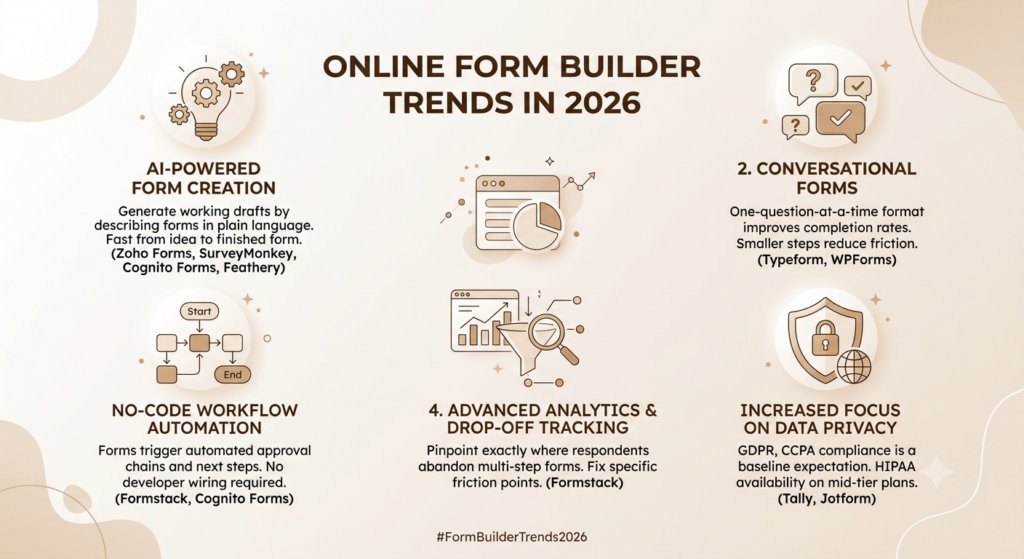
AI-Powered Form Creation
Describing a form in plain language and getting a working draft back is no longer a novelty feature. Zoho Forms now lets users go from idea to a finished form by entering a prompt in a few words, and SurveyMonkey, Cognito Forms, and Feathery have all shipped similar generators over the past year.
Conversational Forms
Typeform pioneered the one-question-at-a-time format, but it’s no longer exclusive. WPForms now offers its own conversational mode, and the underlying insight that breaking a long form into smaller steps improves completion has become standard practice rather than a premium feature.
No-Code Workflow Automation
Forms increasingly trigger what happens next, not just collect data. Formstack and Cognito Forms route submissions through approval chains automatically, no developer required to wire it up.
Advanced Analytics and Drop-Off Tracking
Knowing how many people submitted a form used to be enough. Now teams want to know exactly where respondents abandon a multi-step form, so they can fix the specific field causing friction instead of guessing.
Increased Focus on Data Privacy
GDPR and CCPA compliance have moved from “nice to have” to baseline expectation. Tally hosts all data in the EU by default, and HIPAA compliance, once an enterprise-only feature, is now available on mid-tier plans at Jotform, Cognito Forms, and Formstack.
AI-assisted form generation, no-code workflow automation, and drop-off analytics have become the primary differentiators among online form builders heading into 2026, with privacy compliance shifting from an enterprise add-on to a standard expectation across mid-tier plans.
How to Choose the Right Online Form Builder
With dozens of form builders offering similar-looking features, choosing the right platform can feel overwhelming. The reality is that there isn’t a single “best” online form builder for every business. The right choice depends on your goals, existing tech stack, budget, and future growth plans.
Before committing to a platform, evaluate the following factors carefully.
1. Start With Your Primary Use Case
The first step is defining exactly what you need the form builder to accomplish.
Different tools excel in different areas:
- Lead generation and contact forms
- Customer surveys and feedback collection
- Event registrations
- Payment and order forms
- Client onboarding
- Internal business workflows
- Applications and approval processes
- Research and data collection
For example, a marketing team generating leads may prioritize CRM integrations and conversion-focused form designs, while an operations team may care more about approval workflows and automation.
Being clear about your primary use case immediately narrows the field and prevents paying for features you’ll never use.
2. Evaluate Integration Capabilities Early
A form builder rarely operates in isolation.
The data collected through forms typically needs to flow into other systems, such as:
- CRM platforms
- Email marketing software
- Project management tools
- Payment processors
- Analytics platforms
- Customer support systems
- Databases and spreadsheets
One of the most common mistakes businesses make is choosing a form builder first and checking integrations later.
If your forms cannot connect seamlessly with the tools your team already relies on, you’ll end up creating manual processes that increase administrative work and introduce opportunities for errors.
Before making a decision, verify that the platform supports your existing software stack through either native integrations or automation tools such as Zapier and Make.
3. Think Beyond Your Current Requirements
Many businesses choose a form builder based solely on today’s needs.
That works until growth creates new challenges.
A startup collecting 50 submissions per month may eventually need to handle thousands of responses, multiple team members, advanced workflows, and stricter security requirements.
Ask yourself:
- Will submission volumes increase significantly?
- Will multiple departments need access?
- Will approval workflows become necessary?
- Are compliance requirements likely to grow?
- Will you need advanced reporting in the future?
Choosing a platform that can scale with your organization can save considerable time, cost, and migration effort later.
4. Compare Pricing Beyond the Entry-Level Plan
Most form builders advertise attractive starting prices, but those prices rarely reflect real-world usage.
When comparing plans, pay attention to:
- Monthly response limits
- Number of forms allowed
- Storage restrictions
- Team member limits
- Branding removal costs
- Advanced feature availability
- Payment processing fees
- Integration access
A platform that appears inexpensive initially can become significantly more expensive once you exceed response limits or require additional users.
Always estimate costs based on your expected usage over the next 12-24 months rather than your current needs alone.
5. Prioritize User Experience
The best form builder is one your team will actually enjoy using.
A platform may offer hundreds of features, but if everyday tasks feel complicated, productivity suffers.
Evaluate:
- Form-building speed
- Interface clarity
- Template quality
- Mobile responsiveness
- Ease of editing and maintenance
- Learning curve for new team members
Similarly, consider the experience from the respondent’s perspective. Cleaner, faster, and more intuitive forms typically achieve higher completion rates and better data quality.
6. Review Security and Compliance Requirements
Security may not seem important when creating a simple contact form, but it becomes critical as businesses collect more sensitive information.
If your forms handle customer data, payment details, employee information, healthcare records, or regulated data, investigate:
- GDPR compliance
- HIPAA compliance
- SOC 2 certifications
- Data encryption
- Role-based permissions
- Audit logs
- Single Sign-On (SSO)
Larger organizations and regulated industries should treat compliance as a core selection criterion rather than an afterthought.
7. Test Before You Commit
The most reliable way to evaluate a form builder is to build a real form.
Create a version of an actual workflow you’re planning to use and test:
- Form creation process
- Logic and conditional workflows
- Integrations
- Notifications
- Mobile experience
- Reporting capabilities
Most leading platforms offer free plans or trial periods, making hands-on testing easy.
What feels intuitive in a product demo can feel very different when managing real submissions, real customers, and real business processes.
Final Verdict
If you only take one thing from this guide, take this: the “best” online form builder depends entirely on what you’re actually trying to do, not which tool has the prettiest pricing page.
Best overall: Jotform, for the breadth of templates, integrations, and payment options. Best free option: Tally, for unlimited submissions without a credit card. Best for enterprises: Formstack, for workflow automation at scale. Best for surveys: SurveyMonkey, for statistical rigor and question depth. Best for lead generation: HubSpot Forms, for native CRM integration. Best AI-powered form builder: Feathery, for document intelligence and developer control.
Start with your actual use case, not the most-recommended name on a list. Match the tool to the job, and the rest of this decision gets a lot easier.
Frequently Asked Questions
What is the best online form builder?
Jotform is the strongest overall pick thanks to its template library, integration depth, and flexible payment support, though Tally wins on pure value if budget is the deciding factor.
Are there free online form builders?
Yes. Google Forms and Tally both offer genuinely unlimited free plans, while Jotform, Cognito Forms, Zoho Forms, and Fillout offer capped but functional free tiers.
Which form builder is best for payments?
Paperform and Cognito Forms both support payment collection with zero platform fees, and Jotform supports the widest range of payment gateways, including Stripe, PayPal, and Square.
What is the best Typeform alternative?
Tally is the closest free alternative with unlimited submissions, while Paperform offers a comparable design experience with stronger payment and calculation features.
Which form builder has the best conditional logic?
Cognito Forms leads here thanks to its Excel-style calculation engine combined with multi-level conditional visibility and repeating sections for variable line items.
Are online form builders secure?
Reputable platforms encrypt data in transit and at rest, and several, including Jotform, Cognito Forms, and Formstack, offer HIPAA compliance with a signed BAA on qualifying plans. Always check a tool’s specific compliance certifications before collecting sensitive data.
Can AI create forms automatically?
Yes. Zoho Forms, SurveyMonkey, and Feathery all let you describe a form in plain language and receive a structured draft within seconds, which you can then edit manually.
Is Google Forms good enough for businesses?
For simple internal surveys and RSVPs, yes. For anything involving payments, advanced branching logic, or brand customization, most businesses outgrow it quickly.
How much do online form builders typically cost?
Free options exist for basic needs, while paid plans for small teams generally run $10 to $50 a month, and enterprise-grade workflow platforms like Formstack or HubSpot can run into the hundreds or thousands monthly, depending on seats and contact volume.