

You placed an order online. Within minutes, you got a confirmation email. The next day, a shipping notification. Two days later, the package arrived. Everything just worked.
But behind that seamless experience? A chain of decisions, data movements, and system handoffs that happen in seconds. Most customers never think about it. But if you’re running a business and any one of those steps fails, you hear about it immediately.
That’s where an order management system comes in. It’s the operational backbone most growing businesses can’t afford to ignore, yet many don’t fully understand until something breaks. This article walks you through what an OMS is, how it works, when you need one, and which features actually matter for your business.
Table of Contents
What Is Order Management?
Order management is the end-to-end process of receiving, tracking, and fulfilling customer orders. It starts the moment a customer places an order and ends when they’ve received their purchase (or completed a return).
It covers every step in between: inventory checks, payment confirmation, picking and packing, shipping, and after-sale service. In a small business, one person might handle all of this manually. In a larger operation, it spans multiple teams, warehouses, and software systems.
The problem isn’t that order management is complicated. The problem is that as businesses grow, manual processes stop working. A spreadsheet that worked for 50 orders a month collapses at 500. And at 5,000, it’s not just inefficient. It’s a liability.
What Is an Order Management System?
An order management system (OMS) is software that centralizes and automates the entire order lifecycle, from the moment a customer clicks “buy” to the moment the product reaches their door (and beyond, if there’s a return).
A good OMS connects your sales channels, inventory, warehouse operations, payment systems, and shipping carriers into one unified view. Instead of switching between five tools and updating spreadsheets manually, your team works from a single dashboard that reflects real-time status across the board.
For businesses selling across multiple channels (website, app, marketplace, retail store), an OMS becomes the single source of truth. Zepto, for example, manages order fulfilment across hundreds of dark stores in India. Without an OMS-level system connecting inventory, routing logic, and delivery tracking in real time, 10-minute delivery would simply not be possible.
How Does an Order Management System Work?
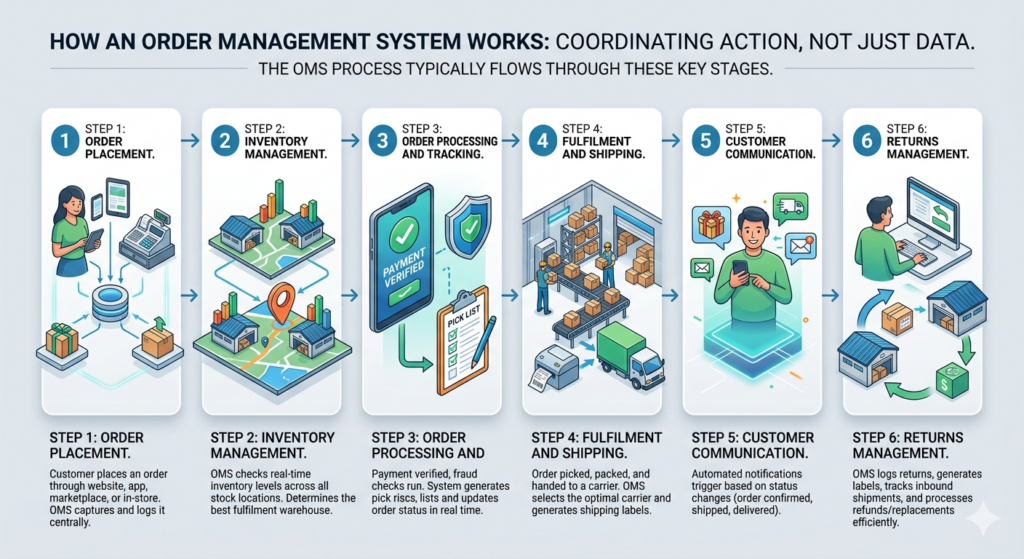
An OMS doesn’t just store data. It coordinates action. Here’s how the process typically flows:
Step 1: Order Placement The customer places an order through any channel: your website, an app, a marketplace like Amazon, or even in-store. The OMS captures this order and logs it centrally, regardless of where it originated.
Step 2: Inventory Management The system checks real-time inventory levels across all your stock locations. It confirms whether the item is available, and if you hold stock in multiple warehouses, it determines which location should fulfil the order based on proximity, stock levels, or fulfilment cost.
Step 3: Order Processing and Tracking Payment is verified, fraud checks run, and the order moves into processing status. The OMS generates a pick list for the warehouse team or triggers automated picking in more advanced setups. Order status updates in real time throughout this stage.
Step 4: Fulfillment and Shipping The order gets picked, packed, and handed to the right carrier. The OMS selects the carrier based on rules you set (speed, cost, destination), generates the shipping label, and syncs tracking details back to the system. Businesses with complex fleets or high delivery volumes often complement an OMS with dispatch management software to automate driver assignment, route execution, and real-time dispatch visibility.
Step 5: Customer Communication Automated notifications go out at each milestone: order confirmed, order shipped, out for delivery, delivered. These aren’t manual emails. The OMS triggers them based on status changes.
Step 6: Returns Management When a return request comes in, the OMS logs it, generates a return label if needed, tracks the inbound shipment, and processes the refund or replacement once received. Without this, returns become a manual nightmare fast.
An order management system automates the entire order lifecycle from placement to fulfilment and returns. It connects sales channels, inventory, warehouses, and carriers into a single real-time view. Businesses using an OMS typically reduce order processing time significantly and cut fulfilment errors caused by manual coordination.
Why Is Order Management Important for Your Business?
Here’s an honest answer: bad order management doesn’t just frustrate customers. It costs you money in ways that are hard to trace back to the source.
Automation Saves Time
Every manual step in your order process is a tax on your team’s time. Someone updates a spreadsheet. Someone emails the warehouse. Someone checks a carrier website for tracking updates. Multiply that by hundreds of orders per day, and you’ve got a significant chunk of your operational capacity going to tasks that software can handle in milliseconds.
Automation in an OMS means orders flow from placement to fulfilment without a human needing to touch each one. Your team’s attention goes to exceptions, not routine tasks.
Reduced Human Error
Manual processes have a predictable failure rate. The more steps, the more people involved, the more chances for a mistake. A wrong address gets entered. The wrong size gets shipped. An inventory count is off by three units, and a customer gets an oversell notification after paying.
An OMS reduces these errors by automating data entry and syncing information across systems in real time. According to a 2023 ShipBob report, businesses using automated order management saw a 67% reduction in fulfillment errors compared to those relying on manual processes.
Accurate Reporting
If your order data lives in five different places, getting a clear picture of what’s actually happening in your business is almost impossible. How many orders were shipped late last month? What’s your return rate by product? Which warehouse has the fastest fulfilment time?
An OMS centralizes this data and makes reporting straightforward. You get dashboards that show you exactly what’s happening without someone spending two hours pulling data from multiple sources.
Enhanced Customer Experience
Customers expect transparency. They want to know where their order is, and they want updates without having to email you to ask. An OMS powers real-time status pages, proactive shipping notifications, and fast resolution when something goes wrong.
Brands like Myntra and Nykaa have built significant customer loyalty partly because their post-purchase experience is predictable and clear. That reliability isn’t luck. It’s operational infrastructure.
When Do You Actually Need an Order Management System?
Not every business needs enterprise OMS software from day one. But there are clear signals that manual processes are holding you back.
You probably need an OMS if:
- You’re processing more than 100 orders per day, and fulfillment errors are creeping up
- You sell across more than two channels (website + marketplace + retail, for example)
- Your inventory data is often inaccurate enough that you’ve had overselling incidents
- Your customer service team spends significant time answering “where is my order?” questions
- Returns are handled through ad hoc email chains rather than a defined process
- You’re expanding to new geographies or adding new fulfilment locations
The signal isn’t always volume. Sometimes it’s complexity. A B2B wholesale business with 20 large orders per week might need an OMS far more urgently than a D2C brand doing 200 small shipments per day, because B2B orders involve custom pricing, complex routing, and credit terms that manual tools can’t manage cleanly. In a B2B order-to-cash flow, an OMS should hold each wholesale order until the buyer’s credit limit clears, and wiring it to automated credit decisions makes that check instant instead of a manual bottleneck.
The right time to invest in an order management system is when manual processes begin creating consistent errors, delays, or customer complaints. Businesses selling across multiple channels or managing more than one fulfilment location almost always reach this threshold faster than expected.
How to Choose the Right Order Management System
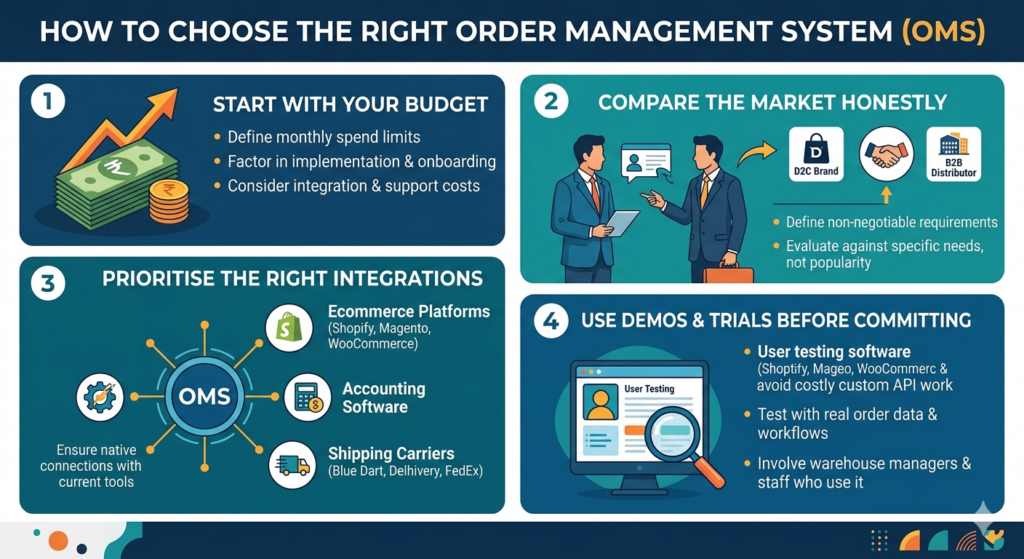
There’s no universal answer here. The right OMS for a fast-growing D2C brand is very different from what a mid-sized B2B distributor needs. But the evaluation process follows a consistent pattern.
Start With Your Budget
OMS solutions range from affordable plans built for small businesses to enterprise contracts that run into crores per year. Before you look at any platform, define what you’re willing to spend monthly and what return you need to justify it.
Don’t just look at the subscription cost. Factor in implementation, onboarding, and ongoing support. Some platforms look cheap until you realize the integrations you need are paid add-ons.
Compare the Market Honestly
Don’t shortlist platforms based on what you’ve heard from other founders. The platform that worked for a fashion D2C brand in Mumbai may be the wrong fit for a B2B electronics distributor in Chennai. Write down your non-negotiable requirements first, then evaluate each platform against them.
Prioritize the Right Integrations
An OMS is only as useful as the tools it connects to. Check whether it integrates natively with your current tech stack: your ecommerce platform (Shopify, WooCommerce, Magento), your accounting software, your preferred carriers (Blue Dart, Delhivery, FedEx), and any warehousing or ERP tools you’re already using.
Poor integrations are where OMS implementations typically go wrong. A platform that requires custom API work to connect with your existing warehouse management software will cost you more in development than it saves in operations.
Use Demos and Trials Before Committing
Most serious OMS vendors offer demos or free trials. Use them. Put your actual order data in and run through your real workflows. If the system feels clunky for your most common use case, it won’t feel better at scale.
Bring in the people who’ll actually use it, not just the decision-maker. The warehouse manager’s opinion of the pick-and-pack flow matters as much as the ops head’s view of the reporting dashboard.
The Benefits of a Distributed Order Management System
A distributed order management system (DOM) is a more advanced type of OMS built for businesses that fulfil orders from multiple locations: multiple warehouses, retail stores, third-party logistics providers (3PLs), or a mix of all three.
Where a standard OMS manages orders, a DOM also intelligently decides where each order should be fulfilled from, based on real-time data.
Manage Order Exceptions Effectively
Not every order goes smoothly. Stock-outs happen. Carriers miss pickups. Weather delays shipments. A DOM system identifies these exceptions automatically and reroutes affected orders without requiring manual intervention every time.
For a company like Reliance Retail, which manages fulfilment across thousands of locations, exception handling at scale is impossible without a system that can catch and resolve issues faster than any human team could.
Execute Predictable Order Orchestration Policies
Orchestration policies are the rules your OMS follows when deciding how to fulfil an order. Which warehouse gets priority? At what cost threshold do you switch carriers? When does an order qualify for same-day dispatch?
A DOM lets you set these policies once and trust the system to apply them consistently across every order, every day. This removes the inconsistency that comes from different team members making different calls on edge cases.
Channel Revenue Management
A distributed OMS can also help you understand which channels are most profitable from a fulfilment perspective, not just a sales perspective. An order placed through your own website might have a 30% higher margin than the same product sold through a marketplace, once you factor in fulfilment costs by channel.
This kind of visibility helps you make smarter decisions about where to invest your sales and marketing spend.
A distributed order management system extends standard OMS capabilities by intelligently routing each order to the best available fulfilment location in real time. It applies predefined orchestration policies consistently, handles fulfilment exceptions automatically, and gives businesses visibility into profitability across channels and locations.
Key Features of an Effective Order Management System
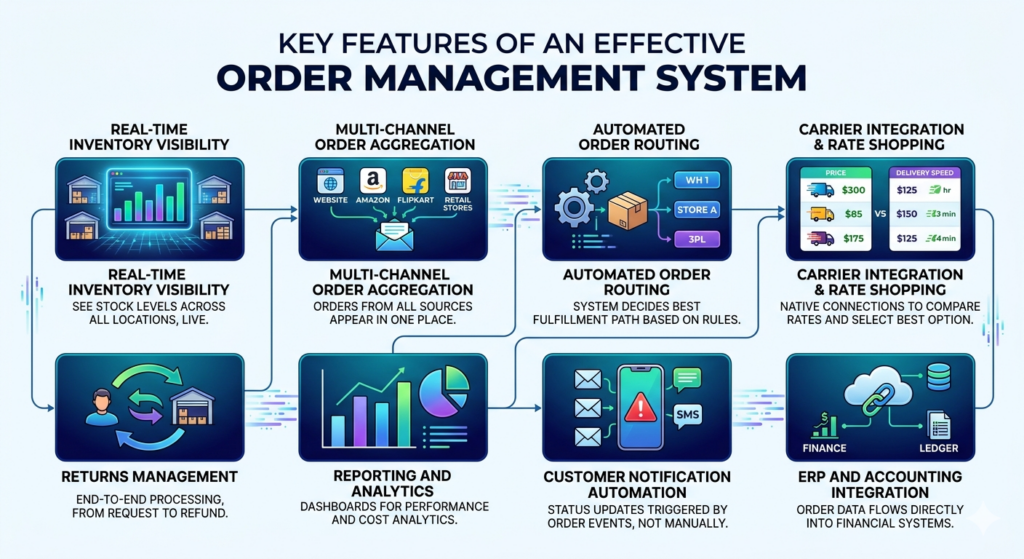
Not every OMS is built the same. Here are the features that actually matter when evaluating platforms:
Real-time inventory visibility: You need to see stock levels across all locations at once, not a snapshot that’s 15 minutes old.
Multi-channel order aggregation: Orders from your website, Amazon, Flipkart, and your retail stores should all appear in one place.
Automated order routing: The system should decide which warehouse, store, or 3PL fulfils each order based on your rules, without human input.
Carrier integration and rate shopping: Native connections to major carriers, with the ability to compare rates and automatically select the best option per order.
Returns management: End-to-end return processing, from customer request to refund, all within the same system.
Reporting and analytics: Dashboards covering fulfilment speed, error rates, carrier performance, and cost per order.
Customer notification automation: Status updates triggered by order events, not by someone manually sending emails.
ERP and accounting integration: Order data should flow directly into your finance systems without manual reconciliation.
Different Types of Order Management Systems
Understanding the categories helps you narrow down what kind of OMS fits your situation.
Cloud-Based vs. On-Premise Systems
Cloud-based OMS platforms run on the vendor’s servers and are accessed through a browser or app. You pay a subscription fee, and the vendor handles infrastructure, updates, and security. This is the default choice for most growing businesses because setup is faster, upfront cost is lower, and you can access the system from anywhere.
On-premise OMS software is installed on your own servers. You own the licence, manage the infrastructure, and handle updates yourself. Some large enterprises prefer this for data security reasons or because their IT teams require direct control over the system. The upfront cost is higher, but there’s no ongoing subscription fee.
For most small and mid-sized businesses, cloud-based is the practical choice. On-premise makes more sense when you have enterprise-scale customization needs and an IT team to support it.
Individual and Enterprise Systems
Individual or SMB-focused OMS platforms are designed for businesses with straightforward fulfilment needs: single or few warehouses, moderate order volumes, and limited channel complexity. They’re affordable, quick to set up, and don’t require technical implementation teams.
Enterprise OMS platforms handle complexity at scale: hundreds of fulfilment locations, millions of orders, complex B2B workflows, and custom pricing rules by customer segment. They require longer implementation timelines and dedicated internal resources to manage, but they’re built for the kind of operational complexity that SMB tools can’t handle.
Broader Use Cases of OMS Across Industries
An OMS isn’t just an ecommerce tool. The core need, which is managing orders accurately across multiple channels and fulfilment points, shows up across industries in slightly different forms.
Retail
For retail businesses that operate both online and offline, an OMS handles ship-from-store, click-and-collect, and endless aisle fulfilment. A customer orders online and picks up in the nearest store. The OMS routes that order to the right location, updates inventory, and triggers the pick-ready notification.
Shoppers Stop and Lifestyle have invested in OMS infrastructure specifically to make this kind of omnichannel experience work. Without it, store staff are getting ad hoc calls asking them to locate and hold products, which is neither scalable nor reliable.
Manufacturing
In manufacturing, order management extends into production planning. An OMS for a manufacturer needs to handle custom orders, multi-component assemblies, and production lead times. The order doesn’t just get routed to a warehouse. It triggers a production sequence.
A contract manufacturer producing custom packaging for FMCG brands, for example, needs an OMS that can manage order-specific production schedules and component procurement, not just shipping.
Wholesale and Distribution
B2B wholesale businesses deal with tiered pricing, credit terms, bulk order processing, and complex routing between multiple buyer locations. An OMS built for this context handles purchase order management, customer-specific pricing, and partial shipment tracking across multi-location deliveries.
A wholesale distributor supplying pharmacies across India, for example, needs to track partial deliveries, manage back-orders, and reconcile against customer purchase orders. These workflows are completely different from D2C fulfilment, and a generic OMS often can’t handle them cleanly.
Common eCommerce Order Management Challenges
Even with an OMS in place, businesses run into predictable problems. Knowing what they are helps you avoid or prepare for them.
Inventory inaccuracy: If your OMS isn’t syncing in real time with your warehouse, your inventory numbers are wrong. This leads to overselling, customer disappointment, and expensive emergency fixes.
Integration failures: An OMS that doesn’t talk cleanly to your carrier, your ecommerce platform, or your accounting software creates manual gaps that defeat the purpose of having the system.
Poor exception handling: When an order can’t be fulfilled as expected, what happens? If the answer is “someone figures it out manually,” you don’t have a system. You have a dashboard with gaps.
Scaling without process design: Buying an OMS and expecting it to fix your operations automatically doesn’t work. The system enforces whatever logic you program into it. If your underlying processes are messy, the OMS makes them efficiently messy.
Customer communication gaps: An OMS that doesn’t trigger proactive updates puts your support team on the back foot. Most “where is my order?” tickets are preventable with the right automation.
The most common ecommerce order management failures stem from poor system integration, inaccurate real-time inventory data, and weak exception handling processes. Businesses that invest in OMS implementation without first mapping their order workflows typically see limited returns from the technology.
5 Order Management Software Options Worth Knowing
Here are five platforms that come up consistently in OMS evaluations. These aren’t the only options, and the best one for you depends entirely on your business size, industry, and budget.
NetSuite Order Management
NetSuite is part of Oracle’s cloud ERP suite and is built for mid-market to enterprise businesses. Its strength is deep integration between order management, inventory, financials, and CRM. If you need an OMS that connects tightly with your broader business operations and you’re already on NetSuite, the order management module is a natural fit.
It’s not cheap, and it’s not quick to implement. But for businesses that have outgrown standalone tools, it’s one of the most complete options available.
Zoho Inventory
Zoho Inventory is part of the broader Zoho suite and is well-suited for small to mid-sized businesses, particularly in India, where Zoho has a strong support infrastructure. It handles multi-channel order management, integrates with Flipkart, Amazon, and Shopify natively, and connects cleanly with Zoho Books for accounting.
For Indian businesses already using Zoho CRM or Zoho Books, Zoho Inventory reduces integration complexity significantly. Pricing starts low enough that it’s accessible to businesses just starting to formalize their operations.
Veeqo
Veeqo is focused on ecommerce fulfilment and was acquired by Amazon in 2021. It’s strong on multi-channel order aggregation, carrier rate shopping, and warehouse management for businesses shipping physical products. It has a clean interface and a relatively fast setup.
The Amazon connection means it integrates particularly well with Amazon FBA and FBM workflows, which makes it a practical choice if Amazon is a significant sales channel for your business.
TradeGecko (now QuickBooks Commerce)
TradeGecko rebranded as QuickBooks Commerce after its acquisition by Intuit. It’s designed for wholesale and B2B commerce, handling features like tiered pricing, purchase order management, and multi-currency support. If you’re a D2C brand that also sells wholesale to retail partners, the B2B-specific features here are worth evaluating.
Worth noting: Intuit has been shifting the product’s direction since acquisition, so confirm current feature availability before committing.
Salesorder.com
Salesorder.com is a cloud-based OMS built specifically for wholesale distributors and manufacturers. It handles complex B2B order workflows, including blanket purchase orders, drop shipments, and customer-specific pricing. For businesses in the wholesale or manufacturing space that have found retail-focused OMS tools too limiting, this is worth a look.
The Operational Foundation You Can’t Ignore
Most businesses don’t think about order management until it breaks. A lost order. A duplicate shipment. A customer who ordered twice because their original order got stuck without any communication. By then, the damage is already done.
The businesses that scale operations cleanly are the ones that invest in infrastructure before they’re forced to. An order management system isn’t glamorous. It doesn’t show up in your brand story or your marketing campaigns. But it’s what makes every other part of your business work the way customers expect it to.
Whether you’re running a D2C brand growing faster than your processes can keep up with, a B2B distributor managing complex fulfilment across buyer locations, or a retail business trying to unify online and offline operations, the question isn’t whether you need an OMS. It’s
Frequently Asked Questions
What is an order management system in simple terms?
An order management system is software that handles everything from when a customer places an order to when they receive it. It connects your sales channels, inventory, warehouse operations, and shipping in one place so orders flow through your business without manual coordination at every step.
Is an OMS the same as a warehouse management system?
No, they’re different tools that often work together. A warehouse management system (WMS) focuses specifically on operations inside the warehouse, such as picking routes, bin locations, and packing processes. An OMS manages the order lifecycle from a broader perspective, including channel management, customer communication, and returns. Many businesses use both and integrate them.
What’s the difference between an OMS and an ERP?
An ERP (Enterprise Resource Planning) system manages the full spectrum of business operations, including finance, HR, procurement, and operations. An OMS is focused specifically on the order lifecycle. Large businesses often use an OMS as a module within their ERP. Smaller businesses might use a standalone OMS that integrates with their accounting software separately.
How does an OMS handle returns?
A good OMS manages the full returns process: accepting the return request, issuing a return shipping label, tracking the inbound return, updating inventory when the item is received, and processing the refund or replacement. Without this, returns are handled through email and manual spreadsheet updates, which creates delays and errors.
Do small businesses really need an order management system?
Not always from day one. But most businesses that grow beyond 100 orders per day, or that sell across more than two channels, reach a point where manual processes create consistent errors. At that point, the cost of not having an OMS (in lost orders, customer complaints, and team time) typically exceeds the cost of the software.
What should I look for when choosing an OMS for my ecommerce business?
The most important factors are: how well it integrates with your existing tools (ecommerce platform, carriers, accounting software), whether it handles your specific channels and fulfillment locations, the quality of real-time inventory tracking, and whether the reporting gives you the visibility you actually need. Price matters, but a cheap OMS that doesn’t integrate cleanly with your stack will cost you more in workarounds.
What is a distributed order management system?
A distributed order management system (DOM) is a type of OMS built for businesses with multiple fulfillment locations. It goes beyond tracking orders. It decides which location should fulfil each order based on rules like proximity, cost, and stock availability. It’s the right choice when you’re managing stock across multiple warehouses, retail stores, or 3PL providers simultaneously, the exact setup omnichannel fulfillment depends on.
Can an OMS reduce customer complaints about late deliveries?
Yes, but not just by speeding up fulfilment. The bigger impact is on communication. An OMS with automated customer notifications means customers know the status of their order at every stage without having to contact your support team. Most “where is my order?” complaints come from a lack of proactive updates, not from actual delays.
What are common mistakes businesses make when implementing an OMS?
The most common mistakes are: buying a system before mapping out their actual order workflows, underestimating integration complexity with existing tools, not involving the warehouse or ops team in the selection process, and expecting the software to fix process problems that need to be solved before implementation. An OMS amplifies your existing processes, good and bad.