
Reaching the right person at the right company sounds simple. In practice, it’s one of the most time-consuming parts of any outbound sales or marketing workflow.
You find a promising company. You identify the right decision-maker on LinkedIn. And then you hit a wall -no email address, no direct line, no easy way in. So you either waste credits on LinkedIn InMails, guess the format and risk a bounce, or just move on.
That’s the gap email finder tools are built to close. They help you go from “I know who I want to reach” to “I have a verified email address in my CRM” in minutes, not hours.
This guide covers everything you need to know about email finder tools -how they work, what features actually matter, which tools are worth using in 2026, and how to stay on the right side of compliance laws while running outbound campaigns.
Table of Contents
What Are Email Finder Tools?
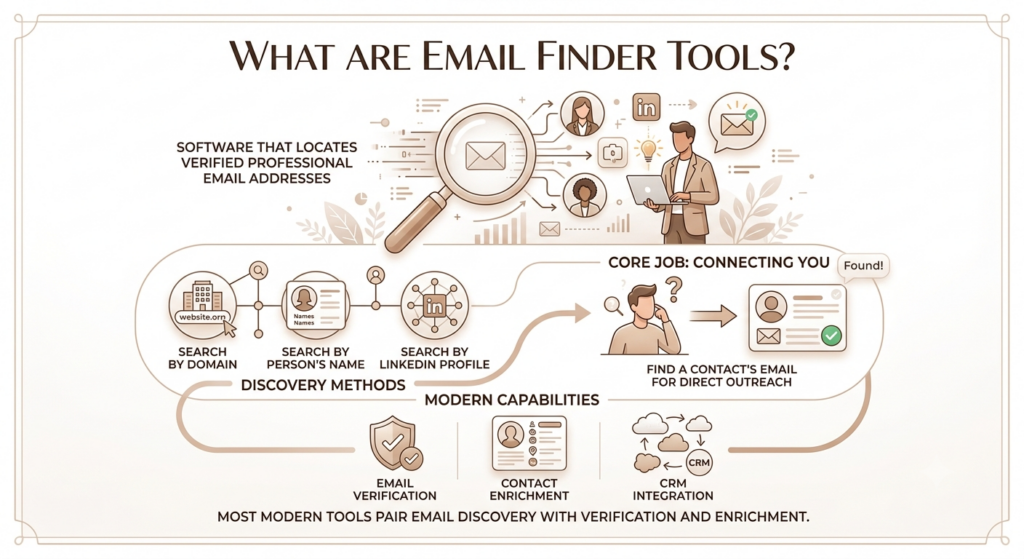
An email finder tool is software that helps you locate verified professional email addresses for people at specific companies, either by searching a domain, a person’s name, or their LinkedIn profile.
The core job is simple: you want to reach someone, you don’t have their contact details, and the tool finds it for you. Most modern tools go beyond basic lookup and pair email discovery with verification, contact enrichment, and CRM integration.
Who Actually Uses These Tools?
Email finder tools show up across several different teams:
Sales teams use them to build prospect lists, reach decision-makers, and fill their CRM with verified contacts before cold outreach campaigns. Marketing teams use them for account-based marketing programs where you need direct contacts at specific companies rather than generic form submissions. Recruiters use them to reach candidates who aren’t actively applying -particularly useful for finding emails beyond LinkedIn’s InMail cap. Agencies use them to research contacts at prospective clients. Founders doing early sales often use them to get to buyers fast without a full sales operations team behind them.
The common thread: everyone is trying to reduce the time between “I found the right person” and “I have a way to contact them.”
How Are Email Finders Different from Email Verification Tools?
This trips people up. An email finder locates an address you don’t have yet. An email verification tool checks whether an address you already have is valid and likely to deliver successfully.
Most modern email finder tools bundle both functions -they find the address and verify it before showing it to you. But they’re still two distinct capabilities, and some tools do one significantly better than the other.
An email finder tool locates professional email addresses through domain search, name lookup, or LinkedIn profile extraction. Email verification software checks whether an existing address is valid, active, and unlikely to bounce. Most B2B prospecting teams need both capabilities, which is why many modern email finder tools include built-in verification as part of their core workflow.
How Do Email Finder Tools Work?
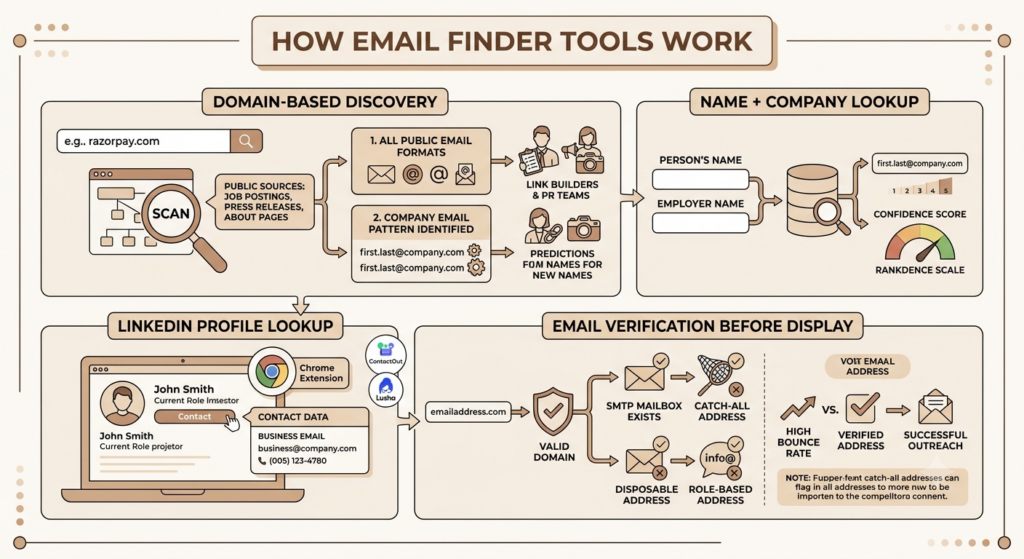
Most people treat email finder tools like a magic search box. Put a name in, get an email out. What’s actually happening underneath is more interesting, and knowing it helps you understand why some tools return better results than others.
Domain-Based Email Discovery
This is how tools like Hunter.io made their name. You enter a company’s domain (say, razorpay.com) and the tool scans publicly available web sources -job postings, press releases, public profiles, About pages -to surface every email format it can find for that domain.
It also identifies the email pattern the company uses. If the first ten results all follow fi********@*****ny.com, the tool can predict the format for anyone at that company, even if their specific email hasn’t been publicly indexed. That’s pattern recognition, and it’s genuinely useful for link builders and PR teams who need to reach editors and journalists at specific publications.
Name + Company Lookup
You give the tool a person’s name and their employer. The tool cross-references its database and any available public sources to return the most likely email address for that individual. Results are usually ranked by confidence score, which tells you how certain the tool is that the address is valid.
LinkedIn Profile Lookup
Many tools offer a Chrome extension that overlays contact data directly on LinkedIn profiles. You’re browsing someone’s profile, you click the extension, and their business email appears alongside any available phone number. Tools like ContactOut and Lusha are particularly strong here because they were built around LinkedIn workflows from the start.
Email Verification Before Displaying Results
Better tools don’t just return an address -they run it through a verification layer first. This typically involves checking whether the domain is valid, whether the mailbox exists (SMTP verification), whether it’s a catch-all address that accepts all emails regardless of validity, and whether it’s a disposable or role-based address (like info@ or hello@) that you shouldn’t be using for cold outreach.
The distinction between a catch-all and a genuinely verified address matters a lot for your bounce rate. Tools that surface catch-all addresses without flagging them can lead to unexpectedly high bounces, even when the software claims high accuracy.
Why Sales and Marketing Teams Use Email Finder Tools
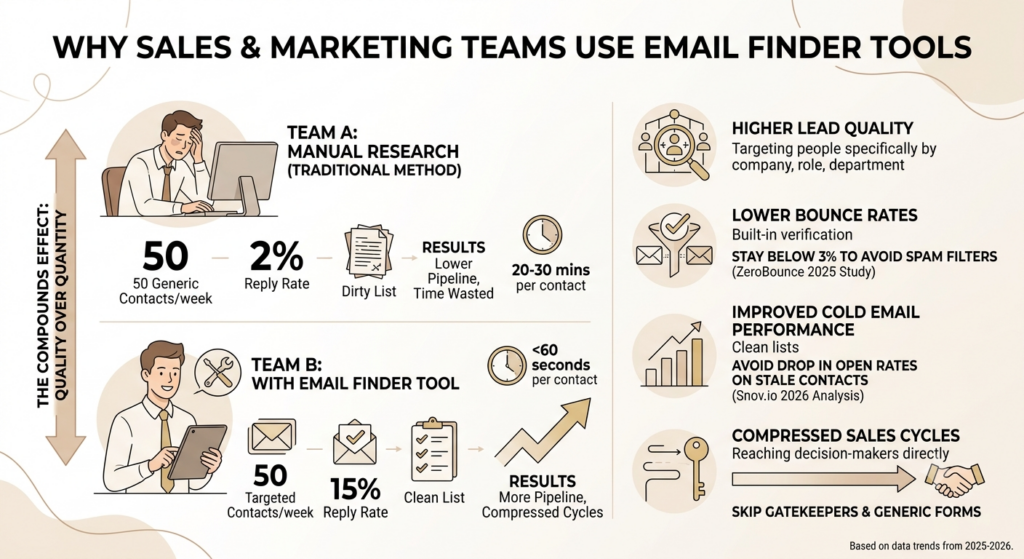
The straightforward answer is time. Manual research to find one verified email address can take 20 to 30 minutes per contact. A good email finder tool cuts that to under 60 seconds.
But the value goes beyond speed.
Lead quality goes up because you’re reaching people you’ve specifically chosen, not generic contacts from a purchased list. You know the company, the role, the department -you’ve done the targeting work, and the tool just gets you the contact.
Bounce rates drop when verification is built in. According to ZeroBounce’s 2025 Deliverability Study, bounce rates above 3% trigger spam filters at Gmail, Outlook, and Yahoo. That kind of sender reputation damage takes weeks to fix. Verified contact data is how you stay below that threshold.
Cold email performance improves when your list is clean. According to Snov.io’s analysis of 10+ million emails, the average cold email open rate in 2026 sits at 27.7%. That number drops sharply when you’re sending to unverified or stale contacts that bounce or land in spam.
Sales cycles compress when you can reach decision-makers directly instead of going through gatekeepers or generic contact forms that may never be read.
The compounding effect is real. A sales team that finds 50 better contacts per week, with a 15% reply rate on clean outreach, generates more pipeline than a team blasting 500 unverified contacts with a 2% reply rate on a dirty list.
Email finder tools reduce manual prospecting time by locating and verifying contact information through automated domain search, name lookup, and LinkedIn extraction. Teams using verified contact data consistently report lower bounce rates and higher cold email reply rates than teams relying on unverified purchased lists or manual research.
Key Features to Look for in Email Finder Tools
Not every tool is built the same. Here’s what actually matters when you’re evaluating options:
Email Search Methods
At minimum, you want domain search, name + company search, and LinkedIn profile lookup. Bulk email lookup matters too if you’re enriching large lists. The more search methods a tool supports, the more flexible it is across different workflows.
Email Verification Quality
This is where tools diverge most significantly. Look for SMTP verification (actually pings the mail server), catch-all detection, disposable email filtering, and bounce prediction. Some tools, like UpLead, verify addresses at the point of export rather than at the time of indexing -which means the verification is fresher.
Contact Enrichment
Beyond the email address, good tools surface job titles, company size, industry, phone numbers, and sometimes social profiles. This is what separates a bare email finder from a proper prospecting tool. Contact enrichment data is what makes personalisation possible at scale.
CRM Integrations
Your email finder is only as useful as its ability to push data into your workflow. Look for native integrations with Salesforce, HubSpot, Pipedrive, or whatever CRM your team uses. CSV export is a baseline, not a feature.
Chrome Extension
For teams doing LinkedIn-based prospecting, a working Chrome extension is non-negotiable. The extension should work reliably on both LinkedIn profiles and Sales Navigator search results, and it should survive LinkedIn’s frequent platform updates.
API Access
If you’re enriching records at scale, running automated workflows, or feeding data into a custom tech stack, API access is essential. Most tools offer this on paid plans.
Compliance and Data Transparency
This matters more than most buyers check. Look for clear documentation of how contact data was sourced, a lawful basis for processing under GDPR, and a functional opt-out/deletion process. If a vendor can’t tell you plainly where their data comes from, that’s a red flag.
Best Email Finder Tools in 2026
The market has several strong players, each optimised for a different workflow. Here’s an honest breakdown:
1. Hunter.io -Best for Domain Search and Clean Simplicity
Hunter.io built its reputation on domain search, and it still does that better than almost anything else. Enter a domain, get a list of all discoverable contacts at that company, along with confidence scores and the email pattern the company uses.
Key features: Domain search, name + company search, bulk email finder, email verification, Chrome extension, basic cold outreach campaigns, and an AI email writer on paid plans. The Signals feature (available on paid plans) surfaces companies showing buying intent through hiring activity.
Pricing: Free plan with 25 searches per month. Paid plans start at approximately $49/month for 2,000 credits, scaling to $204/month for 25,000 credits. Annual billing reduces each plan by roughly 30%.
Best for: Link builders, PR teams, and marketers who need reliable domain-level contact discovery. Also a strong pick for teams that don’t need phone numbers and want a clean, focused tool rather than a full sales platform.
Limitations: No phone number data. The database relies on publicly indexed emails, which can miss contacts at companies with low web footprints. Per Snov.io’s comparative tests, its verification accuracy in real-world conditions sits around 91.3% on standard B2B domains.
2. Apollo.io -Best for Full-Funnel Sales Teams
Apollo.io is a different category of tool entirely. It’s not just an email finder -it’s a sales engagement platform with a database of 275M+ contacts, built-in email sequencing, a dialer, CRM features, and basic intent data. If you’re building a sales stack from scratch, Apollo is compelling.
Key features: Massive contact database, email sequences, LinkedIn extension, phone numbers on higher tiers, intent signals, and integrations with Salesforce and HubSpot.
Pricing:Free: Limited credits and core prospecting features
Basic: $49/user/month (billed annually) or $59/user/month (billed monthly)
Professional: $79/user/month (billed annually) or $99/user/month (billed monthly)
Organisation: $119/user/month (billed annually) or $149/user/month (billed monthly)
Best for: Sales-led teams that want to find contacts, sequence outreach, and track engagement from one platform.
Limitations: Apollo’s breadth can work against it for email accuracy. Users on review platforms report 15-25% bounce rates in some campaigns, which suggests the verification layer is less strict than dedicated email finders. For high-volume cold email where deliverability is critical, pairing Apollo with a separate verification tool is worth considering.
3. Snov.io -Best Value for Small Teams Who Want Everything in One Place
Snov.io sits between Hunter’s simplicity and Apollo’s complexity. It combines email finding, multi-step verification, LinkedIn automation, drip email campaigns, inbox warm-up, and a lightweight CRM under one plan. Independent verification benchmarks put its accuracy between 98-99%, higher than Hunter’s verified results in comparable tests.
Pricing: Starter from $39/month for 1,000 credits (billed annually). Pro from $74.25/month for 5,000 credits. Watch the credit math -finding costs one credit and verification costs one credit, so 1,000 credits equals 500 verified emails.
Best for: Small outbound teams who want to reduce tool sprawl and handle prospecting, verification, and sequencing from one dashboard.
Limitations: No phone numbers on standard plans. LinkedIn automation is an add-on at $69/month per seat, which can nearly double your cost if you use it heavily.
4. RocketReach -Best for Multi-Channel Contact Data
RocketReach stands out for its breadth of contact coverage, including personal email domains (useful for recruiting), phone numbers, and social profiles alongside business emails. Its database covers over 700 million professionals.
Best for: Recruiters who need personal emails alongside business contacts, and sales teams that cold call as well as email.
Limitations: The interface feels dated compared to newer tools, and CRM integrations require more setup. Accuracy can vary by industry.
5. UpLead -Best for Accuracy Guarantee
UpLead’s headline claim is a 95% email accuracy guarantee, backed by real-time verification at the point of export. You only download contacts that have been actively verified, which prevents stale data from entering your CRM.
Best for: Teams where deliverability is the primary concern and they’d rather get fewer but cleaner results than large lists with noise baked in.
6. Lusha -Best Chrome Extension for LinkedIn
Lusha’s Chrome extension surfaces verified emails and direct-dial phone numbers directly on LinkedIn profiles with a single click. It’s GDPR and CCPA compliant, with strong North American contact coverage.
Best for: SDRs who spend most of their day on LinkedIn and need instant contact enrichment without leaving the platform.
Pricing: Free plan includes a limited number of reveals monthly. Paid plans scale with contact volume.
7. ContactOut -Best for Recruiter LinkedIn Workflows
ContactOut is purpose-built for finding emails and phone numbers from LinkedIn profiles. The Chrome extension overlays contact data directly on LinkedIn with one click, and it covers personal email domains well, which matters for recruiting, where candidates may have moved roles.
Best for: Talent teams doing sourcing primarily through LinkedIn.
8. Wiza -Best for LinkedIn Sales Navigator Bulk Export
Wiza specialises in bulk extraction from LinkedIn Sales Navigator searches, verifying every email in real time before delivery. It’s a clean workflow for teams who do most of their prospecting inside Navigator.
Best for: High-volume LinkedIn prospectors who need to export and verify large lists efficiently.
9. GetProspect -Best Budget Option with LinkedIn Focus
GetProspect offers basic email lookup by domain and LinkedIn profile at an accessible price point. It’s a reasonable starting point for teams testing outbound prospecting for the first time.
Pricing: Free tier with 50 credits/month. Paid from $49/month.
10. Cognism -Best for Enterprise Teams Targeting European Markets
Cognism is the strongest tool for teams doing serious outbound into European markets. Its “Diamond Data” is phone-verified by a human team, its GDPR compliance posture is documented to an enterprise standard, and it covers EMEA contacts more thoroughly than any US-headquartered tool. Emails go through five verification layers, including compliance checks and machine learning models.
Best for: Enterprise sales teams where compliance is a hard gate, particularly for EU/EMEA outbound.
Limitations: Enterprise pricing, custom contracts. Not the right fit for small teams or tight budgets.
The email finder tools market in 2026 covers a wide spectrum: from focused domain search tools like Hunter.io to full sales engagement platforms like Apollo.io to enterprise-grade compliance-first tools like Cognism. The right choice depends on your team size, contact volume, geographic target markets, and whether you need email finding only or a complete outbound workflow in a single platform.
Email Finder Tools Comparison Table
| Tool | Best For | Verification | Bulk Search | LinkedIn Extension | CRM Integration | API | Free Plan | Starting Price |
| Hunter.io | Domain search | Yes | Yes | Yes | Yes | Yes | 25 searches/mo | ~$49/mo |
| Apollo.io | Full sales platform | Yes | Yes | Yes | Yes | Yes | 10,000 credits | $49/user/mo |
| Snov.io | All-in-one outreach | 98-99% accuracy | Yes | Yes (add-on) | Yes | Yes | 50 credits/mo | $39/mo |
| RocketReach | Multi-channel data | Yes | Yes | Yes | Yes | Yes | Limited | $39/mo |
| UpLead | Verified accuracy | Real-time export | Yes | Yes | Yes | Yes | 5 contacts trial | Custom |
| Lusha | LinkedIn SDRs | Yes | Yes | Yes | Yes | Yes | Limited reveals | Custom |
| ContactOut | Recruiting | Yes | Yes | Yes | Yes | No | 4 reveals/day | $79/mo |
| Wiza | Navigator bulk export | Real-time | Yes | Yes | Yes | Yes | Limited | $49/mo |
| GetProspect | Budget/beginners | Yes | Yes | Yes | Basic | Yes | 50 credits/mo | $49/mo |
| Cognism | Enterprise EU/EMEA | 5-layer + human | Yes | Yes | Yes | Yes | No | Custom |
Email Finder Tools vs Email Verification Tools -What’s the Difference?
A lot of buyers conflate these two categories. They’re related, but they solve different problems.
An email finder tool locates an email address you don’t have yet. Its job is discovery -finding the right contact at the right company from a name, domain, or LinkedIn profile.
An email verification tool checks whether an email address you already have is valid. It doesn’t find new addresses. It tells you whether existing ones will deliver or bounce.
| Email Finder | Email Verifier | |
| Purpose | Locate new email addresses | Validate existing addresses |
| Input | Name, domain, LinkedIn URL | An email address or a list |
| Output | Email address + confidence score | Valid / Invalid / Catch-all / Risky |
| Best Use Case | Building prospect lists from scratch | Cleaning lists before campaigns |
| Examples | Hunter.io, Apollo.io, Snov.io | ZeroBounce, NeverBounce, BriteVerify |
Most modern email finder tools include a verification component, but their primary purpose is still discovery. If you’re cleaning an existing list of 10,000 contacts, a dedicated email verification tool like ZeroBounce or NeverBounce will do that job faster and more cheaply than using a finder’s verification credits.
How to Choose the Right Email Finder Tool for Your Team
There’s no universal answer. The right tool depends on what your workflow actually looks like.
Define Your Use Case First
If you’re a solo founder doing 20 targeted outreach emails per week, Hunter.io’s free plan may be enough. If you’re an SDR team running 500+ sequences per month, you need bulk processing, CRM sync, and probably a dedicated sequencer alongside your finder. Don’t pay for platform complexity you won’t use.
Check Verification Quality Independently
Ignore accuracy percentages on vendor marketing pages. <cite index=”4-1″>Independent benchmarks show significant gaps between claimed accuracy and real-world results -for example, Skrapp’s email finder delivered 42-48% valid emails against its claimed 92% in independent tests.</cite> The only way to know is to run the same 50-100 contacts through two or three tools and compare bounce rates yourself.
Think About Where Your Prospects Are
If your ICP (ideal customer profile) is concentrated in the US and UK markets, most tools cover you well. If you’re targeting EU markets heavily, GDPR compliance documentation becomes a hard filter, and Cognism or Lusha are stronger choices. If you’re doing outbound in India, most tools have decent coverage for major cities and enterprise companies, but thinner data for mid-market or regional businesses.
Consider Total Cost, Not Just Sticker Price
<cite index=”10-1″>Watch the credit math on tools like Snov.io, where finding and verification each cost one credit -so 1,000 credits actually equals 500 verified emails.</cite> Factor in whether LinkedIn automation, phone credits, or inbox warm-up add-ons push your actual monthly cost significantly above the headline rate.
Test with a Free Plan Before Committing
Most tools offer a free tier that’s sufficient for evaluation. <cite index=”10-1″>Hunter.io’s 50 free credits, Apollo’s free tier, and similar starter plans let you test data quality on your specific target domains before committing budget.</cite> Run the same prospect list through your top two picks, send a small test batch, and compare bounce rates and reply rates against each other.
Compliance – GDPR, CAN-SPAM, and What You Need to Know
This section matters more than most buyers realise, and it’s where a lot of outbound teams get into trouble.
What the Law Actually Says
In the US, CAN-SPAM governs commercial email. It’s an opt-out framework -cold B2B email is legal as long as you include a working unsubscribe mechanism, use honest subject lines, and identify the message as commercial. <cite index=”10-1″>Penalties run up to $53,088 per violation, so compliance isn’t optional, but the bar for legal cold outreach in the US is relatively low.</cite>
In the EU, GDPR is significantly stricter. <cite index=”12-1″>EU regulators are steering businesses toward an opt-in model even for professional communications. Purchased lists, scraped data, and third-party databases are legally risky unless you can prove that every contact has explicitly agreed to receive your emails.</cite>
<cite index=”12-1″>For context, in late 2024, the French regulator CNIL fined Orange €50 million for sending advertisements that blended with regular emails without proper consent.</cite> Compliance enforcement is real, and it’s getting more active.
What This Means for Your Tool Choice
If you prospect into EU markets, you need a tool with clear GDPR documentation, a lawful basis for the personal data in their database, and a functional deletion request process. <cite index=”13-1″>Cognism, Lusha, and Apollo all have explicit GDPR compliance documentation -review it before committing.</cite> Cognism is the strongest for EU/EMEA outbound.
For Indian B2B markets, India’s data protection framework (the Digital Personal Data Protection Act, or DPDPA) is newer but increasingly relevant. Keep opt-out handling clean and avoid adding contacts who have clearly indicated they don’t want to receive commercial communications.
Practical Compliance Checklist
Always include a working unsubscribe link in cold emails. Honour opt-out requests within 10 days (US) or immediately (EU). Use professional business emails, not personal domains, for outreach. Check that your email finder’s data sourcing aligns with applicable law before using it in target markets. And if you’re sending into the EU, set up SPF, DKIM, and DMARC authentication on your sending domain -<cite index=”12-1″>Gmail and Outlook now require these configurations to ensure deliverability.</cite>
B2B cold email compliance in 2026 requires different standards depending on geography. In the US, CAN-SPAM allows cold outreach with an opt-out mechanism. In the EU, GDPR enforcement has tightened significantly -teams targeting European contacts need tools with explicit GDPR compliance documentation, clear data sourcing transparency, and functional deletion workflows. For EU outbound, Cognism currently offers the strongest compliance posture of any email finder on the market.
Common Mistakes When Using Email Finder Tools
Most email finder problems aren’t tool problems. They’re usage problems.
Treating catch-all addresses as verified. A catch-all domain accepts all emails sent to it, even for addresses that don’t exist. Sending to these inflates your apparent delivery rate while tanking your engagement and sender reputation. Always filter catch-all results out or flag them for manual review before sending.
Not re-verifying old exports. <cite index=”10-1″>Email lists decay roughly 2% every four weeks as people change roles and companies restructure.</cite> A list you built three months ago and haven’t re-verified is already carrying significant bounce risk. Run verification again before every major campaign.
Using role-based addresses for cold outreach. Addresses like info@, hello@, or contact@ are shared inboxes, not individual contacts. Sending cold outreach to these roles gets you ignored at best and flagged as spam at worst. Configure your finder to exclude role-based returns.
Relying on one tool’s accuracy claim. Every email finder markets 90%+ accuracy. Real-world performance varies by industry, geography, and company type. Test independently before scaling spend.
Skipping personalisation on verified contacts. Finding a valid email address is the starting line, not the finish line. <cite index=”11-1″>According to Snov.io’s analysis of 10+ million cold emails, personalised emails achieved meaningfully higher open rates (20.79%) compared to non-personalised outreach (14.96%).</cite> The best contact data in the world doesn’t save a generic email.
Best Practices for Using Email Finder Tools
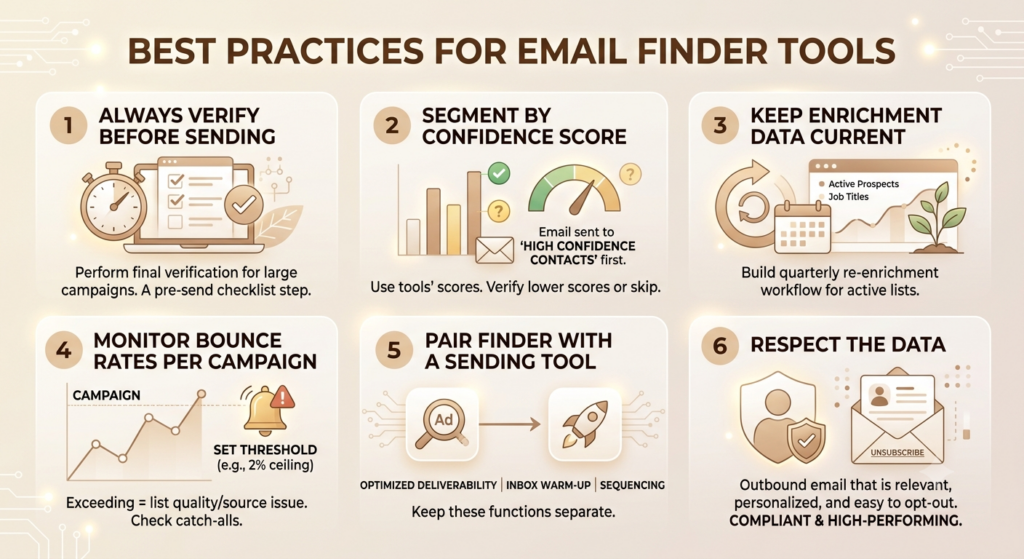
A few habits that separate teams with clean, high-performing outreach from teams that burn domain reputation and waste credits:
Always verify before sending. Even if the finder includes verification, run a final check on large lists before a major campaign. Treat verification as a step in your pre-send checklist, not a one-time action at import.
Segment by confidence score. Tools like Hunter.io attach confidence scores to each result. Don’t treat a 60% confidence score the same as a 95% score. Send to high-confidence contacts first, and verify or skip the lower-confidence results before including them in a campaign.
Keep enrichment data current. Job titles change, companies get acquired, and teams restructure. An enrichment snapshot is only as useful as its freshness. Build quarterly re-enrichment into your workflow for active prospect lists.
Monitor bounce rates per campaign. Set a bounce rate threshold (2% is a reasonable ceiling) and treat exceeding it as an alert that something needs fixing -either in your list quality, your source tool, or how you’re handling catch-all results.
Pair your finder with a sending tool. Email finder tools find contacts. They’re not optimised for email deliverability, inbox warm-up, or campaign sequencing at scale. Tools like Instantly, Lemlist, or Reply.io handle the sending side. Keep these functions separate.
Respect the data. Every email address in your Finder export belongs to a real person. The compliance rules exist for a reason. Outbound email that’s relevant, personalised, and easy to opt out of isn’t just compliant -it performs better.
Use Cases by Team Type
For Sales Teams
Sales reps use email finder tools to build targeted prospect lists by domain, enrich CRM records with verified contacts, and speed up the gap between “identified account” and “first outreach sent.” Tools like Apollo.io and Snov.io are common picks because they handle finding, verification, and sequencing in one platform.
A practical example: a B2B SaaS startup targeting CFOs at manufacturing companies in the mid-market can use Apollo to filter by company size, industry, and title -then export verified emails directly into their HubSpot sequence.
For Marketing Teams
Account-based marketing programs depend on being able to reach specific people at specific companies. Email finder tools fill the gap where a target account has been identified, but no direct contact exists in the CRM
What the Law Actually Says
In the US, CAN-SPAM governs commercial email. It’s an opt-out framework -cold B2B email is legal as long as you include a working unsubscribe mechanism, use honest subject lines, and identify the message as commercial. <cite index=”10-1″>Penalties run up to $53,088 per violation, so compliance isn’t optional, but the bar for legal cold outreach in the US is relatively low.</cite>
In the EU, GDPR is significantly stricter. <cite index=”12-1″>EU regulators are steering businesses toward an opt-in model even for professional communications. Purchased lists, scraped data, and third-party databases are legally risky unless you can prove that every contact has explicitly agreed to receive your emails.</cite>
<cite index=”12-1″>For context, in late 2024, the French regulator CNIL fined Orange €50 million for sending advertisements that blended with regular emails without proper consent.</cite> Compliance enforcement is real, and it’s getting more active.
What This Means for Your Tool Choice
If you prospect into EU markets, you need a tool with clear GDPR documentation, a lawful basis for the personal data in their database, and a functional deletion request process. <cite index=”13-1″>Cognism, Lusha, and Apollo all have explicit GDPR compliance documentation -review it before committing.</cite> Cognism is the strongest for EU/EMEA outbound.
For Indian B2B markets, India’s data protection framework (the Digital Personal Data Protection Act, or DPDPA) is newer but increasingly relevant. Keep opt-out handling clean and avoid adding contacts who have clearly indicated they don’t want to receive commercial communications.
For Recruiters
Recruiters use tools like ContactOut and Lusha to find candidate emails beyond LinkedIn’s InMail cap. Personal email coverage matters here -a candidate who left their job three months ago may still be reachable via personal email even if their business address is inactive.
For Agencies
Agencies use email finder tools both for client work (finding contacts at prospective clients) and for their clients (building lead lists as a deliverable). Bulk processing and API access matter more here than for individual users.
For Startups
Early-stage founders often handle outbound themselves before hiring a sales team. Hunter.io’s free plan or Snov.io’s starter tier are common picks -enough to run targeted campaigns without significant upfront investment.
Future Trends in Email Finder Software
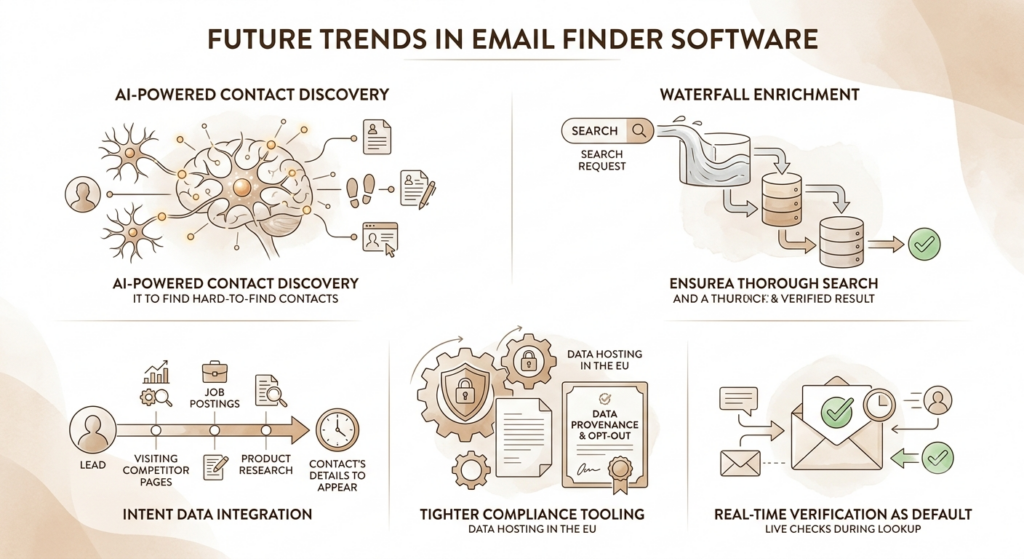
The category is changing fast. Here’s where things are heading:
AI-powered contact discovery. Tools are moving beyond pattern-based email guessing toward AI models that cross-reference multiple data sources in real time to find contacts that aren’t publicly indexed. Seamless.AI’s real-time search approach is an early version of this.
Waterfall enrichment. Instead of relying on one database, tools like FullEnrich route each lookup through multiple upstream providers in sequence, taking the first verified result. This improves hit rates significantly, especially for contacts at smaller companies with limited public web footprints.
Intent data integration. The next evolution isn’t just “find this contact” -it’s “find this contact when they’re actively researching your category.” Tools like Cognism and ZoomInfo are already combining contact data with intent signals (companies visiting competitor pages, job postings signalling a buying need). This targeting by timing is where the real lift comes from.
Tighter compliance tooling. As GDPR enforcement intensifies in Europe and similar frameworks spread to US states, tools will need to offer better data provenance documentation, automated opt-out processing, and EU-resident data hosting as standard features rather than enterprise add-ons.
Real-time verification as default. Static database verification is increasingly being replaced by live SMTP checks at the moment of lookup rather than at the time of indexing. This reduces stale data problems significantly and will likely become table stakes within the next two years.
Conclusion
Email finder tools do one important thing: they close the gap between identifying the right prospect and actually being able to reach them. But the quality of that contact data -how it was found, how recently it was verified, whether the tool flags catch-alls and role-based addresses -determines whether your outbound program runs smoothly or burns domain reputation chasing stale contacts.
The right tool for your team isn’t necessarily the biggest database or the lowest price per credit. It’s the one that fits your workflow, covers your target markets reliably, and gives you enough transparency about data sourcing to stay compliant.
Start with a free plan. Test real bounce rates. Only scale spend once you’ve confirmed the data quality holds for your specific ICP.
Frequently Asked Questions
What is an email finder tool?
An email finder tool is software that helps you locate professional email addresses for specific people at companies, using domain search, name lookup, or LinkedIn profile extraction. Most tools include verification to confirm the address is valid before it’s delivered to you.
How accurate are email finder tools?
Accuracy varies significantly between tools and target markets. Marketing claims of 90%+ accuracy often don’t match independent test results. Hunter.io returned 91.3% valid results in structured B2B testing. Snov.io’s verification layer achieves 98-99% accuracy in independent benchmarks. The only reliable way to assess accuracy for your specific use case is to run a test batch and check bounce rates yourself.
Are email finder tools legal to use?
In most jurisdictions, yes -with caveats. In the US, CAN-SPAM allows B2B cold email with a working unsubscribe mechanism and honest sender identification. In the EU, GDPR requires a clear lawful basis for processing contact data and stricter consent standards. Always check the tool’s compliance documentation for your target markets, and ensure your outreach includes an opt-out option.
What’s the difference between an email finder and an email verification tool?
An email finder locates email addresses you don’t have yet. An email verification tool checks whether email addresses you already have are valid and deliverable. Many email finder tools include a verification step, but they have distinct capabilities. If you’re cleaning a large existing list, a dedicated verification tool like ZeroBounce or NeverBounce is more cost-effective.
Which email finder is best for small businesses or solo founders?
Hunter.io and Snov.io are the most practical options for small teams. Hunter’s free plan (25 searches/month) is enough to evaluate the tool and run light prospecting. Snov.io’s starter tier at $39/month bundles finding, verification, and basic drip campaigns for teams who don’t want to manage multiple tools.
Can email finder tools integrate with CRMs?
Yes. Most established tools offer native integrations with Salesforce, HubSpot, Pipedrive, and other major CRMs. Apollo.io and Snov.io include lightweight CRM features within the platform itself. Check whether the integration is bidirectional (push and pull) or export-only, and whether it syncs automatically or requires manual triggers.
Do email finder tools work with LinkedIn?
Most tools offer a Chrome extension that works on LinkedIn profiles. ContactOut, Lusha, and Wiza are particularly strong for LinkedIn-based prospecting. If you use Sales Navigator, check specifically whether the extension works on Navigator search results, not just individual profiles -behaviour varies.
What features should I prioritise when evaluating email finder tools?
Verification quality, credit math transparency, CRM integration, LinkedIn extension reliability, and compliance documentation are the five things that matter most in practice. Accuracy percentages in vendor marketing are almost always optimistic -test real bounce rates before committing.
Are there free email finder tools worth using?
Hunter.io’s free plan (25 searches/month), Apollo.io’s free tier, and GetProspect’s free credits (50/month) are all functional for light evaluation or very early-stage prospecting. They’re not sufficient for any meaningful outbound volume, but they’re useful for testing before spending money.
How do I reduce bounce rates when using email finder tools?
Always verify before sending. Filter out catch-all addresses and role-based emails. Re-verify any list that’s more than 30 days old. Keep bounce rate monitoring set to alert you above 2% per campaign. And use tools that verify at the point of export rather than relying on database snapshots that may be months old.