
AI tools are rapidly changing how marketers work.
Not in the vague “AI will transform marketing someday” way. That phase is over.
We’re now at the stage where you can literally connect your ad account to an AI assistant and manage campaigns using natural language.
That’s what Meta Ads MCP unlocks.
With Meta’s new AI connectors and MCP (Model Context Protocol) support, you can connect your Meta Ads account directly to tools like Anthropic’s Claude and perform tasks like:
- Creating campaigns
- Pulling reports
- Adjusting budgets
- Analyzing ad performance
- Managing ad sets
- Generating marketing insights
…all through conversation.
And honestly? It feels a little surreal the first time you use it.
Instead of clicking through Ads Manager for 20 minutes, you type:
“Create a traffic campaign targeting Hong Kong and keep it paused.”
And Claude does it.
In this guide, we’ll walk you through exactly how to connect Meta Ads MCP to Claude, based on the latest setup flow, Meta’s official AI connectors rollout, and a working implementation.
This tutorial is written specifically for marketers, media buyers, founders, and performance teams who want practical implementation help, not just technical documentation.
Table of Contents
What Is Meta Ads MCP?
Before jumping into setup, it’s important to understand what’s actually happening here.
MCP = Model Context Protocol
Model Context Protocol (MCP) is an open standard that allows AI assistants to securely connect with external tools, APIs, and software platforms.
Think of it like a bridge between Claude and your marketing stack.
Instead of Claude operating in isolation, MCP allows it to:
- Read data from external platforms
- Perform actions inside those platforms
- Respond using live account information
In this case, the platform is Meta Ads.
Meta recently launched official AI connectors and MCP support for advertising workflows, allowing tools like Claude to interact directly with Meta Ads accounts through OAuth authentication.
Why This Matters for Marketers
This isn’t just another AI gimmick.
It changes the operating model of performance marketing.
Traditionally, campaign management required:
- Manual navigation
- Repetitive dashboard tasks
- Constant reporting exports
- Cross-platform analysis
Now?
A marketer can ask:
“Show me underperforming ad sets with rising CPM and low ROAS.”
Or:
“Create a paused traffic campaign targeting Singapore.”
And Claude can execute it.
That dramatically reduces operational friction.
It also shifts marketers toward more strategic work:
- Decision-making
- Creative direction
- Systems thinking
- Growth experimentation
Instead of repetitive account management.
Also Read: Complete Guide to AI Generated Ads
What You Need Before Connecting Meta Ads MCP to Claude
Before starting, make sure you have the following:
1. A Claude Account
You’ll need access to Claude.
Some connector features may require Claude Pro or higher depending on your region and rollout access. Multiple setup guides currently note that custom connector access may be limited on free plans.
2. Access to a Meta Ads Account
You need:
- Admin access OR
- Standard advertiser access
To the Meta ad account you want to connect.
3. Access to Claude Connectors
You need the ability to add custom connectors inside Claude settings.
Meta AI connectors are currently rolling out gradually, so some users may not yet have access.
Step-by-Step: How to Connect Meta Ads MCP to Claude
Now let’s walk through the actual setup.
This process takes around 5-10 minutes.
Step 1: Open Claude Settings
Log into Claude.
Then:
- Click your profile/settings area
- Open Settings
- Navigate to Connectors
In the video walkthrough, the setup starts by opening Claude settings and navigating directly to connectors.
Step 2: Add a Custom Connector
Inside Connectors:
Click:
“Add Custom Connector”
Do not select “Browse Connectors.”
This is important because Meta Ads MCP currently works through a custom MCP endpoint setup flow.
Several setup guides confirm this exact process.
Step 3: Name the Connector
You can name it anything.
Examples:
- Meta Ads MCP
- Meta Ads Connector
- Facebook Ads MCP
The name itself doesn’t affect functionality.
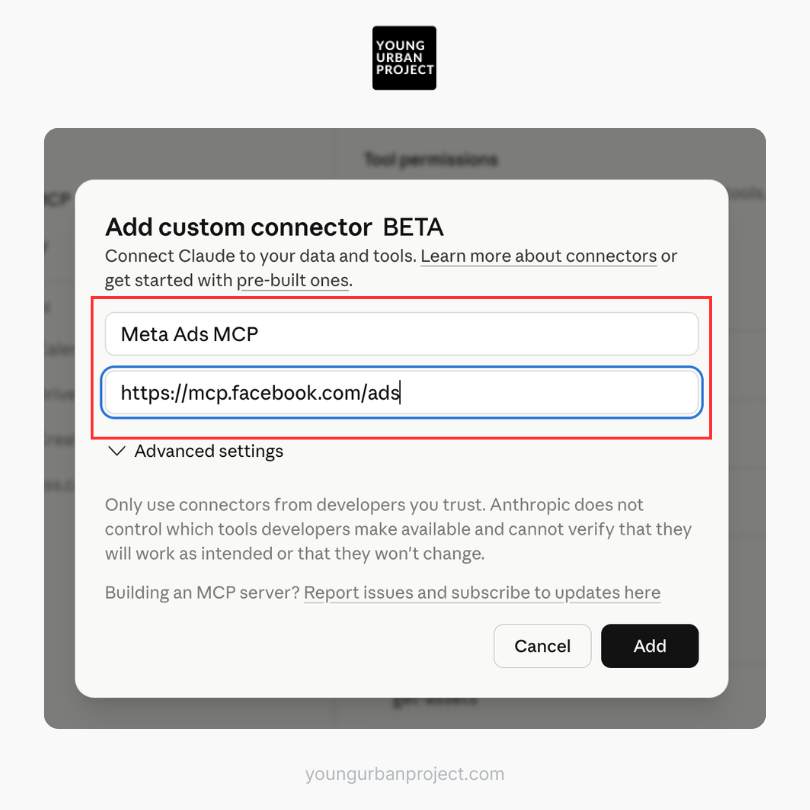
In the screenshot below, we named this connector “Meta Ads MCP.”
Step 4: Paste the MCP Server URL
Now paste the MCP server URL into the Remote MCP Server URL field.
https://mcp.facebook.com/adsDepending on the implementation you’re using, your provider may supply a custom MCP endpoint.
This is important:
There Are Multiple MCP Providers
Right now, the ecosystem includes:
- Meta’s official MCP
- Third-party hosted connectors
- Agency-focused MCP tools
- Analytics-specific integrations
Examples include:
- Porter Metrics
- Ryze AI
- Pipeboard
- Composio
- Canva
Each provides slightly different functionality and setup methods.
For this tutorial, use the MCP URL associated with your provider or the one demonstrated in your workflow.
Step 5: Click “Add”
Once the URL is pasted:
Click:
Add
Claude will now register the connector.
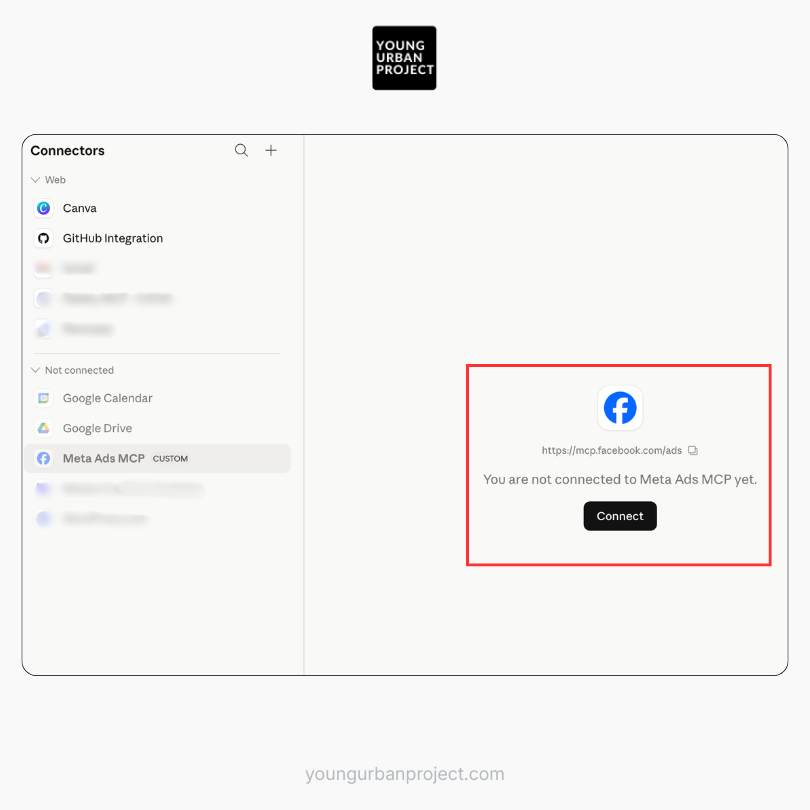
After setup, the connector should appear in your connectors list.
Step 6: Authenticate with Meta
Next, click:
Connect
Claude will redirect you to Meta’s OAuth authorization flow.
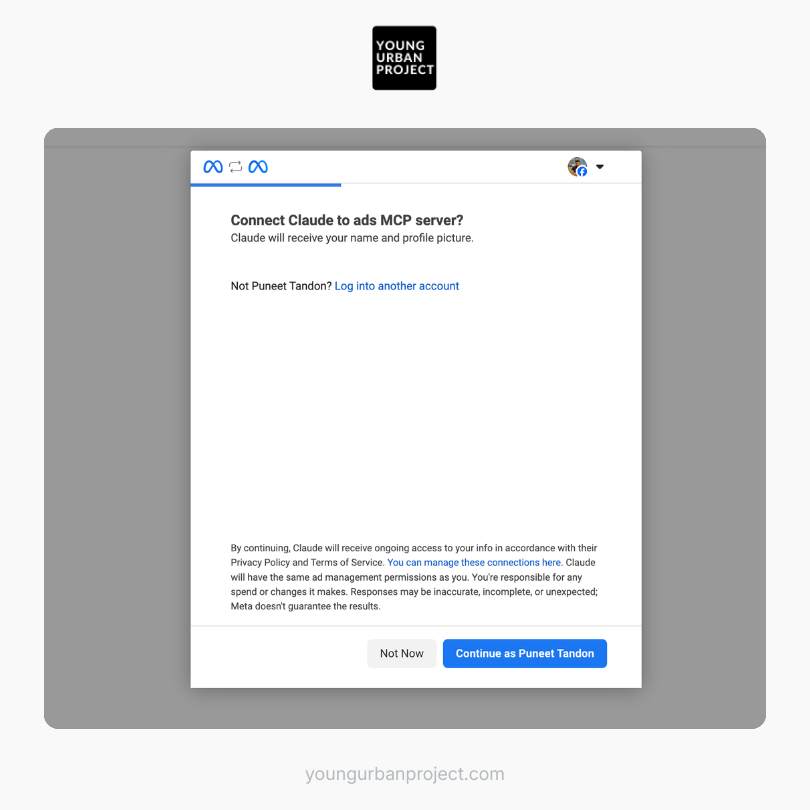
This is similar to connecting Meta to tools like:
- Shopify
- HubSpot
- Zapier
Meta’s official AI connector rollout uses standard Meta Business OAuth authentication rather than requiring a developer app setup.
💡Quick note: If you want to learn AI skills to boost marketing ROI, get paid more, and become future-proof – check out the 4-week AI-Marketing Course by Young Urban Project.

Step 7: Select Your Ad Accounts
Meta will now ask which accounts Claude can access.
You can:
- Select all accounts
- Or choose specific accounts only
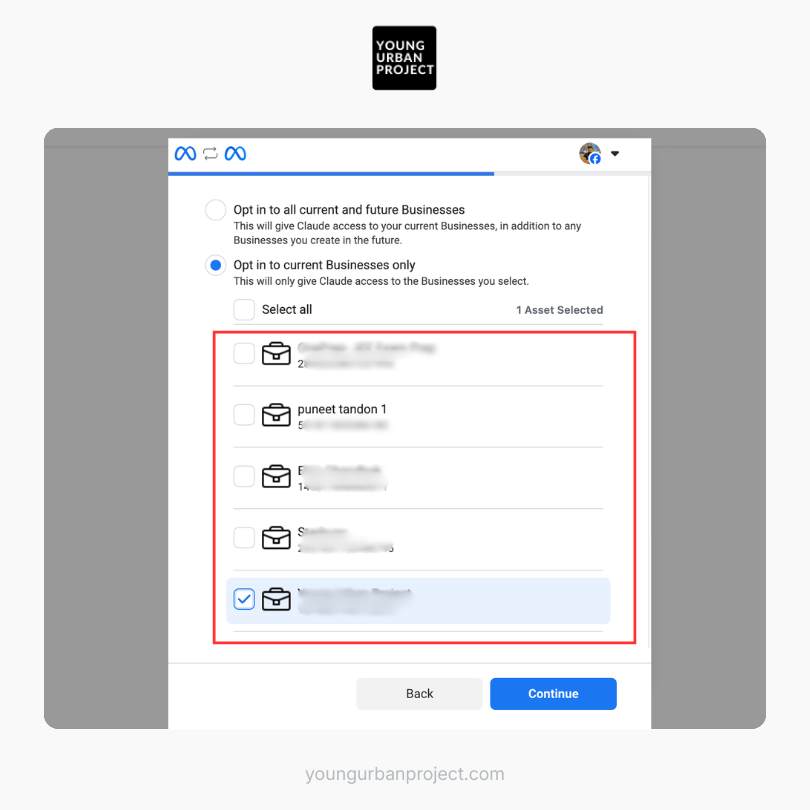
Recommendation:
If you manage client accounts:
Only expose the accounts you actually need.
Especially in agency environments.
Step 8: Save Permissions
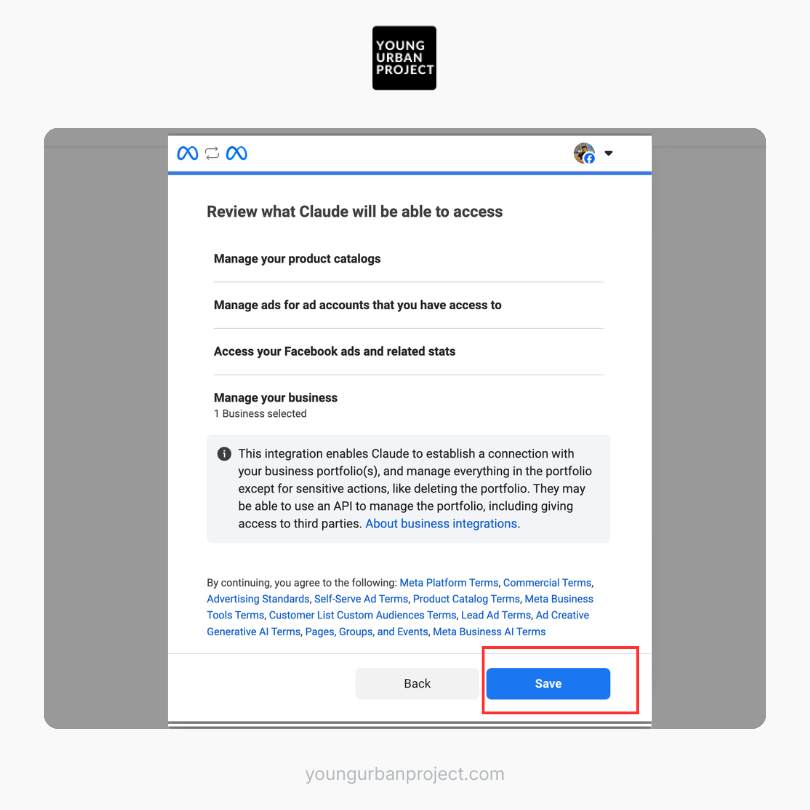
Click:
Save
Claude and Meta Ads are now connected.
At this point, Claude can interact with your ad account through the MCP connector.
Step 9: Configure Connector Permissions
This is one of the most important steps.
Inside Claude, open:
Configure Connector
You’ll now see a list of actions Claude can perform.
Examples may include:
- Read campaign data
- Create campaigns
- Pause ads
- Edit budgets
- Pull reports
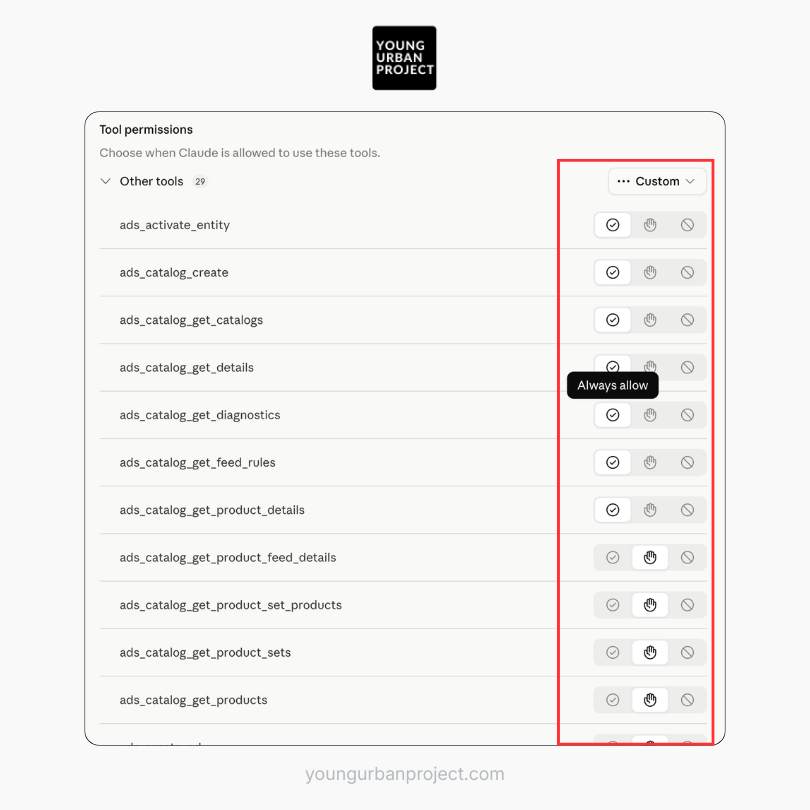
Important Safety Recommendation
This is where you can change permissions for all tools to “Always Allow” if you want to use the MCP freely. However, you can choose to “Ask Permission” if you want to approve any changes (if you want to keep higher control). Or choose “Block” if you want to forbid Claude from taking that particular action.
Also Read: How to Plan Meta Ads Campaigns that Convert
Your First Test: Creating a Campaign with Claude
Now comes the fun part.
Open a new chat in Claude.
Try a prompt like:
“Access my Meta Ads account and create a paused traffic campaign targeting Hong Kong.”
Claude can successfully:
- Access the ad account
- Created a traffic campaign
- Built an ad set
- Apply Hong Kong targeting
- Leave the campaign paused
This is real workflow execution.
What You Can Actually Do with Meta Ads MCP
This is where things get interesting.
Most people initially think this is “just reporting.”
It’s not.
The connector can support operational workflows across campaign management.
Common Meta Ads MCP Use Cases
1. Campaign Creation
Example prompts:
- “Create a lead gen campaign targeting UK marketers.”
- “Launch a traffic campaign for Singapore.”
- “Duplicate my top-performing campaign.”
2. Performance Analysis
You can ask:
- “Show my worst-performing ad sets this week.”
- “Analyze CTR trends over 30 days.”
- “Which creatives are fatiguing fastest?”
Several MCP providers now market creative fatigue analysis and campaign diagnostics as core use cases.
3. Budget Management
Examples:
- “Increase budget on campaigns with ROAS above 3.”
- “Pause campaigns with CPA above target.”
- “Reduce spend on low CTR ad sets.”
4. Reporting
Claude can summarize:
- Spend trends
- ROAS performance
- CPM changes
- Funnel drop-offs
And present insights conversationally.
What is the difference between Meta Ads MCP and Manus?
Meta Ads MCP is a connector-based integration that allows AI assistants like Claude to interact directly with Meta Ads through authenticated APIs and structured permissions. Manus, on the other hand, is an autonomous AI agent designed to perform broader browser-based workflows and multi-step tasks.
Meta Ads MCP is typically more reliable for structured advertising operations, while Manus is designed for more flexible autonomous task execution.
Is Meta Ads MCP better than Manus for managing Meta Ads?
Meta Ads MCP is generally better for direct Meta Ads management because it connects through official APIs and MCP infrastructure. This allows Claude to securely create campaigns, analyze performance, and manage advertising workflows inside Meta Ads accounts.
Manus may be useful for broader workflow automation, but MCP-based integrations are usually more stable and accurate for platform-specific advertising tasks.
Should marketers use MCP connectors or autonomous AI agents?
It depends on the workflow.
MCP connectors are better for secure, structured, platform-native operations such as campaign management and analytics. Autonomous AI agents like Manus are better suited for cross-platform workflows, browser interactions, and experimental automation tasks.
Many marketers will likely use both approaches together depending on the complexity of their workflows.
This Could Actually be Bigger Than “AI Automation”
Here’s the real shift most marketers are missing.
This isn’t about replacing marketers.
It’s about compressing execution time.
A skilled media buyer still matters.
Actually… maybe more than ever.
Because now strategy becomes the bottleneck, not execution.
The marketer who understands:
- Positioning
- Creative psychology
- Audience behavior
- Offer construction
…can move dramatically faster.
Risks and Considerations Before Using Meta Ads MCP
This part matters a lot.
Because Claude potentially gains write access to your ad account.
Some marketers are understandably cautious.
Even advanced Meta advertisers like Jon Loomer have highlighted the need for careful permission management when using AI connectors.
Key Risks
1. Accidental Campaign Changes
Claude may:
- Pause campaigns
- Change budgets
- Duplicate assets
- Modify targeting
If permissions are too broad.
2. Over-Automation
AI is powerful.
But marketing still requires judgment.
You shouldn’t blindly allow autonomous optimization without human oversight.
3. Attribution Misinterpretation
Claude only works with the data available.
If attribution is flawed, recommendations may also be flawed.
Best Practices for Safe Usage
Start with Read-Only Permissions
Initially allow:
- Reporting
- Analysis
- Insights
Before enabling write actions.
Test in Paused Campaigns
Always test campaign creation in paused mode first.
That’s smart practice.
Use Clear Prompts
Ambiguous instructions create ambiguous outcomes.
Bad:
“Optimize my account.”
Better:
“Pause ad sets with CTR below 0.5% and CPA above $50.”
How This Changes the Future of Performance Marketing
Honestly, this feels like the beginning of a major workflow shift.
For years, marketers worked inside dashboards.
Now dashboards are becoming infrastructure layers behind conversational interfaces.
Instead of:
- Clicking
- Filtering
- Exporting
- Reporting
You’ll increasingly:
- Ask
- Analyze
- Decide
- Execute
Through AI assistants.
And that changes the skill hierarchy.
Execution becomes easier.
Strategic thinking becomes more valuable.
Final Thoughts
Connecting Meta Ads MCP to Claude is surprisingly simple.
But the implications are much bigger than the setup itself.
This is one of the clearest signs yet that AI is moving beyond content generation and into operational marketing workflows.
And while we’re still early…
The marketers who learn these systems now will probably have a serious advantage over the next few years.
Not because AI replaces expertise.
But because it amplifies it.
Frequently Asked Questions (FAQs)
What is Meta Ads MCP?
Meta Ads MCP is a Model Context Protocol (MCP) connector that allows AI assistants like Claude to interact directly with Meta Ads accounts. It enables users to manage campaigns, analyze ad performance, adjust budgets, and automate advertising workflows using natural language prompts.
What does MCP mean in AI?
MCP stands for Model Context Protocol, an open standard that allows AI models and assistants to securely connect with external tools, APIs, and software platforms. MCP enables AI systems like Claude to access real-time data and perform actions inside applications such as Meta Ads.
How does Claude connect to Meta Ads?
Claude connects to Meta Ads through an MCP connector and OAuth authentication. Users add a custom MCP server inside Claude settings, authorize their Meta account permissions, and then allow Claude to interact with selected Meta Ads accounts.
Can Claude create Meta ad campaigns automatically?
Yes. Once connected through Meta Ads MCP, Claude can create campaigns, ad sets, targeting configurations, and budgets using conversational prompts. Many marketers use Claude to create paused test campaigns before launching them manually.
What can you do with Meta Ads MCP and Claude?
Meta Ads MCP allows Claude to:
– Create campaigns.
– Duplicate ad sets.
– Pull advertising reports.
– Analyze campaign performance.
– Adjust budgets.
– Pause ads.
– Review ROAS and CTR trends.
– Generate performance insights.
The connector essentially turns Meta Ads management into a conversational workflow.
Is Meta Ads MCP officially supported by Meta?
Meta has introduced official AI connector infrastructure and MCP-compatible workflows for advertising automation. However, some implementations currently rely on third-party MCP providers and hosted connectors depending on the setup being used.
Do you need coding skills to connect Meta Ads MCP to Claude?
No. Most Meta Ads MCP setups are no-code and only require users to:
– Add a custom connector.
– Paste the MCP server URL.
– Authenticate with Meta.
– Configure permissions.
The process is similar to connecting SaaS tools through OAuth integrations.
Is Meta Ads MCP safe to use?
Meta Ads MCP can be safe when permissions are configured carefully. Since it is an official MCP, it doesn’t post ad account ban risks. Many marketers initially grant read-only access before allowing campaign creation or budget editing permissions. Since Claude can potentially modify live campaigns, approval settings and account permissions should be managed cautiously.
What is the benefit of connecting Claude to Meta Ads?
Connecting Claude to Meta Ads reduces manual campaign management tasks and enables conversational advertising workflows. Instead of navigating dashboards manually, marketers can use natural language prompts to analyze performance, manage campaigns, and automate repetitive actions.
Can Claude analyze Meta Ads performance data?
Yes. Claude can analyze connected Meta Ads account data to identify trends in:
– ROAS
– CTR
– CPM
– CPA
– Spend efficiency
– Creative fatigue
– Audience performance
It can also summarize campaign performance in conversational reports.
What is the difference between Meta Ads MCP and traditional ad automation tools?
Traditional ad automation tools rely on predefined rules and dashboards, while Meta Ads MCP enables dynamic conversational interaction through AI assistants like Claude. Instead of configuring rigid workflows, marketers can ask questions and execute actions using natural language.
Can Claude pause or edit live Meta ad campaigns?
Yes. If write permissions are enabled, Claude can pause campaigns, edit budgets, duplicate ads, and make changes inside Meta Ads Manager. Many advertisers recommend testing in paused campaigns before enabling full account control.
Why are marketers using AI assistants for Meta Ads management?
Marketers are increasingly using AI assistants because they reduce operational workload, accelerate reporting, simplify campaign management, and improve workflow efficiency. AI-powered advertising tools also help teams analyze large datasets faster than manual dashboard review.
Can Claude replace Meta Ads Manager?
No. Claude does not replace Meta Ads Manager entirely. Instead, it acts as an AI interface layer that simplifies campaign management and reporting workflows. Strategic decision-making, creative direction, and account oversight still require human input.
What types of marketers benefit most from Meta Ads MCP?
Meta Ads MCP is especially useful for:
Performance marketers
Media buyers
DTC brands
Marketing agencies
Growth teams
eCommerce businesses
SaaS marketers
It is particularly valuable for teams managing multiple ad accounts or high campaign volumes.
Why is Meta Ads MCP important for the future of AI marketing?
Meta Ads MCP represents a shift toward AI-native marketing operations where conversational AI systems can interact directly with advertising platforms. This changes how marketers manage campaigns by reducing manual execution work and enabling faster analysis, optimization, and experimentation.