
You’ve got a business idea, a side project or a portfolio that’s been overdue for months. What you don’t have is a developer or a design budget. Perhaps you also lack the patience to sit through three hours of tutorials. So the website stays on the to-do list. Again.
An AI website generator earns its place in exactly that gap. All you have to do is describe what you’re building and answer a few questions. The result? The tool hands back a draft with pages, text, images and a layout. Minutes, not weeks.
This guide covers all you need to know about an AI website generate? Learn how they actually work, what you can build with one, which platforms deserve a look in 2026, and where they fall short. You’ll also get a sample prompt and an SEO checklist you can use today.
One expectation to set early. The tool builds the first version. You still have to read every line. You still have to fix what’s wrong and make the site sound like your business. Think of the output as a good first draft, nothing more.
Table of Contents
What Is an AI Website Generator?
An AI website generator is software that turns a written description of your business or project into a working website. And the plus point? The layout, text, images and page structure are already in place. You describe the site. The tool drafts it.
That’s a different starting point from the one most people know. With a traditional build, you pick a template. Then you spend an evening swapping placeholder text. You go hunting for the setting that moves the contact form. A developer-led build is slower still.
A generator flips the order. You give it inputs first. It produces the draft. Some tools take a plain-English prompt. Others ask a short set of questions about your industry, goals and style, then build from your answers.
For example, Squarespace’s Blueprint AI walks you through five guided steps. It lets you choose the direction at each one. You’ll also see the same kind of tool sold as an AI website builder. So don’t be thrown by the label.
Behind the scenes? It produces several things at once. A page structure (home, about, services, contact). Headlines and body copy. Images. A colour and font scheme. All of these suit your industry.
Here’s an illustrative example. Say a baker in Pune wants to sell custom cakes online. She types in her business name, her city and one line about made-to-order celebration cakes. A few minutes later? she has a homepage, a menu page, an about page and an enquiry form. The cake descriptions are generic. The stock photos aren’t hers. But she isn’t staring at a blank screen anymore. That’s the real shift.
How Does an AI Website Generator Work?
An AI website generator works in five stages. You describe your goal. The AI interprets it. The platform generates a layout and content. You edit the draft. You publish. The whole cycle can fit inside an hour for a simple site.
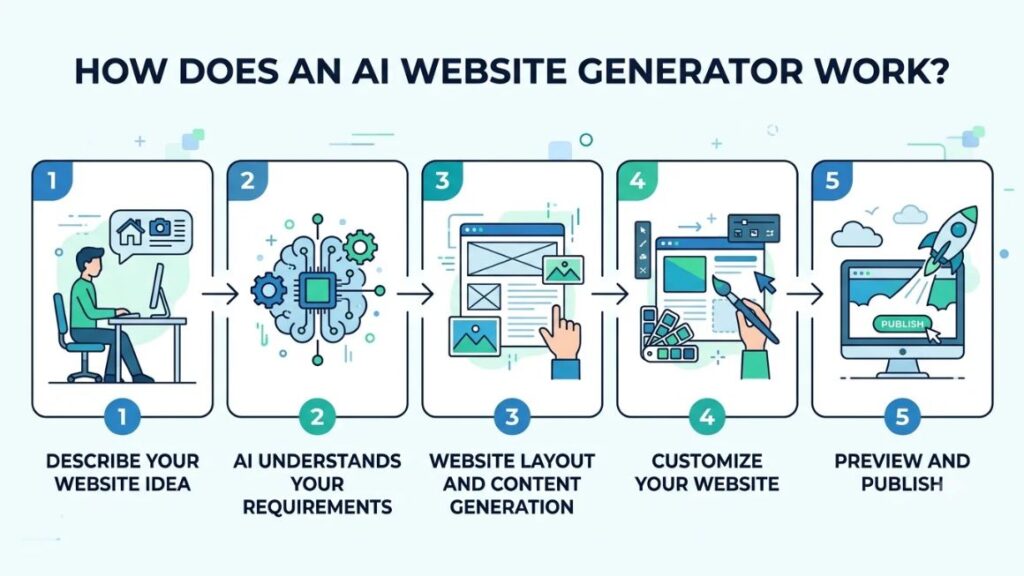
Step 1: Describe Your Website Idea
Start with the basics.
- What does the business do?
- Who is it for?
- What do you want visitors to do?
- Which pages do you need?
“A site for my business” gives the tool almost nothing. “A booking site for a physiotherapy clinic in Jaipur, with a services page and a WhatsApp enquiry button” gives it plenty to work with.
Step 2: AI Understands Your Requirements
The platform runs your input through a large language model. That’s a type of generative AI trained on huge volumes of text. Natural-language processing is the part of AI that reads everyday language. It pulls out the details that matter. Your industry, audience, listed pages and preferred tone. Those details get matched to layouts and content patterns the system already knows.
This is also where things go wrong. A vague prompt gets a vague reading. So you end up with a template-flavoured guess.
Step 3: Website Layout and Content Generation
Next comes the build. The tool:
- Proposes a page structure and navigation menu.
- Writes headlines and body text
- Picks or generates images
- Suggests colours and fonts
For instance, Durable generates a full site with images, content and a contact form in about 30 seconds. That’s according to TechRadar’s review. Other platforms take longer because they ask more questions first.
Step 4: Customize Your Website
Now the real work starts. You:
- Edit the text
- Swap in your own photos
- Change fonts and colours
- Add or remove sections
Most platforms use a drag-and-drop editor for this. So you won’t touch code. Replace the generic stuff first. Your own photos and your actual services do more for you than any AI-written paragraph.
Step 5: Preview and Publish
Check the preview on a phone and a laptop. Spacing still goes wrong a lot more often than you’d expect. Then connect a domain and publish. Some platforms bundle hosting into the plan. For example, 10Web runs WordPress sites on Google Cloud hosting it provides itself.
What Can You Build Using AI Website Creation Tools?
You can build business sites, portfolios, blogs, online stores and landing pages with an AI website generator. Keep in mind, how far you can take each one depends on the platform. What each site needs is a better guide than what the tool promises.
Business Websites
Local businesses, agencies and service providers need a clear services page, contact details, a map and some proof, such as reviews or past clients. A salon or a clinic can get that live quickly. Durable is aimed squarely at this kind of small business site.
Personal Portfolios
Designers, photographers, developers and freelancers need a gallery, a short bio and an obvious way to get in touch. Squarespace and Framer both lean toward visual work. So an image-heavy layout tends to hold up better there.
Blogs and Content Websites
Creators, publishers and educators need clean article templates, categories and a quick way to publish every week. WordPress-based platforms such as 10Web fit this well. The blogging tools come with WordPress itself.
Ecommerce Websites
Online stores need product pages, a shopping cart, payment integrations and shipping settings. Wix, Squarespace and other website creation tools all offer selling features on paid plans. But check what your plan allows before you upload 200 products.
Landing Pages
Campaigns, lead generation and product launches need one offer, a short form and a button that’s hard to miss. Speed matters most here. A landing page for a webinar can be live before lunch. Framer is a popular pick for exactly this.
Best AI Website Generators to Consider in 2026
The best AI website generator depends on the job. Wix suits most small businesses. Hostinger suits tight budgets. Framer suits designers. 10Web suits WordPress fans. Durable suits speed and Squarespace suits polished brand sites. Each takes a different approach to AI website design. So the comparison below focuses on who each one is really for.
1. Wix AI
Best for all-round website creation. Wix doesn’t charge extra for its AI tools. It comes with every plan. The free plan lets you try the AI builder with Wix ads on your site. Beyond the draft, you get bookings, stores and marketing tools. Wix also introduced Harmony in January 2026. That pairs prompt-driven generation with the classic drag-and-drop editor. The catch is choice overload for first-timers. Confirm plan prices on Wix’s pricing page, because they move.
2. Hostinger AI Website Builder
Best for budget-conscious beginners. Hosting, a domain and the AI tools come in one plan. So you get one bill and one dashboard. The headline price of $2.99 a month applies to a 48-month billing cycle. It rises to $10.99 at renewal, according to Website Builder Expert’s 2026 testing. That gap matters. The AI output is a decent starting point rather than a polished site. One reviewer notes that exporting is not really an option if you outgrow it.
3. Framer AI
Best for modern and design-focused websites. Framer’s Wireframer generates an editable responsive page from a text prompt. Then you refine it with real design control. That suits landing pages and portfolios. For total beginners it’s steeper than Wix or Squarespace. Reviewers point out that the AI produces wireframes rather than polished sites and that you can’t export HTML or CSS.
4. 10Web
Best for WordPress-based websites. 10Web produces WordPress sites bundled with Google Cloud hosting and an Elementor-based editor. So you get the plugin library without assembling hosting yourself. The trade-off is upkeep. Updates, plugin conflicts and security still need your attention, even where the platform automates some of it. And the AI can misread a page brief or suggest unrelated images. So review everything.
5. Durable
Best for quickly creating small business websites. You enter a business name, type and location and the site appears. It also bundles basic business tools: Durable’s plans include a CRM and invoicing. The limit is flexibility. One review describes low customization depth and a quick ceiling for anything beyond brochure-style sites. So check your needs before you start.
6. Squarespace
Best for portfolios and visually polished brand websites. Blueprint AI guides your design choices instead of taking a single prompt. Website Builder Expert built a functional site with it in under 10 minutes. Templates are the draw. Ecommerce tools are built in. The downside is flexibility. You work inside Squarespace’s design system. That keeps layouts tidy but limits how far you can bend them.
Quick Comparison of the Platforms
| Platform | Best for | Ease of use | Key consideration |
| Wix | General business websites | Beginner-friendly | Customization options |
| Hostinger | Budget websites | Beginner-friendly | Renewal costs |
| Framer | Design-led websites | Moderate | Design learning curve |
| 10Web | WordPress websites | Moderate | WordPress maintenance |
| Durable | Small businesses | Beginner-friendly | Advanced customization |
| Squarespace | Portfolios and brands | Beginner-friendly | Platform flexibility |
No AI website generator wins on every count. Prices change often. Introductory rates rarely last. So check each platform’s official pricing page before you buy. Look at the renewal price, not just the first-year offer.
The best AI website generator depends on what you’re building. Wix suits general business sites, Hostinger suits tight budgets, Framer suits design-led pages, 10Web suits WordPress users, Durable suits fast small-business sites and Squarespace suits polished portfolios. Always compare renewal prices, not introductory rates.
Benefits of Using AI to Build a Website
The main benefits are speed, lower upfront cost, no coding requirement, easier content creation and quicker changes. None of them replace judgement.
Faster Website Creation
A freelancer who used to lose a week choosing templates can have a working draft by lunch. An AI website generator trims the slowest part of the job which is the blank-page stage. So your time goes into the offer and the pitch.
Reduced Initial Development Costs
A first site no longer needs a developer’s quote. No-code website development has pushed the cost of a first build down far enough that a small shop can launch this quarter instead of “someday”. Hosting, domain and plan fees still apply, though.
No Advanced Coding Skills Required
You edit by clicking and typing. A café owner can change opening hours herself instead of waiting on anyone for a two-minute fix. Been searching for a website generator without coding? This is the main reason these tools exist.
Easier Content and Design Creation
Most platforms draft headlines, service descriptions and meta descriptions, and suggest colour palettes. Stuck on how to word your About page? A rough version to react to beats a blank page every time.
Faster Experimentation and Updates
Want to test two landing page headlines before a campaign? Generate both versions in minutes and compare. Cheap changes mean you test more. Testing is where most small sites quietly improve.
Limitations You Should Know Before Using AI
An AI-generated website is a starting point, not a finished business asset. Even the best AI website generator hands you a draft. A draft has gaps. Five limits matter most. Each one is easier to handle if you know about it before you pay.
Generated Content May Need Editing
Generic phrasing, wrong details and invented claims all show up. A draft might call your clinic “award-winning” when you’ve never entered an award. It may list services you don’t offer. Read everything. Fix it before a customer finds it. It’s tedious. It’s also the job.
Limited Design Flexibility on Some Platforms
Speed-first tools trade control for convenience. Durable and Hostinger get you live fast. But if you need an unusual layout, a custom booking flow or a very specific brand look, you may hit a wall sooner than you’d like.
SEO Is Not Guaranteed
A site that looks good isn’t automatically a site that ranks. Google’s guidance warns that using generative AI to produce many pages without adding value for users may violate its scaled content abuse policy.
Platform Lock-In and Website Ownership
Some platforms don’t let you export your site as portable code. That can mean rebuilding from scratch if you leave. Read the terms on content, domain and export before you commit.
Security, Accessibility and Maintenance
Somebody still has to update plugins, run backups, check colour contrast and write alt text. Platforms handle some of it. Not all.
How to Create Your First Website Using AI?
To create a website with AI, decide the site’s purpose, choose a platform, write a detailed prompt, generate the draft, edit every page and publish on your own domain.
Step 1: Choose Your Website’s Purpose
Write one sentence that says what the site must do, such as “get appointment bookings for my dental clinic”. Every later choice depends on it.
Step 2: Select the Right Platform
Match the platform to the job. Pick Durable or Wix for a small business, Squarespace or Framer for a portfolio and 10Web if you want WordPress. Start on a free plan or trial where one exists.
Step 3: Write a Detailed AI Prompt
An AI website generator can only work with what you give it, so give it specifics. Business type. Audience. Pages. Tone, The main action you want visitors to take. Here’s a sample prompt to adapt:
“Create a modern, mobile-friendly website for a digital marketing agency serving small businesses. Include a homepage, about page, services page, case studies, testimonials and contact page. Use a clean design, clear navigation, professional language and prominent enquiry buttons. Make the website easy to navigate and optimize its structure for search engines.”
Swap in your own services, city and audience. Specifics beat adjectives every time. A prompt of three or four sentences usually does better than a single line. If the first result misses, tweak the prompt and run it again. It costs you a minute.
Step 4: Generate Your Website
Run the generator and look at the structure before the design. Are the pages you asked for there? If your AI website generator got the structure wrong, rerun it before editing anything. Fixing a weak foundation costs more than regenerating.
Step 5: Review and Customize Every Page
Read each page out loud. Replace generic text with your real services, prices and photos. Check names, addresses and phone numbers twice.
Step 6: Connect Your Domain and Publish
Connect your domain. Test the site on a phone. Confirm the contact form actually reaches your inbox and then publish.
How to Make Your AI-Generated Website SEO-Friendly?
AI-powered website creation gets you live fast, but search visibility is a separate job. A generated site isn’t a ranked site. The technical setup and content quality still need checking. Whichever AI website generator you picked, the checks below are your job.
Use Relevant Keywords Naturally
Work out what people type to find your service. Then use those phrases in headings and body text the way you’d say them out loud. Cramming a keyword into every sentence reads badly and doesn’t help.
Write Unique Page Titles and Meta Descriptions
Generators often produce near-identical titles across pages. Give each page its own title and a meta description that says what the visitor will get.
Create Clear Website Navigation
Keep the menu short. Visitors should reach your services and contact pages within two clicks.
Optimize Images and Alt Text
Compress images and describe each one in alt text. It helps screen-reader users and image search.
Improve Mobile Experience and Page Speed
Google’s Core Web Vitals rate a page as good when the largest element loads within 2.5 seconds, interactions respond within 200 milliseconds and layout shift stays at or under 0.1, measured at the 75th percentile of visits. Run your published site through PageSpeed Insights and fix what it flags.
Add Internal Links and Useful Content
Link your service pages to each other. Publish pages that answer real customer questions, such as pricing, process and common objections. Pages that add nothing beyond the template give search engines little reason to show them.
Set Up Analytics and Search Console
Install Google Analytics and verify the site in Google Search Console. You’ll see which searches bring visitors and which pages have indexing problems.
Also Read: 30 Keyword Research Tools for Every Use Case in 2026
A generated site doesn’t rank on its own. Rankings depend on unique titles, useful content, fast mobile performance and a clean technical setup, all of which you need to check yourself after the platform finishes its draft.
How to Choose the Right Platform for Your Needs?
Choose by what you’re building, what you’ll pay over three years and how easily you can leave. Compare AI website design tools on those points before you compare them on looks. Any AI website generator looks good in a demo. So test yours with your own content and your own photos.
Also ask a boring question early. What happens if you cancel? Find out whether you can take your content with you, how the domain transfers and what support looks like at 9 p.m. on a launch night. The answers often decide the choice more than the template library does.
Platform selection criteria –
- Budget and ongoing costs, including renewal
- Website type and business goals
- Customization requirements
- Ecommerce and integrations
- Hosting and domain ownership
- SEO capabilities
- Export and migration options
- Customer support
A freelancer who needs a portfolio live this week might pick Squarespace for polish or Framer for design freedom. A local business, say a dental clinic, probably wants Wix or Durable for quick setup and bookings. An ecommerce brand with a large catalogue should compare Squarespace and Wix on product limits, payment options and checkout before anything else.
The Future of AI-Powered Website Creation
AI website development is shifting from one-shot generation toward ongoing editing and business integrations, judging by what platforms have actually shipped so far.
Conversational Website Editing
Several AI website generator products now offer chat-style editing. Wix’s Harmony pairs prompt-based generation with the drag-and-drop editor. So you can ask for a change and then refine it by hand.
More Personalized Website Experiences
Today, personalization mostly means tailoring the draft to your industry and location, as Durable does. Whether generators will tailor pages to individual visitors is still an open question.
AI-Assisted Content and SEO Workflows
Wix already includes AI-written meta descriptions, blog posts and image creation. Expect more of that built into editors.
Integration with Marketing and Automation Tools
Automated website creation is already tied to business tools on some platforms. Durable pairs its generator with a CRM and invoicing. That hints at where others may go.
The Growing Role of Human Creativity
The more generation gets automated, the more the differences between sites come from human inputs. Your photos. Your offer. Your voice. Google says it rewards quality content however it is produced. That puts the weight back on you.
Conclusion
For most freelancers, small businesses and creators, yes, with one condition. An AI website generator is worth using when you treat it as a fast first draft. It saves days of setup, costs little to try and needs no code. It isn’t worth it if you publish the draft untouched.
Pick the platform that fits your site type and your post-renewal budget, then read every page, add your own photos and set up analytics. Try one free plan or trial this week.
If you want to apply AI beyond website drafts, from content to campaigns and automation, the YUP AI Marketing course teaches practical workflows you can use in your own work. [CTA: YUP AI Marketing course button]
FYQ (Frequently Asked Questions)
What is an AI website generator?
An AI website generator is software that builds a website from a written prompt or a few questions, producing the layout, text, images and pages for you to edit and publish.
Can I create a website using AI for free?
Yes, to start. Wix lets you use its AI builder on a free plan with Wix ads displayed, and Framer’s AI tools are available on its free plan too. A free AI website builder usually comes with branding or limits, so plan on a paid tier to launch properly.
Is coding required to build a website with AI?
No. You edit with text boxes and drag-and-drop. Code only matters when you want features beyond what the platform offers.
Which AI website generator is best for beginners?
Wix, Squarespace and Durable are the most beginner-friendly in the list above. Wix offers the widest options, Squarespace the most guided design steps and Durable the fastest first draft. Framer and 10Web take longer to learn.
Can AI-generated websites rank on Google?
Yes, they can. Google says quality matters more than the production method, but mass-producing pages without added value breaks its spam policy. Set up titles, speed and analytics yourself.
Can I create an ecommerce website using AI?
Yes. Wix and Squarespace both support online stores, and AI can draft product descriptions. You still set up payments, shipping, taxes and store policies yourself.
How much does it cost to build a website using AI?
It ranges from nothing on a free plan to a monthly subscription fee, plus a domain if one isn’t bundled. Check renewal prices: Hostinger’s $2.99 headline rate, for instance, rises to $10.99 after the first term.
Can I edit my website after AI generates it?
Yes. Every platform here lets you change text, images, fonts, colours and sections after generation. Editing is the expected workflow, not a workaround.
Do I own the website created using AI?
Usually you keep the rights to your own text, images and brand, but platform-built sites often live inside the platform and some can’t export code. Read the terms on ownership, domains and export before committing.
Are AI website generators suitable for professional businesses?
Yes, as a starting point. A professional result needs your own copy, photos, legal pages and a careful accuracy check. Complex needs like custom integrations or very large stores may outgrow simpler generators.