

The average marketing team now runs a sprawling martech stack, and most of it sits unused. That gap between what’s licensed and what’s actually touched is exactly the problem an AI agent for marketing operations is supposed to fix, not by adding another dashboard, but by taking over the work between the dashboards: pulling the data, deciding the next step, and executing it.
Marketing operations teams have spent the last decade solving tool sprawl with more tools. It hasn’t worked. According to Gartner’s 2022 Marketing Technology Survey, marketers utilize just 42% of their stack’s available capabilities, and separate industry benchmarking in 2026 puts martech utilization even lower, hovering near 34-49% depending on how “active use” is defined. Meanwhile, the stack keeps growing. That’s the pain point agentic AI claims to solve: not another point solution, but a layer that actually operates the ones you already bought.
This piece breaks down what an AI agent for marketing operations actually is. Learn why the category is moving so fast right now and which platforms are worth evaluating in 2026, how real brands (Indian and global) are using them and how to roll one out without becoming a Gartner cancellation statistic.
Table of Contents
What Is an AI Agent for Marketing Operations?
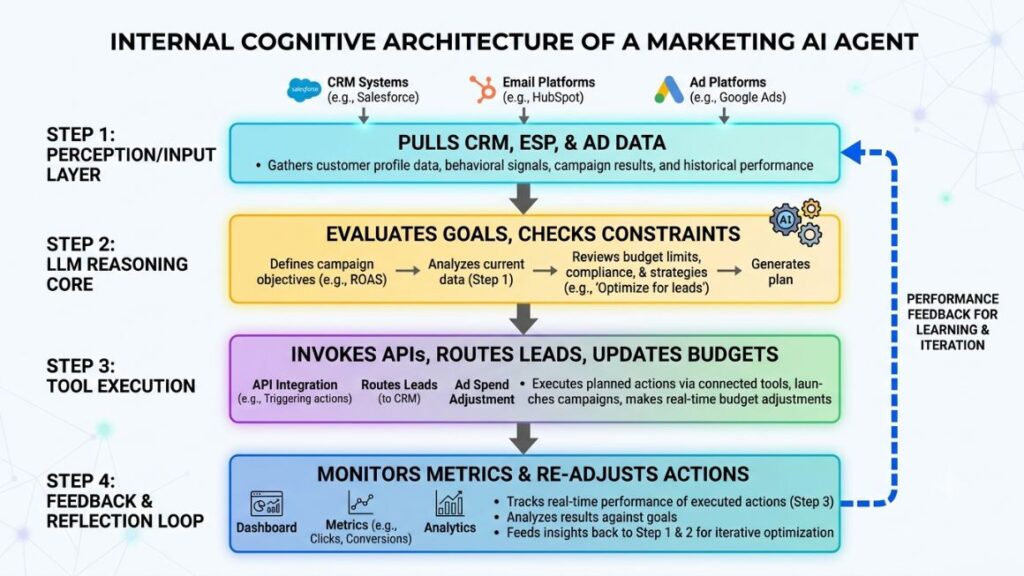
An AI agent for marketing operations is a software system that uses a large language model to plan and execute multi-step marketing tasks on its own, then adjusts based on what happens. It doesn’t just answer a question. It decides what to do next, does it, checks the outcome and decides again.
That’s really the whole difference. A chatbot answers. A workflow automation rule executes a fixed sequence you defined in advance (“if form submitted, then send email”). An agent reasons about the goal and figures out the steps itself, which means it can handle situations you didn’t explicitly script.
Take lead routing. A workflow rule might say: Assign to Rep A if lead score is above 80. An agent, by contrast, can pull the firmographic data of the lead. It can check rep capacity in real time, weigh deal size probability and route accordingly. Then it flags anomalies for a human instead of silently misrouting them. The rule follows instructions. The agent pursues an outcome.
This matters for marketing ops specifically because so much of the job is coordination work, not creative work: syncing a CDP with an ESP, reconciling attribution across five ad platforms, briefing a campaign and then checking whether it’s pacing correctly. That’s precisely the kind of multi-system, multi-step judgment work agents are built for.
Read More: What is Agentic AI? A Comprehensive Guide
Why Marketing Operations Needs Agentic AI Right Now
The timing isn’t accidental. Three things converged in 2025 and 2026. The market matured. Adoption jumped. The gap between adoption and actual impact became impossible to ignore.
Start with the money. The category is projected to grow from $7.06 billion in 2025 to $93.2 billion by 2032 according to MarketsandMarkets’ 2026 Agentic AI Market report. That is a 44.6% compound annual growth rate. This isn’t hype cycle noise. It’s enterprise software vendors, from Salesforce to SAP, rebuilding their core products around autonomous execution instead of dashboards and recommendations.
Adoption is moving just as fast on the ground. The State of AI Agents research by LangChain found that 57.3% of surveyed professionals had agents running in production entering 2026. That is up from 51% the year before, with mid sized companies (100 to 2,000 employees) the most aggressive adopters. This isn’t experimentation anymore. It’s operational infrastructure.
The agentic AI market is projected to grow from $7.06 billion in 2025 to $93.2 billion by 2032 at a 44.6% CAGR. That is according to MarketsandMarkets’ 2026 report. Over half of surveyed professionals, 57.3% entering 2026 per LangChain’s State of AI Agents research, already run agents in production, up from 51% a year earlier.
The Adoption-Impact Paradox
Here’s the part that should give every marketing ops leader pause. “The State of AI in 2025: Agents, Innovation, and Transformation” report by McKinsey, published in November 2025, found that 88% of organizations now use AI in at least one business function. This is up from 78% a year prior. That’s near-universal.
But only about 6% of respondents qualify as “AI high performers,” meaning they attribute an EBIT impact of 5% or more to AI use and report significant value from it. Most companies are using AI. Almost none are seeing it hit the bottom line.
That’s not important. It’s the whole story of this article. Adoption is table stakes now. The differentiator is whether your rollout is disciplined enough to convert usage into measurable performance. This is exactly why the “how to roll this out” section below matters more than the tool comparison.
Read More: AI Agent for Enterprise Marketing: Features, Tools & Real-World Examples

AI Agents vs. Marketing Automation vs. Generative AI: What’s the Difference?
People use these three terms interchangeably. That’s where budgets get wasted. Each does a fundamentally different job.
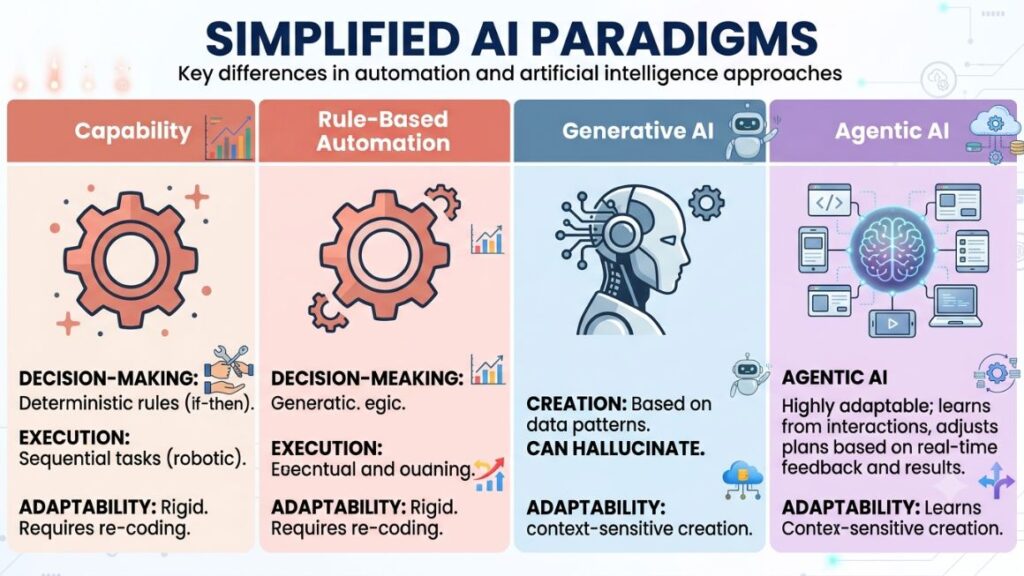
| Capability | Rule-Based Automation | Generative AI | Agentic AI |
| Decision-making | None, follows pre-set logic | None, responds to a single prompt | Plans multi-step actions toward a goal |
| Execution | Executes fixed triggers | Produces content or text | Takes actions across tools and systems |
| Adapts to new situations | No | No, unless re-prompted | Yes, adjusts based on outcomes |
| Example | “If cart abandoned, send email after 2 hours” | “Write me five subject lines” | “Recover this abandoned cart using whichever channel and offer historically converts this segment” |
| Human role | Sets the rules once | Prompts each time | Sets the goal and guardrails, monitors exceptions |
Marketing automation platforms like the classic HubSpot Workflows or Marketo were built on the first column. Generative AI tools, ChatGPT included, sit in the second. Agentic AI is the third column. It’s the one that can actually replace a chunk of the manual coordination a marketing ops manager does today. That doesn’t mean generative AI or rule-based automation disappear. Most real stacks in 2026 run all three layered together.
Read More: How to Build AI Agents (Step-by-Step Guide)
Where AI Agents Are Already Changing Marketing Operations Workflows
Agentic AI isn’t evenly distributed across the marketing function. It’s concentrated in a handful of workflows where the task is repeatable, the data is structured and errors are recoverable.
Lead Scoring and Routing
This is the most mature use case and for good reason. It’s data-rich, rules-adjacent, and revenue critical. Traditional lead scoring assigns static point values (job title +10, downloaded whitepaper +5). Agentic lead scoring pulls in real time signals, firmographic fit, intent data, rep capacity and historical conversion patterns. Then it routes dynamically instead of dumping every lead into the same queue.
For example, HubSpot’s Prospecting Agent researches prospects inside the CRM. It drafts personalized outreach without a human building the sequence step by step. The output isn’t a static score. It’s a routed, prioritized and often pre drafted next action.
Campaign Briefing, Execution, and Optimization
Campaign ops used to mean a brief document. These include a build in the ad platform, manual pacing checks and a post-mortem deck three weeks later. Agents compress that cycle. They can take a campaign goal, pull historical performance by channel and segment and generate a media plan while adjusting bids or budgeting allocation mid-flight on the basis of live performance, flagging only the decisions that cross a risk threshold.
Salesforce’s 2026 Agentic Enterprise Index, drawing on Agentforce telemetry from February 2025 through April 2026, found that the average enterprise customer now runs 13 activated agents. That is up from 5 fourteen months earlier. Those retail deployments correlated with 4x higher online sales growth. That’s not a hypothetical use case. That’s a live telemetry number from inside production accounts.
Reporting, Attribution, and Cross-Channel Analysis
This is the workflow every marketing ops person secretly hates: reconciling Meta Ads, Google Ads, email and CRM data into one attribution story every Monday morning. Reporting agents pull from every connected source, normalize the data and generate the narrative summary a human used to write by hand. Then they flag anomalies (a sudden CPA spike and a channel underperforming its historical baseline) instead of burying them in a 40-tab spreadsheet.
Reporting and attribution work is one of the clearest early wins for agentic AI in marketing operations. This is because the task is structured, recurring and low-risk if the agent gets a number wrong. That is unlike customer facing execution. Teams running reporting agents typically cut the weekly reporting cycle from days to hours. This frees analysts to interpret rather than assemble data.
Content Production at Scale
Content agents don’t just generate a draft. The more mature versions research the brief and check it against brand voice guidelines. Generate multiple variants and route them into a review queue automatically. That closes the loop between “content calendar” and “published asset” without a human manually moving files between five tools.
Read More: Best AI Agent Builders in 2026
The Best AI Agent Platforms for Marketing Operations in 2026
The category has consolidated around a handful of serious players. Each one is anchored to a different part of the stack.
Salesforce Agentforce is the deepest CRM native option. It’s grounded in Salesforce’s own Data Cloud, meaning agents have instant access to case history, opportunity data, and customer records without integration plumbing. Independent 90-day deployment reviews report tier-1 deflection rates around 62% and cost-per-resolution dropping from roughly $8 with a human agent to $2 with Agentforce, though value drops sharply for teams operating outside the Salesforce ecosystem.
HubSpot Breeze Agents target the SMB-to-mid-market segment already living inside HubSpot’s CRM. The four core agents, Customer Agent, Prospecting Agent, Content Agent, and a Data Agent for CRM hygiene, ship as part of the “Breeze” AI layer. Pricing has shifted toward outcome-based models: as of April 2026, the Customer Agent charges $0.50 per resolved conversation and the Prospecting Agent $1 per qualified lead, on top of Marketing Hub Professional’s base $800/month.
Klaviyo’s K: AI agents are the ecommerce-focused option, built around predictive analytics and lifecycle messaging inside Klaviyo’s existing email and SMS infrastructure.
Supermetrics AI and similar reporting-layer agents sit on top of the stack rather than inside one platform, pulling data across ad accounts, CRMs, and spreadsheets to automate the attribution and reporting workflow described above without requiring a full platform migration.
The pattern across all of them: pricing is moving from seat-based to outcome-based (pay per resolved conversation, per qualified lead), which changes the ROI math marketing ops teams need to run before adopting any of these.
Enterprise agent platforms are converging on outcome-based pricing rather than flat licensing. HubSpot’s Customer Agent charges per resolved conversation and Salesforce’s Agentforce deployments report cost-per-resolution near $2 versus roughly $8 for a human agent, a structural shift that rewards teams who can prove agent accuracy rather than just seat count.
Read More: Agentic Marketing Platforms: The Complete Guide to AI Agents That Plan, Execute & Optimize Marketing
How Indian and Global Brands Are Using AI Agents in Marketing Operations
MakeMyTrip announced a collaboration with OpenAI in February 2026 to deepen its AI-led travel discovery, integrating OpenAI’s APIs into its existing “Myra” assistant so conversational queries convert directly into structured, bookable options across flights, hotels, and packages. It’s a clean example of an Indian consumer brand moving from a passive chatbot to an agent that closes the loop from intent to transaction, exactly the shift this article has been describing at the category level.
Globally, retail deployments of Salesforce Agentforce correlated with 4x higher online sales growth according to Salesforce’s own 2026 Agentic Enterprise Index, a number worth treating with the usual skepticism reserved for vendor-published telemetry, but directionally consistent with what independent case reviews report elsewhere in the category.
MakeMyTrip’s February 2026 collaboration with OpenAI, integrated into its Myra assistant, is a concrete Indian example of an agent closing the loop between conversational intent and a bookable transaction rather than stopping at a chatbot answer.
From what we’ve seen with YUP learners working inside Indian D2C and travel brands, the honest pattern right now is narrower than the marketing suggests: most Indian mid-market teams are running agents for reporting and lead routing, not yet full campaign orchestration. That’s not a criticism. It’s the same sequencing the data from McKinsey recommends. You have to prove value on a contained workflow before expanding scope.
How to Roll Out an AI Agent for Marketing Operations (Step-by-Step)
Rolling this out badly is easy. Rolling it out well takes discipline most teams skip because the demo looked too good.
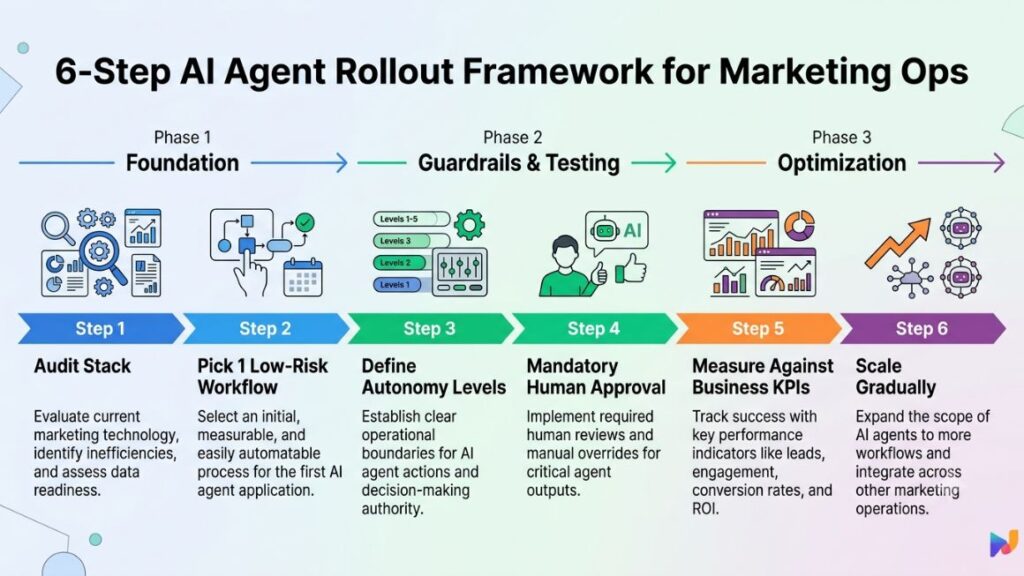
- Audit your current stack first. List every tool, who owns it, and what percentage of its capability is actually used. You can’t decide where an agent should sit until you know what’s already broken versus what’s just unused.
- Pick one workflow, not the whole funnel. Reporting and lead routing are the safest starting points because they’re structured, recurring, and low-risk if the agent gets something wrong. Don’t start with customer-facing campaign execution.
- Set an explicit autonomy level before you launch. Marketing agents generally start at an assistive tier with drafting and recommending, with a human approving every action. Then they graduate to execution rights on low risk, reversible tasks, and only later to broader optimization or orchestration once the data quality and audit trail prove reliable. Write this down. Don’t let it default to “whatever the vendor’s demo defaults to.”
- Pilot with mandatory human approval on every action for the first cycle. No exceptions, even for the boring stuff. This is where you catch the agent’s blind spots before they touch a real customer or a real ad spend budget.
- Measure against a real KPI, not activity. “Agent sent 400 emails” is not a success metric. “Recovered cart revenue increased 12% in the pilot segment” is.
- Scale only when the KPI gate is met. Move to the next workflow, or raise the agent’s autonomy tier on the current one, only when you have evidence, not enthusiasm, that it’s working.
This isn’t a novel sequence. It’s the same “narrow scope, prove value, expand” logic McKinsey found separating the 6% of AI high performers from everyone else stuck in perpetual pilot mode.
Read More: AI Agents for Content Marketing: How Autonomous Workflows Are Replacing Manual Content Ops in 2026
Governance, Risk, and Why Agentic AI Projects Fail
Here’s the uncomfortable forecast every marketing ops leader evaluating this should sit with: Gartner predicts that over 40% of agentic AI projects will be canceled by the end of 2027 due to escalating costs, unclear business value, and inadequate risk controls. Gartner’s analysts also estimate that only about 130 of the thousands of vendors claiming “agentic AI” capability offer genuinely autonomous systems, versus rebranded chatbots and RPA tools, a pattern the firm calls “agent washing.”
That’s a real number, and it should temper how you read every vendor pitch deck in this space. Most agentic AI projects right now are still early-stage experiments that are driven more by competitive pressure than a clear ROI case. The ones that get canceled tend to look fine right up until they hit messy production data, ambiguous edge cases and legacy systems that never showed up in the demo environment.
Gartner forecasts that more than 40% of agentic AI projects may be canceled by the end of 2027. That may happen due to escalating costs, unclear business value, and inadequate risk controls, and estimates that only around 130 of the thousands of vendors claiming agentic AI capability are offering the real thing rather than rebranded automation.
Three things usually separate the teams that scale from the teams: They scoped the pilot narrowly instead of trying to automate the whole funnel at once. They instrumented every agent decision with a visible audit trail from day one. They tied autonomy expansion to a measured KPI gate instead of a launch date on a roadmap slide. This may not apply to every specific stack of the team. But in most cases, the failures aren’t a model quality problem. They’re a governance problem that existed before the agent was ever switched on.
Conclusion
Adoption of AI agents in marketing operations is no longer the differentiator. Almost everyone’s using something. Discipline separates the 6% of high performers from the rest: a narrow pilot, a real KPI, an honest autonomy tier and the patience to expand only when the data backs it up. Tool sprawl got marketing ops into this mess. Another unmanaged tool won’t get it out.
If you’re building the skills to run this kind of rollout, or to make the case for it internally, YUP’s AI Marketing course walks through exactly this: how to evaluate an agent platform, structure a pilot, and read the KPI data honestly enough to know when to scale it.
FAQs
What is an AI agent for marketing operations?
An AI agent for marketing operations is a software system that uses an LLM to plan, execute and adjust multi step marketing tasks on its own. These include routing a lead or reallocating campaign budget instead of just following a fixed rule or answering a single prompt.
AI agent vs. marketing automation, what’s the difference?
Marketing automation follows pre-set rules you define in advance (“if X happens, do Y”). An AI agent reasons toward a goal and decides its own next step. This means it can handle situations the rule based system was never explicitly programmed for.
How do I set up an AI agent for my marketing team?
Start by auditing your current stack, then pick one contained workflow, usually reporting or lead routing. Then set an explicit autonomy level with mandatory human approval for the first cycle. Measure against a real business KPI and only expand scope once that KPI gate is met.
Who actually needs an AI agent for marketing operations?
Teams juggling data across multiple disconnected platforms, with recurring reporting or lead routing work that eats analyst time every week, get the clearest early return. Teams with fewer than two or three integrated systems usually don’t have enough workflow complexity to justify the setup yet.
Is agentic AI worth it for a small or mid-size marketing team?
It can be. LangChain’s data shows mid-sized companies (100 to 2,000 employees) are actually the most aggressive adopters. They are putting agents into production today. The risk isn’t team size. It’s starting with too broad a scope instead of one narrow, measurable workflow.
Why do most agentic AI marketing projects fail?
Gartner attributes most cancellations to escalating costs, unclear business value and inadequate risk controls instead of model quality. Projects that skip a narrow pilot, skip an audit trail or expand autonomy based on a roadmap date instead of measured results are the ones most likely to get scrapped by 2027.
Does an AI agent replace a marketing operations manager?
No. It replaces the repetitive coordination work, the manual reporting reconciliation, the routing logic, the campaign pacing checks, but someone still has to set the goal, define the guardrails, review exceptions, and decide when to expand autonomy. That’s arguably a more strategic version of the marketing ops role, not a smaller one.
What’s the difference between Salesforce Agentforce and HubSpot Breeze?
Agentforce is deeper for teams already fully inside Salesforce’s CRM and Data Cloud, with independent reviews reporting strong tier-1 deflection rates, but its value drops outside that ecosystem. Breeze is built for HubSpot-native mid-market teams and has moved toward outcome-based pricing, charging per resolved conversation or per qualified lead rather than a flat seat fee.