

Managing a growing member base on spreadsheets works – until it doesn’t. At some point, the manual follow-ups pile up, payment records go out of sync, and a member quietly lapses because no one caught the renewal gap in time. It’s not a failure of effort. It’s a failure of tooling.
Membership management software exists precisely to fix this. It handles the operational layer of running a member-based organization, so your team can focus on the work that actually grows it. Whether you run a professional association, a nonprofit, a fitness studio, or an alumni network, the right platform can cut admin time dramatically and improve how members experience your organization every single day.
This guide covers what membership management software is, who needs it, what features to look for, how to implement it without creating chaos, and what the smart organizations are doing differently in 2025.
Table of Contents
What Is Membership Management Software?
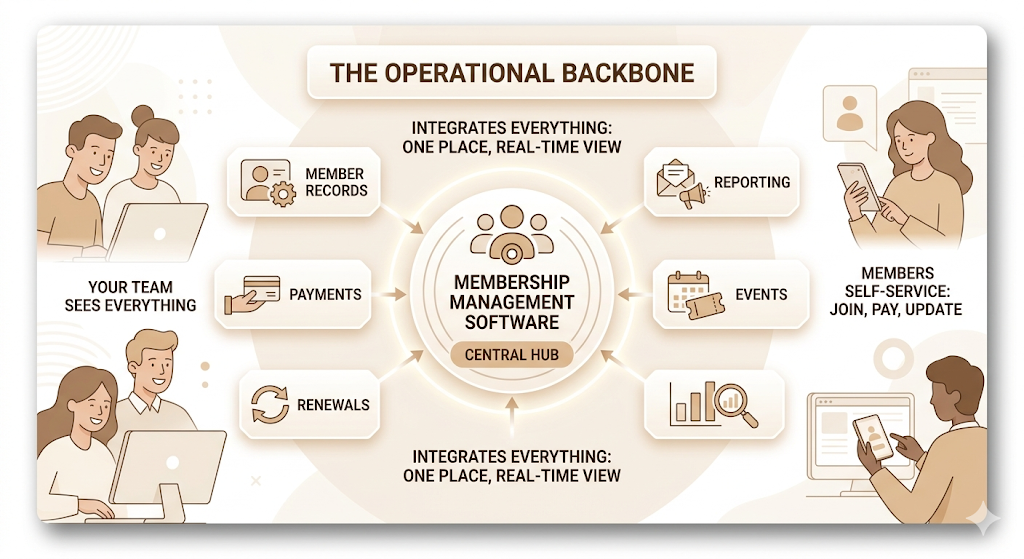
Membership management software is a platform that centralizes everything involved in running a membership organization: member records, payments, renewals, communications, events, and reporting, all in one place.
Think of it as the operational backbone for any organization that relies on recurring member relationships. Instead of tracking renewals in a spreadsheet, chasing payments over email, and managing event sign-ups in a third tool, everything lives in one system. Members can join, pay, update their profiles, and register for events without emailing anyone. Your team sees everything in real time.
How It Works
The core loop is straightforward. A prospective member finds your membership page, selects a plan, pays online, and gets added to your member database automatically. From there, the software handles onboarding emails, access to the member portal, event invitations, and renewal reminders, all triggered by rules you set once.
When a renewal is coming up, the system sends reminders. When a payment fails, it retries automatically or flags it for follow-up. When a member hasn’t logged in for 90 days, you can trigger a re-engagement sequence without anyone manually pulling a list.
Types of Organizations That Use It
Membership management software is used across more sectors than most people realize. Professional associations use it to manage thousands of credentialed members across chapters. Nonprofits use it to track donors who have converted into recurring supporters. Gyms and fitness studios use it to handle class access and billing. Alumni networks use it to manage engagement across graduation cohorts. Chambers of Commerce use it to coordinate business directories and local events. Religious organizations use it to track congregation participation and giving. Online professional communities use it to manage subscription tiers and content access.
The thing is, the software doesn’t care what type of organization you are. What it cares about is whether you have recurring member relationships that need to be tracked, paid for, and nurtured over time.
Why Membership Management Matters More Than Ever
Managing members manually was always painful. But in 2025, the cost of that pain has gone up.
Member expectations have shifted. People who manage their Netflix, Spotify, and gym memberships entirely through apps now expect the same from professional associations and community organizations. A PDF invoice and a reply-by-email renewal process signal something about your organization that you probably don’t want it to.
Common Challenges Without Software
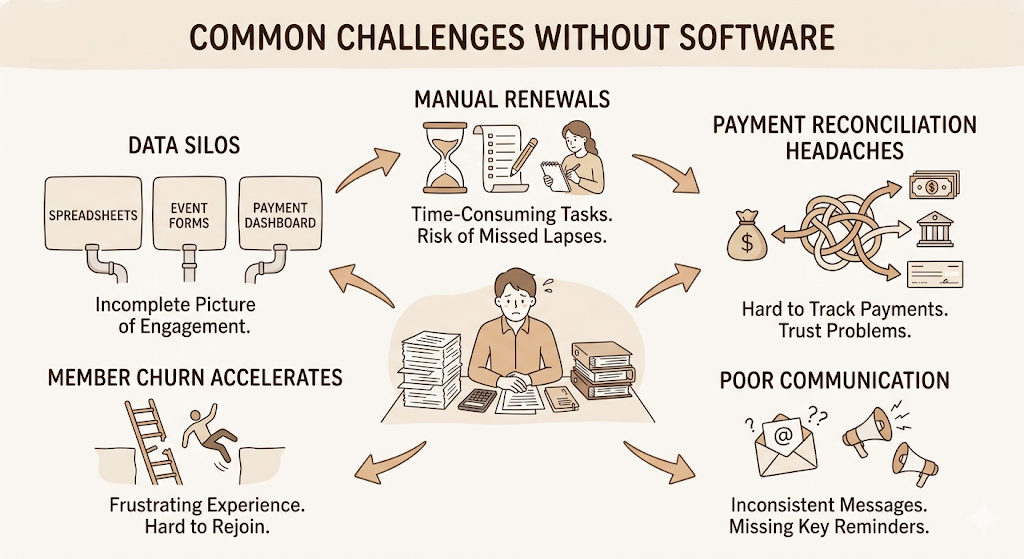
Without a dedicated platform, the problems tend to cluster in predictable ways.
Manual renewals become a full-time job as membership grows. Someone has to track who renewed, who lapsed, and who needs a nudge. That someone usually has better things to do.
Payment tracking across bank transfers, cheques, and online payments creates reconciliation headaches every month. When a member claims they paid and you can’t verify it instantly, that’s a trust problem.
Poor communication happens when you’re not sure which members should receive which messages. Sending renewal reminders to members who already renewed, or missing members who are about to lapse, is equally damaging.
Member churn accelerates when the experience is frustrating. If rejoining your organization requires a phone call or an email exchange, some people simply won’t bother.
Data silos happen when your membership list is in a spreadsheet, your event sign-ups are in a Google Form, and your payments are in a PayPal dashboard. Nothing talks to anything, so your actual picture of member engagement is always incomplete.
Impact on Member Experience
Members notice how easy or hard it is to deal with your organization. A self-service portal where they can update their address, download an invoice, or register for an event in two minutes creates goodwill. A system where every change requires an email request erodes it slowly.
Member retention is directly tied to how frictionless the experience feels. Organizations that invest in member management platforms consistently report higher renewal rates than those running manual operations. This isn’t surprising. Easier to renew means more renewals.
Business Benefits
Beyond member experience, the internal benefits are real. Administrative time drops significantly when renewals, payments, and communications are automated. Finance teams get cleaner records. Leadership gets actual data on engagement, not anecdotal impressions. Event teams get registration data in real time instead of compiling it by hand.
Membership management software centralizes member records, payments, renewals, and communications in a single platform. Organizations that automate renewals and member communications consistently report higher retention rates and lower administrative overhead. The shift from manual membership tracking to dedicated software is driven by both operational efficiency and rising member expectations for self-service digital experiences.
Key Features Every Membership Management Platform Should Have
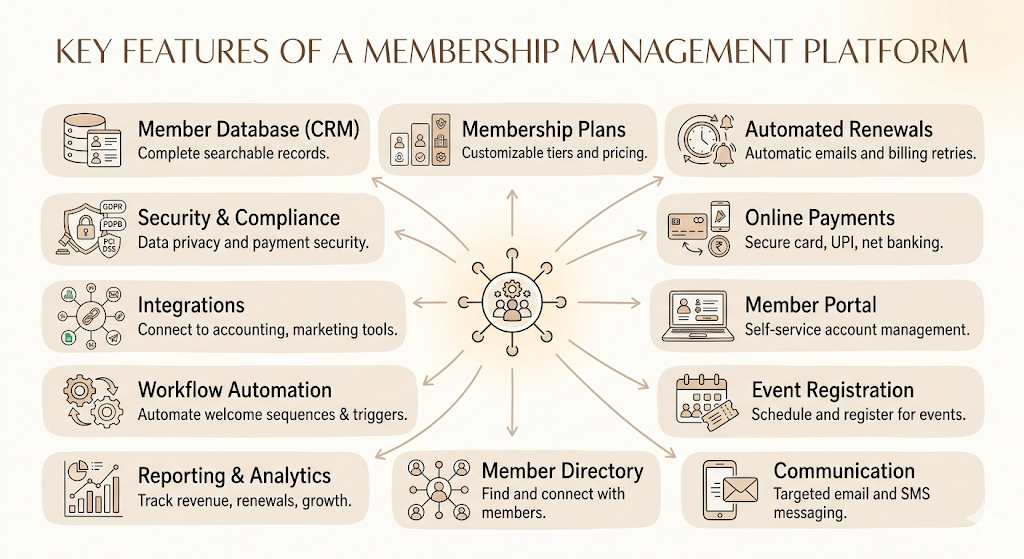
Not all platforms are equal. Some are designed for small clubs with 200 members. Others handle global associations with 50,000. The features that matter depend on your scale, but there’s a baseline that any serious platform should cover.
Member Database (CRM)
This is the foundation. Every member’s contact details, membership tier, join date, payment history, event attendance, and engagement data should live in a single, searchable record. A good membership database lets you filter by any combination of these fields to find exactly who you need to reach.
Membership Plans and Levels
You need to be able to define multiple membership types: individual, corporate, student, lifetime, and so on. Each tier should have its own pricing, access rules, and renewal cycle. If you can’t customize this, you’ll hit a ceiling quickly.
Automated Renewals
Manual renewal follow-up is one of the most time-consuming tasks in membership management. Good software handles this automatically: reminder emails go out at 60, 30, and 7 days before expiry. If a member doesn’t renew, a grace period kicks in. If payment fails, the system retries. Your staff only needs to handle exceptions.
Online Payments and Billing
Members should be able to pay immediately, through whatever method makes sense for them, without needing to call your office. Look for support for credit cards, debit cards, UPI, and net banking if your membership is India-based. The platform should also handle receipts, invoices, and GST compliance automatically.
Self-Service Member Portal
A member portal is where members manage their own accounts. They can update their details, download invoices, check their membership status, register for events, and access member-only content. The more members can do for themselves, the less your team handles manually.
Event Registration
If you run any kind of programming, event registration needs to be built in or tightly integrated. Members should be able to see upcoming events, register, pay if needed, and receive reminders, all from within the same platform.
Email and SMS Communication
The platform should let you send targeted emails to specific segments: all members whose renewal is in 30 days, members who attended the last event, and members in a specific city. Mass email tools without segmentation are not the same thing.
Member Directory
A searchable directory where members can find and connect with each other adds real value to membership, especially in professional associations and chambers of commerce. Members who use the directory are more engaged and more likely to renew.
Reporting and Analytics
You need to see your renewal rate, revenue by membership tier, event attendance trends, and member growth over time. If you’re making decisions about your organization without this data, you’re guessing.
Workflow Automation
Beyond renewals, good platforms let you automate sequences. A new member joins: send a welcome email, assign a buddy, schedule a 30-day check-in. An event is posted: notify all members in the relevant category. These automations build a consistent member experience without ongoing manual effort.
Integrations
Membership management software doesn’t operate in isolation. It should connect to your accounting software, email marketing tool, and website. We’ll cover the key integrations in detail later.
Security and Compliance
Member data is sensitive. Payment information, especially. Your platform should be PCI DSS compliant for payments and GDPR/PDPB compliant for data handling. Always check this before signing a contract.
How Membership Management Software Works
A concrete walkthrough makes this clearer than any list of features.
A potential member visits your organization’s website and clicks “Join.” They see the available membership tiers with clear pricing. They select a plan, fill in their details, and pay online. The membership management software creates a member record immediately, sends a confirmation email, and gives them access to the member portal.
Your admin team sees the new member in the dashboard without doing anything. The member shows up in the correct segment for communications. Their renewal date is already set.
Thirty days before renewal, the software sends an automated reminder. The member clicks a link, reviews their details, and renews with one click. If they ignore the first reminder, two more go out. If they still don’t renew, their access lapses automatically after a grace period you’ve defined.
Meanwhile, you post an upcoming event. The software notifies all members in the relevant tier. They register through the portal. Reminders go out the day before. Post-event, you can see attendance data alongside engagement metrics for those members.
At the end of the quarter, you pull a report. You see your renewal rate, average tenure, revenue by tier, and event attendance trends. You make decisions based on actual numbers.
That’s the full loop. One platform. No spreadsheet reconciliation. No manual email chains.
Membership management software automates the full member lifecycle from initial sign-up through payment, onboarding, ongoing engagement, and renewal. The core workflow eliminates manual administrative tasks by triggering automated actions at each stage, including renewal reminders, failed payment retries, event notifications, and segmented communications. Organizations running this workflow typically see renewal rates improve within the first renewal cycle after implementation.
Who Needs Membership Management Software?
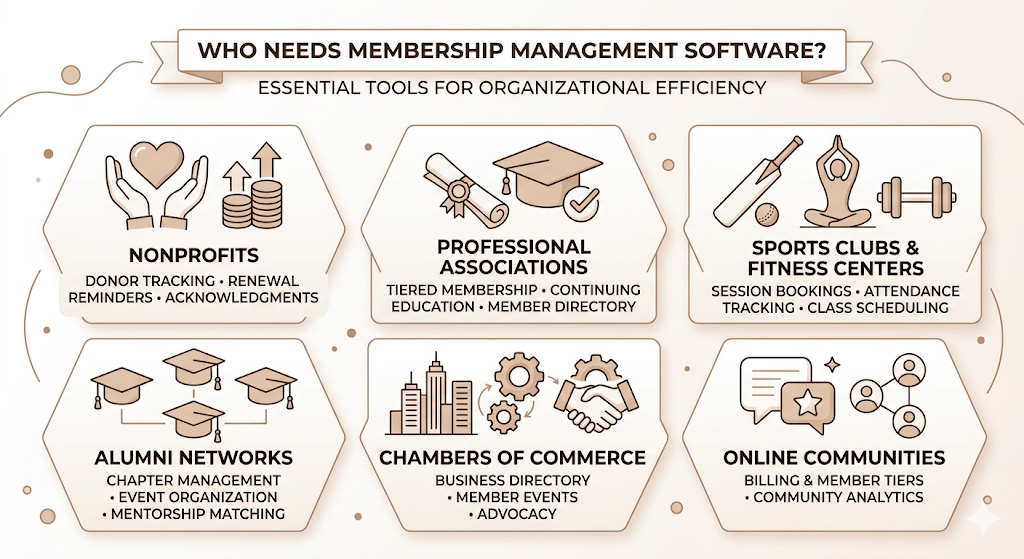
Nonprofits
Nonprofits managing recurring donors or structured membership programs need a way to track giving history, communicate with different donor tiers, and automate renewal or pledge reminders. Nonprofit membership management often has the added complexity of grant compliance and donor acknowledgment requirements, which good platforms handle natively.
Professional Associations
An association with thousands of credentialed professionals needs tiered membership, chapter management, continuing education tracking, and a directory. This is exactly what enterprise-grade membership platforms are built for. The Indian Medical Association and the Institute of Chartered Accountants of India are examples of organizations managing large professional membership databases.
Sports Clubs and Fitness Centers
A cricket academy or yoga studio manages session bookings, class access, equipment tracking, and seasonal renewals. Platforms like Glofox, Mindbody, or Rezerv are built specifically for this segment, with features like class scheduling, attendance tracking, credit-based memberships, and digital check-in.
Alumni Networks
University alumni networks in India, like those run by IIMs and IITs, manage tens of thousands of graduates across chapters, geographies, and graduation years. Segmentation, event management, and mentorship matching are key features here.
Chambers of Commerce and Trade Organizations
A chamber of commerce manages a business directory, member events, advocacy communications, and tiered corporate memberships. The directory visibility is itself a key membership benefit, making a searchable, well-maintained member portal non-negotiable.
Online Communities
Subscription-based communities on platforms like Circle or Mighty Networks often pair their community platform with a membership management tool to handle billing, member tiers, and analytics.
Membership Management Software vs CRM: What’s the Difference?
People conflate these two regularly. They’re not the same.
A CRM (Customer Relationship Management tool) is designed for managing sales pipelines, tracking leads, and recording customer interactions. It’s optimized for conversion. A membership management platform is designed for recurring relationships, renewals, dues, and member engagement over time. It’s optimized for retention.
| Feature | Membership Management Software | CRM |
| Primary purpose | Manage recurring member relationships | Manage sales and customer interactions |
| Member lifecycle | Join, engage, renew, lapse, rejoin | Lead, opportunity, close, upsell |
| Billing | Membership dues, tiers, automated renewals | Invoices, deal values |
| Events | Built-in registration and attendance | Rarely built in |
| Renewals | Automated, core feature | Manual or custom-built |
| Community management | Member directory, portal | Not designed for this |
| Reporting | Retention rate, renewal rate, engagement | Pipeline metrics, win rate |
| Best for | Associations, nonprofits, clubs, communities | Sales teams, B2B businesses |
A CRM can technically track members. But you’ll spend months building workflows that a dedicated membership platform does natively. For organizations with a true membership model, the dedicated tool wins.
That said, some organizations benefit from both. A large professional association might use Salesforce as a CRM for corporate sponsor relationships while running Memberful or Wild Apricot for individual member management. The two systems can sync if integrated properly.
Essential Integrations to Look For
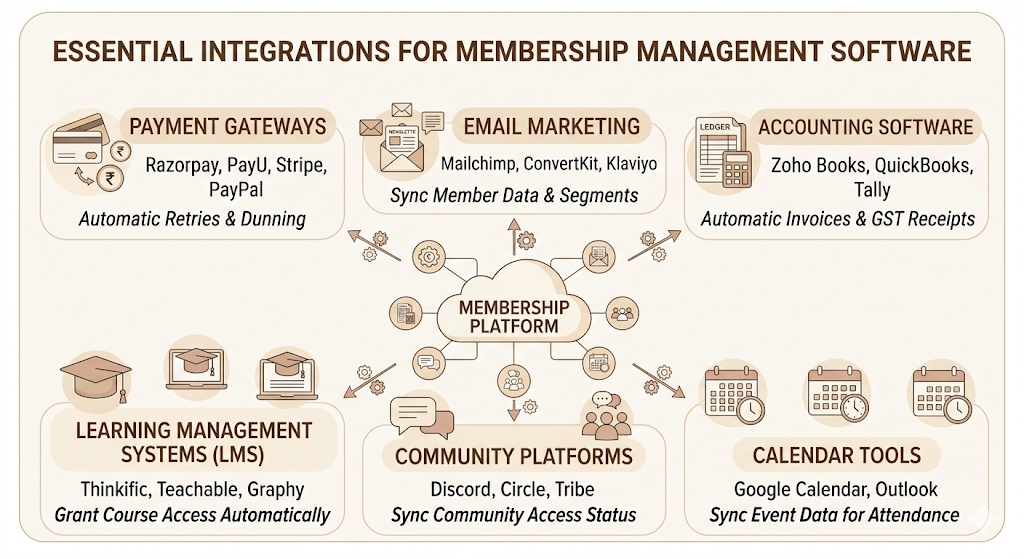
Membership management software is only as useful as the tools it connects with. Isolated platforms create the same data silo problem you were trying to escape.
Payment Gateways
For Indian organizations, Razorpay and PayU are the default integrations to check. Global platforms often support Stripe and PayPal. Confirm that your preferred gateway is supported and that it handles automatic retries and dunning management (the automated process for recovering failed payments).
Email Marketing
If you run newsletters, drip campaigns, or event communications through Mailchimp, ConvertKit, or Klaviyo, your membership platform should sync member data to those tools. Segment updates in your membership CRM should automatically update your email lists.
Accounting Software
Zoho Books, QuickBooks, and Tally are common accounting tools in India. Membership platforms that can push transaction data to these systems eliminate manual bookkeeping. Look for automatic invoice generation and GST-compliant receipt output.
Learning Management Systems
If your membership includes access to courses or certifications, an LMS integration is essential. Platforms like Thinkific, Teachable, or Graphy (popular in India) should be able to verify membership status and grant access automatically.
Community Platforms
Some organizations run their member community on a separate platform: Discord, Circle, or Tribe. Integrating membership status with community access ensures that lapsed members lose access automatically, and new members get it without a manual invite.
Calendar Tools
Event data should sync to Google Calendar or Outlook. Members who can add events directly to their calendar are more likely to actually show up.
How to Choose the Right Membership Management Software
This is where most organizations waste the most time. They evaluate a dozen platforms, get dazzled by demos, and end up choosing based on whichever sales rep was most responsive. Here’s a more useful process.
Define Your Organization’s Needs First
Before looking at any platform, write down your answers to these questions: How many members do you have? How many membership tiers do you offer? Do you run events? Do you have chapters or geographic groups? What payment methods do your members use? What tools do you already use that need to be integrated?
Your answers define your requirements. Evaluate platforms against requirements, not features.
Consider Member Size
Most platforms are priced and built for specific scale ranges. Platforms like Wild Apricot and MemberPress work well for organizations under 5,000 members. For larger associations, platforms like YourMembership, Fonteva, or Salesforce’s Nimble AMS become relevant. Choosing an enterprise platform for 500 members means paying for infrastructure you don’t need. Choosing a small platform with 5,000 members means hitting walls.
Evaluate Pricing Models Carefully
Membership management software pricing comes in a few structures: flat monthly fee, per-member pricing, or transaction percentage. Per-member models are predictable. Transaction-based pricing looks cheap until you process a lot of dues. Get a projected annual cost based on your current member count and expected growth.
Check Ease of Use (For Your Admin Team, Not Just You)
The demo you see is built by someone who knows the platform well. Ask to run a test scenario: add a member, create a membership tier, and set up a renewal automation. If your admin team can’t do this in 30 minutes without help, training costs will be high.
Review Customer Support Quality
Membership management software breaks at the worst times: during a renewal push, before a major event, when a bulk payment run fails. Check support availability, response time commitments, and whether you get a dedicated account manager or a ticketing queue. For Indian organizations, verify time zone coverage.
Assess Security Standards
Ask directly: Are you PCI DSS compliant? Where is member data stored? Can we export all our data if we want to leave? What is your uptime SLA? These aren’t optional questions.
Request a Demo Using Your Real Use Case
Don’t sit through a polished product demo. Ask the sales team to walk through your specific scenario. If you have chapters, ask how chapters work. If you have complex tiers, ask them to build one in front of you. A platform that can’t handle your real scenario in a demo certainly can’t handle it in production.
Common Mistakes to Avoid
Most implementation failures are predictable. They come from the same handful of errors.
Choosing based only on price. The cheapest platform is rarely the right one once you factor in the cost of workarounds, manual effort, and eventually migrating to something better. Calculate the total cost of ownership, not just the subscription cost.
Ignoring scalability. A platform that handles 500 members’ fines may break at 5,000. Ask platforms about their largest customers and what happens to pricing and performance as you grow.
Overlooking integrations. If your preferred payment gateway isn’t supported, or your accounting software can’t sync, you’re going to be doing manual work indefinitely. Check the integration list before committing.
Poor migration planning. Importing years of member data from a spreadsheet or a legacy system without cleaning it first creates chaos. Duplicate records, old email addresses, and incorrect renewal dates all carry over. Data migration deserves its own project plan.
Skipping staff training. The best platform in the world is useless if your admin team doesn’t know how to use it. Budget time and budget for training, not just setup.
Not evaluating support quality. A platform with great features and poor support is a risk. Check Trustpilot, Capterra, and G2 reviews specifically for comments about support responsiveness.
Implementation Best Practices
Prepare and Clean Your Member Data
Before migrating anything, audit your existing membership records. Remove duplicates. Standardize formats. Verify email addresses. Flag members whose data is incomplete. This is the least exciting part of implementation and the most important.
Train Your Team Before Going Live
Give your admin team at least one week of hands-on time in a test environment before the platform goes live. Let them break things, ask questions, and build muscle memory. A confused admin on launch day is a problem.
Start with Core Features
Resist the urge to configure every feature at launch. Get renewals, payments, and communications working correctly first. Add event registration, advanced automation, and reporting in phase two. Phased rollout reduces the number of things that can go wrong at once.
Test the Full Member Journey
Before launch, run through the entire member experience yourself: sign up as a test member, pay, receive the confirmation, log into the portal, register for an event, trigger a renewal. Every step that feels confusing to you will feel confusing to your members.
Gather Member Feedback Early
Two weeks after launch, email a short survey to your most engaged members. Ask: Was the sign-up process clear? Was anything confusing or frustrating? Did the renewal reminder arrive at the right time? Real member feedback will surface issues that internal testing misses.
Measuring Success After Implementation
Implementation isn’t the finish line. The question is whether the platform is actually improving how your organization operates. Track these KPIs from month one.
Renewal rate is the single most important metric for any membership organization. Calculate it as renewals received divided by renewals due in a period. A healthy renewal rate varies by sector, but for professional associations, it typically sits above 80%. Improvement within the first two renewal cycles is a signal that automation is working.
Member retention rate tells you how many members are staying over longer periods: 12 months, 24 months, or lifetime. This is distinct from renewal rate because it accounts for lapsed members who rejoin.
Active members as a percentage of total members tells you whether people are engaging, not just paying. A member who logs in, attends events, and uses the directory is less likely to lapse than one who never logs in.
Event participation rate measures how many members attend your programming. Low participation often signals communication problems that membership management software can fix through better segmentation.
Payment success rate measures the percentage of renewals processed without a failed payment. Platforms with good dunning management typically achieve 90%+ success rates on the first attempt.
Administrative time saved is harder to measure but worth tracking. Survey your admin team before and after implementation: how many hours per week do they spend on manual membership tasks?
Measuring the success of membership management software requires tracking renewal rate, member retention, active member percentage, and administrative time saved. Organizations should establish baseline measurements before implementation and review these metrics at 30, 90, and 180 days post-launch to identify whether automation is driving the expected outcomes. Renewal rate improvement within the first two renewal cycles is typically the earliest and most reliable signal of implementation success.
Future Trends in Membership Management Software
The platforms being built today look meaningfully different from what was standard three years ago. Several trends are worth paying attention to.
AI-Powered Member Support
More platforms are embedding AI chatbots directly into member portals. A member who wants to know their renewal date, update payment details, or find another member in the directory no longer needs to email a human. This reduces admin load and improves response time simultaneously.
Predictive Member Retention
The most sophisticated platforms are starting to surface churn risk scores: a member who hasn’t logged in for 60 days, hasn’t attended any events this year, and has a payment method that’s due to expire is flagged before they lapse. Your team can reach out proactively rather than reactively.
Personalized Member Experiences
Generic welcome emails and mass newsletters are becoming table stakes rather than differentiators. Platforms are increasingly enabling personalized content delivery based on member interests, engagement history, and tier. A member who primarily attends finance-focused events should see finance events first in their portal feed, not a generic calendar.
Mobile-First Member Portals
In India, especially, where mobile internet access drives the majority of digital engagement, mobile-first member portals are moving from nice-to-have to expected. According to IAMAI’s India Internet Report 2024, over 700 million Indians access the internet primarily via mobile. Membership platforms that don’t provide a clean mobile experience are losing engagement before it starts.
Workflow Automation at Scale
Beyond basic renewal reminders, modern platforms are building no-code automation builders that let organizations design complex member journeys without developer help. A new member joins, gets a welcome sequence, is invited to a new member orientation, gets matched with a buddy in their industry, and receives a 90-day engagement check-in, all automated, all triggered by one join event.
API-First Platforms
Organizations with existing websites, custom databases, or complex tech stacks are increasingly looking for API-first membership platforms that can power the back-end while the front-end remains custom. This trend is more relevant for large organizations and digital-native communities than for small clubs.
The Bottom Line on Membership Management Software
At a certain scale, manual membership management doesn’t just slow you down. It actively limits how good the member experience can be. You can’t personalize the communication you’re sending manually. You can’t catch at-risk members before they lapse if you’re checking a spreadsheet once a month. You can’t give members a self-service experience if everything requires an email to your office.
Membership management software solves all of this. But the platform alone isn’t enough. The organizations that see the biggest results are the ones that commit to implementation properly: clean data going in, trained staff from day one, and a habit of actually reading the reports the platform generates.
Choosing based on a feature list is a mistake. Choosing based on what your organization actually needs, at your actual scale, with your actual workflows, is how you pick a platform you’ll still be happy with three years later.
If you’re managing more than a few hundred members and still doing it manually, the question isn’t whether to invest in membership management software. It’s which platform fits your organization best.
Frequently Asked Questions
What is membership management software?
Membership management software is a platform that helps organizations manage their members, dues, renewals, events, and communications in one place. Instead of tracking member data in spreadsheets and chasing renewals manually, the software automates these processes and gives both staff and members a centralized dashboard to work from.
Who should use membership management software?
Any organization with a recurring membership model benefits from dedicated software. This includes professional associations, nonprofits, sports clubs, fitness centers, alumni networks, chambers of commerce, religious organizations, and online communities. If you’re manually tracking renewals for more than 50 members, you’ve already crossed the threshold where software pays for itself.
What features are most important in a membership management platform?
The non-negotiable features are: a centralized member database, automated renewals, online payment processing, a self-service member portal, and reporting. Everything else depends on your use case. Event registration matters if you run programming. A mobile app matters if your members are primarily mobile users. Build your feature list from your actual requirements.
Can membership software automate renewals?
Yes, and this is one of the most valuable features it offers. Good platforms send renewal reminders at configurable intervals, retry failed payments automatically, and manage grace periods without human intervention. Automated renewals typically improve renewal rates because members get consistent, timely reminders rather than sporadic manual follow-up.
Is membership management software suitable for nonprofits?
It’s often where the ROI is clearest. Nonprofits managing recurring donors, tiered giving programs, or structured volunteer membership save significant admin time when these processes are automated. Several platforms, including Wild Apricot and MemberPlanet, offer nonprofit pricing tiers. Platforms like Salesforce’s Nonprofit Success Pack (NPSP) work well for larger nonprofits with more complex needs.
How much does membership management software cost?
Pricing varies significantly. Small-organization platforms like Wild Apricot start around $40-$60 USD per month for basic plans. Mid-market platforms range from $100-$500 per month. Enterprise platforms for large associations can run into thousands of dollars per month, often with implementation and training costs on top. Always calculate the total annual cost against the admin hours you expect to save.
Can it integrate with payment gateways like Razorpay?
Most international platforms support Stripe and PayPal natively. For Indian organizations needing Razorpay, PayU, or UPI support, you need to specifically check the platform’s integration list before committing. Some platforms support these through Zapier or a custom API, but native integration is preferable for reliability.
What is the difference between a CRM and membership management software?
A CRM is designed for managing sales pipelines and customer interactions, optimized for conversion. Membership management software is designed for recurring member relationships, optimized for retention. The features that make a CRM powerful (deal tracking, lead scoring, pipeline stages) are largely irrelevant for membership management. The features that matter for membership (automated renewals, dues tracking, member portals, event registration) aren’t available in most CRMs out of the box.
Is cloud-based membership software better than self-hosted?
For most organizations, yes. Cloud-based platforms handle infrastructure, security updates, and backups for you. Self-hosted platforms require a technical team to manage servers, apply patches, and maintain uptime. Unless you have specific data residency requirements or unusual customization needs, cloud-based is the right default choice.
How long does implementation usually take?
For small organizations (under 1,000 members) using an out-of-the-box platform, implementation typically takes two to four weeks. This includes data migration, configuration, and basic staff training. For mid-size organizations or those migrating from a legacy system, expect six to twelve weeks. Large enterprise implementations with custom integrations can take six months or more.
What should I measure to know if it’s working?
Focus on renewal rate, active member percentage, payment success rate, and administrative time. Check renewal rate first, because automated reminders typically show an impact within the first renewal cycle. If the renewal rate isn’t improving within three months, audit your reminder sequences and member portal experience before assuming the platform is at fault.